smtp
14 Topics
MS Account Blocked due to OAuth Emails
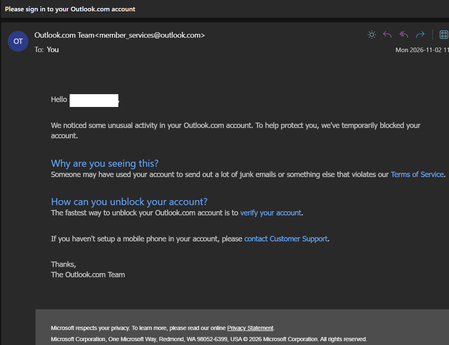
Hi! I am writing in this community forum in the event my account gets blocked again due to false positive flagging and to ensure it never happens again. Lately I've been noticing that my MS account has been constantly getting flagged for suspicious activity. Based on the patterns, it seems to be flagged when my TrueNAS server sends OAuth email alert to my own email. Specifcally, my email was blocked after 5 emails were sent in a single day, or it could be from 3 emails being sent in a single minute. This issue only started occuring recently and has never happened before during my time using TrueNAS OAuth emails, so I am not sure what may have changed to cause this. For the time being, I have disabled Outlook OAuth email alerts from TrueNAS for the time being until this bug or whatever the root cause for this has been determined. More importantly I want to discuss potential flaws during the account recovery process that may require the attention of Microsoft employee. During the attempt to recover my account and prove that I am not a bot, I had to click and hold a button. This button is not visible if MSEdge's tracking prevention is set to strict. I refreshed the page multiple times before figuring out I had to add https://account.live.com:443 as an exception. Due to the page refreshing multiple times, the account recovery itself ended up getting blocked. Possibily due to the servers mistakening this as a brute force attempt. This made the recovery process more difficult. Whenever my account is flagged, I get an email from email address removed for privacy reasons to unlock my verify my account. However, many sources indicate that this email is fraudulent and is a form of an AiTM phishing attack (sources: https://learn.microsoft.com/en-us/answers/questions/4583915/i-received-a-email-form-the-email-member-services, https://learn.microsoft.com/en-us/answers/questions/4670819/is-member-services-@-outlook-safe ) This is of course quite ironic since instead of this suspicious email address being flagged for phishing, my own legitimate account gets flagged which triggers some sort of bot reply from the suspicious email that would actually compromise my account. The email also correctly identifies my name, which I have censored. Also, if you copy the link on "verify your account", you will see https://go.microsoft.com/fwlink/?linkid=xxxxxxx. With a phishing mail like this, users who are also affected by false positive flagging for suspicious activity for using OAuth emails are at high risk for falling victim to this scam. So going back to the purpose of this post. Is there any possible way to continue using TrueNAS Outlook OAuth notifications without getting my account falsely flagged as suspicious?132Views0likes1Comment
Exchange RFC 6710, RFC 6758 and RFC 4021 compliance
I need to verify whether Exchange Online supports the following SMTP extension RFCs: RFC 6710 - Simple Mail Transfer Protocol Extension for Message Transfer Priorities (MT-PRIORITY) RFC 6758 - Tunneling Plaintext Authentication Credentials Using TLS (CRAM) RFC 4021 - Registration of Mail and MIME Header Field Names Specifically, I need to know: Are these RFCs implemented and advertised in the Exchange Online SMTP EHLO response? Is there official Microsoft documentation that lists the complete set of supported SMTP extensions for Exchange Online? If these RFCs are not supported, is there a published list of unsupported RFCs or a roadmap for future implementation? Context: I'm integrating third-party mail systems that require RFC 6710 (MT-PRIORITY) support for priority message handling. Currently, Microsoft documentation only references RFCs 3030, 2920, 6698, and 8461 as supported extensions, but there is no comprehensive list of unsupported RFCs. Any clarification or documentation would be greatly appreciated.116Views0likes0Comments
Stop ASP.NET SMTP Emails from Appearing in Office 365 Sent Items Without Affecting Manual Sends
We are sending Emails to our clients through an ASP.NET application using the SMTP protocol and using an O365 Account (email address removed for privacy reasons). The problem is that every time a mail (reset password, otp, campaigns, etc) is sent from asp.net application, a copy of that mail is created in the "Sent Items" of the Support mailbox. This is not needed and it is quickly filling our Support mailbox. How to stop this? Is there any setting in the Exchange Server? Please note that the Support mailbox is also used by our company support representative to send resolutions to customers using O365 Outlook Web Access. The mails send by the representative are very much needed in the sent items. It's only the ASP.NET-sent mails that we want to prevent in the "Sent Items".125Views1like0CommentsAdd native postfix to Windows Server
With the removal of smtp from Windows Server starting with Windows Server 2025, microsoft should add postfix to the server in a similar manner to how ssh was added to windows server. The source code is actively maintained: https://github.com/vdukhovni/postfix.2.8KViews10likes1Comment
Sending emails using python SMTP from gmail to outlook being blocked
I am trying to send emails from my domains mailbox which is google based but it is being blocked with the following error: 450 4.7.26 Service does not accept messages sent over IPv6 [2607:f8b0:4864:20::f2e] unless they pass either SPF or DKIM validation (signature failure). Emails being sent to outlook if they are received are frequently ending up in the junk folder. I have a paid service so all users receiving emails from my platform are expecting these emails and I'm almost only having this issue with outlook, is there anything i can do from my end so that outlook stops flagging my emails to my customers?544Views0likes2Comments
Do final user accounts need office 365 licences to use SMTP server?
Hi, I have an app on Azure AD that requires this scope: https://outlook.office.com/SMTP.SendAsApp from office 365 exchange online API. to access SMTP server, as per documentation (https://learn.microsoft.com/es-es/exchange/client-developer/legacy-protocols/how-to-authenticate-an-imap-pop-smtp-application-by-using-oauth#authenticate-connection-requests). Will my final users account need to have this API licenced?685Views1like1Comment
Exchange 2016 User Mailboxes Migrated to Exchange 2019 | IMAP | SMTP Permission
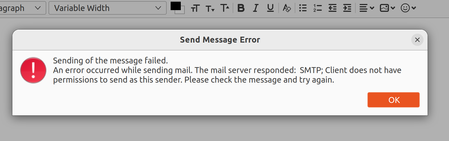
We have migrated from Exchange 2016 to Exchange 2019 Servers. Exchange 2016 servers have been shutdown now. When I initially setup a new servers, i created a new user and mailbox for each server. Problem: When we configure IMAP Profile in Thunderbird client (windows/Linux) the below happens: 1) new users on new servers - works fine 2) old users who were migrated from 2016 - the issue pops up when sending the email. receiving works fine. The error message is as shown756Views0likes1Comment
Receive Connector Parameters for Ubuntu Postfix
Hello, first of all, please excuse me if my wording is off - I usually have nothing to do with Exchange and Servers in general and never have. We are sending mail from a linux server to a recieve connector via postfix. While sending a larger amount of emails at once (lets say 50 different mails to 50 different adresses at once), we regulary get an error and after a few emails the sending process stops. I looked at the settings of our recieve conncetor and noted the following settings, that may be the source of this problem: MaxInboundConnectionPerSource: 20 MaxInboundConnectionPercentagePerSource: 2 So the questions are: 1. Does Postfix establish multiple Connections at once? If so, would our recieve connector stop recieving mails if Postfix establishes more than 20 connections? 2. If at a single time, only this one system sends mails, thus the Connection Percentage of this one source is at 100%, would our connector stop recieving? Thanks in advance and sorry for the unprofessional language.1.4KViews0likes2Comments
How do I enabled smtp auth for a mailbox in exchange online
Hi All, I am trying to enable SMTP auth for my exchange server. I have followed the instruction given here https://docs.microsoft.com/en-us/exchange/clients-and-mobile-in-exchange-online/authenticated-client-smtp-submission to enable a specific mailbox to have SMTP Auth. But I am still getting a timeout error when I am trying to test the config via smtper.net I also tried writing a simple c# code and test getting the same issue. Here are the config that I used Host: smtp.office365.com port: 587 using secure connection and authentication using the username and password of the user account Please help Thanks TikluSolved4.2KViews0likes1Comment