smb
74 Topics
ISV Offering SaaS vs On-Prem
Hi all, We are a partner and have some apps on the marketplace (appsource) for customers to download. We would like to offer the same apps for on-premise deplyments as well. How would we go about object numbers and customers' licenses? How do we add our object id range we develop in to be part of the customers' license? Thanks in advance!Land Your Offer - Anatomy of Revenue Generating Partner Offer - Part 1 - Copilot in 30
Copilot in 30: A Ready-Made Marketplace Offer to Grow Your SMB Practice Thirty days. Twenty-five users. One repeatable offer that turns AI curiosity into a long-term customer relationship. Small and medium businesses know AI matters. What they lack is a trusted guide and a low-risk way to start. Copilot in 30 gives you both: a $0, 25-user, 30-day Microsoft 365 Copilot Business trial from Microsoft, wrapped in a structured journey that only a partner can deliver. Package it as a Microsoft Marketplace offer and you have a scalable on-ramp to every SMB customer in your base — and to the managed services that follow. Start Here: Why Publishing on Microsoft Marketplace Matters Microsoft Marketplace is Microsoft's partner-focused business platform, designed to help you reach more customers and simplify how you sell. A published offer gives your practice a permanent, discoverable storefront in the place customers already look for Copilot help. More importantly, an offer turns your expertise into something repeatable. Instead of scoping every engagement from scratch, you define the journey once — activities, timeline, deliverables — and run it across dozens of customers. Professional service and managed service offer types are available in Partner Center, so the same offer can carry both the 30-day journey and what comes after it. The SMB Opportunity Hiding in Plain Sight SMB customer segment is still early in their AI journey. These are organisations with 300 or fewer users on Microsoft 365 Business Basic, Standard or Premium — typically without an in-house AI team. That combination is exactly where partners win: high demand, limited internal capacity, and a customer base large enough that a well-designed, repeatable offer scales far beyond what bespoke projects can. Why Copilot Is the Right First AI Step for SMBs Microsoft 365 Copilot Business is the cost-effective Copilot add-on built for SMB customers, delivering the same capabilities as Microsoft 365 Copilot inside the apps their people already use — Outlook, Teams, Word, Excel and PowerPoint. No platform overhaul, minimal training, immediate relevance. Copilot is also the on-ramp. Once a team works confidently with Copilot, the natural next steps are agents, automated workflows and Copilot Cowork — each one deepening the customer's dependence on the partner who guided them there. Meet Copilot in 30: 25 Users, 30 Days, $0 Copilot in 30 is a limited-time, CSP partner-led Microsoft 365 Copilot Business trial for SMB customers with fewer than 300 employees. The essentials: What the customer gets: 25 Microsoft 365 Copilot Business seats for 30 days at $0, transacted through CSP New Commerce (Product ID CFQ7TTC0MM8R · SKU 006Z) Who qualifies: Customers on Microsoft 365 Business Basic, Standard or Premium with no paid Microsoft 365 Copilot today — one trial per customer How long it runs: Available to transact until 31 December 2026 What happens at Day 30: The trial auto-converts to a paid subscription unless renewal settings are changed, with a 7-day cancellation window What Microsoft provides: A launch kit, campaign materials, setup guidance, the Copilot Success Planner and conversion guidance Microsoft supplies the licences and the assets. The offer — and the customer relationship — is yours. Your Role: The Guide Who Turns a Trial Into a Habit A trial alone rarely changes behaviour. A guided trial does. Your job across the 30 days is to make sure 25 people experience real value in real work, and that the sponsor can see it. Before Day 0 — pick the right customers, become "Customer Zero" by using Copilot in your own business, secure a named sponsor and Copilot admin, and build a 30-day success plan with agreed measures. Day 0 — transact the trial, set the paid renewal quantity and term, complete admin setup, assign all 25 licences and run the kick-off with starter prompts. Days 1–28 — lead a weekly scenario (Outlook, Teams, Apps, Agents), review Copilot Analytics, re-engage low-activity users and capture proof points in the customer's own words. Days 29–30 — run the outcome and ROI review, confirm the paid offer and open the expansion and consumption conversation. Every touchpoint is partner expertise the customer cannot get from a licence alone — and every one moves the decision at Day 30 from "should we?" to "how much more?" Inside the Offer: Activities, Timeline and Deliverables Below is the full activity plan behind the offer, ready to drop into your own offer description or statement of work. ID Stage Activity Trial day (of 30) Key deliverables — Pre-req Customer eligibility (Copilot Business trial) Before Day 0 Active M365 Business base licence; no paid M365 Copilot; one $0 trial per customer; CSP New Commerce transactable; offer open to 31 Dec 2026 I1 Identify Build the prioritised target list Pre-trial Tier A/B target list from ASPX and Cloud Ascent; 50–300 eligible seats I2 Identify Confirm eligibility and trial fit Pre-trial Eligibility check: M365 Business base licence, no paid Copilot, one trial I3 Identify Launch the acquisition campaign Pre-trial Campaign email sent; briefing delivered; responses triaged into pipeline I4 Identify Be Customer Zero: complete microskilling Pre-trial Microskilling complete; internal Copilot experience; team briefed P1 Plan Confirm sponsor and success measures Pre-trial Named sponsor and admin; 25 trial users; agreed success measures P2 Plan Build the 30-day success plan Pre-trial Personalised Success Planner output; weekly scenarios; admin and user views P3 Plan Confirm technical and compliance readiness Pre-trial Minimum requirements verified; data and compliance review; blocker log A1 Activate Transact the trial in CSP New Commerce Day 0 25-seat, 30-day, $0 trial ordered (CFQ7TTC0MM8R · SKU 006Z) A2 Activate Configure the paid renewal settings Day 0 Renewal quantity, term and billing set; Cowork usage-based billing if in scope A3 Activate Complete admin setup and assign licences Day 0 Recommended settings on; 25 licences assigned (starts the clock) A4 Activate Run the kick-off and share starter prompts Day 0 Kick-off email; starter prompts; four-week prompt series scheduled X1 Experience Week 1 · Outlook — catch up and communicate Days 1–7 Week 1 prompts landed; first-week activation rate reviewed X2 Experience Week 2 · Teams — meetings that run themselves Days 8–14 Copilot Analytics checkpoint; recaps adopted; low-activity users re-engaged X3 Experience Week 3 · Apps — create in minutes Days 15–21 App scenarios and proof points; week 3 training gate before day 30 X4 Experience Week 4 · Agents — unlock the next level Days 22–28 Role-built agents trialled; 30-day usage trends from the admin centre C1 Convert Outcome review, paid offer and expansion plan Days 29–30 ROI review; 50-seat offer confirmed in 7 days; wave 2 plan; consumption conversation opened Land Your Offer: What One Customer Is Worth The table below is the revenue anatomy of one Copilot in 30 engagement — and it shows that the money is not in the trial, but in what the trial sets up. Item Value Detail Offer duration 30 days Trial clock runs Days 1–30; identify, plan and Day 0 setup precede it Trial offer 25 seats M365 Copilot Business · 30 days · $0 · one per customer · to 31 Dec 2026 CSP incentive — 25 seats (K) $0.32K 5.0% direct bill (2.5% M365 CSP Core + 2.5% Strategic Product Accelerator Tier 1) on 25 M365 Copilot Business seats x $21/mo† ≈ $6.3K/yr; indirect reseller 2.5% ≈ $0.16K Conversion target 50 seats Lead with 50 paid seats at conversion; sets up the wave 2 expansion plan CSP incentive — 50 seats (K) $0.63K 5.0% direct bill (Core + SPA Tier 1) on 50 M365 Copilot Business seats x $21/mo† ≈ $12.6K/yr; indirect reseller 2.5% ≈ $0.32K Frontier Accelerate deployment funding (K) $2.5K Microsoft Commercial Incentives funding for the Copilot deployment engagement when the conversion lands with 50 paid seats†; funds the deployment and adoption work that leads into managed services † Illustrative estimates from the offer plan. Confirm current incentive rates, funding and eligibility in Partner Center. Three streams stack on top of each other: CSP incentive — earned on every paid Copilot Business seat from the moment the trial converts, and growing again when the customer expands from 25 to 50 seats. Frontier Accelerate deployment funding — $2,500 available when you lead the conversion with 50 paid seats, paying for the deployment work that makes the expansion stick. Managed services — the recurring engagement described in Day 31 and Beyond, which is where the largest and most durable share of revenue lives. Now multiply. Everything above is the anatomy of a single customer. Landing the offer means running it across every eligible customer in your base — and you don't need to guess who they are. Partner Center's growth insights reporting, available through the AI Business Solutions & Security Insights (ASPX) dashboard, gives you account-level Copilot eligibility, seat whitespace, free Copilot Chat usage and adoption signals for the customers you already manage. To turn that export into a ranked target list, my colleague Brian O'Shea has built a Copilot for 30 Power BI dashboard that sits over your ASPX data and scores each customer on a 0–100 priority scale from eligible seats, whitespace, free-to-paid potential and opportunity signals — so your first cohort is the ten customers most likely to convert, not the first ten who reply. How the Offer Fits Together: From Trial Inputs to Proof of Value The offer runs left to right in three layers: Trial inputs — 25 users, 30 days, $0 CSP trial SKU; an SMB with 50–300 eligible Microsoft 365 seats; no paid Copilot today; a Business Basic, Standard or Premium base; one trial per customer to 31 Dec 2026; a named sponsor and Copilot admin; auto-conversion to paid unless changed. Five stages — Identify (I1–I4), Plan (P1–P3), Activate (A1–A4), Experience (X1–X4) and Convert (C1, T1, T2, W2). Each stage produces a concrete output the sponsor can see. Proof of value — a prioritised list and campaign responses; agreed use cases and success measures; a provisioned trial with 25 licences assigned; weekly usage from the Microsoft 365 admin centre; adoption proof points in the customer's words; paid conversion confirmed in Partner Center — and a named wave 2 expansion beyond the first 25. The highlighted activities — admin setup (A3), Week 4 agents (X4), 25→50 paid seats (T1), Frontier Accelerate funding (T2) and the wave 2 expansion plan (W2) — are where the engagement stops being a project and starts becoming an ongoing relationship: managed services, agent build-out, Copilot Studio and Copilot Cowork follow-on once the trial converts. Day 31 and Beyond: Managed Services That Keep Delivering The end of the trial is the start of the real engagement. Package these as standing services in your offer: Copilot adoption management — monthly Copilot Analytics business reviews, prompt and scenario refreshes, champion programme and onboarding for each new wave of users Licence and expansion management — take the customer from 25 to 50 paid seats and on to wave 2, aligning renewals, terms and billing as the footprint grows Agent build-out — design, build and maintain role-based agents with Copilot Studio for sales, service, finance and operations scenarios surfaced in Week 4 Copilot Cowork enablement and governance — introduce consumption-based Cowork scenarios, set budgets and cost controls, and report on usage each month Security, compliance and readiness — keep data protection, permissions and governance in step with expanding AI use, including a path to Microsoft 365 Business Premium Quarterly value reviews — refresh success measures, capture new proof points and agree the next expansion plan with the sponsor Each of these is a recurring, outcome-based service rather than a one-off project — and each keeps you positioned as the customer's AI partner as their needs grow. Ready to Build Your Copilot in 30 Offer? Download the Copilot in 30 launch kit and Microsoft 365 Copilot Partner FAQ from the Microsoft AI Cloud Partner Program. Be Customer Zero — run Copilot and the microskilling series inside your own business first. Publish your offer in Partner Center as a professional service (the 30-day journey) with a managed service follow-on (Day 31 and beyond). Pick your first cohort — customers with 50–300 seats on a Microsoft 365 Business plan and no paid Copilot today. Transact your first trial through CSP New Commerce (Product ID CFQ7TTC0MM8R · SKU 006Z) and set the paid renewal on Day 0. Book the Day 30 review before Day 1 — so the conversion and expansion conversation is already on the calendar. The window closes on 31 December 2026. The customers are already in your base. Publish the offer and start the clock. Resources From AI curiosity to Copilot adoption in 30 days — Microsoft Partner Blog Copilot in 30 Launch Kit — partner GTM playbook, customer trial guide, invitation and weekly prompt emails, admin setup guidance Build Your 30-Day Copilot Success Plan Copilot Success Planner Walkthrough video Partner Skilling Hub | Microskilling for Copilot in 30 Power BI Dashboard that integrates with your ASPXi Partner Data · By Brian O'Shea Create compelling customer business cases666Views2likes1Comment
Can't share a folder on a local network in Microsoft Windows Server 2025 STD
We have two Microsoft Windows Server 2025 Standard (Version 24H2, Build Number 26100.32995) servers in our Active Directory. We can't share folders; it constantly asks for a username and password. We've tried every solution, but nothing worked. I found a similar thread, but the solutions there didn't work either. topic : https://learn.microsoft.com/en-us/answers/questions/5559013/opening-fire-share-on-2025-server-from-another-202 How can i solve this sharing problem ?469Views0likes3Comments
Customer Expansion Opportunity Blocked by Licensing Transition Policy
Where do we get assistance when Partner Support resources are Policy blocked: a { text-decoration: none; color: #464feb; } tr th, tr td { border: 1px solid #e6e6e6; } tr th { background-color: #f5f5f5; } We have a 26-user Financial Services customer in CA currently annual licensed on Microsoft 365 E3. The customer wishes to modernize and expand its Microsoft investment through: Microsoft 365 Copilot adoption Expanded security capabilities Additional Purview workloads SharePoint storage expansion (5TB) Migration from competitor ShareFile to Microsoft 365 The resulting solution increases Microsoft's footprint, strengthens customer security posture, and displaces a competitive platform. However, the customer's economics require transitioning from Microsoft 365 E3 to Microsoft 365 Business Premium. Current guidance received through Partner Support is that E3 to Business Premium represents a downgrade and therefore is not permitted. Business Impact The current position creates a conflict between policy enforcement and customer growth objectives. Without flexibility: Customer may delay adoption of Copilot. ShareFile displacement opportunity is reduced. Microsoft security expansion is reduced. Customer perception of Microsoft licensing flexibility is negatively impacted. With flexibility: Customer remains on Microsoft platform. Security posture improves. Additional Microsoft workloads are adopted. Competitive platform is displaced. Annual Microsoft revenue increases materially. Customer Profile Industry: Financial Services User Count: 26 Eligible for Business Premium user limits Existing Microsoft customer Strategic security and compliance requirements Requested Guidance We are requesting executive review of a licensing path that enables: Transition from E3 to Business Premium. Expansion into Copilot. Expansion into security and compliance workloads. Migration from ShareFile into SharePoint. Our goal is not cost reduction but overall Microsoft platform expansion and improved customer outcomes.198Views0likes0Comments
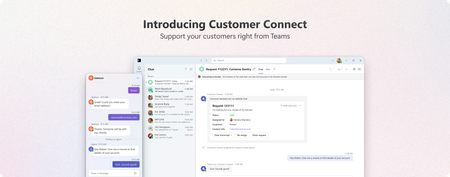
Teams Customer Connect: Now available globally in 26 languages
We're excited to announce that Customer Connect web chat in Microsoft Teams (previously called Live Chat) is now available globally, supporting 26 languages and bringing seamless customer engagement to businesses worldwide. For small and medium-sized businesses, every customer interaction matters. Whether someone discovers your business through a Google search, a social media post, or a friend's recommendation, the moment they land on your website is critical. With Customer Connect in Teams, you can now connect with these potential customers instantly no matter where your business is based in the world. A better way to connect with customers Your website is often the first-place potential customers interact with your business. When they have questions, waiting hours or days for an email response isn't ideal – neither for them nor for you. Customer Connect let you respond instantly to website visitors directly within Teams. No more switching tools. What's new with global availability With support for 26 languages, businesses can now provide customer support no matter where you operate. Whether you are based in Tokyo, São Paulo, or Berlin, you can set up Customer Connect to interact with customers in your preferred language. Supported languages Czech, Danish, German, English (Canada), English (United Kingdom), English (United States), Spanish (Chile), Spanish (Spain), Spanish (Mexico), French (Canada), French (France), Hungarian, Indonesian, Italian, Japanese, Korean, Norwegian Bokmål, Dutch, Polish, Portuguese (Brazil), Portuguese (Portugal), Swedish, Thai, Vietnamese, Chinese Simplified (China), Chinese Traditional (Taiwan) Key capabilities Simple setup Add the Customer Connect chat widget to your website in minutes. Configure your welcome message, set your availability, and you're ready to start conversations. Native Teams integration Chats appear alongside your regular Teams conversations. All customer interactions are automatically tracked and organized in Teams channels and Microsoft Lists, giving your team full visibility into every conversation. Customers can also book appointments directly with members of your team, making it easy to schedule follow-ups or provide high touch support. Getting started If you're already using Microsoft 365 Business, Customer Connect is included - no additional licensing required. To enable Customer Connect: Open the Admin app in Teams Configure your Customer Connect chat widget settings Add the chat widget to your website Start receiving and responding to customer chats in Teams Learn more Set up Customer Connect for your business Start a discussion with us Microsoft Teams - Small Business CommunityPartner Blog | Copilot monetization for SMBs: Convert renewal momentum into wins
Partners serving small and medium-sized businesses (SMBs) continue to tell us that customers are excited about AI, but they want clear guidance on what to buy, how to buy it, and how to justify the investment. For partners, this creates a critical opportunity to simplify the path to decision and translate that momentum into measurable wins. This is the third installment in our Copilot series focused on SMB monetization. Earlier posts covered how Microsoft 365 Copilot Chat introduces AI in an approachable way and how Microsoft 365 Copilot Business embeds AI into everyday work, and how agents extend AI into core processes. This month, we are focusing on the moment that matters most: converting interest into action. Stage 3: Empower & Achieve is the inflection point Stage 3 of the Microsoft Customer Engagement Methodology (MCEM), Empower & Achieve, is built for customers approaching a decision point. This is where partners can accelerate deals and create a more predictable path to conversion. As customers evaluate their options, partners can help move them forward by: Bundling Microsoft 365 Copilot Business with Microsoft 365 at renewal or upgrade moments Reducing friction with promotion kits, in-market offers, and CSP incentives Reinforcing value with ROI tools, business case builders, and customer success stories These actions help simplify decision-making while addressing the two things SMB buyers care most about: clarity and confidence. This is also where Customer Zero partners stand out. By sharing first-hand experience with Copilot, partners can bring practical insights into conversations and build the trust customers need to move forward. With the recent announcements on transitioning Microsoft 365 Business with Copilot promotion bundles into two durable SKUs, partners are well positioned to help organizations scale from intent to action, while giving organizations the controls to scale AI responsibly. Stage 3 is also where you can align go-to-market efforts to a repeatable framework. When you consistently apply the Empower & Achieve motion, you can improve conversion at renewal and upgrade moments, strengthen your value story, and create a clear on ramp to ongoing adoption and expansion. Continue reading blog here202Views1like0CommentsPatner Case Study | Pax8
From their early days of selling Microsoft licenses to becoming a leading cloud commerce marketplace, Pax8 has always centered their business on the Microsoft partner experience. And their future-focused, partner first approach is redefining what it means to be a modern Cloud Solution Provider (CSP). For Pax8, the next evolution of that role is the Managed Intelligence Provider (MIP)—a partner that moves beyond managing systems to orchestrating intelligence and delivering measurable business outcomes with AI. While Pax8 delivers critical value through the streamlined billing and provisioning of Microsoft licenses, they also know that real business transformation doesn’t happen just because you’ve purchased software—it happens because of everything that comes after the sale. That’s why they invested heavily in enablement, education, and professional services. And that’s why today, they’re successfully cultivating an ecosystem that drives meaningful, scalable growth for partners and customers alike. Grounded in their experience as a member of the Microsoft AI Cloud Partner Program, Pax8’s approach has changed the trajectories of organizations like Sourcepass, a US-based managed services provider (MSP). Together, Sourcepass and Pax8 are making enterprise-grade AI accessible to small and medium-sized businesses (SMBs)—but they’re going beyond traditional deployments. They’re delivering functional, agentic solutions designed to help customers realize value and support recurring service opportunities. Navigating AI adoption in the SMB reality SMBs are under constant pressure to do more with less, and the business outcomes they need the most—efficiency, strong security, scalable growth—are the exact outcomes AI can deliver. But with limited budgets, it’s hard for SMBs to justify the spend without clear proof of value—no matter how interested they might be. “SMBs hear about AI and want to be part of the wave,” said Elliott Eliason, Productivity Solution Consultant at Pax8, “but they don’t want to spend thousands without getting results back.” And once they’ve made an investment in AI, they likely lack the internal resources to operationalize it. That includes preparing data governance, validating security controls, and teaching teams new workflows. For a partner like Sourcepass, who primarily serves SMBs, this means their customers need trusted, strategic advisors who can guide them in turning AI’s potential into tangible outcomes. Continue reading here Explore all case studies or submit your own Subscribe to case studies tag to follow all new case study posts. Don't forget to follow this blog to receive email notifications of new stories!217Views0likes0CommentsPitch Maker Agent: Turn Copilot Chat Signals into Microsoft 365 Copilot Deals
Executive Summary Customers are already using free Copilot Chat at scale, but adoption is often ungoverned and disconnected from the Microsoft 365 workloads where measurable productivity and risk controls live. The Pitch Maker Agent (BETA) helps partners convert Partner Center Copilot growth opportunity signals into customer-ready narratives—reducing pitch preparation from days to minutes and improving consistency across stakeholders (replace with your measured baseline). What it enables (partner outcomes) Turn raw usage signals into an executive business case with clear opportunity, risk, and next steps. Standardize value conversations across IT and business buyers while keeping customer context specific. Accelerate conversion from exploration to governed deployment by anchoring on Microsoft 365 workloads. Why it’s different Evidence-led: uses Partner Center Copilot growth opportunities (ASPX) signals rather than generic prompts. Buyer-ready: outputs a structured narrative (not a feature list) designed for executive alignment and action. Inputs required Partner Center Copilot growth opportunities export (all columns) for the target customer. The Opportunity: From AI Exploration to Enterprise Direction The move from free Copilot Chat to Microsoft 365 Copilot is a timing advantage: customers have intent and familiarity, but need a governed path that ties AI to real work in Teams, Outlook, Excel, and beyond. Advisory gap: translate usage metrics into business insight executives can fund. Governance gap: balance opportunity with security, compliance, and lifecycle controls. Workflow gap: connect AI usage to measurable outcomes inside Microsoft 365 workloads. How the Agent Works (BETA) The Agent follows a simple, repeatable flow to generate an executive-ready pitch narrative from Partner Center Copilot growth opportunity signals. See the agent in action below. In three steps Upload the Partner Center Copilot growth opportunities export (all columns). Run the Agent to translate usage signals into a customer-specific executive narrative. Use the generated business case, recommendations, and next steps in the customer conversation. What the Output Enables Translate Partner Center signals into a fundable business case, faster. Improve executive alignment by presenting opportunity, risk, and plan in one narrative. Increase repeatability across accounts with a consistent structure and messaging. The figure below illustrates how the Agent turns usage signals into a concise, executive-ready pitch narrative and action plan. Figure 1. From Copilot Chat signals to an executive pitch narrative and next-step plan. For customers, the conversation shifts from features to outcomes—clear productivity impact, role-based change, and risk-aware governance. Deployment and Execution The Agent is delivered as a solution package and deployed through Copilot Studio with a straightforward publish-and-run flow. Prepare Partner Center ASPX export (all columns) and validate sensitivity labels. Import the solution package into Copilot Studio. Verify dependencies, publish the Agent, and enable access in Microsoft 365 Copilot and Teams. Run the guided pitch flow by uploading customer data and capturing the narrative output. The run guide provides step-by-step visuals for data preparation, import, publication, and how to use the output in customer conversations. Why This Matters for Partner Practices The Pitch Maker Agent (BETA) supports a repeatable value motion: identify opportunity, align stakeholders, and move customers from experimentation to governed Microsoft 365 Copilot adoption. Higher conversion: clearer executive rationale anchored in evidence and outcomes. Lower effort: less time drafting, more time on discovery and delivery. Better governance: built-in prompts to address risk, readiness, and controls early. Call to Action This week: 15-minute start Locate the solution package and run guide in the Agent folder. Deploy the Agent in Copilot Studio and publish to Microsoft 365 Copilot/Teams. Export Partner Center Copilot growth opportunities data and validate sensitivity labels. Upload the dataset and generate a customer-specific executive pitch narrative. Resources Helpful links to learn more and access supporting materials: Partner Center Copilot growth opportunities data GitHub repository Overview: Run guide995Views0likes0CommentsIntroducing new security and compliance add-ons for Microsoft 365 Business Premium
Small and medium businesses (SMBs) are under pressure like never before. Cyber threats are evolving rapidly, and regulatory requirements are becoming increasingly complex. Microsoft 365 Business Premium is our productivity and security solution designed for SMBs (1–300 users). It includes Office apps, Teams, advanced security such as Microsoft Defender for Business, and device management — all in one cost-effective package. Today, we’re taking that a step further. We’re excited to announce three new Microsoft 365 Business Premium add-ons designed to supercharge security and compliance. Tailored for medium-sized organizations, these add-ons bring enterprise-grade security, compliance, and identity protection to the Business Premium experience without the enterprise price tag. Microsoft Defender Suite for Business Premium: $10/user/month Cyberattacks are becoming more complex. Attackers are getting smarter. Microsoft Defender Suite provides end-to-end security to safeguard your businesses from identity attacks, device threats, email phishing, and risky cloud apps. It enables SMBs to reduce risks, respond faster, and maintain a strong security posture without adding complexity. It includes: Protect your business from identity threats: Microsoft Entra ID P2 offers advanced security and governance features including Microsoft Entra ID Protection and Microsoft Entra ID Governance. Microsoft Entra ID protection offers risk-based conditional access that helps block identity attacks in real time using behavioral analytics and signals from both user risk and sign-in risk. It also enables SMBs to detect, investigate, and remediate potential identity-based risks using sophisticated machine learning and anomaly detection capabilities. With detailed reports and alerts, your business is notified of suspicious user activities and sign-in attempts, including scenarios like a password-spray where attackers try to gain unauthorized access to company employee accounts by trying a small number of commonly used passwords across many different accounts. ID Governance capabilities are also included to help automate workflows and processes that give users access to resources. For example, IT admins historically manage the onboarding process manually and generate repetitive user access requests for Managers to review which is time consuming and inefficient. With ID Governance capabilities, pre-configured workflows facilitate the automation of employee onboarding, user access, and lifecycle management throughout their employment, streamlining the process and reducing onboarding time. Microsoft Defender for Identity includes dedicated sensors and connectors for common identity elements that offer visibility into your unique identity landscape and provide detailed posture recommendations, robust detections and response actions. These powerful detections are then automatically enriched and correlated with data from other domains across Defender XDR for true incident-level visibility. Keep your devices safe: Microsoft Defender for Endpoint Plan 2 offers industry-leading antimalware, cyberattack surface reduction, device-based conditional access, comprehensive endpoint detection and response (EDR), advanced hunting with support for custom detections, and attack surface reduction capabilities powered by Secure Score. Secure email and collaboration: With Microsoft Defender for Office 365 P2, you gain access to cyber-attack simulation training, which provides SMBs with a safe and controlled environment to simulate real-world cyber-attacks, helping to train employees in recognizing phishing attempts. Additionally automated response capabilities and post-breach investigations help reduce the time and resources required to identify and remediate potential security breaches. Detailed reports are also available that capture information on employees’ URL clicks, internal and external email distribution, and more. Protect your cloud apps: Microsoft Defender for Cloud Apps is a comprehensive, AI-powered software-as-a-service (SaaS) security solution that enables IT teams to identify and manage shadow IT and ensure that only approved applications are used. It protects against sophisticated SaaS-based attacks, OAuth attacks, and risky interactions with generative AI apps by combining SaaS app discovery, security posture management, app-to-app protection, and integrated threat protection. IT teams can gain full visibility into their SaaS app landscape, understand the risks and set up controls to manage the apps. SaaS security posture management quickly identifies app misconfigurations and provides remediation actions to reduce the attack surface. Microsoft Purview Suite for Business Premium: $10/user/month Protect against insider threats Microsoft Purview Insider Risk Management uses behavioral analytics to detect risky activities, like an employee downloading large volumes of files before leaving the company. Privacy is built in, so you can act early without breaking employee trust. Protect sensitive data wherever it goes Microsoft Purview Information Protection classifies and labels sensitive data, so the right protections follow the data wherever it goes. Think of it as a ‘security tag’ that stays attached to a document whether it’s stored in OneDrive, shared in Teams, or emailed outside the company. Policies can be set based on the ‘tag’ to prevent data oversharing, ensuring sensitive files are only accessible to the right people. Microsoft Purview Data Loss Prevention (DLP) works in the background to stop sensitive information, like credit card numbers or health data, from being accidentally shared with unauthorized people Microsoft Purview Message Encryption adds another layer by making sure email content stays private, even when sent outside the organization. Microsoft Purview Customer Key gives organizations control of their own encryption keys, helping meet strict regulatory requirements. Ensure data privacy and compliant communications Microsoft Purview Communication Compliance monitors and flags inappropriate or risky communications to protect against policy and compliance violations. Protect AI interactions Microsoft Purview Data Security Posture Management (DSPM) for AI provides visibility into how AI interacts with sensitive data, helping detect oversharing, risky prompts, and unethical behavior. Monitors Copilot and third-party AI usage with real-time alerts, policy enforcement, and risk scoring. Manage information through its lifecycle Microsoft Purview Records and Data Lifecycle Management helps businesses meet compliance obligations by applying policies that enable automatic retention or deletion of data. Stay investigation-ready Microsoft Purview eDiscovery (Premium) makes it easier to respond to internal investigations, legal holds, or compliance reviews. Instead of juggling multiple systems, you can search, place holds, and export information in one place — ensuring legal and compliance teams work efficiently. Microsoft Purview Audit (Premium) provides deeper audit logs and analytics to trace activity like file access, email reads, or user actions. This level of detail is critical for incident response and forensic investigations, helping SMBs maintain regulatory readiness and customer trust. Simplify Compliance Management Microsoft Purview Compliance Manager helps track regulatory requirements, assess risk, and manage improvement actions, all in one dashboard tailored for SMBs. Together, these capabilities help SMBs operate with the same level of compliance and data protection as large enterprises but simplified for smaller teams and tighter budgets. Microsoft Defender and Purview Suites for Business Premium: $15/user/month The new Microsoft Defender and Purview Suites unite the full capabilities of Microsoft Defender and Purview into a single, cost-effective package. This all-in-one solution delivers comprehensive security, compliance, and data protection, while helping SMB customers unlock up to 68% savings compared to buying the products separately, making it easier than ever to safeguard your organization without compromising on features or budget. FAQ Q: When will these new add-ons be available for purchase? A: They will be available for purchase as add-ons to Business Premium in September 2025. Q: How can I purchase? A: You can purchase these as add-ons to your Business Premium subscription through Microsoft Security for SMBs website or through your Partner. Q: Are there any seat limits for the add-on offers? A: Yes. Customers can purchase a mix of add-on offers, but the total number of seats across all add-ons is limited to 300 per customer. Q: Does Microsoft 365 Business Premium plus Microsoft Defender Suite allow mixed licensing for endpoint security solutions? A: Microsoft Defender for Business does not support mixed licensing so a tenant with Defender for Business (included in Microsoft 365 Business Premium) along with Defender for Endpoint Plan 2 (included in Microsoft 365 Security) will default to Defender for Business. For example, if you have 80 users licensed for Microsoft 365 Business Premium and you’ve added Microsoft Defender Suite for 30 of those users, the experience for all users will default to Defender for Business. If you would like to change that to the Defender for Endpoint Plan 2 experience, you should license all users for Defender for Endpoint Plan 2 (either through standalone or Microsoft Defender Suite) and then contact Microsoft Support to request the switch for your tenant. You can learn more here. Q: Can customers who purchased the E5 Security Suite as an add-on to Microsoft 365 Business Premium transition to the new Defender Suite starting from the October billing cycle? A: Yes. Customers currently using the Microsoft 365 E5 Security add-on with Microsoft 365 Business Premium are eligible to transition to the new Defender Suite beginning with the October billing cycle. For detailed guidance, please refer to the guidelines here. Q: As a Partner, how do I build Managed Detection and Response (MDR) services with MDB? A: For partners or customers looking to build their own security operations center (SOC) with MDR, Defender for Business supports the streaming of device events (device file, registry, network, logon events and more) to Azure Event Hub, Azure Storage, and Microsoft Sentinel to support advanced hunting and attack detection. If you are using the streaming API for the first time, you can find step-by-step instructions in the Microsoft 365 Streaming API Guide on configuring the Microsoft 365 Streaming API to stream events to your Azure Event Hubs or to your Azure Storage Account. To learn more about Microsoft Security solutions for SMBs you can visit our website.88KViews9likes42CommentsPartner Blog | Partner-led momentum, broader availability for SMB: Microsoft 365 Business with Copilot
Small and medium-sized businesses (SMBs) are entering a new phase of AI adoption. It is no longer defined by experimentation. It is about moving from individual use cases to everyday, scalable impact as organizations move toward Frontier Transformation. Recent findings from the 2026 Work Trend Index Annual Report reinforce what many partners are already seeing with customers. 58% of AI users say they are already producing work they couldn’t a year ago, and 66% report spending more time on higher-value work as AI takes on execution. For partners serving SMB customers, this marks a clear inflection point. The opportunity is to move beyond access to AI and focus on empowering SMBs to scale and operationalize it by simplifying buying conversations, driving more predictable renewals, and building on existing services around AI-powered productivity and secure operations. These trends are already starting to be reflected across our partner ecosystem. In December, we introduced Microsoft 365 Copilot Business to streamline AI adoption for SMBs and support a clearer partner-led motion. Partners who were early adopters validated strong and growing demand. This momentum signals a broader shift in how work is evolving. AI delivers the most value when it is embedded in the everyday flow of work and surrounded with the right security, governance, and business context built in from day one. SMB customers want a straightforward buying experience, predictable renewals, and a consistent way to deploy across users and locations without adding complexity. Building on that momentum, we are evolving our approach to unlock more partner-led opportunities with new SKUs built for the way SMB customers buy and renew. They give partners an always-on offer that can be standardized across accounts and carried confidently into renewal conversations. What is launching on July 1 Starting July 1, 2026, we are transitioning the promotional bundles into two durable SKUs, available at the current promotional price point, giving partners a more consistent and scalable way to drive adoption and renewal opportunities with customers. Microsoft 365 Business Standard with Copilot: $23.50/user/month 1 (1–300 seats, annual subscription with annual billing) Microsoft 365 Business Premium with Copilot: $32/user/month (1–300 seats, annual subscription with annual billing) We are also launching a new 25% promotional offer on Microsoft 365 Business Basic plus Microsoft 365 Copilot Business ($21/user/month, 1–300 seats, for annual subscription with annual billing), available through December 31, 2026. This provides a clear entry point for Business Basic customers who would like to get started with Copilot. In addition, the current 15% promotional offer on Microsoft 365 Copilot Business ($18/user/month, 1–300 seats, for annual subscription with annual billing) has also been extended through December 31, 2026, providing partners with more opportunities to scale AI adoption and build pipeline. We encourage partners to lead with Microsoft 365 Business Standard with Copilot or Business Premium with Copilot as integrated offerings for productivity, AI, and security, designed to support partner-led SMB conversations. Microsoft 365 Business Basic, Standard, and Premium also remain available as standalone plans for customers who prefer to purchase Copilot separately. This gives you flexibility to meet customers where they are. Continue reading here1KViews0likes0Comments