smb
74 TopicsWindows Server Summit 2024 – Powered by Engineering
The significantly EXPANDED Windows Server Summit 2024, with content now powered by Microsoft Engineering teams has been announced. Join us on March 26th to March 28th to discover the latest updates on Windows Server 2025, on-prem and Hybrid scenarios, Azure Arc, Identity, Virtualization, SMB updates and more! Interact with expert speakers and engineering teams through live Q&A and comments section. Register now and don't miss out on this multi-day, deep technical content focused, virtual event hosted on Microsoft Tech Community.12KViews11likes6CommentsIntroducing new security and compliance add-ons for Microsoft 365 Business Premium
Small and medium businesses (SMBs) are under pressure like never before. Cyber threats are evolving rapidly, and regulatory requirements are becoming increasingly complex. Microsoft 365 Business Premium is our productivity and security solution designed for SMBs (1–300 users). It includes Office apps, Teams, advanced security such as Microsoft Defender for Business, and device management — all in one cost-effective package. Today, we’re taking that a step further. We’re excited to announce three new Microsoft 365 Business Premium add-ons designed to supercharge security and compliance. Tailored for medium-sized organizations, these add-ons bring enterprise-grade security, compliance, and identity protection to the Business Premium experience without the enterprise price tag. Microsoft Defender Suite for Business Premium: $10/user/month Cyberattacks are becoming more complex. Attackers are getting smarter. Microsoft Defender Suite provides end-to-end security to safeguard your businesses from identity attacks, device threats, email phishing, and risky cloud apps. It enables SMBs to reduce risks, respond faster, and maintain a strong security posture without adding complexity. It includes: Protect your business from identity threats: Microsoft Entra ID P2 offers advanced security and governance features including Microsoft Entra ID Protection and Microsoft Entra ID Governance. Microsoft Entra ID protection offers risk-based conditional access that helps block identity attacks in real time using behavioral analytics and signals from both user risk and sign-in risk. It also enables SMBs to detect, investigate, and remediate potential identity-based risks using sophisticated machine learning and anomaly detection capabilities. With detailed reports and alerts, your business is notified of suspicious user activities and sign-in attempts, including scenarios like a password-spray where attackers try to gain unauthorized access to company employee accounts by trying a small number of commonly used passwords across many different accounts. ID Governance capabilities are also included to help automate workflows and processes that give users access to resources. For example, IT admins historically manage the onboarding process manually and generate repetitive user access requests for Managers to review which is time consuming and inefficient. With ID Governance capabilities, pre-configured workflows facilitate the automation of employee onboarding, user access, and lifecycle management throughout their employment, streamlining the process and reducing onboarding time. Microsoft Defender for Identity includes dedicated sensors and connectors for common identity elements that offer visibility into your unique identity landscape and provide detailed posture recommendations, robust detections and response actions. These powerful detections are then automatically enriched and correlated with data from other domains across Defender XDR for true incident-level visibility. Keep your devices safe: Microsoft Defender for Endpoint Plan 2 offers industry-leading antimalware, cyberattack surface reduction, device-based conditional access, comprehensive endpoint detection and response (EDR), advanced hunting with support for custom detections, and attack surface reduction capabilities powered by Secure Score. Secure email and collaboration: With Microsoft Defender for Office 365 P2, you gain access to cyber-attack simulation training, which provides SMBs with a safe and controlled environment to simulate real-world cyber-attacks, helping to train employees in recognizing phishing attempts. Additionally automated response capabilities and post-breach investigations help reduce the time and resources required to identify and remediate potential security breaches. Detailed reports are also available that capture information on employees’ URL clicks, internal and external email distribution, and more. Protect your cloud apps: Microsoft Defender for Cloud Apps is a comprehensive, AI-powered software-as-a-service (SaaS) security solution that enables IT teams to identify and manage shadow IT and ensure that only approved applications are used. It protects against sophisticated SaaS-based attacks, OAuth attacks, and risky interactions with generative AI apps by combining SaaS app discovery, security posture management, app-to-app protection, and integrated threat protection. IT teams can gain full visibility into their SaaS app landscape, understand the risks and set up controls to manage the apps. SaaS security posture management quickly identifies app misconfigurations and provides remediation actions to reduce the attack surface. Microsoft Purview Suite for Business Premium: $10/user/month Protect against insider threats Microsoft Purview Insider Risk Management uses behavioral analytics to detect risky activities, like an employee downloading large volumes of files before leaving the company. Privacy is built in, so you can act early without breaking employee trust. Protect sensitive data wherever it goes Microsoft Purview Information Protection classifies and labels sensitive data, so the right protections follow the data wherever it goes. Think of it as a ‘security tag’ that stays attached to a document whether it’s stored in OneDrive, shared in Teams, or emailed outside the company. Policies can be set based on the ‘tag’ to prevent data oversharing, ensuring sensitive files are only accessible to the right people. Microsoft Purview Data Loss Prevention (DLP) works in the background to stop sensitive information, like credit card numbers or health data, from being accidentally shared with unauthorized people Microsoft Purview Message Encryption adds another layer by making sure email content stays private, even when sent outside the organization. Microsoft Purview Customer Key gives organizations control of their own encryption keys, helping meet strict regulatory requirements. Ensure data privacy and compliant communications Microsoft Purview Communication Compliance monitors and flags inappropriate or risky communications to protect against policy and compliance violations. Protect AI interactions Microsoft Purview Data Security Posture Management (DSPM) for AI provides visibility into how AI interacts with sensitive data, helping detect oversharing, risky prompts, and unethical behavior. Monitors Copilot and third-party AI usage with real-time alerts, policy enforcement, and risk scoring. Manage information through its lifecycle Microsoft Purview Records and Data Lifecycle Management helps businesses meet compliance obligations by applying policies that enable automatic retention or deletion of data. Stay investigation-ready Microsoft Purview eDiscovery (Premium) makes it easier to respond to internal investigations, legal holds, or compliance reviews. Instead of juggling multiple systems, you can search, place holds, and export information in one place — ensuring legal and compliance teams work efficiently. Microsoft Purview Audit (Premium) provides deeper audit logs and analytics to trace activity like file access, email reads, or user actions. This level of detail is critical for incident response and forensic investigations, helping SMBs maintain regulatory readiness and customer trust. Simplify Compliance Management Microsoft Purview Compliance Manager helps track regulatory requirements, assess risk, and manage improvement actions, all in one dashboard tailored for SMBs. Together, these capabilities help SMBs operate with the same level of compliance and data protection as large enterprises but simplified for smaller teams and tighter budgets. Microsoft Defender and Purview Suites for Business Premium: $15/user/month The new Microsoft Defender and Purview Suites unite the full capabilities of Microsoft Defender and Purview into a single, cost-effective package. This all-in-one solution delivers comprehensive security, compliance, and data protection, while helping SMB customers unlock up to 68% savings compared to buying the products separately, making it easier than ever to safeguard your organization without compromising on features or budget. FAQ Q: When will these new add-ons be available for purchase? A: They will be available for purchase as add-ons to Business Premium in September 2025. Q: How can I purchase? A: You can purchase these as add-ons to your Business Premium subscription through Microsoft Security for SMBs website or through your Partner. Q: Are there any seat limits for the add-on offers? A: Yes. Customers can purchase a mix of add-on offers, but the total number of seats across all add-ons is limited to 300 per customer. Q: Does Microsoft 365 Business Premium plus Microsoft Defender Suite allow mixed licensing for endpoint security solutions? A: Microsoft Defender for Business does not support mixed licensing so a tenant with Defender for Business (included in Microsoft 365 Business Premium) along with Defender for Endpoint Plan 2 (included in Microsoft 365 Security) will default to Defender for Business. For example, if you have 80 users licensed for Microsoft 365 Business Premium and you’ve added Microsoft Defender Suite for 30 of those users, the experience for all users will default to Defender for Business. If you would like to change that to the Defender for Endpoint Plan 2 experience, you should license all users for Defender for Endpoint Plan 2 (either through standalone or Microsoft Defender Suite) and then contact Microsoft Support to request the switch for your tenant. You can learn more here. Q: Can customers who purchased the E5 Security Suite as an add-on to Microsoft 365 Business Premium transition to the new Defender Suite starting from the October billing cycle? A: Yes. Customers currently using the Microsoft 365 E5 Security add-on with Microsoft 365 Business Premium are eligible to transition to the new Defender Suite beginning with the October billing cycle. For detailed guidance, please refer to the guidelines here. Q: As a Partner, how do I build Managed Detection and Response (MDR) services with MDB? A: For partners or customers looking to build their own security operations center (SOC) with MDR, Defender for Business supports the streaming of device events (device file, registry, network, logon events and more) to Azure Event Hub, Azure Storage, and Microsoft Sentinel to support advanced hunting and attack detection. If you are using the streaming API for the first time, you can find step-by-step instructions in the Microsoft 365 Streaming API Guide on configuring the Microsoft 365 Streaming API to stream events to your Azure Event Hubs or to your Azure Storage Account. To learn more about Microsoft Security solutions for SMBs you can visit our website.88KViews9likes42CommentsAccidental Teams Free deletion email sent out - explanation and FAQs
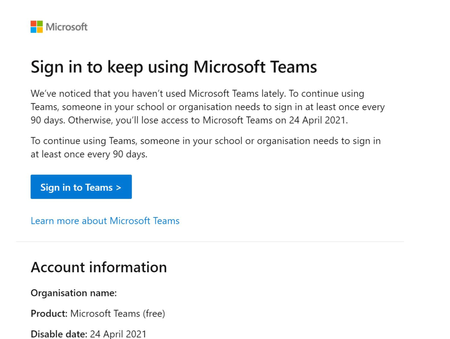
Hi folks - My name is Sam Cosby and I help run the Customer Experience & Obsession side for Teams Free Organizations within the Teams Engineering Team at Microsoft. Thanks for feedback from some Teams Free users on the following thread, as this has helped convey a clear problem that we needed to address. The following post is to explain that particular problem in further detail, with some additional FAQs that should help us understand further for anyone who may have seen this. I'll follow up on this thread once the bug is fully resolved. I received an email stating my trial is ending for Microsoft Teams (Free), but I didn’t sign up for a trial, why did I receive this? Back in January of 2021, there was an implementation of a new method to help reduce the number of Teams Free organizations that go unused over a 90-day period of inactivity by deleting them. Only organizations that did not have any sign-ins during this period and/or the grace period after the 90 days (120 days in total), would eventually become deleted. Unfortunately, there was a bug that sent out notification emails to Teams Free Admins even if their organization was in use during the past 90 days. We’ve since fixed this bug and expect that we shouldn’t see any additional emails be sent out to organizations that have been recently used. Figure 1: Example of accidental email sent out. Will Teams Free still delete in the next few weeks? No, as long as Teams has been in use in the past 90 days. While there are articles out there that have shown Teams Free Admins how to view their license ‘duration’, it’s been confirmed that once the fix goes live that any Teams Free orgs impacted with the above email will be ‘extended’ automatically and won’t have to worry about any data loss. Why does Teams Free have a deleted state? There was a new organization deletion method created back in January of 2021 to help reduce organization clutter by implementing a new deletion policy on organizations that go unused over a 90-day period of inactivity by deleting them. Only Teams Free organizations that did not have any sign-ins during this period and during the 30-day grace period after the 90 days (120 days in total), would eventually become deleted. Will documentation be updated? Yes. We realized that while this new method to help reduce organization clutter was released, the documentation unfortunately did not get updated as expected. We’ll be making changes to this as soon as we can to address the new deletion policies for Teams Free orgs moving forward. What does deleted mean for Teams Free? When the subscription is deleted, customer data is deleted and Azure Active Directory is removed, if not in use by other services. Users can’t access Teams, files/apps/services in this state.Solved9.2KViews4likes6CommentsSimplified controls for managing external collaboration in Teams admin center
We know that collaboration with customers, vendors, and partners outside of your small or medium business is critical to your success. We also know that many SMBs have limited IT admin resources, and setup can be a challenge. To make external collaboration setup in Microsoft Teams easier for your SMB, we have introduced a new overview page in Teams admin center that consolidates settings into a single view and have simplified how we describe the settings you can apply. From the new settings, you can select from pre-configured modes that quickly set smart defaults that are right for your business. If your business is open to external collab across chats, calls, meetings, and teams and channels, you can select Open mode to quickly get setup If your business is more conservative, you can select Controlled to align to pre-existing external collab defaults If you want full control of what is enabled and disabled for your business, you can always select Custom as well We're looking forward to hearing your feedback about the new settings experience. Learn more about how you can use these settings, Unified external collab settings managementNew Microsoft Purview Deployment Blueprint | Lightweight guide to mitigate data leakage
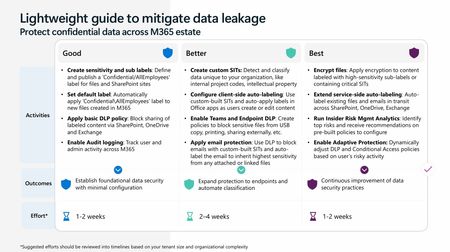
We’re excited to share our latest Data Security deployment blueprint: “Lightweight guide to mitigate data leakage”—a practical resource designed to help organizations quickly enable core data security features across their Microsoft 365 estate with minimal setup. The blueprint follows a good / better / best model that maps protections to your licensing. “Good” highlights foundational features included in Business Premium SKUs, while “Better” and “Best” layer in advanced E5 Compliance capabilities, such as auto-labeling, Endpoint DLP, insider risk signals and much more. With the new E5 Compliance Add-On for Business Premium, this guide shows how organizations can capture quick wins today while building toward stronger, long-term security practices. This blueprint is designed for IT administrators, security teams, and compliance stakeholders tasked with protecting sensitive data – and it’s equally valuable for Microsoft partners and consultants supporting customers on their data security journey. Whether you’re enabling basic safeguards or advancing towards automated protection, this guide provides clear, actionable steps to strengthen your data security posture. Ready to get started? Visit our Purview deployment blueprint page or jump straight to the direct PPT link for a step-by-step walkthrough. Securing your data doesn’t have to be complex – this lightweight blueprint makes it achievable for organizations of any size.
FY24 Modern Work & Security Partner Guide for SMB - now available for download!
Dear Parters, If you are present in the SMB market and would like to understand how Microsoft can support you programmatically in driving your Modern Work & Security business, then download and use our Modern Work & Security Partner guide. The guide summarizes programs and resources that help you to plan your enablement, go-to-market, target customers and identifying and developing opportunities from pre-sales to post-sales. Please find the download link below and leverage the guide actively. The guide will be periodically updated so make sure you use the download link in order to always have the latest version at hand.Land Your Offer - Anatomy of Revenue Generating Partner Offer - Part 1 - Copilot in 30
Copilot in 30: A Ready-Made Marketplace Offer to Grow Your SMB Practice Thirty days. Twenty-five users. One repeatable offer that turns AI curiosity into a long-term customer relationship. Small and medium businesses know AI matters. What they lack is a trusted guide and a low-risk way to start. Copilot in 30 gives you both: a $0, 25-user, 30-day Microsoft 365 Copilot Business trial from Microsoft, wrapped in a structured journey that only a partner can deliver. Package it as a Microsoft Marketplace offer and you have a scalable on-ramp to every SMB customer in your base — and to the managed services that follow. Start Here: Why Publishing on Microsoft Marketplace Matters Microsoft Marketplace is Microsoft's partner-focused business platform, designed to help you reach more customers and simplify how you sell. A published offer gives your practice a permanent, discoverable storefront in the place customers already look for Copilot help. More importantly, an offer turns your expertise into something repeatable. Instead of scoping every engagement from scratch, you define the journey once — activities, timeline, deliverables — and run it across dozens of customers. Professional service and managed service offer types are available in Partner Center, so the same offer can carry both the 30-day journey and what comes after it. The SMB Opportunity Hiding in Plain Sight SMB customer segment is still early in their AI journey. These are organisations with 300 or fewer users on Microsoft 365 Business Basic, Standard or Premium — typically without an in-house AI team. That combination is exactly where partners win: high demand, limited internal capacity, and a customer base large enough that a well-designed, repeatable offer scales far beyond what bespoke projects can. Why Copilot Is the Right First AI Step for SMBs Microsoft 365 Copilot Business is the cost-effective Copilot add-on built for SMB customers, delivering the same capabilities as Microsoft 365 Copilot inside the apps their people already use — Outlook, Teams, Word, Excel and PowerPoint. No platform overhaul, minimal training, immediate relevance. Copilot is also the on-ramp. Once a team works confidently with Copilot, the natural next steps are agents, automated workflows and Copilot Cowork — each one deepening the customer's dependence on the partner who guided them there. Meet Copilot in 30: 25 Users, 30 Days, $0 Copilot in 30 is a limited-time, CSP partner-led Microsoft 365 Copilot Business trial for SMB customers with fewer than 300 employees. The essentials: What the customer gets: 25 Microsoft 365 Copilot Business seats for 30 days at $0, transacted through CSP New Commerce (Product ID CFQ7TTC0MM8R · SKU 006Z) Who qualifies: Customers on Microsoft 365 Business Basic, Standard or Premium with no paid Microsoft 365 Copilot today — one trial per customer How long it runs: Available to transact until 31 December 2026 What happens at Day 30: The trial auto-converts to a paid subscription unless renewal settings are changed, with a 7-day cancellation window What Microsoft provides: A launch kit, campaign materials, setup guidance, the Copilot Success Planner and conversion guidance Microsoft supplies the licences and the assets. The offer — and the customer relationship — is yours. Your Role: The Guide Who Turns a Trial Into a Habit A trial alone rarely changes behaviour. A guided trial does. Your job across the 30 days is to make sure 25 people experience real value in real work, and that the sponsor can see it. Before Day 0 — pick the right customers, become "Customer Zero" by using Copilot in your own business, secure a named sponsor and Copilot admin, and build a 30-day success plan with agreed measures. Day 0 — transact the trial, set the paid renewal quantity and term, complete admin setup, assign all 25 licences and run the kick-off with starter prompts. Days 1–28 — lead a weekly scenario (Outlook, Teams, Apps, Agents), review Copilot Analytics, re-engage low-activity users and capture proof points in the customer's own words. Days 29–30 — run the outcome and ROI review, confirm the paid offer and open the expansion and consumption conversation. Every touchpoint is partner expertise the customer cannot get from a licence alone — and every one moves the decision at Day 30 from "should we?" to "how much more?" Inside the Offer: Activities, Timeline and Deliverables Below is the full activity plan behind the offer, ready to drop into your own offer description or statement of work. ID Stage Activity Trial day (of 30) Key deliverables — Pre-req Customer eligibility (Copilot Business trial) Before Day 0 Active M365 Business base licence; no paid M365 Copilot; one $0 trial per customer; CSP New Commerce transactable; offer open to 31 Dec 2026 I1 Identify Build the prioritised target list Pre-trial Tier A/B target list from ASPX and Cloud Ascent; 50–300 eligible seats I2 Identify Confirm eligibility and trial fit Pre-trial Eligibility check: M365 Business base licence, no paid Copilot, one trial I3 Identify Launch the acquisition campaign Pre-trial Campaign email sent; briefing delivered; responses triaged into pipeline I4 Identify Be Customer Zero: complete microskilling Pre-trial Microskilling complete; internal Copilot experience; team briefed P1 Plan Confirm sponsor and success measures Pre-trial Named sponsor and admin; 25 trial users; agreed success measures P2 Plan Build the 30-day success plan Pre-trial Personalised Success Planner output; weekly scenarios; admin and user views P3 Plan Confirm technical and compliance readiness Pre-trial Minimum requirements verified; data and compliance review; blocker log A1 Activate Transact the trial in CSP New Commerce Day 0 25-seat, 30-day, $0 trial ordered (CFQ7TTC0MM8R · SKU 006Z) A2 Activate Configure the paid renewal settings Day 0 Renewal quantity, term and billing set; Cowork usage-based billing if in scope A3 Activate Complete admin setup and assign licences Day 0 Recommended settings on; 25 licences assigned (starts the clock) A4 Activate Run the kick-off and share starter prompts Day 0 Kick-off email; starter prompts; four-week prompt series scheduled X1 Experience Week 1 · Outlook — catch up and communicate Days 1–7 Week 1 prompts landed; first-week activation rate reviewed X2 Experience Week 2 · Teams — meetings that run themselves Days 8–14 Copilot Analytics checkpoint; recaps adopted; low-activity users re-engaged X3 Experience Week 3 · Apps — create in minutes Days 15–21 App scenarios and proof points; week 3 training gate before day 30 X4 Experience Week 4 · Agents — unlock the next level Days 22–28 Role-built agents trialled; 30-day usage trends from the admin centre C1 Convert Outcome review, paid offer and expansion plan Days 29–30 ROI review; 50-seat offer confirmed in 7 days; wave 2 plan; consumption conversation opened Land Your Offer: What One Customer Is Worth The table below is the revenue anatomy of one Copilot in 30 engagement — and it shows that the money is not in the trial, but in what the trial sets up. Item Value Detail Offer duration 30 days Trial clock runs Days 1–30; identify, plan and Day 0 setup precede it Trial offer 25 seats M365 Copilot Business · 30 days · $0 · one per customer · to 31 Dec 2026 CSP incentive — 25 seats (K) $0.32K 5.0% direct bill (2.5% M365 CSP Core + 2.5% Strategic Product Accelerator Tier 1) on 25 M365 Copilot Business seats x $21/mo† ≈ $6.3K/yr; indirect reseller 2.5% ≈ $0.16K Conversion target 50 seats Lead with 50 paid seats at conversion; sets up the wave 2 expansion plan CSP incentive — 50 seats (K) $0.63K 5.0% direct bill (Core + SPA Tier 1) on 50 M365 Copilot Business seats x $21/mo† ≈ $12.6K/yr; indirect reseller 2.5% ≈ $0.32K Frontier Accelerate deployment funding (K) $2.5K Microsoft Commercial Incentives funding for the Copilot deployment engagement when the conversion lands with 50 paid seats†; funds the deployment and adoption work that leads into managed services † Illustrative estimates from the offer plan. Confirm current incentive rates, funding and eligibility in Partner Center. Three streams stack on top of each other: CSP incentive — earned on every paid Copilot Business seat from the moment the trial converts, and growing again when the customer expands from 25 to 50 seats. Frontier Accelerate deployment funding — $2,500 available when you lead the conversion with 50 paid seats, paying for the deployment work that makes the expansion stick. Managed services — the recurring engagement described in Day 31 and Beyond, which is where the largest and most durable share of revenue lives. Now multiply. Everything above is the anatomy of a single customer. Landing the offer means running it across every eligible customer in your base — and you don't need to guess who they are. Partner Center's growth insights reporting, available through the AI Business Solutions & Security Insights (ASPX) dashboard, gives you account-level Copilot eligibility, seat whitespace, free Copilot Chat usage and adoption signals for the customers you already manage. To turn that export into a ranked target list, my colleague Brian O'Shea has built a Copilot for 30 Power BI dashboard that sits over your ASPX data and scores each customer on a 0–100 priority scale from eligible seats, whitespace, free-to-paid potential and opportunity signals — so your first cohort is the ten customers most likely to convert, not the first ten who reply. How the Offer Fits Together: From Trial Inputs to Proof of Value The offer runs left to right in three layers: Trial inputs — 25 users, 30 days, $0 CSP trial SKU; an SMB with 50–300 eligible Microsoft 365 seats; no paid Copilot today; a Business Basic, Standard or Premium base; one trial per customer to 31 Dec 2026; a named sponsor and Copilot admin; auto-conversion to paid unless changed. Five stages — Identify (I1–I4), Plan (P1–P3), Activate (A1–A4), Experience (X1–X4) and Convert (C1, T1, T2, W2). Each stage produces a concrete output the sponsor can see. Proof of value — a prioritised list and campaign responses; agreed use cases and success measures; a provisioned trial with 25 licences assigned; weekly usage from the Microsoft 365 admin centre; adoption proof points in the customer's words; paid conversion confirmed in Partner Center — and a named wave 2 expansion beyond the first 25. The highlighted activities — admin setup (A3), Week 4 agents (X4), 25→50 paid seats (T1), Frontier Accelerate funding (T2) and the wave 2 expansion plan (W2) — are where the engagement stops being a project and starts becoming an ongoing relationship: managed services, agent build-out, Copilot Studio and Copilot Cowork follow-on once the trial converts. Day 31 and Beyond: Managed Services That Keep Delivering The end of the trial is the start of the real engagement. Package these as standing services in your offer: Copilot adoption management — monthly Copilot Analytics business reviews, prompt and scenario refreshes, champion programme and onboarding for each new wave of users Licence and expansion management — take the customer from 25 to 50 paid seats and on to wave 2, aligning renewals, terms and billing as the footprint grows Agent build-out — design, build and maintain role-based agents with Copilot Studio for sales, service, finance and operations scenarios surfaced in Week 4 Copilot Cowork enablement and governance — introduce consumption-based Cowork scenarios, set budgets and cost controls, and report on usage each month Security, compliance and readiness — keep data protection, permissions and governance in step with expanding AI use, including a path to Microsoft 365 Business Premium Quarterly value reviews — refresh success measures, capture new proof points and agree the next expansion plan with the sponsor Each of these is a recurring, outcome-based service rather than a one-off project — and each keeps you positioned as the customer's AI partner as their needs grow. Ready to Build Your Copilot in 30 Offer? Download the Copilot in 30 launch kit and Microsoft 365 Copilot Partner FAQ from the Microsoft AI Cloud Partner Program. Be Customer Zero — run Copilot and the microskilling series inside your own business first. Publish your offer in Partner Center as a professional service (the 30-day journey) with a managed service follow-on (Day 31 and beyond). Pick your first cohort — customers with 50–300 seats on a Microsoft 365 Business plan and no paid Copilot today. Transact your first trial through CSP New Commerce (Product ID CFQ7TTC0MM8R · SKU 006Z) and set the paid renewal on Day 0. Book the Day 30 review before Day 1 — so the conversion and expansion conversation is already on the calendar. The window closes on 31 December 2026. The customers are already in your base. Publish the offer and start the clock. Resources From AI curiosity to Copilot adoption in 30 days — Microsoft Partner Blog Copilot in 30 Launch Kit — partner GTM playbook, customer trial guide, invitation and weekly prompt emails, admin setup guidance Build Your 30-Day Copilot Success Plan Copilot Success Planner Walkthrough video Partner Skilling Hub | Microskilling for Copilot in 30 Power BI Dashboard that integrates with your ASPXi Partner Data · By Brian O'Shea Create compelling customer business cases670Views2likes1CommentJoin Us at MVP Summit: Helping SMBs thrive through Teams
The Microsoft MVP Summit is just around the corner, and we’re excited to invite Microsoft MVPs to a Teams SMB–focused conversation designed specifically for you on March 24th at 11 am PDT. The session is exclusive to MVP Summit attendees, and it’s intended for MVPs who work closely with small and medium businesses—or who are passionate about how Microsoft Teams continues to evolve for the SMB audience. Why should MVPs join this session? Engage directly with the Microsoft Teams product team focused on SMB. Share real-world insights and feedback from your customers and partners. Learn how we’re thinking about SMB-specific scenarios and where Teams is heading. Connect with fellow Microsoft MVPs who care deeply about Teams and SMB innovation Attending MVP Summit in person? If you’ll be joining us in Redmond for the MVP Summit, we’d love to meet you face to face. Stop by to say hello, put names to faces, and have an informal, candid conversation with the team. These discussions are invaluable to us—and we’re always eager to hear what’s working well and where we can do better. The MVP Summit is a unique, invitation-only forum for open, two-way dialogue, and this session is all about ensuring that the SMB voice—represented by Microsoft MVPs—continues to shape the future of Teams. We’re looking forward to the conversation and hope to see you there. 👉 summit.microsoft.comPartner Opportunity to Influence the ISV Copilot Tooling Roadmap.
Microsoft Partners - We're sharing an opportunity for you to contribute to the Microsoft roadmap for tooling and capabilities that help ISVs build, deploy, and monitor Copilots. Voice your company's thoughts on what features and capabilities would help your company whether you're considering a custom Copilot or have already built one. Complete this survey (~5 mins) by EOD 11/22 to influence the roadmap. In this context, Copilot refers custom Copilots, Microsoft Copilots extensions, autonomous agents, and genAI infused Industry applications.