sites
2668 Topics
Applying Search Schema fails
Hi everyone, We've been fighting a SharePoint Online search issue at one of our customers since early July 2026. We've had a Microsoft Support case open for a few months, but it has hit a dead end. I'm posting here to find out whether others are seeing the same thing and whether anyone has found a workaround. Our setup An in-house ERP system syncs customers and projects to a SharePoint list, which serves as the provisioning master list. A provisioning engine (PnP PowerShell / PnP provisioning templates) creates a site for each item, using one of two templates: Customer site or Project site. During provisioning we apply: Property bag values at site level (for example, the account manager for a customer) Custom columns in the document libraries for document metadata SearchSettings in the XML template that map both the property bags and the columns to the default RefinableStringXX managed properties Some values link to managed metadata, and some are free text. This approach was designed together with the customer, and Microsoft Support confirmed that it is a supported implementation. The issue Applying the SearchSettings fails. Running Invoke-PnPSiteTemplate with the SearchSettings section returns one of these: Service unavailable now, please try again later. The request was canceled due to the configured HttpClient.Timeout of 100 seconds elapsing. Without SearchSettings, the template applies without problems. Even applying only the first line of the SearchSettings on a brand-new site causes the timeout. The Search Schema pages are extremely slow at both site collection and tenant level, much slower than in any other tenant we work in. The issue has now gotten worse. We can't create, modify or delete any managed property mapping, at either site collection or tenant level. Opening _layouts/15/selectcrawledproperty.aspx (for example, to edit RefinableString01) now always returns "Sorry, something went wrong. An unexpected error has occurred." What Microsoft Support told us At first, the case was pushed back as out of scope because we use PnP. After escalation, engineering confirmed that the behaviour matches a known issue: Search Schema pages load slowly when a large number of implicit properties and mappings exist. They confirmed it's not caused by misconfiguration on our side. However, there is no public documentation, no workaround, no fix and no ETA, and no further escalation path. They suggested we give feedback through the community, so here we are. Questions for the community Has anyone else run into this Search Schema latency or the "Service unavailable" error when applying SearchSettings, especially in tenants with many sites and mappings? Has anyone been able to reduce the number of implicit or crawled properties in a tenant, or "reset" the site-level search configuration, and did that help? Could this be related to the recent search migration issues reported in service health SP1393483 and in this thread? Are there any best practices or (unofficial) limits for the number of property bag values or library columns mapped to RefinableStrings across many sites? For example, does linking to managed metadata make it better or worse? Has anyone tried splitting the SearchSettings into smaller increments and applying them one by one? We're also looking at reducing the number of mappings and the number of sites that need search support. Still, it would be very helpful to understand the actual limit we're hitting, since this affects how we design future solutions as well. Thanks in advance for any insights!4Views0likes0Comments
Sites with long file path length
I have a big problem to solve with SharePoint online Teams sites where data was migrated from On-Prem file shares and there are more items with a long file path length than we are able to fix. In some directories, it has gotten better but employees didn't listen to us when we told them to start creating less nested folders, shorter file and folder name and to try and fix older directories. In the beginning around 2 years ago, we migrated everything and turned on OneDrive sync and found out quickly how that wasn't going to work for one department, so we then told them to work out of the browser which seemed to solve the problem. Well, not everyone kept working from only the browser and more and more people continued to get OneDrive sync issues. Now I have ran some reports to get the actual file path length for some of the sites. For the biggest site, I show the largest file path length at 397, and I figured 220 would give a good starting point to have OneDrive successfully sync without errors given that OneDrive and File Explorer will add extra characters in the path. Starting at 220 characters, there are more than 61,000 affected files with a path ranging from 220 - 397, and more than 107,000 starting at 200 characters. The first problem to solve is to get the department to stop naming files in this way and stop creating all the nested folders. They need to establish a better naming convention. The second problem to solve is fixing as many of these as possible, but with this many items to correct it seems impossible. Has anyone worked on a SP online site to programmatically fix something like this to reduce the path length? Even trying this with a script sounds impossible, but there has to be something that can be done to help? Right??277Views0likes1CommentSharePoint list dynamic filtering on a multi-choice column
Hello, I was wondering if anyone has a solution/work around for a limitation I'm running into with using dynamic filtering on one of my SharePoint lists. The way I have it set up: there is a "Tags" column that has multi-selectible choices like "x", "y", "z", etc. The problem I'm running into is when you try doing dynamic filtering on the list webpart and want to view every item with tags "x AND y", it filters using the logic "x OR y". So, the output contains way too many unrelated items and the filtering is pretty much pointless. This is on top of the limitation that you can only dynamically filter by 1 column at a time, which is why I needed to add every tag to a multi-selectable choice column in the first place. Has anyone found a way around this? Or is there some solution I'm not seeing?Solved681Views0likes1Comment
Posting news article not sending notification to Teams activity feed
Hello I am trying to troubleshoot why when posting a news article it is not coming up in people's Teams activity feed. We have a hub of sites branded as the intranet but they are not news organisation sites. When news posts are published from any site in this hub, people are receiving notifications of news posts in their Teams activity feed. Eg. 'Joe Blogs published news'. On a stand alone communication site, I publish a news post, for the members of that site they do not receive the notification in their Teams activity feed. Some facts We are not using Viva Connections - so there is no home site (no Viva license yet) No sites are news organisation sites Internet sites are not necessarily followed (most people do not follow) so this has no bearing on receiving notification in Teams Notification settings in Teams are not disabled for test users What other steps can I take to investigate why this site not connected to the internet hub is not pushing notifications? It is one example of a site, there are many that do not push notifications as well. Thank you.273Views0likes2CommentsWhat is the maximum length of a Check-In Comment in a SharePoint document library?
We are using SharePoint document libraries with versioning enabled and users provide comments when checking in documents. Is there a maximum number of characters allowed in the Check-In Comment field, and is this limit documented by Microsoft?Solved605Views0likes1CommentExternal Users Unable to Access Microsoft List Form
We have created a Microsoft List and are using the default Microsoft Lists Form for data entry / intake form. Internal users can access the form URL and submit items successfully. However, external users are unable to access the form link, even though they have been granted Contribute permissions to the SharePoint list. External users can: Access the list Create new items using the + New button Edit items based on their permissions However, they cannot access the dedicated Microsoft Lists Form URL and getting following error. This link is only available to internal users. This link is not available to you. Our requirement is to allow external users to: Open the Microsoft Lists Form URL View the form Submit new items without providing additional access beyond what is required for form submission, and without using Microsoft Forms. Is guest/external user access to the Microsoft Lists Form experience supported? If so, what configuration or permissions are required to enable external users to access and submit items through the form URL?Solved729Views0likes3Comments
SharePoint Online Site Deletion blocked by Retention Policy although no content is retained
Hi everyone, I'm trying to understand whether this behavior is expected or if other organizations are experiencing the same issue. Environment SharePoint Online (Microsoft 365) Microsoft Purview Retention Policy Retention duration: 180 days Trigger: based on last modified date After retention period: Do nothing The intention of the policy is not to automatically delete content. We only want to prevent deletion for 180 days and allow deletion afterwards. Microsoft previously explained to us that retention applies to the content/items, not to the container (the SharePoint site itself). Problem We are currently unable to delete SharePoint sites. When attempting to delete a site from the SharePoint Admin Center we receive the following message: This site can't be deleted at this time because it is blocked by a compliance policy. What we already checked For the affected site: CompliancePolicyIds = empty ArchiveStatus = NotArchived SensitivityLabel = empty The Preservation Hold Library is empty: Preservation Hold Library => Items = 0 We also inspected the internal DLC properties of the site and found entries such as: dlc_sitehaspolicy dlc_sitehasexpirationpolicy dlc_webhasexpirationpolicy Even after clearing these values for testing purposes, the site still could not be deleted. Important Observation If we explicitly exclude the site from the retention policy, deletion becomes possible. This makes it appear that the retention policy is blocking deletion of the site container itself, even though our understanding was that retention should only protect retained content and not permanently prevent deletion of the entire SharePoint site. Has anyone else observed this behavior? Additional OneDrive Issue We are seeing a similar problem with unlicensed OneDrive accounts. Many of these OneDrive sites: are already archived are shown as blocked by retention/compliance cannot be deleted remain present for years For example: ArchiveStatus = FullyArchived CompliancePolicyIds = empty The accounts appear in the list of unlicensed OneDrive accounts, but we are unable to permanently remove them while the retention policy is in effect. Has anyone found a practical way to clean up or remove these orphaned/unlicensed OneDrive sites when a tenant-wide retention policy is configured? Questions Has anyone seen a situation where: CompliancePolicyIds is empty the Preservation Hold Library is empty but site deletion is still blocked by a compliance policy? Does a retention policy configured as: Retain for 180 days Then Do nothing intentionally block deletion of the entire SharePoint site container? Is it expected that excluding a site from the retention policy immediately makes deletion possible? How are other organizations handling site lifecycle management when tenant-wide retention policies are enabled? Has anyone experienced similar issues with unlicensed OneDrive accounts that cannot be deleted because of retention/compliance requirements? Any experiences, recommendations, or explanations would be greatly appreciated. Thanks!277Views0likes2Comments
Recycle Bin and Site Content Hidden for Site Members and Site Visitors
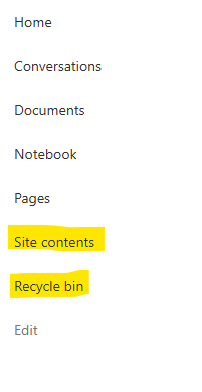
I posted this before but made a mistake with my write up, so I am reposting. I have a requirement that the Recycle bin and Site Contents should be be hidden from the Site Members and Site Visitors. Please how can I achieve this because the Server Infrastructure activation is not working for me. Any workarounds? Please help559Views0likes1Comment