sites
2667 Topics
Auto-Increment Number Field in a SharePoint List
I need to create an auto-increment field with a standard amount of digits. The format needs to be like this T000001, T000002, T000003, ......T000010, etc (7 Digits). When it gets to the 10th record it should not do this T0000010 (8 digits). I tried using the popular, often referenced solution (link below). This method does not work as I hoped. If you put it in a format like this T1000, when it gets to the 10th item it does this T100010 rather than T10010. Here is the popular solution I already tried: https://www.epmpartners.com.au/blog/how-to-create-an-auto-incrementing-number-field-in-a-sharepoint-list/Solved343KViews1like26Comments
Custom/Vanity domain name/URL for Sharepoint Online
Hi, I would like to change the default Sharepoint.com URLs to company's URLs, so: 1) contoso.sharepoint.com => sharepoint.contoso.com 2) contoso-my.sharepoint.com => mysharepoint.contoso.com 3) contoso.sharepoint.com/sites/abc => sites.contoso.com/abc How can this be configured? Thanks,208KViews6likes39CommentsChanging a Private Sharepoint Online site to a Public one
Hey all, anyone have and advice on what is the PROPER way to take a Sharepoint Online site that was created from a MS Teams team and opening it to a Public (RO) site? We found multiple ways, but just want to know what is the best practice. Thanks!Solved197KViews1like19CommentsDeleted files/folders reappear as they are synced back online from client OneDrive
We are heading towards the end of a big push to get all files in OneDrive or SharePoint. The Finance department (VIPs) are getting very frustrated with deleted files/folders reappearing as they are synced back online from other user's sycned client OneDrives (the name of the user and date/time are listed with the file online). PLEASE HELP. I am also opening a ticket. This is what we have tried: Make sure all sync clients are up to date Try renaming the folder/file and then deleting it from online SharePoint This did not work at all. Both the original and the renamed files/folders reappeared Checked SharePoint permissions. There are some unique permissions on a few documents but in general the members have edit permissions. GET HELP FROM THIS COMMUNITY173KViews0likes56Comments
What is the domain "nrb.footprintdns.com"??
Hello Everyone From 3/2/2018, when I access my SharePoint site the following certificate site? is displayed. https://37CFD84CE79EF6104C98E018AE6ABD10.nrb.footprintdns.com37CFD84CE79EF6104C98E018AE6ABD10.nrb.footprintdns.com And request me to type account and pw.. Although I entered my PW I cant access my sharepoint site. I want to know why? And how can I access my site. So I want to ask the following questions: 1.When I access the above URL Office 365 sign in page is appeared what is the relationship between Microsoft? 2.Since today Microsoft is beginning to use the [nrb.footprintdns.com] domain? 3. What is the purpose that Microsoft use the [nrb.footprintdns.com]? 4. I googled and I found the following site. And I can also search the domain [37CFD84CE79EF6104C98E018AE6ABD10.nrb.footprintdns.com] in there. https://www.threatcrowd.org/ I really don’t understand why microsoft use the thteats? Site for what purpose DNS? I did not have this situation previous to 3/2/2018. Can anyone tell me how to resolve this situation.. I do not have any certificate knowledge so I will very appreciate if anyone can tell me the reason simply. Thanks.Solved117KViews4likes40Comments
Default view mode/edit mode behavior for Word and Excel Online files
I can't find the documentation for this, but I think it's a relatively new feature. I want my Word/Excel/PowerPoint online files to open in view mode instead of edit mode. When you open an Office Online file, the URL is like this [site collection]/_layouts/15/Doc.aspx?sourcedoc=[source location]&action=default&mobileredirect=true&DefaultItemOpen=1. The three paramtersare action, mobileredirect, and DefaultItemOpen. Does anyone know how to change the action parameter so that its value is "view" instead of "default"? Is this set at the tenant level, or site collection and/or library level?115KViews6likes21Comments
Save list as template on modern team site
Wonder if anyone can advise how I can create a list in a modern sharepoint team site from a template that I saved from a classic team site. I don't see any option from within powershell settings. I have been getting my head around all the various sharepoint resources and have been creating lists etc on my classic team site for now but our users are starting to use the modern team sites created from Office 365 groups and I really would like to have them use some of the list templates I've created. Any help appreciated.110KViews1like27CommentsFind Groups on Sharepoint Online Sites
Hello everyone, hope you are all well! First of all, I apologize if the text seems strange. I don't know the language and I use an Online Translator. Even so, I intend to be quick. A user has created a site, on this site, in a Library he has two or three folders in a hierarchy. Something like "Documents/Folder 01/Folder 02/Folder 03" The objective is to give access permissions, manipulation to Folder 03. To do this, access "Site Permissions / Advanced Permission Settings" and create a group, insert an external account and assign the desired level of permission to the group. This group is usually there together with the other groups (Visitors, Members and Owners). I remove the Group from there, as I don't want its members to access the site, having seen the hierarchy issue. I navigate to "Folder 02", and manage access to "Folder 03". There I insert the group saying what I want it to do (if it only displays or if it can be edited). Ready. The account outside the organization, the Tenant receives the invitation email and normally accesses the Library in question. With the proper permissions without any kind of problem. It turns out that now if I want to locate the Group to add someone else or remove it, changing the permission level is very confusing. Complicated. At least for me. I usually only have relative success if when accessing the Site's settings, I receive this message below: "Some of the content on this site has different permissions than what you see here. Show these items. // There are users with limited access to this site. Users may have limited access if an item or document on the site has been shared with them. Show Users." Clicking on "Show Users." there it shows the Group and the "magic happens" I've tried it several ways. I have read and re-read all the Documentation in this regard. And unless I misunderstood, I can't find a "smooth" way to do this. And this makes it a little more difficult to guide an organization user with less power of understanding. For that reason, and already apologizing again, I wanted to know if you understand that it's really complicated OR if I'm the one having difficulties doing it. Thank you very much for your help. HugsSolved106KViews1like4CommentsConfigure modern search results to search all of your organization (rather than the current site)
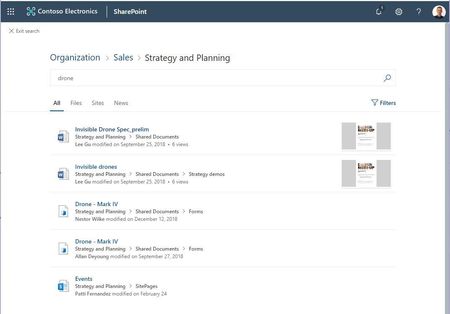
Hey everyone, We heard from many of you the need to be able to change the scope of your modern search results pages. When you create a new communication site or team site in SharePoint Online today, and type into the search box, you are taken to the modern search results page. This page shows results from your current site by default, and allows you to expand the scope of your search to the hub that the current site is associated with (if there is one), or to the whole organization. But there is a desire for being able to change the behavior to always search over the whole organization, or across the hub a site is associated with, without needing an additional click, especially if the site in question will be used as a modern landing page for your organization. I'm happy to say that with the latest version of the SharePoint PnP PowerShell extensions, it is possible to run a simple command as the site owner, and make your site use the organization, or the hub scope by default. To change this setting: 1. Start PowerShell in administrator mode as you will be installing the PnP extensions. 2. Run the following commands to in this order: PS C:\WINDOWS\system32> Install-Module SharePointPnPPowerShellOnline # If you previously had installed this module, you may need to use the "-Force" parameter to install the newer version. PS C:\WINDOWS\system32> Connect-PnPOnline -Url https://contosodemosg.sharepoint.com/sites/Strategy -UseWebLogin # this will prompt you to sign into your site. Use the site owner credentials to sign in PS C:\WINDOWS\system32> $web = Get-PnPWeb PS C:\WINDOWS\system32> $web.SearchScope = 1 # 1 for Tenant, 2 for Hub, 3 for Site, 0 for default behavior PS C:\WINDOWS\system32> $web.Update() PS C:\WINDOWS\system32> Invoke-PnPQuery After running these commands, the site will start to show results from the whole organization. To go back to the default setting, run the commands again with the value provided to "SearchScope" parameter to 0. To search across the Hub, use 2 as the SearchScope value. We will be providing a way to set this setting using the UI in a future release as well. Updated in April 2020 to reflect the ability to search across Hubs.Solved103KViews22likes78Comments