single sign-on
16 Topics
Authenticator app not working on new phone - old phone with app is gone
Hello Tech Community, I have trouble with my email (hotmail) account. About 12 months ago I downloaded and activated the authenticator app after having hackers trying to enter my hotmail account. A few months ago I changed my phone and I have never been asked for second factor authentication until today (so I did not pay much attention to it as I could see it. The phone number attached is old and have no access to it and that device is long gone too). BIG PROBLEM! I have the app on my new phone but it is not linked to my account (and cannot do a Cloud Recovery). If I try to do anything with my account (forward emails or change anything) it asks me for the authenticator approval/code (that I do not have access to). I am scared about doing something that will log me out of my email (which I still have access to) but cannot make any changes nor log out. Please help. Can I deactivate the authenticator app somehow? or re-set it-up to work again? Can I migrate all my emails to a new account so I do not lose years of information if I get logged out? Can I set the forwarding emails option without having to pass by second facto authentication? Looking forward to hearing from you wise community, Thank you37KViews0likes7Comments
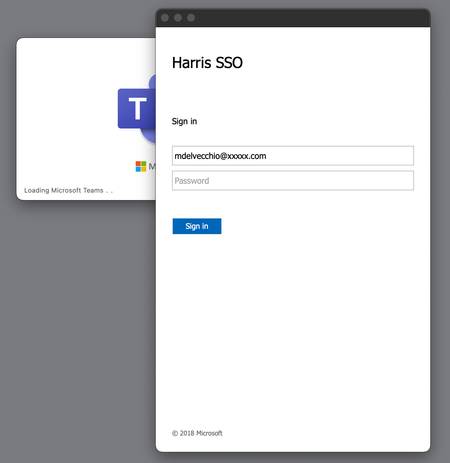
Teams login keeps using old organization SSO (classic, Mac)
I’m running Teams classic on my Mac (because there doesn’t seem to be a personal use version of the new Teams). I used to use it with my prior job, now I want to use a personal credential. However, it keeps popping up a SSO (single sign-on) modal to authenticate with my prior organization, where I no longer work. There is no way to cancel or use an alternative, personal credential. Trying to close the modal does nor resolve the issue. What the heck? How do I tell Teams classic (Mac) to stop using SSO from the old org?7.4KViews0likes3Comments
Credential prompt when adding additional mailbox in Outlook
Hi, We have Azure AD Connect configured to sync user from AD to AAD. AD FS is in place to handle SSO for the managed domains in Office 365. Users run Windows 10 1809 and Outlook 365 1902. When a user logon to his/her computer and start Outlook for the first time Outlook detects the users email and the user can just click Connect and continue trough the wizard in Outlook to add his/her mailbox. During this process the user is never prompted to enter their password. If the user decide to add a second mailbox (File -> Add Account) in Outlook they enter the email address of the additional mailbox and click Connect. What happens then is they are presented with window where our AD FS server is prompting for a username and password. The username is pre-populated with the the email address of the mailbox they try to add. The user have propper permissions to access the mailbox. If they change the username to their own email address and enter their own password they mailbox is successfully added to Outlook. My question is, is it possible to have Outlook authenticate using the logged on user account credentials so we get an SSO experience when adding additional mailboxes in Outlook? Regards Erik3.2KViews0likes1CommentUser with hundreds of Interactive Sign-In log entries that are "Interrupted"
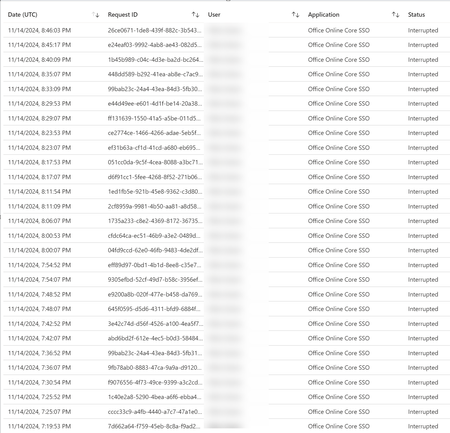
I have one user in our organization that has hundreds of Interactive Sign-in logs in EntraID that are marked as "Interrupted". I don't even know where to start with the user. Does anyone have a recommendation for isolating the cause of these logs? Recent entries are 95% related to Office Online Core SSO application.1.9KViews0likes5Comments
PIM for security group membership for a Sass application role
Can PIM be used for membership of a plain security group? We have a Sass application configured with SSO using Azure AD and admin roles in Sass app are controlled via an Azure AD security group. This security group does not have any Azure AD or Azure roles assigned. Could we use PIM to assign group membership of this security group as Eligible? Up-on activation, admins will then become active members of the group and get JIT access to Sass app.Solved1.8KViews0likes2CommentsAccount Hacked
Hello Community, My account has been hacked, copied and/or duplicated with some other account as I was originally Sids1 with this email for more than 6 months now and this has changed somehow. It's very concerning to me since I also found some other person named Siddhartha when I was logging into my account. I reported that to the Microsoft Account Team but have not received any replies yet. Please suggest anything that can be done to catch this hacker who is stealing my identity to and fro. Best Regards Siddhartha SharmaSolved1.5KViews1like4Comments
Issues with MS Office Logging me out of documents shared via Sharepoint on Mac
I work in D365 on a Mac and have since 2007. I do a lot of collaborative work in Microsoft office and until around April of this year, it has always worked perfectly. But for the past 6 months, I have been getting randomly logged out of Word, Excel and PowerPoint while actively working in a document. I am then unable to log back in and have to quite all MS applications, open up KeyChain in Spotlight and delete all items under login associated with Exchange, Office and ADAL... This only happens when working in a document via Sharepoint, and seemingly every 20 min or so. This makes collaborative work in Sharepoint now impossible. I cannot keep closing everything down and clearing the cache of logins in KeyChain. What happened and how do I fix this permanently?1.3KViews0likes1CommentIntune - disable Windows Hello
I have a goal: 1. Disable Windows Hello for Business without impacting current users on EntraID via Intune, 2. Configure password sync on the Okta site and Entra ID and MDM device What could be the way to disable PIN (for onboarded devices) and switch only to a password on endpoints? the password must be synchronized with Okta in both directions. Thank you,1.3KViews0likes3CommentsAAD multiple accounts from same realm is not supported by clients.
I've signed out of Excel for iPadOS 2.101.25100311. I've closed (not forced shutdown) and reopened the app. I'm trying to sign in with a different Microsoft account. However, it shows the error: "Another account from your organization is already signed in on this device". How can I completely sign out of that other account? The troubleshooting details are below. Correlation Id: 5520852a-4877-ec4c-97be-f3de2c079058 Timestamp: 2026-06-21T22:49:29.000Z DPTI: FAF41146-8AF4-425C-95EE-1654DD13C47C Message: AAD multiple accounts from same realm is not supported by clients. Tag: 5pzx9Solved699Views0likes1Comment
Hacked Microsoft Account Recovery with Semi Access
I'm at a complete loss and it is infuriatingly ridiculous. I am entirely unable to get a hold of a human being at Microsoft and am being turned down by automated responses nonstop. So here's what's happening: My Microsoft account has been hijacked (obviously not this one) for its valuable Minecraft account and has now been sold. I am logged into my account via my PC, have full access of the main email address, but I have been locked out of my account using the alias email. Whenever I want to log in to my account, it wants to instead send a code to an email address I do not own and can't access. I have tried the Sign-In Helper, the Recovery Form, the hotline, the support email without any result, let alone a non-automated response. I sadly don't have the Recovery Code of my 15 year old-ish account. Since I still have full access of my email address I get updates of security info being changed and what not. Last month a stranger sent me screenshots of someone trying to sell my Minecraft account, for which I myself have received multiple buying offers, and voila yesterday I received notification of my alias mail address changing followed by Minecraft server apps being added to my Microsoft account. While I had already given up retrieving my account, whenever I get notifications my heart sinks a new while some hope sparks up again. Do you people have any idea of what I could do? I don't even rule out legal actions at this point. While I do of course have the email address of the hijacker and the buyer, I fear that contacting them results in me being locked out permanently. I'm just begging to catch the attention of anyone involved with Microsoft. This being walled out with automated responses is killing me.300Views1like3Comments