sharepoint
100 TopicsSharePoint AI innovations hit GA, powering new Copilot app and agents
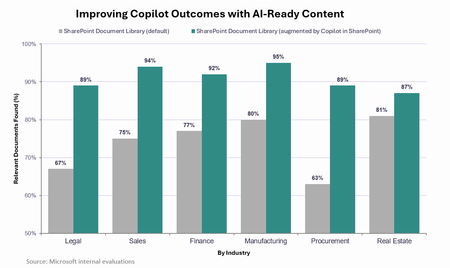
SharePoint AI innovations hit GA, powering new Copilot app and agents Today we announced the new Copilot app, bringing together how people assist, delegate, build, and automate work in one experience powered by Work IQ. Because Work IQ grounds these experiences in your work and organizational context, the quality and structure of knowledge behind them matters more than ever. The better that content gets, the better Copilot gets: in Microsoft evaluations, responses in the Copilot app improved by an average of 17 percentage points when the underlying content had been enriched and structured by Copilot. That’s why over the past year we’ve invested in Copilot’s content experiences and tools – both in the Copilot app and inside the content repository itself with the Copilot in SharePoint preview. In just the past month, millions of users have tried this preview, applying it to real-world challenges to translate complex content into tangible business value and accelerate their organization’s AI transformation.3.3KViews2likes1CommentIntroducing SharePoint News and Viva Engage cross-posting
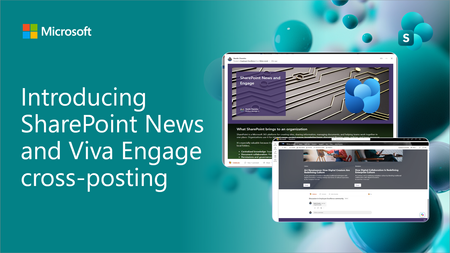
SharePoint News can now be cross-posted directly to a Viva Engage storyline or community. The original post retains its full SharePoint experience, while comments, replies, and reactions stay synchronized across both platforms.3.1KViews12likes18CommentsSharePoint AI page authoring: Select, describe, and refine
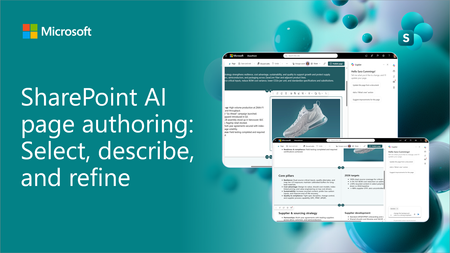
SharePoint AI page authoring is getting an updated experience with on-canvas selection. Authors can select a web part or section, describe the intended change in natural language, and review the results directly on the page. See the updated experience in action and learn how it makes page editing faster and more intuitive for both new and experienced authors.1.8KViews1like3CommentsUpcoming changes to classic experiences in SharePoint Online
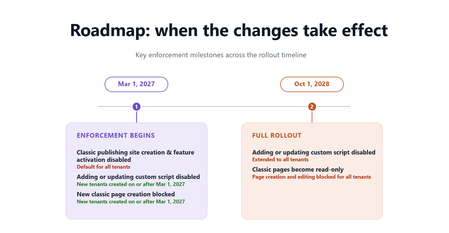
For the latest details, timelines, FAQs, and implementation guidance, read the full Microsoft Learn article. In 2016, we introduced modern SharePoint and the SharePoint Framework to our online service – a cloud-born user experience & developer extensibility framework. Ten years later, we continue to invest in this stable platform to provide reliable, well-governed, AI-ready, mobile-friendly, and secure-by-default foundations for customers’ publishing and content management needs. Also in 2016, we renamed our previous publishing and UX extensibility system to “classic”. These features were designed to ease our customers’ transition from on premises environment to the cloud service. Now, ten years later, these classic features are used by fewer than 5% of our monthly active tenant base, and the classic SharePoint page content is not participating in the latest ways content should be secured, managed, and shared. Classic pages are also not fully represented in the content formats that power Microsoft 365 Copilot, which can reduce the coverage and accuracy of Copilot responses that draw on classic content. As such, over the next two years, we will take steps to retire classic SharePoint pages and custom scripting add/update capability in SharePoint Online from Microsoft 365 – below you will find details on timelines, assessment tooling, and migration guidance. Overview We are introducing a set of changes to classic experiences in SharePoint Online across two phases. No classic page content or data will be deleted by Microsoft in these phases. Existing pages will remain accessible in a read-only form. Phase 1 – Beginning March 1, 2027 The following changes will take effect: For all tenants Creation of new classic publishing sites and activation of the classic publishing feature will be disabled for site collection and sub sites. The AllowClassicPublishingSiteCreation tenant setting will be enforced as False and cannot be changed. For new tenants created on or after March 1, 2027 Users cannot create new classic pages — including wiki pages, web part pages, blog pages, publishing pages, and custom ASPX pages. The ability to add or update custom scripts will be disabled by default, and the site setting DenyAddAndCustomizePages will be enforced as True and cannot be changed. Note that this setting applies only to classic pages — modern SharePoint pages are not affected, and custom solutions built on the SharePoint Framework (SPFx) will continue to work under your organization's existing governance. Phase 2 - Beginning October 1, 2028 The following changes will extend to all tenants: Classic user-created pages — including wiki pages, web part pages, blog pages, publishing pages, and custom ASPX pages — will become read-only. Users will no longer be able to create or edit these classic pages. The ability to add or update custom scripts will be disabled and the DenyAddAndCustomizePages site setting will be enforced as True and cannot be changed. What you should do now For SharePoint administrators: No data or content will be deleted by Microsoft as part of this change, and all existing data governance features will continue to be honored and continue to function. Discover and assess your classic SharePoint environment Identify usage of classic sites and pages across your tenant. Use the “SharePoint Classic Activities” Purview Audit log category - included in Audit (Standard) and available to all organizations, and events (ClassicPageCreated, ClassicPageEdited, and ClassicPageViewed) to identify active classic page usage, and leverage the Microsoft 365 Assessment Tool to understand the overall classic scope and modernization feasibility. Prioritize based on business importance and usage If your assessment finds no classic content, none of these changes apply to your organization — no action needed. Otherwise, focus first on high-value or frequently updated classic sites and pages, and identify where modernization will have the greatest impact. Classifying content by business criticality can help guide a phased migration plan. Transform to modern SharePoint experiences before enforcement deadlines SharePoint administrators should use modernization tools such as SharePoint PnP Modernization and SharePoint Page Modernization Agent to convert classic pages into modern SharePoint experiences where applicable. Microsoft will continue enhancing the tooling to accelerate page modernization with best-effort fidelity reservation, but it may not fully automate complex scenarios; modernization is a project that typically requires planning, resourcing, and highly customized pages often need redesign or manual rebuilding. Adopt a phased migration strategy Combine centralized IT-led planning and prioritization with distributed execution by site owners over time. Most organizations find success by modernizing page content in waves rather than attempting a single large-scale migration. For detailed guidance, tools, and step-by-step recommendations, refer to the Microsoft Learn article. For site owners and content authors: Site owners should work with their SharePoint administrators to identify classic sites and pages that are still actively used and determine which content should be modernized, retired, or replaced. Documentation, assessment tools, and migration guidance linked below can help organizations understand available modernization options and prepare for the transition. How do I get help? Refer to the following documentation, tools, and Microsoft partner resources to support your migration from classic SharePoint experiences: Modernize your classic SharePoint sites | Microsoft Learn Transform classic pages to modern pages | Microsoft Learn Microsoft 365 Assessment Tool Microsoft Solution Providers Learn more For complete details, timelines, FAQs, and ongoing updates, see the Microsoft Learn announcement. A Message Center post in the Microsoft 365 admin center has been sent to all tenants. (MC1464926 & MC1464924)7.4KViews0likes4CommentsSharePoint Showcase: 10 Custom AI Skills Every SharePoint Site Owner Should Build
In this edition of SharePoint Showcase, we explore how skills work, how to create or install them, and ten practical examples to help SharePoint site owners get started. These examples are not an exhaustive list, but a curated starting point for identifying everyday processes that can become reusable, team-ready skills.9.6KViews4likes2CommentsWhat's New in Copilot in SharePoint: September 2026
Your monthly roundup of what's new in Copilot in SharePoint. Copilot in SharePoint helps you do more with your content — ask questions, run workflows, and create sites, pages, interactive reports, and Office files using natural language. This month, reusable skills can follow you across SharePoint and OneDrive, Copilot can measure and improve those skills with evaluations, and new guidance helps AI agents build live, SharePoint-safe experiences. Here's everything that's new.8.3KViews3likes0CommentsSharePoint Flexible Sections just got more predictable and easier to use
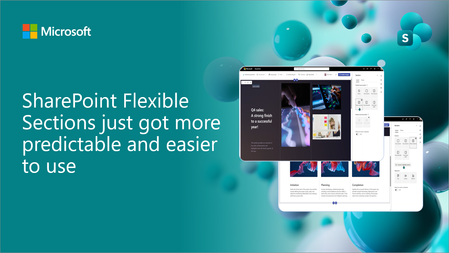
A new set of usability updates makes Flexible Sections more predictable and easier to author: column layout guides for cleaner reflow, a persistent grid toggle for at-a-glance structure, and one-click, non-destructive conversion from standard sections. Watch the demo and share your feedback in the comments; it's what keeps shaping what we build nex1.6KViews4likes3CommentsSharePoint Showcase: 5 Ways Organizations Improve Business Processes with Copilot in SharePoint
AI becomes most impactful when it helps with the work teams already do every day. The challenge is rarely a lack of information. It is turning trusted information into a clear, repeatable process without starting from scratch each time. That is where Copilot in SharePoint can help. It works with the content and structure already in SharePoint, including sites, pages, lists, libraries, and files. Teams can ask questions, compare and summarize content, organize information, create outputs, and turn repeatable multi-step processes into reusable skills. The examples below are based on real customer scenarios from organizations exploring Copilot in SharePoint. To protect customer confidentiality, organization names and identifying details have been generalized. What matters is the pattern: start with trusted SharePoint content, define the work that needs to happen, keep people in control, and make the process easier to repeat.2KViews0likes0Comments