sharepoint online office 365
57 Topics
Access rights to viewing a video in a Sharepoint Site
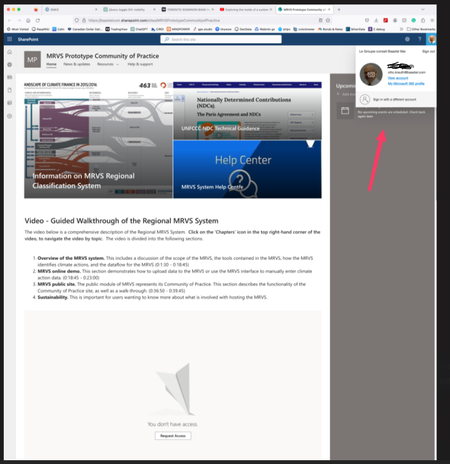
Hello, I created a SharePoint site and invited some of my colleagues (i.e. internal users) to the site. See image below. Even though this person is an internal user, he still has to request access to the video. Can you tell me why? The goal is for all users who have access to the Sharepoint site to not have to request permission to view videos. Thanks.Solved9.5KViews0likes9Comments
Restrict applying retention labels in sharepoint site documents
My organization is looking to use retention labels on documents within sharepoint sites, but wants to only allow sharepoint administrators or site owners to be able to do this. They don't want to allow sharepoint site members from applying a retention label in order to prevent other users from applying retention labels on non-relevant documents. Is this possible?2.1KViews0likes2Commentssearching an External user in People picker and starting an invitation
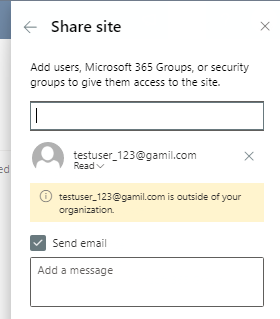
I want to write code to search for non-existing external user email for next step giving me this email as suggestion for sending them an invitation. for example, there is a functionality by Standard SharePoint (the picture below) when you want to share the SharePoint site with some non- existing external user (OOB UI)991Views0likes1CommentTo get values from multiline text to checkbox
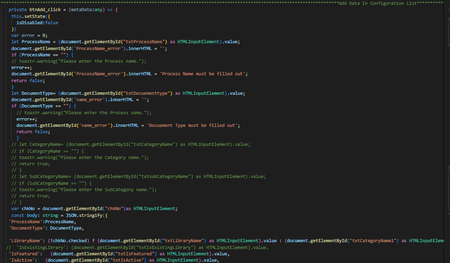
Hello Everyone, I have an Problem to get the Checkbox value in edit mode to reading value to checkbox I will Explain the scenario. i have created the the web part in that web part we get the checkbox value from different list dynamically when i checked the check box value to added in SharePoint list in multi line of text comma separately added successfully. now, I want to added value of multi line of text value came into the check boxes in checked form but issue i s facing in that to get check box value hoe can i get the multi line of text value in checkbox to get the value from SharePoint multi line text value how can i get the value in SharePoint list576Views0likes0CommentsHow to make URLs open in new tab in adaptive cards
We have created one Spfx adaptive card extension to use in Viva dashboard. We need to show some hyperlinks in the card. We have used the markdown language as shown below to show this. But the hyperlinks are opening in the same tab. { "type": "TextBlock", "text": "**[${Title}](${URL})**", "wrap": true } Also we tried using Action.OpenUrl as shown below. With this also the links are opening in the same tab. "actions": [ { "type": "Action.OpenUrl", "title": "View More", "url": "${URL}" } ] Is there way we can force the links in adaptive cards to open in new tab. Thanks.5.7KViews0likes2Comments
Dynamic Membership Added Users Receive "Access Denied" accessing SharePoint Site
Greetings everyone. Before I created this post, I did browse the internet and these forums for a possible solution. Of the items I found, they all stated permissions eventually propagated to the affected users. Here's the situation. I created several 365 groups for departments. I used dynamic membership to add users based on their department attribute. This was done back at the end of September. I'm receiving reports of users unable to access their department site. When I check either Azure AD, 365 Admin Center, or the 365 site, members show. Upon checking permissions on their SharePoint site, however; I find all users except Owners can access the site. Everyone else has None for permission level. We have done this setup for other departments, but this is the first one we've ever seen do this. All members exist in the group as I can use it for other permissions elsewhere in our tenancy. Has anyone seen something like this before? I'm wondering if turning the group back to Assigned from Dynamic, waiting an hour for all members to be removed, then setting it back to Dynamic with the rule. It seems strange that the permissions have not propagated after all this time.1.3KViews0likes1CommentPowershell for sharepoint online
Hi, I have a powershell script related to SharePoint 2013 server. Can this be converted to work on online, as the site is community site template which was available in SharePoint 2013 and its also available in SharePoint online. we are having an issue with community SharePoint site online and need to use the same script which fixed the issue on SP 2013 community site. Below is the script $web = Get-SPWeb <Affected web URL here> $categorieslist = $web.Lists["Categories"] $categorieslist.Title = "Categories_old" $categorieslist.RootFolder.MoveTo($web.Url + "/lists/categories_old") $categorieslist.Update() Write-Host "Categories list issue fixed..." Disable-SPFeature -Identity CommunitySite -Url $web.Url Enable-SPFeature -Identity CommunitySite -Url $web.Url Write-Host "Community Site Feature reactivated..."Solved4.3KViews0likes3Comments
Site page auto saves and creates multiple duplicates under site page library.
I have many subsite/site, issue is with one particular. When I try to choose a saved template to create a new page, page auto saves which creates multiple duplicates in site page library. When i click on save as draft It throws error box: Changes not saved We're sorry, we encountered an unexpected error. Please refresh the page and try again. This is happening when i choose saved templates only and under one specific subsite/site. Working by choosing blank template does not give any error. If i try to save as template from the blank page/template save as template option gives me same error as mentioned above. versioning is enabled under library setting server side publishing is also enabled. note: this is happening with specific subsite/site only and not in other subsite/site within.1.7KViews0likes3Comments
JSON View Formatting - Count total number of items in SP list
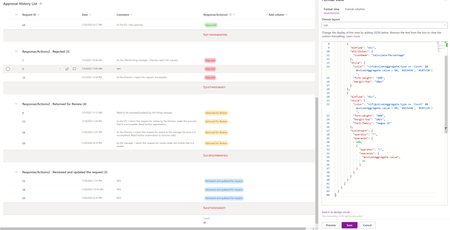
Hi, I want to modify the groups footer of a custom view that is grouped by a metadata column named Response/Actionv2. In the Totals section of the view settings I enabled Count for this column, which now displays the number of items (rows) for each of the groups. However, I would like to use this number in the JSON formatting to calculate and display the proportion (in percentage %) of total number of decisions. As you can see in the code below, I've included the static number 31, but I'd like to be able to dynamically reference the total number of items in the list? Basically, do you have an idea on how to implement this formula: (@columnAggregate.value / TOTAL NUMBER OF ITEMS) * 100 { "$schema": "https://developer.microsoft.com/json-schemas/sp/v2/row-formatting.schema.json", "groupProps": { "hideFooter": false, "footerFormatter": { "elmType": "div", "children": [ { "elmType": "div", "attributes": { "iconName": "CalculatorPercentage" }, "style": { "color": "=if(@columnAggregate.type == 'Count' && @columnAggregate.value < 50, '#d13438', '#107c10')", "font-weight": "600", "margin-top": "10px" } }, { "elmType": "div", "style": { "color": "=if(@columnAggregate.type == 'Count' && @columnAggregate.value < 50, '#d13438', '#107c10')", "font-weight": "600", "margin-top": "10px", "font-family": "Segoe UI" }, "txtContent": { "operator": "*", "operands": [ 100, { "operator": "/", "operands": [ "@columnAggregate.value", 31 ] } ] } } ] } } }7.9KViews0likes1CommentPowerShell to find all suspended workflow for classic SharePoint online sites
I have a powershell script to find the list for all suspended workflows in classic SP online site but i am getting error "Add-PsSnapin : No snap-ins have been registered for Windows PowerShell version 5". On some research i found that this sript is for SP server Can you please advise, how to modify it to use it with SP online. Thanks if ( (Get-PSSnapin -Name "Microsoft.SharePoint.Powershell" -ErrorAction SilentlyContinue) -eq $null ) { Add-PsSnapin Microsoft.SharePoint.Powershell } $siteURL = "<Site URL>"; $libName = "<LibraryName>"; $spWeb = Get-SPWeb $siteURL; $spList = $spWeb.Lists[$libName]; $spListItems = $spList.Items; #Get the Workflow Manager object and then the instance of the Manager $wfMgr = New-object Microsoft.SharePoint.WorkflowServices.WorkflowServicesManager($spWeb); $wfInstanceSvc = $wfMgr.GetWorkflowInstanceService(); foreach($spListItem in $spListItems) { #Get a list of workflow instances running for the item in the library $wfInstances = $wfInstanceSvc.EnumerateInstancesForListItem($spList.ID, $spListItem.ID); foreach($wfInstance in $wfInstances) { #Check to see if the instance is suspended. If so, write it. if($wfInstance.Status -eq "Suspended") { write-host("Instances for library item: {0}" -f $spListItem.ID); } } }1.5KViews0likes2Comments