sensitivity labels
41 Topics
Encrypting a SharePoint List
Hi We are developing a solution that will save sensitive info on a SharePoint List. Thinking to use Sensitivity labels to encrypt the info. It is possible to: Encrypt certain columns? if not Certain List Certain site... Where can I find some instructions on how to achieve this? I assume a form in MS forms is not encrypted? ThanksSolved8.2KViews0likes3Comments
Sensitivity labels
Hi all, I have a question(s) related to sensitivity label(s) limitations: 1.) are there limitations on how many sensitivity labels can I create for 1 organization? If yes, what are they? 2.) "auto-labelling policies" - are there any limitations on that? If yes, what are they? KR DTLDSolved6.1KViews0likes2CommentsMultilingual sensitivity labels in SharePoint Sites, Office Web and MS Team groups
I configured multilingual sensitivity labels (the new unified labels). In the Office Client Apps the language detection is fine, the labels are displayed in German. But in SharePoint Sites, Office Web and MS Team groups the sensitivity labels are still in the default language. The preferredlanguage attribute of the user account is fine (de-de). The language change is more than 36 hours ago. Someone an idea how or when the label languages will be changed in other M365 services? Thanks for some hints. Tobias5KViews1like5Comments
Identifying Sensitivity labels using Purview APIs
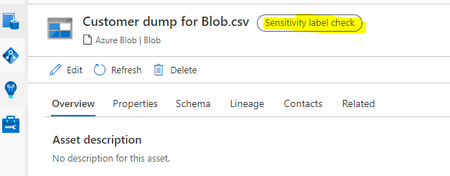
Appreciate any inputs on the below: 1. I created a sensitivity label in the MS Compliance center following steps in https://docs.microsoft.com/en-us/azure/purview/how-to-automatically-label-your-content#create-or-extend-existing-sensitivity-labels-to-azure-purview 2. Now when I scan a file in Purview, it does apply the label for one of the files satisfying the criteria (has SSN data) 3. Now when I use the GET Entity by guid REST API, I get the below classification section indicating the label details This has no reference to the sensitivity label name nor indicates that is a sensitivity label. Given that this is in the 'classification' section, how do we differentiate this from other classifications. How do we match it with the name?Solved3.4KViews0likes1CommentCan you prevent the downgrade of a sensitivity label?
I know you can require a justification to downgrade a label to a less restrictive label, but can you prevent it? It seems a logical extension of this capability but I cannot find any articles to suggest this is possible. The only thing I can think of is to encrypt the label, and don't allow the "Edit rights". I am going to be testing this, but I was wondering if there is another (better) way.3.4KViews0likes2Comments
Default Sensitivity (Information Protection) Labels in a SharePoint Online Document Library
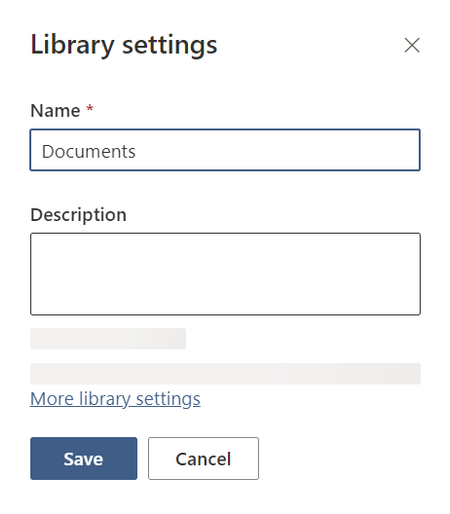
I am currently in the process of implementing information protection in a new SharePoint Online architecture that I am building to replace our one classic site (to rule them all), but I am experiencing an issue when trying to assign a default sensitivity label to an existing or new document library. When accessing the basic library settings for any existing document library, I get two grey boxes that look like they are loading in, but never load where the default sensitivity label settings should be. When creating a new document library, I can see the default sensitivity label setting, but there are no labels available. For some context, I have created four sensitivity labels so far, and have created a test label policy that has assigned all four labels to my own account for testing. For licensing, I have the following: Office 365 E3 Enterprise Mobility + Security E5 Microsoft Defender for Office 365 (Plan 2) Microsoft 365 E5 Compliance This Licensing structure came out cheaper than M365 E5 and I was under the assumption that it had all of the functionality that my organisation requires at this point in time. I have raised this issue with Microsoft support on the April 25th and still have not yet had a proper consultation let alone a resolution, so I am hoping the community here would be a bit more responsive. Let me know if there is any more information that might be of help.2.8KViews0likes6CommentsSharing: PDF readers that support Purview labels
As I was researching on Adobe Acrobat reader and Sensitivity labels, I decided to check if the common alternative PDF readers out there are able to support Purview MIP Sensitivity labels. There is already a published documentation on this for SharePoint-Compatible PDF readers that supports Microsoft IRM: https://learn.microsoft.com/en-us/purview/sp-compatible-pdf-readers-for-irm (last updated Nov-2023) but I wanted to see if these same PDF readers supports the ability for end-users to use/ select labels similar to that of Adobe Acrobat As of 11-June-2025; atleast one of them clearly do: Nitro PDF: Yes. Documentation shows that users can see and use the sensitivity labels. PDF -X.change Editor: Yes. Documentation show that users can see and use the sensitivity labels. (check the official website, I can't hyperlink it because the site is blocked. FOX PDF editor: No. Documentation only states RMS and not clear if it show Purview labels. This is for F.O.X.I.T editor (spelled without the ".") but for some reason there is a community ban on that word and it won't allow me to post the full name PDFescape: No. Sumatra PDF: No Okular: No If there are other PDF readers that I've missed, I encourage you list it down in the comment below. Would love to grow this list.2KViews5likes4CommentsMicrosoft Purview Best Practices
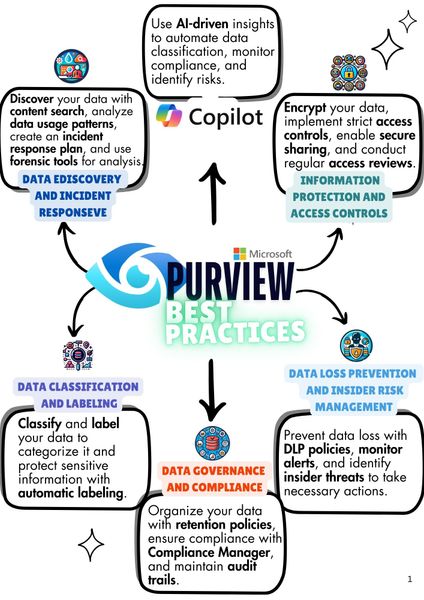
Microsoft Purview is a solution that helps organizations manage data and compliance. It also uses AI to classify data, monitor compliance, and identify risks. Key features include data discovery, classification, governence, retention, compliance management, encryption, and access controls. Purview ensures data security, prevents insider threats, and helps implement data loss prevention policies to meet compliance requirements. Hello everyone - This is just a short introduction, I am Dogan Colak. I have been working as an M365 Consultant for about 5 years, holding certifications such as MCT, SC-100, SC-200, SC-300, and MS-102, with a focus on Security & Compliance. This year, I am excited to share what I have learned with the Microsoft Technology Community. In the coming days, I will be publishing videos and articles based on the training agenda I have created. I will also share these articles on LinkedIn, so feel free to follow me there. I am always open to feedback and suggestions. See you soon!1.4KViews2likes1CommentDefault Sensitivity Label to be added to migrated files (from Local Network Server)
Hi Experts, We are migrating our file-sharing services from a local network file server to MS Teams/SPO. The requirement is to enable and give default sensitivity labels from the migrated files. Manually assigning sensitivity labels in over a TB of files is hectic and could be prone to error as well. MS Purview MIP labels and label policies are configured, however, at present, only new documents and/or revised files are only having the sensitivity labels assigned. Any suggestions, guide, and tips will be highly appreciated. Thanks, Rhey1.3KViews1like6Comments