security
178 Topics
Microsoft account hacked
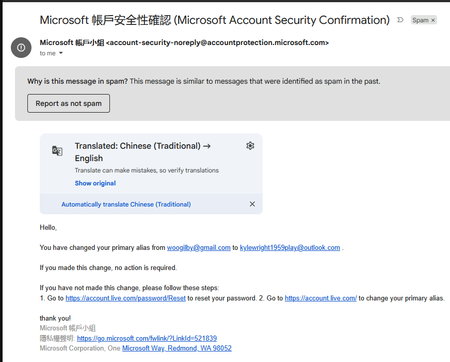
Hello everyone, unfortunately I fell victim to the infamous mrbeast infostealer hack. My original microsoft account (w*******@gmail.com) has its email, recovery email and password changed, so theres absolutely nothing i can do to proof my own identity. I do have access to my gmail (w*******@gmail.com), and i can even see the email notifications, the new email and the new recovery email. Picture 1: change in primary email. Picture 2: removal of my own email. This is very sad because this is already concrete proof, but theres no place to even upload screenshot in the hacked support. It just says insufficient evidence, whereas ea instantly changes back to my original email upon clicking a link, and steam allows locking up the email even though i have no evidence. What can I do? Also, support fails because it asks me to enter the email, but my email's already changed, so i cant receive the verification code. Thank you.110Views0likes2Comments
Hacked Microsoft Account Recovery with Semi Access
I'm at a complete loss and it is infuriatingly ridiculous. I am entirely unable to get a hold of a human being at Microsoft and am being turned down by automated responses nonstop. So here's what's happening: My Microsoft account has been hijacked (obviously not this one) for its valuable Minecraft account and has now been sold. I am logged into my account via my PC, have full access of the main email address, but I have been locked out of my account using the alias email. Whenever I want to log in to my account, it wants to instead send a code to an email address I do not own and can't access. I have tried the Sign-In Helper, the Recovery Form, the hotline, the support email without any result, let alone a non-automated response. I sadly don't have the Recovery Code of my 15 year old-ish account. Since I still have full access of my email address I get updates of security info being changed and what not. Last month a stranger sent me screenshots of someone trying to sell my Minecraft account, for which I myself have received multiple buying offers, and voila yesterday I received notification of my alias mail address changing followed by Minecraft server apps being added to my Microsoft account. While I had already given up retrieving my account, whenever I get notifications my heart sinks a new while some hope sparks up again. Do you people have any idea of what I could do? I don't even rule out legal actions at this point. While I do of course have the email address of the hijacker and the buyer, I fear that contacting them results in me being locked out permanently. I'm just begging to catch the attention of anyone involved with Microsoft. This being walled out with automated responses is killing me.133Views1like1Comment
Minha conta Microsoft foi comprometida e o e-mail original deixou de ser reconhecido
Olá, preciso de ajuda para recuperar minha conta Microsoft. Minha conta originalmente usava o endereço email address removed for privacy reasons. Recentemente perdi o acesso e, quando tento entrar ou usar o formulário de recuperação com esse endereço, aparece a mensagem de que “a conta Microsoft inserida não existe”. Acredito que o endereço de e-mail e as informações de segurança da conta tenham sido alterados sem minha autorização. O endereço email address removed for privacy reasons ainda aparece no meu Microsoft Authenticator. Ainda tenho o Authenticator associado à conta antiga, mas o código de verificação não é aceito. Durante uma tentativa de recuperação apareceu o endereço email address removed for privacy reasons, que não reconheço. A conta também ainda aparece associada ao meu perfil de administrador do Windows e ainda consigo acessar minha conta do Minecraft pelo site. Já tentei o Assistente de Entrada e o formulário de recuperação, mas o endereço original não é mais reconhecido. Gostaria de saber qual é o procedimento correto para recuperar a conta ou entrar em contato com o suporte responsável por contas Microsoft comprometidas. Obrigado pela ajuda!121Views0likes0Comments
Microsoft Account connected apps management
Why is there no visible “Connected apps” management page in Microsoft Account? I noticed that third-party applications connected to a personal Microsoft account can be managed at: https://account.live.com/consent/Manage However, I cannot find any obvious navigation path to this page from the main Microsoft Account portal: https://account.microsoft.com/ The main account portal provides sections such as Security, Privacy, Devices, Subscriptions, and Your info, but there does not appear to be a visible “Connected apps”, “Apps and services”, or “App permissions” entry. I only discovered the consent management page after receiving a Microsoft security notification that a new application had been granted access to my Microsoft account. The “Manage your apps” button in that email links to the older account.live.com consent page. This creates two usability and security concerns: Users may not know where to review or revoke third-party OAuth permissions unless they still have the original security notification email. Microsoft Account management currently uses both microsoft.com and live.com domains, which can be confusing for users trying to verify whether an account-management page is an official Microsoft page. Would it be possible to add a visible “Connected apps”, “Apps and services”, or “App permissions” entry under Security or Privacy in account.microsoft.com? This would not require redesigning the existing consent system. Even a simple link from account.microsoft.com to the existing account.live.com/consent/Manage page would make third-party permission management much easier to discover. Is there currently an official navigation path to this page that I may have missed?416Views0likes2Comments
Microsoft values a hacker's disposable email more than your email linked to Microsoft for 8 years
My Pc was compromised and my session tokens were stolen . I had security info connected with my email and phone number . I also had passkey setup on both my pc (after reset) and my phone . It took one click for the hacker to remove the security features . They setup their own security info and added a disposable email instead of mine . I was somehow able to log in to the account using my pc passkey , as it was already signed in . First I requested to change the hacker's email to my one , which was useless cause the wait time period was 30 days . But in doing so I locked myself out of recovering the account with the mail that notified me that my security info was changed . I went to account recovery which only allowed me to change the password not the email so its still connected to the hacker's email . My frustration is the hacker can 1 click change my forever linked email since accounts creation . But when i try to do so they prevents me to do that stating that "there was recent security information change and the account will not allow for additional change for 30 years" . I opened up "account recovery form" and filled it out , point to be noted there were no fields where I could enter my details of my problem they just ask some basic information . After sometime they send a mail stating provided information is not enough . How am i suppose to provide more information if there are no fields for additional information . I contacted Microsoft agent , they guided me to reply to the account recovery form mail which did not worked as I was not allowed to reply on such email . I contacted Microsoft agent again , this time they told me I will be getting an email with account recovery form and I should mention every details . Well it was the same recovery form I used earlier with limited fields . I still field out the form and after sometime I was mailed by mailto:email address removed for privacy reasons to provide additional details for my identify , I was again requested to submit an account recovery form on https://account.live.com/acsr?cs=1 which was the same link with limited fields to provide information . I proceeded but in the end I was told that I have reached the daily limit for submitting form for this account . Just to be sure I mailed mailto:email address removed for privacy reasons the requested details .152Views0likes0Comments
Authenticator não funciona
Tenho um e-mail corporativo (sou o adm único, nao tem ti) que faço login na conta do powerbi, contudo, meu celular com o authenticator foi perdido e já nao tenho mais acesso, por este motivo, nao consigo mais logar na conta pq ele sempre direciona para o authenticador que nao tenho mais acesso e não abre a possibilidade de receber o codigo por outro meio, (sms ou email). ja tentei vários recursos (chat, telefone do suporte) para recuperar a conta e nao consigo. Todas as opções direcionam para o autenticador. solicito a microsoft que dê uma solução, resetando o autenticador anterior para que eu possa acessar a conta e incluir métodos alternativos de desbloqueio, ou sugira outra solução.276Views0likes1CommentStrange redirect when signing in - phishing?
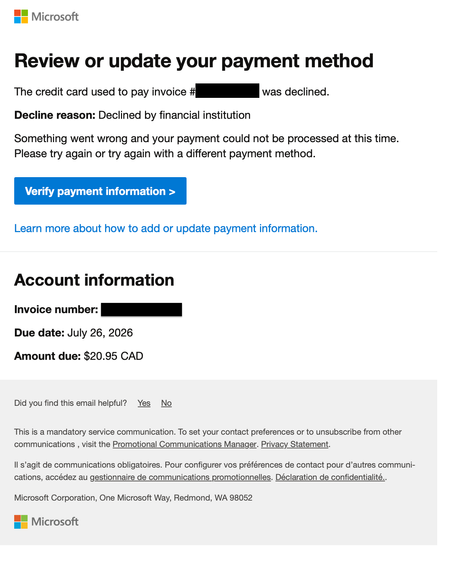
I just restarted my Business Standard 365 license today and this afternoon got an email from email address removed for privacy reasons with the following content: But when I clicked on the 'Verify payment information' button I am redirected to a page with the following URL: https://admin.cloud.microsoft/Error/UnAuth?errorCode=100014 looking like this: This looks highly suspicious (Times New Roman font, URL with no top-level extension such as .com, unusual graphics). Is this legitimate or a phishing attempt? Now, when I try to login to admin.microsoft.com to check my account the same suspicious "Sign out and login with a different account" page pops up repeatedly.755Views0likes6CommentsMicrosoft Authenticator receives repeated unexpected sign-in requests from different countries.
I have received multiple unexpected Microsoft Authenticator number-matching requests over the last few weeks. The requests came from different countries (Mexico, France, and Spain), and I denied all of them. I changed my password after the first incident. My password is unique and stored in Bitwarden. I have Microsoft Authenticator enabled, and I do not use passwordless sign-in. The strange part is that these authentication requests do not appear in my Recent Activity page. Is there anything I can do to stop these requests? I came here because a support representative told me to. I appreciate all your help beforehand.367Views0likes2CommentsDevice Bound Session Credentials Edge
Hi everyone, For a customer i did some research about token protection within M365. I did find a lot information what to configure within M365 to get a multi layer protection (CA, Identity Protection, device compliance, etc). What i didn't found was a solution for token/cookie protection from the browser, until i found this article: https://en.ittrip.xyz/windows/edge/edge-147-device-bound#index_id0 This article states that edge 147 supports Device Bound Session Credentials which makes it much harder to do a off-device replay of a cookie. It also is saying: If you buy rather than build, ask your identity provider or SaaS vendor a direct question: do you have a roadmap for Device Bound Session Credentials or an equivalent browser-session binding model? So my question is: Does M365 (via the browser) supports Device Bound Session Credentials or will it be supported any time soon? Hope you have a nice day! Regards, MJSolved656Views0likes2Comments
I received 2FA request but I can't identify the source
Since a couple of weeks, I've started received unwanted prompt on my phone to "confirm my identity": asking me to approve (second factor). Obviously, this isn't me and I reject those. At first, I was thinking it was just some phishing/stuffing attack, but I tried to find out how I could see those attempts and it is impossible to see "failed attempt" on the Windows Account web page or on the 2FA application. I have no clue how to investigate this, I would like to confirm what is the "source" of these attempts. Is there any way to have more extensive logs?164Views0likes2Comments