security
5820 TopicsThe Start Menu Opens But Refuses to Register Clicks
I am experiencing an issue where the Start Menu opens normally on my Windows system, but it does not respond to any mouse clicks or keyboard inputs. This makes it impossible to select or open any applications, settings, or options from the menu, effectively rendering it unusable.0Views0likes0Comments
Some windows are very small
I use linux MInt now daily and i am very happy with it. Whats a bit strange for me is that some windows are open very small. My screen settings is 150% and i need this for my e-Ink Screen. Eclipse for example looks fine but if a window pops up that asks me to write something in it it is very small. The same thing was now with the wine setup window. I use now the magnus app to read the text... has someone a similair problem and maybe a solution for it?2Views0likes0CommentsKerberos and the End of RC4: Protocol Hardening and Preparing for CVE‑2026‑20833
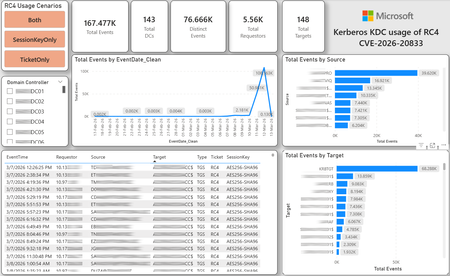
CVE-2026-20833 addresses the continued use of the RC4‑HMAC algorithm within the Kerberos protocol in Active Directory environments. Although RC4 has been retained for many years for compatibility with legacy systems, it is now considered cryptographically weak and unsuitable for modern authentication scenarios. As part of the security evolution of Kerberos, Microsoft has initiated a process of progressive protocol hardening, whose objective is to eliminate RC4 as an implicit fallback, establishing AES128 and AES256 as the default and recommended algorithms. This change should not be treated as optional or merely preventive. It represents a structural change in Kerberos behavior that will be progressively enforced through Windows security updates, culminating in a model where RC4 will no longer be implicitly accepted by the KDC. If Active Directory environments maintain service accounts, applications, or systems dependent on RC4, authentication failures may occur after the application of the updates planned for 2026, especially during the enforcement phases introduced starting in April and finalized in July 2026. For this reason, it is essential that organizations proactively identify and eliminate RC4 dependencies, ensuring that accounts, services, and applications are properly configured to use AES128 or AES256 before the definitive changes to Kerberos protocol behavior take effect. Official Microsoft References CVE-2026-25177 - Security Update Guide - Microsoft - Active Directory Domain Services Elevation of Privilege Vulnerability Microsoft Support – How to manage Kerberos KDC usage of RC4 for service account ticket issuance changes related to CVE-2026-20833 (KB 5073381) Microsoft Learn – Detect and Remediate RC4 Usage in Kerberos AskDS – What is going on with RC4 in Kerberos? Beyond RC4 for Windows authentication | Microsoft Windows Server Blog So, you think you’re ready for enforcing AES for Kerberos? | Microsoft Community Hub Risk Associated with the Vulnerability When RC4 is used in Kerberos tickets, an authenticated attacker can request Service Tickets (TGS) for valid SPNs, capture these tickets, and perform offline brute-force attacks, particularly Kerberoasting scenarios, with the goal of recovering service account passwords. Compared to AES, RC4 allows significantly faster cracking, especially for older accounts or accounts with weak passwords. Technical Overview of the Exploitation In simplified terms, the exploitation flow occurs as follows: The attacker requests a TGS for a valid SPN. The KDC issues the ticket using RC4, when that algorithm is still accepted. The ticket is captured and analyzed offline. The service account password is recovered. The compromised account is used for lateral movement or privilege escalation. Official Timeline Defined by Microsoft Important clarification on enforcement behavior Explicit account encryption type configurations continue to be honored even during enforcement mode. The Kerberos hardening associated with CVE‑2026‑20833 focuses on changing the default behavior of the KDC, enforcing AES-only encryption for TGS ticket issuance when no explicit configuration exists. This approach follows the same enforcement model previously applied to Kerberos session keys in earlier security updates (for example, KB5021131 related to CVE‑2022‑37966), representing another step in the progressive removal of RC4 as an implicit fallback. January 2026 – Audit Phase Starting in January 2026, Microsoft initiated the Audit Phase related to changes in RC4 usage within Kerberos, as described in the official guidance associated with CVE-2026-20833. The primary objective of this phase is to allow organizations to identify existing RC4 dependencies before enforcement changes are applied in later phases. During this phase, no functional breakage is expected, as RC4 is still permitted by the KDC. However, additional auditing mechanisms were introduced, providing greater visibility into how Kerberos tickets are issued in the environment. Analysis is primarily based on the following events recorded in the Security Log of Domain Controllers: Event ID 4768 – Kerberos Authentication Service (AS request / Ticket Granting Ticket) Event ID 4769 – Kerberos Service Ticket Operations (Ticket Granting Service – TGS) Additional events related to the KDCSVC service These events allow identification of: the account that requested authentication the requested service or SPN the source host of the request the encryption algorithm used for the ticket and session key This information is critical for detecting scenarios where RC4 is still being implicitly used, enabling operations teams to plan remediation ahead of the enforcement phase. If these events are not being logged on Domain Controllers, it is necessary to verify whether Kerberos auditing is properly enabled. For Kerberos authentication events to be recorded in the Security Log, the corresponding audit policies must be configured. The minimum recommended configuration is to enable Success auditing for the following subcategories: Kerberos Authentication Service Kerberos Service Ticket Operations Verification can be performed directly on a Domain Controller using the following commands: auditpol /get /subcategory:"Kerberos Service Ticket Operations" auditpol /get /subcategory:"Kerberos Authentication Service" In enterprise environments, the recommended approach is to apply this configuration via Group Policy, ensuring consistency across all Domain Controllers. The corresponding policy can be found at: Computer Configuration - Policies - Windows Settings - Security Settings - Advanced Audit Policy Configuration - Audit Policies - Account Logon Once enabled, these audits record events 4768 and 4769 in the Domain Controllers’ Security Log, allowing analysis tools—such as inventory scripts or SIEM/Log Analytics queries—to accurately identify where RC4 is still present in the Kerberos authentication flow. April 2026 – Enforcement with Manual Rollback With the April 2026 update, the KDC begins operating in AES-only mode (0x18) when the msDS-SupportedEncryptionTypes attribute is not defined. This means RC4 is no longer accepted as an implicit fallback. During this phase, applications, accounts, or computers that still implicitly depend on RC4 may start failing. Manual rollback remains possible via explicit configuration of the attribute in Active Directory. July 2026 – Final Enforcement Starting in July 2026, audit mode and rollback options are removed. RC4 will only function if explicitly configured—a practice that is strongly discouraged. This represents the point of no return in the hardening process. Official Monitoring Approach Microsoft provides official scripts in the repository: https://github.com/microsoft/Kerberos-Crypto/tree/main/scripts The two primary scripts used in this analysis are: Get-KerbEncryptionUsage.ps1 The Get-KerbEncryptionUsage.ps1 script, provided by Microsoft in the Kerberos‑Crypto repository, is designed to identify how Kerberos tickets are issued in the environment by analyzing authentication events recorded on Domain Controllers. Data collection is primarily based on: Event ID 4768 – Kerberos Authentication Service (AS‑REQ / TGT issuance) Event ID 4769 – Kerberos Service Ticket Operations (TGS issuance) From these events, the script extracts and consolidates several relevant fields for authentication flow analysis: Time – when the authentication occurred Requestor – IP address or host that initiated the request Source – account that requested the ticket Target – requested service or SPN Type – operation type (AS or TGS) Ticket – algorithm used to encrypt the ticket SessionKey – algorithm used to protect the session key Based on these fields, it becomes possible to objectively identify which algorithms are being used in the environment, both for ticket issuance and session establishment. This visibility is essential for detecting RC4 dependencies in the Kerberos authentication flow, enabling precise identification of which clients, services, or accounts still rely on this legacy algorithm. Example usage: .\Get-KerbEncryptionUsage.ps1 -Encryption RC4 -Searchscope AllKdcs | Export-Csv -Path .\KerbUsage_RC4_All_ThisDC.csv -NoTypeInformation -Encoding UTF8 Data Consolidation and Analysis In enterprise environments, where event volumes may be high, it is recommended to consolidate script results into analytical tools such as Power BI to facilitate visualization and investigation. The presented image illustrates an example dashboard built from collected results, enabling visibility into: Total events analyzed Number of Domain Controllers involved Number of requesting clients (Requestors) Most frequently involved services or SPNs (Targets) Temporal distribution of events RC4 usage scenarios (Ticket, SessionKey, or both) This type of visualization enables rapid identification of RC4 usage patterns, remediation prioritization, and progress tracking as dependencies are eliminated. Additionally, dashboards help answer key operational questions, such as: Which services still depend on RC4 Which clients are negotiating RC4 for sessions Which Domain Controllers are issuing these tickets Whether RC4 usage is decreasing over time This combined automated collection + analytical visualization approach is the recommended strategy to prepare environments for the Microsoft changes related to CVE‑2026‑20833 and the progressive removal of RC4 in Kerberos. Visualizing Results with Power BI To facilitate analysis and monitoring of RC4 usage in Kerberos, it is recommended to consolidate script results into a Power BI analytical dashboard. 1. Install Power BI Desktop Download and install Power BI Desktop from the official Microsoft website 2. Execute data collection After running the Get-KerbEncryptionUsage.ps1 script, save the generated CSV file to the following directory: C:\Temp\Kerberos_KDC_usage_of_RC4_Logs\KerbEncryptionUsage_RC4.csv 3. Open the dashboard in Power BI Open the file RC4-KerbEncryptionUsage-Dashboards.pbix using Power BI Desktop. If you are interested, please leave a comment on this post with your email address, and I will be happy to share with you. 4. Update the data source If the CSV file is located in a different directory, it will be necessary to adjust the data source path in Power BI. As illustrated, the dashboard uses a parameter named CsvFilePath, which defines the path to the collected CSV file. To adjust it: Open Transform Data in Power BI. Locate the CsvFilePath parameter in the list of Queries. Update the value to the directory where the CSV file was saved. Click Refresh Preview or Refresh to update the data. Click Home → Close & Apply. This approach allows rapid identification of RC4 dependencies, prioritization of remediation actions, and tracking of progress throughout the elimination process. List-AccountKeys.ps1 This script is used to identify which long-term keys are present on user, computer, and service accounts, enabling verification of whether RC4 is still required or whether AES128/AES256 keys are already available. Interpreting Observed Scenarios Microsoft recommends analyzing RC4 usage by jointly considering two key fields present in Kerberos events: Ticket Encryption Type Session Encryption Type Each combination represents a distinct Kerberos behavior, indicating the source of the issue, risk level, and remediation point in the environment. In addition to events 4768 and 4769, updates released starting January 13, 2026, introduce new Kdcsvc events in the System Event Log that assist in identifying RC4 dependencies ahead of enforcement. These events include: Event ID 201 – RC4 usage detected because the client advertises only RC4 and the service does not have msDS-SupportedEncryptionTypes defined. Event ID 202 – RC4 usage detected because the service account does not have AES keys and the msDS-SupportedEncryptionTypes attribute is not defined. Event ID 203 – RC4 usage blocked (enforcement phase) because the client advertises only RC4 and the service does not have msDS-SupportedEncryptionTypes defined. Event ID 204 – RC4 usage blocked (enforcement phase) because the service account does not have AES keys and msDS-SupportedEncryptionTypes is not defined. Event ID 205 – Detection of explicit enablement of insecure algorithms (such as RC4) in the domain policy DefaultDomainSupportedEncTypes. Event ID 206 – RC4 usage detected because the service accepts only AES, but the client does not advertise AES support. Event ID 207 – RC4 usage detected because the service is configured for AES, but the service account does not have AES keys. Event ID 208 – RC4 usage blocked (enforcement phase) because the service accepts only AES and the client does not advertise AES support. Event ID 209 – RC4 usage blocked (enforcement phase) because the service accepts only AES, but the service account does not have AES keys. https://support.microsoft.com/en-gb/topic/how-to-manage-kerberos-kdc-usage-of-rc4-for-service-account-ticket-issuance-changes-related-to-cve-2026-20833-1ebcda33-720a-4da8-93c1-b0496e1910dc They indicate situations where RC4 usage will be blocked in future phases, allowing early detection of configuration issues in clients, services, or accounts. These events are logged under: Log: System Source: Kdcsvc Below are the primary scenarios observed during the analysis of Kerberos authentication behavior, highlighting how RC4 usage manifests across different ticket and session encryption combinations. Each scenario represents a distinct risk profile and indicates specific remediation actions required to ensure compliance with the upcoming enforcement phases. Scenario A – RC4 / RC4 In this scenario, both the Kerberos ticket and the session key are issued using RC4. This is the worst possible scenario from a security and compatibility perspective, as it indicates full and explicit dependence on RC4 in the authentication flow. This condition significantly increases exposure to Kerberoasting attacks, since RC4‑encrypted tickets can be subjected to offline brute-force attacks to recover service account passwords. In addition, environments remaining in this state have a high probability of authentication failure after the April 2026 updates, when RC4 will no longer be accepted as an implicit fallback by the KDC. Events Associated with This Scenario During the Audit Phase, this scenario is typically associated with: Event ID 201 – Kdcsvc Indicates that: the client advertises only RC4 the service does not have msDS-SupportedEncryptionTypes defined the Domain Controller does not have DefaultDomainSupportedEncTypes defined This means RC4 is being used implicitly. This event indicates that the authentication will fail during the enforcement phase. Event ID 202 – Kdcsvc Indicates that: the service account does not have AES keys the service does not have msDS-SupportedEncryptionTypes defined This typically occurs when: legacy accounts have never had their passwords reset only RC4 keys exist in Active Directory Possible Causes Common causes include: the originating client (Requestor) advertises only RC4 the target service (Target) is not explicitly configured to support AES the account has only legacy RC4 keys the msDS-SupportedEncryptionTypes attribute is not defined Recommended Actions To remediate this scenario: Correctly identify the object involved in the authentication flow, typically: a service account (SPN) a computer account or a Domain Controller computer object Verify whether the object has AES keys available using analysis tools or scripts such as List-AccountKeys.ps1. If AES keys are not present, reset the account password, forcing generation of modern cryptographic keys (AES128 and AES256). Explicitly define the msDS-SupportedEncryptionTypes attribute to enable AES support. Recommended value for modern environments: 0x18 (AES128 + AES256) = 24 As illustrated below, this configuration can be applied directly to the msDS-SupportedEncryptionTypes attribute in Active Directory. AES can also be enabled via Active Directory Users and Computers by explicitly selecting: This account supports Kerberos AES 128 bit encryption This account supports Kerberos AES 256 bit encryption These options ensure that new Kerberos tickets are issued using AES algorithms instead of RC4. Temporary RC4 Usage (Controlled Rollback) In transitional scenarios—during migration or troubleshooting—it may be acceptable to temporarily use: 0x1C (RC4 + AES) = 28 This configuration allows the object to accept both RC4 and AES simultaneously, functioning as a controlled rollback while legacy dependencies are identified and corrected. However, the final objective must be to fully eliminate RC4 before the final enforcement phase in July 2026, ensuring the environment operates exclusively with AES128 and AES256. Scenario B – AES / RC4 In this case, the ticket is protected with AES, but the session is still negotiated using RC4. This typically indicates a client limitation, legacy configuration, or restricted advertisement of supported algorithms. Events Associated with This Scenario During the Audit Phase, this scenario may generate: Event ID 206 Indicates that: the service accepts only AES the client does not advertise AES in the Advertised Etypes In this case, the client is the issue. Recommended Action Investigate the Requestor Validate operating system, client type, and advertised algorithms Review legacy GPOs, hardening configurations, or settings that still force RC4 For Linux clients or third‑party applications, review krb5.conf, keytabs, and Kerberos libraries Scenario C – RC4 / AES Here, the session already uses AES, but the ticket is still issued using RC4. This indicates an implicit RC4 dependency on the Target or KDC side, and the environment may fail once enforcement begins. Events Associated with This Scenario This scenario may generate: Event ID 205 Indicates that the domain has explicit insecure algorithm configuration in: DefaultDomainSupportedEncTypes This means RC4 is explicitly allowed at the domain level. Recommended Action Correct the Target object Explicitly define msDS-SupportedEncryptionTypes with 0x18 = 24 Revalidate new ticket issuance to confirm full migration to AES / AES Conclusion CVE‑2026‑20833 represents a structural change in Kerberos behavior within Active Directory environments. Proper monitoring is essential before April 2026, and the msDS-SupportedEncryptionTypes attribute becomes the primary control point for service accounts, computer accounts, and Domain Controllers. July 2026 represents the final enforcement point, after which there will be no implicit rollback to RC4.22KViews4likes13CommentsHow to Configure macOS Privacy Preferences Policy Control (PPPC) Using the Intune Settings Catalog
By: Chris Kunze - Principal Product Manager | Microsoft Intune Privacy Preferences Policy Control (PPPC) settings on macOS are used to pre-approve privacy permissions for apps so users aren't repeatedly prompted by macOS for access requests. Common examples include Full Disk Access, Screen Recording, Camera, Microphone, Accessibility, Files and Folders, and Apple Events permissions. Organizations commonly deploy PPPC profiles to improve the user experience, reduce support calls, and ensure management and security tools have the permissions they require to function correctly. This is especially important for tools such as Microsoft Defender, remote support applications, compliance agents, and inventory tools. PPPC profiles also help standardize privacy settings across managed Macs and support zero-touch onboarding scenarios where users can begin working without manually approving a series of permission prompts. Intune’s settings catalog provides a straightforward way to deploy PPPC settings, but because macOS uses strict matching criteria, a few configuration details are important to get right. If these settings aren’t configured correctly, apps can either break - or worse, fail quietly. This article walks through the key configuration details that help ensure those settings are applied correctly. How macOS evaluates PPPC entries macOS evaluates PPPC entries using a combination of: App identifier (Bundle ID or Path) Code requirement (from the app’s signature) The specific permission being granted or denied. Apple requires each PPPC payload to use either Authorization or Allowed, but not both. If any of these values don’t align correctly, the policy won’t apply. Configure PPPC in Intune settings catalog Create a settings catalog profile. In the Intune admin center, create a macOS configuration profile using Settings Catalog. Search for: Privacy Preferences Policy Control. This is where you'll configure the PPPC permissions required by your application. Use the Authorization field When configuring, select the Authorization setting instead of the legacy Allowed setting whenever supported, but never both. Get the correct code requirement On a Mac where the application is installed, open Terminal and run: codesign -dr - /Applications/YourApp.app Replace /Applications/YourApp.app with the path to the application you're configuring. The output will contain a string similar to: designated => identifier "com.example.app" and ... Copy everything that appears after “designated =>” exactly as displayed. You'll use this value when configuring the PPPC entry in Intune. Note: Some applications return a multi-line code requirement. If that happens, paste the value into Intune as a single continuous string without line breaks. The content for the Identifier field can also be extracted from this command. Configure the PPPC entry After gathering the required information, configure the application entry. Field Value Identifier type Bundle ID or Path Identifier Application Bundle ID Code requirement Full output from the codesign command in Step 3. Authorization Allow Tip: Use Bundle ID for apps whenever possible. Bundle IDs are more reliable than file paths because they typically remain consistent when an app is updated or moved. Why PPPC settings may not apply If these settings fail, they fail silently. Intune may report the policy as successfully applied, but macOS evaluates PPPC entries when the app requests access to the protected resource. Upon app launch, macOS skips any entry where the code requirement doesn’t match the app’s current binary signature without any indication that the setting is skipped. The three most common causes are: Incorrect code requirement The code requirement must match the application's current signing information exactly. Even a small mismatch can prevent the PPPC setting from being applied. Mixing Authorization and Allowed Apple’s documentation states PPPC entries should use either Authorization or Allowed, not both. Wrong identifier type If the PPPC entry is configured with the wrong identifier type, macOS won't match the application correctly. Try it in your environment If you’ve been avoiding the settings catalog for PPPC, try this approach. Pull the identifier and code requirement directly from the app using codesign, use Authorization when available, and validate the configuration with a pilot group before broader deployment. Most PPPC issues come down to matching. Once you understand how macOS evaluates these settings it becomes much more predictable. If you have any questions, leave a comment below or reach out to us on X @IntuneSuppTeam. Join our community! Discuss real-world scenarios, get expert guidance, connect with peers, and influence the future of Microsoft Security products. Learn more at aka.ms/JoinIntuneCommunity.650Views0likes2CommentsAdvancing Windows driver security: Removing trust for the cross-signed driver program
Microsoft announces the removal of trust for all kernel drivers signed by the deprecated cross-signed root program, enhancing Windows security by enforcing that only drivers signed through the Windows Hardware Compatibility Program (WHCP) are trusted by default. This change will take effect with the April 2026 Windows update for Windows 11 versions 24H2, 25H2, 26H1, and Windows Server 2025, aiming to reduce attack surfaces while maintaining compatibility for essential cross-signed drivers through an allow list.37KViews5likes22Comments
I received 2FA request but I can't identify the source
Since a couple of weeks, I've started received unwanted prompt on my phone to "confirm my identity": asking me to approve (second factor). Obviously, this isn't me and I reject those. At first, I was thinking it was just some phishing/stuffing attack, but I tried to find out how I could see those attempts and it is impossible to see "failed attempt" on the Windows Account web page or on the 2FA application. I have no clue how to investigate this, I would like to confirm what is the "source" of these attempts. Is there any way to have more extensive logs?19Views0likes1CommentBLOG: Windows Insiders - State of vbscript deprecation June 2026
While I greatly appreciate the decision of vbscript / cscript / wscript removal, with security and hardening in mind – I would also appreciate if Microsoft could be actively using the vNext release channel, preparing for feature removal. With this blogpost, I am sharing my point of view on the state of dependencies I am seeing in this regard, focusing on a way forward towards the full removal of vbscript. My findings show, that there is a quite some action required, and this stands a bit contrary to the announcement, Microsoft intends removing the optional feature of vbscript by default with the upcoming release - anticipated by fall 2027. Given my lessons learned from Secure Boot CA2023 exchange initiative, Microsoft guidance, foremost PowerShell based scripts, tooling and dashboards have been released quite late, looking at the timeline, considering the impact and scale customers had to deal with, and consequences for their security posture if they are not ready and done, with first certificates to expire soon. Taking this learning into account and and projecting it to vbscript deprecration I come to the following conclusion: SMB customers, enterprises, Microsoft Products, see below, are required to be updated or replaced, in order of adopting this change. I believe there is quite some communication and learning curve required for users, admins, enterprises and OEMs in adopting the implicated change and including changed workflows and automation processes. Looking forward to the next Windows Insider and esp. Windows Server Insider vNext builds! Both Windows Insiders and Windows Server Insiders, also including ISV and OEMs may assist in reviewing and validating the new workflows required - assuming vbscript deprecation is in effect, as planned. Without further ado, I am sharing my observations in regard to VBScript deprecation. I will try to keep this blogpost updated as soon I am aware about public facing changes. Third-Party AMD Chipset drivers so far is one of the major non MSFT related blockers. Suggestions: Microsoft should initiate talks with AMD and other ISV and OEMs fixing their dependencies, also offering other solutions, see below. Currently AMD Chipset drivers silently using vbscript calls checking for OS and HW platform compatibility. The installer fails when vbscript optional feature is removed. OEM, ISV and Enterprise Potentially affected: expected dependencies for imaging, deployment and management workflows. Related or unrelated to Microsoft products. LOB apps custom Office Integration logon and logoff scripts setup and installers Recommendation: Please observe vbscript related events in Windows Event Viewer at scale using PowerShell, Remoting or Windows Event Subscriptions: VBScriptDeprecationAlert Event ID 4096 VBScript is scheduled for deprecation. Our telemetry indicates that your system is currently utilizing VBScript. We strongly recommend identifying and migrating away from any VBScript dependencies at the earliest. The following process has been detected as using VBScript. The associated process tree and call stack are provided below to assist in identifying the scenario in which VBScript was invoked. Microsoft Windows Server and Client OS affected: slmgr.vbs / printer management vbscripts / product activation logic and UX, setup.exe, slui.exe Office 2024 LTSC affected: slmgr.vbs / ospp.vbs / Office deployment toolkit / product activation logic Microsoft has placed a new PowerShell based script into the respective OSPP folder. This script however is rather offering on checking licensing and cannot activate the Office product at this time. Microsoft 365 Business, Enterprise, Home, Family Affected: ospp.vbs despite being subscription based will also trouble with activation once vbscript is removed Sconfig Related to product activation. no changes so far, relies on external changes. The script itself is safe to comply with the change, now it has been reworked and updated using PowerShell , starting Windows Server 2022. WinRM Affected: the whole WinRM configuration command, e.g. winrm qc Windows Server Roles and Features: KMS / ADBA Potentially affected as they rely on slmgr for adding and removing CSVLK keys. Windows Server Roles and Features: IIS legacy IIS extension management. Windows Server Roles and Features: WSUS related deployment and configuration scripts. System Center Products incl. ConfigMgr there might be depencendies for OS deployments in regard to OS imaging. ADK, esp. Windows Imaging Tools and VAMT 3 potentially affected. Need to adopt changes in regard to activation and other operations. Suggestions: Recommending all these scripts being converted using Claude or Copilot from vbscript to PowerShell. Providing a serviceable PS modules, especially for printer management, product activation, which enables enterprises to automate their activations and printers, even though Microsoft is going to remove vbscript. The modules should be improved for existing day two adminstration tasks and workflows. slmgr, in particular, had some nuances that were tedious such as identifying and removing (stale) activation keys. Existing tools like slmgr and other will not work well in remoting. They do something but their interactive parts and outputs are reserved for interactive user sessions. Example: you can use slmgr in a remote PowerShell session for installing and activating a key but therer is no result return to the shell. Combining slui.exe and slmgr.vbs into aforementioned improvements in functionality and syntax. Consider support for PowerShell 7 in WinRE and Offline Setup phase. Many thanks for your consideration! Directory: C:\Windows\System32\Printing_Admin_Scripts\en-US Mode LastWriteTime Length Name ---- ------------- ------ ---- -a--- 4/16/2026 10:43 AM 98756 prncnfg.vbs -a--- 4/16/2026 10:43 AM 66172 prndrvr.vbs -a--- 4/16/2026 10:43 AM 62698 prnjobs.vbs -a--- 4/16/2026 10:43 AM 95908 prnmngr.vbs -a--- 4/16/2026 10:43 AM 71616 prnport.vbs -a--- 4/16/2026 10:43 AM 44278 prnqctl.vbs -a--- 4/16/2026 10:43 AM 22612 pubprn.vbs Directory: C:\Windows\System32 Mode LastWriteTime Length Name ---- ------------- ------ ---- -a--- 4/16/2026 9:14 AM 4119 CallUxxProvider.vbs -a--- 4/16/2026 9:14 AM 145712 slmgr.vbs -a--- 4/16/2026 9:14 AM 1720 SyncAppvPublishingServer.vbs -a--- 4/16/2026 9:14 AM 204072 winrm.vbs Directory: C:\Windows\SysWOW64\Printing_Admin_Scripts\en-US Mode LastWriteTime Length Name ---- ------------- ------ ---- -a--- 4/16/2026 10:43 AM 98756 prncnfg.vbs -a--- 4/16/2026 10:43 AM 66172 prndrvr.vbs -a--- 4/16/2026 10:43 AM 62698 prnjobs.vbs -a--- 4/16/2026 10:43 AM 95908 prnmngr.vbs -a--- 4/16/2026 10:43 AM 71616 prnport.vbs -a--- 4/16/2026 10:43 AM 44278 prnqctl.vbs -a--- 4/16/2026 10:43 AM 22612 pubprn.vbs Directory: C:\Windows\SysWOW64 Mode LastWriteTime Length Name ---- ------------- ------ ---- -a--- 4/16/2026 9:14 AM 145712 slmgr.vbs -a--- 4/16/2026 9:14 AM 204072 winrm.vbs Directory: C:\Windows\WinSxS\amd64_microsoft-windows-a..nagement-appvclient_31bf3856ad364e35_10.0.29574.1000_none_0895f7c27f109b8a Mode LastWriteTime Length Name ---- ------------- ------ ---- -a--- 4/16/2026 9:14 AM 1720 SyncAppvPublishingServer.vbs Directory: C:\Windows\WinSxS\amd64_microsoft-windows-iis-legacyscripts_31bf3856ad364e35_10.0.29574.1000_none_ba69ed912e209e30 Mode LastWriteTime Length Name ---- ------------- ------ ---- -a--- 4/16/2026 9:14 AM 98133 adsutil.vbs -a--- 4/16/2026 9:14 AM 41401 IIsExt.vbs Directory: C:\Windows\WinSxS\amd64_microsoft-windows-p..inscripts.resources_31bf3856ad364e35_10.0.29574.1000_en-us_ 4ad0e09e0339f1ef Mode LastWriteTime Length Name ---- ------------- ------ ---- -a--- 4/16/2026 10:43 AM 98756 prncnfg.vbs -a--- 4/16/2026 10:43 AM 66172 prndrvr.vbs -a--- 4/16/2026 10:43 AM 62698 prnjobs.vbs -a--- 4/16/2026 10:43 AM 95908 prnmngr.vbs -a--- 4/16/2026 10:43 AM 71616 prnport.vbs -a--- 4/16/2026 10:43 AM 44278 prnqctl.vbs -a--- 4/16/2026 10:43 AM 22612 pubprn.vbs Directory: C:\Windows\WinSxS\amd64_microsoft-windows-s..r-core-mgmtprovider_31bf3856ad364e35_10.0.29574.1000_none_62cec50667f8da2a Mode LastWriteTime Length Name ---- ------------- ------ ---- -a--- 4/16/2026 9:14 AM 4119 CallUxxProvider.vbs Directory: C:\Windows\WinSxS\amd64_microsoft-windows-security-spp-tools_31bf3856ad364e35_10.0.29574.1000_none_81bcc6c67609fdb9 Mode LastWriteTime Length Name ---- ------------- ------ ---- -a--- 4/16/2026 9:14 AM 145712 slmgr.vbs Directory: C:\Windows\WinSxS\amd64_microsoft-windows-w..for-management-core_31bf3856ad364e35_10.0.29574.1000_none_0688f60763f16bc8 Mode LastWriteTime Length Name ---- ------------- ------ ---- -a--- 4/16/2026 9:14 AM 204072 winrm.vbs Directory: C:\Windows\WinSxS\amd64_updateservices-services_31bf3856ad364e35_10.0.29574.1000_none_bae89f3176313538 Mode LastWriteTime Length Name ---- ------------- ------ ---- -a--- 4/16/2026 9:14 AM 8332 DynamicCompression.vbs -a--- 4/16/2026 9:14 AM 4289 SetAppPool.vbs -a--- 4/16/2026 9:14 AM 5813 SetMimeMap.vbs Directory: C:\Windows\WinSxS\wow64_microsoft-windows-iis-legacyscripts_31bf3856ad364e35_10.0.29574.1000_none_c4be97e36281602b Mode LastWriteTime Length Name ---- ------------- ------ ---- -a--- 4/16/2026 9:14 AM 41401 IIsExt.vbs Directory: C:\Windows\WinSxS\wow64_microsoft-windows-p..inscripts.resources_31bf3856ad364e35_10.0.29574.1000_en-us_ 55258af0379ab3ea Mode LastWriteTime Length Name ---- ------------- ------ ---- -a--- 4/16/2026 10:43 AM 98756 prncnfg.vbs -a--- 4/16/2026 10:43 AM 66172 prndrvr.vbs -a--- 4/16/2026 10:43 AM 62698 prnjobs.vbs -a--- 4/16/2026 10:43 AM 95908 prnmngr.vbs -a--- 4/16/2026 10:43 AM 71616 prnport.vbs -a--- 4/16/2026 10:43 AM 44278 prnqctl.vbs -a--- 4/16/2026 10:43 AM 22612 pubprn.vbs Directory: C:\Windows\WinSxS\wow64_microsoft-windows-security-spp-tools_31bf3856ad364e35_10.0.29574.1000_none_8c117118aa6abfb4 Mode LastWriteTime Length Name ---- ------------- ------ ---- -a--- 4/16/2026 9:14 AM 145712 slmgr.vbs Directory: C:\Windows\WinSxS\wow64_microsoft-windows-w..for-management-core_31bf3856ad364e35_10.0.29574.1000_none_10dda05998522dc3 Mode LastWriteTime Length Name ---- ------------- ------ ---- -a--- 4/16/2026 9:14 AM 204072 winrm.vbs related announcements: https://techcommunity.microsoft.com/blog/Windows-ITPro-blog/vbscript-deprecation-timelines-and-next-steps/4148301595Views3likes5Comments