security and compliance
53 Topics
Microsoft Copilot 365 Personal Premium limits
In my Copilot Notebook, I deliberately loaded 20 PDF files in order to test Copilot’s grounding behavior across the full set of available references. At the time this testing setup was created, 20 references represented the effective grounding limit described for Copilot Notebooks, meaning that these references were expected to form the source base used by Copilot when generating grounded responses. The references consisted of fully functional, original academic textbooks containing relevant and up-to-date scientific information, mostly published within the last ten years. Importantly, the sources do not differ from one another in terms of accessibility, file type, availability, or how they were added to the notebook. They are all PDF files, they are all available in the same environment, and there is no obvious difference in access conditions that would explain why some are consistently used while others are repeatedly treated as inaccessible, unavailable, summarized, or skipped. The purpose of the test was therefore not simply to see whether Copilot could access 20 files, but whether it could actually ground its answers in the complete reference set when explicitly instructed to analyze all available sources. Despite this, in approximately 99.9% of my tests, Copilot appears to ground its responses in only 3 to 5 of the 20 available references, often repeatedly using the same documents. When I ask what happened to the remaining sources, Copilot gives different explanations. Sometimes it says that it does not have access to certain files. Sometimes it says that it only received a summary of the file. Sometimes it says that a step involved in retrieving or processing the information failed. The way Copilot explains this often makes it sound as if access to the uploaded files depends on some external or intermediate system, rather than being something Copilot itself can directly control. This is difficult to understand from a user perspective because the files are already uploaded into the Copilot environment and were specifically provided as source material for analysis. The practical result is that a task explicitly requesting analysis of 20 sources often produces an answer based on only 3 to 5 of them. For academic or research use, this is a serious limitation. If 15 to 17 out of 20 carefully selected sources are not actually examined, then the final synthesis cannot realistically represent the full source base. This also creates uncertainty about what Copilot means when it claims to have used the provided materials. My question to Microsoft is: Is there a technical limit on how much information Copilot can actually retrieve, open, and analyze from uploaded files during a single task or session? If such a limit exists, what is that limit? And why, when 20 valid PDF sources are uploaded and Copilot is explicitly instructed to analyze all of them, does it so often appear to open only 3 to 5 files, while describing the others as inaccessible, summarized, or unavailable because some retrieval step failed?52Views0likes0CommentsMicrosoft Copilot 365
To Microsoft: Serious Concerns Regarding the Actual Capabilities of Microsoft Copilot Microsoft, After 12 consecutive days of intensive testing of Microsoft Copilot, for approximately eight hours per day — around 96 hours of practical use in total — I have serious concerns about the accuracy of the way Copilot's functions and capabilities are described and presented by Microsoft. What I have observed in actual use is repeatedly and substantially different from what the product is presented as being capable of doing. This conclusion is not based on a single unsuccessful prompt, an isolated error, or a short test. It is based on repeated testing over many days, involving continuous academic, analytical, document-based, and multi-step tasks. One of the most serious problems is Copilot's inability to reliably maintain and use conversational context even within the same active session. For example, Copilot can generate a substantial piece of text and, in the immediately following interaction, claim that it cannot see or access that same text. It may ask the user to provide again information or content that Copilot itself generated only one response earlier. This makes it impossible to rely on the system for genuine sequential work. During testing, the same general problem has appeared in different forms: Copilot fails to return reliably to earlier tasks, loses access to information already established within the conversation, fails to connect consecutive instructions, and sometimes behaves as though previous parts of the same active session do not exist. This is particularly serious when Copilot is used for academic or research work. A workflow may require the system first to generate or analyse material, then classify it, compare it with another part of the work, identify its sources, reorganise it, and finally continue developing it. If Copilot cannot reliably access the result of the immediately preceding step, such a workflow becomes fundamentally unreliable. After approximately 96 hours of direct testing, it is increasingly difficult to regard these problems simply as occasional technical limitations. The discrepancy between Microsoft's descriptions of Copilot and the behaviour actually observed during sustained use is substantial enough to raise a much more serious question: whether the functions and capabilities attributed to Copilot in Microsoft's product descriptions accurately represent what the system can actually and reliably do in normal use. From the user's perspective, the current experience creates the impression that Microsoft's claims about Copilot's capabilities are misleading. A capability should not be considered a genuine product capability merely because the system can occasionally perform it under favourable conditions. If a feature is presented to users as part of the product's functionality, users should reasonably be able to expect that functionality to operate consistently enough to be relied upon. After 12 days of testing, that has not been my experience. The difference between the advertised or described capabilities and the actual behaviour of Copilot is not minor. In several fundamental areas — particularly conversational continuity, access to previous work within the same session, multi-step task execution, and reliable reuse of previously generated content — the practical experience does not correspond to the expectations created by Microsoft's descriptions of the product. After nearly 100 hours of testing, I am therefore questioning not simply the quality of Copilot, but the accuracy and transparency of Microsoft's representation of what Copilot is actually capable of doing. If Microsoft describes Copilot as possessing capabilities that repeatedly cannot be reproduced in sustained real-world use, then the issue is no longer merely whether Copilot occasionally makes mistakes. The issue is whether users are being given an accurate representation of the product they are being asked to use and pay for.62Views0likes0Comments
Bitlocker key requested on the boot, but I don’t have any key
My laptop (Windows 10, version 22H2, build 19045), that I have been using more than 6 years already, suddenly started asking for the BitLocker recovery key at startup, which is blocking access to the system entirely. What I've already checked/tried: - Checked account.microsoft.com/devices/recoverykey while signed in with my Microsoft account, no key appears for this device. - Contacted Microsoft Support directly, they said they can no longer assist with Windows 10 issues and suggested posting here instead. Is there any way to recover access to this drive?419Views0likes3CommentsWhat it looks like: Trusted, compliant AI systems at scale
As AI systems move into production, the risk landscape expands beyond traditional app security. Examine emerging threats like prompt injection, data leakage, and autonomous tool misuse—and hear ways to mitigate threats using a defense-in-depth strategy. Find out how to apply layered controls across identity, data protection, orchestration, and runtime environments to keep AI systems secure and controllable. AI security and observability are essential for building trusted, compliant AI systems at scale. That's why we'll also cover how traceability, safety monitoring, and auditability help you maintain trust, prove compliance, and operate with confidence in real-world conditions. How do I participate? Select Add to Calendar to save the date, then click the Attend button to save your spot, receive event reminders, and participate in the Q&A. Not able to attend live? This session will be recorded and available on demand shortly after airing. Just announced! Live Q&A will also be available July 29 from 9:00-10:00 AM SGT (UTC+8) to support attendees in Asia and western Australia. Don't see Attend or Add to Calendar? Sign in to the Tech Community to join the conversation. Organizational policies preventing you from signing in to the Tech Community? Use a personal account or tune in on LinkedIn. This session is part of Path to production for agents: a Microsoft Azure AI Tech Accelerator. View the full agenda for more actionable strategies to help you deliver secure, compliant, and high-performing AI solutions across your organization.789Views0likes4CommentsSCCM PXE Boot Deep Dive – Backend Flow & DP Migration
SCCM PXE Boot Deep Dive – Backend Flow & DP Migration I recently worked on a Distribution Point migration and noticed PXE requests were still routing to the old DP due to DHCP/IP helper configuration. I put together a deep dive explaining: PXE flow (DHCP and TFTP sequence) Role of Distribution Points What changes during DP migration Common failure points One key takeaway: PXE issues are almost always network and routing related, not SCCM itself. Curious how others are handling PXE in large environments. Are you standardizing on IP helpers or still using DHCP options? Full article: http://SCCM%20PXE%20Boot%20Deep%20Dive%20–%20Backend%20Flow%20&%20DP%20Migration268Views0likes1CommentIn Case You Missed It: Frontier Transformation and Wave 3 of Microsoft 365 Copilot Announcements
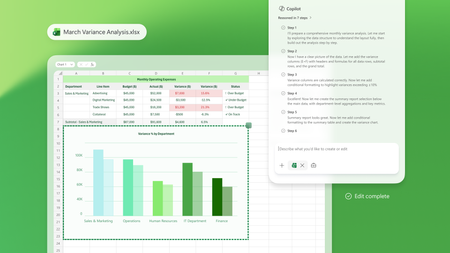
March brought a major set of Frontier Transformation and wave 3 of Microsoft 365 Copilot announcements across Microsoft 365 Copilot, Copilot Chat, and agents—all focused on helping people move faster from intent to action and helping organizations scale AI responsibly. If you missed any of the updates, here’s a quick recap of what’s new and why it matters. Copilot Transforms Knowledge Work These updates deepen how Copilot shows up inside the flow of work—grounded in your content, context, and tools. Word, Excel, and PowerPoint Agents From Copilot Chat, users can ask Word, Excel, or PowerPoint agents to create content, take next steps, or execute tasks, helping them move from intent to action without copying and pasting or switching contexts. 👉 Learn more Edit with Copilot in Word, Excel, and PowerPoint Copilot now creates, edits, and refines content directly inside Word, Excel, and PowerPoint, grounded in the context of a user’s work through Work IQ, so people can iterate and improve content without leaving the app they’re working in. 👉 Learn more Sequences shortened for demonstration purposes. Copilot Chat in Outlook Copilot Chat in Outlook enables users to draft and refine emails, manage calendars and RSVPs, and use the Outlook email widget to take action directly from chat, streamlining everyday communication and scheduling tasks. 👉 Learn more Outlook customer calendar instructions & proactive RSVPs Copilot finds available meeting times, sends invites, and keeps calendars up to date based on custom instructions, notifying users of changes directly in chat to reduce manual coordination. 👉 Learn more Copilot Cowork Built with Anthropic, Copilot Cowork brings a multimodel approach to Microsoft 365 Copilot—so your work isn’t tied to a single model. Cowork moves Copilot beyond prompts into long‑running, multi‑step work. With full awareness of your work context through Work IQ, it lets you delegate meaningful work and stay informed as it progresses. 👉 Learn more Claude Sonnet available in Copilot Chat Users can select Claude models directly in Copilot Chat, alongside next‑generation OpenAI models, bringing leading models from multiple providers into a single Copilot experience. 👉 Learn more Dataverse in Work IQ Work IQ connects signals from Microsoft 365—including documents, meetings, email, and chat—and will soon access operational data in Dataverse through Copilot in Dynamics 365 and Power Apps, bringing work context and business data closer together. 👉 Learn more Work IQ Memory (Chat History) Work IQ Memory enables more relevant, personalized Copilot responses shaped by a user’s work and Copilot chat history over time. 👉 Learn more Extensibility: Work IQ API / MCP Work IQ APIs provide access to production‑ready AI capabilities that work directly with enterprise work context, enabling extensibility through APIs and MCP. 👉 Learn more Launch Demo Copilot in Dynamics 365 & Power Apps Microsoft 365 Copilot is accessible directly within Dynamics 365 Sales, Customer Service, and Power Apps, extending Copilot experiences into business applications where operational work happens. 👉 Learn more Agents That Help Run the Business These announcements focus on building, deploying, and scaling agents across the enterprise. Apps SDK The Apps SDK provides tools to build ChatGPT apps based on the MCP Apps standard, with additional ChatGPT functionality to support agent and Copilot experiences. 👉 Learn more Model Context Protocol (MCP) Apps MCP Apps turn Copilot from a text interface into a governed, interactive execution layer by surfacing interactive app experiences directly in Copilot Chat. 👉 Learn more Apps in Agents: Outlook, Dynamics 365, and Power Apps Agents can bring Outlook, Dynamics 365, and Power Apps directly into chat, allowing users to review information and take action without leaving the conversation. 👉 Learn more Agent Recommendations in Microsoft 365 Copilot When users prompt Microsoft 365 Copilot, the system analyzes intent and recommends an installed, IT‑approved agent directly in the flow of work, making agents easier to discover and use at scale. 👉 Learn more Evaluate agents in Copilot Studio Copilot Studio provides structured, repeatable testing to help catch issues early, reduce the risk of bad answers, and maintain agent quality as agents evolve. 👉 Learn more Visibility, Governance, and Control at Scale As agent usage grows, these updates help organizations move from experimentation to enterprise readiness. Agent 365 Agent 365 serves as the control plane for agents, helping organizations move from experimentation to enterprise‑scale operations by enabling them to observe, govern, and secure agents. 👉 Learn more Microsoft 365 E7: The Frontier Suite Microsoft 365 E7 unifies Microsoft 365 E5, Microsoft 365 Copilot and Agent 365 into a single solution powered by Work IQ and integrated with the productivity apps and security stack customers already rely on. It includes Microsoft Entra Suite and advanced Defender, Intune and Purview security capabilities, delivering comprehensive protection across agents and employees. 👉 Learn more To explore what’s available now—and what’s coming next—visit the Microsoft 365 roadmap and related announcement blogs. 👉 Explore the roadmap8.4KViews3likes1CommentSecurity: An essential part of your Azure and AI journey
Robust security is crucial at every stage of your cloud and AI journey. Take a closer look at the importance of embedding security from the initial consideration of Azure to the ongoing management of workloads and AI applications. Join Uli Homann and David Blank-Edelman as they share insights on how to make Zero Trust actionable as you leverage Microsoft’s platform, products and tools to achieve secure and successful Azure and AI adoption. Learn from the leaders about how to build security into your next Azure or AI project. This session is part of the Azure security and AI adoption Tech Accelerator. Increase your skills by checking out more sessions to help you plan, build, manage and optimize your Azure deployments and AI projects with a security-first mindset. Learn more with Microsoft Secure! Find solutions your organization can use to protect your data, defend against cyberthreats, and stay compliant.1.2KViews2likes1CommentBeyond the hype: turning Microsoft 365 Copilot and agents into real business outcomes
Microsoft Ignite 2025 in San Francisco was an electrifying gathering that brought together over 30,000 tech professionals, business leaders, and innovators from around the globe. This year’s event set a bold tone for the future, spotlighting the transformative role of Copilot and agents in modern workplaces and unveiling a wave of advancements across the Microsoft 365 ecosystem. The energy on the ground reflected both the excitement and the urgency of this new era, making it clear: Microsoft 365 Copilot and agents are not just the future—they are redefining the way companies get work done today. As I spoke with partners and customers, I was inspired by how organizations are embracing these tools to unlock new ways of working and developing rich business solutions. I want to take a moment to reflect on some of my highlights from the event. Extend familiar management infrastructure to agents with Microsoft Agent 365 Over the last week, I heard time and time again how business leaders are embracing the Frontier Firm wave, steering their organizations toward partnering people with agents across every workflow. Thousands of agents are already automating business processes, and by 2028 IDC projects there will be 1.3 billion in circulation.* For enterprise customers, this will bring a massive new digital workforce to manage. As agents get added to every workflow and become more capable, some business leaders have expressed concerns about how to accelerate AI innovation securely. Microsoft Agent 365 turns this challenge into an opportunity. Operating as a control plane for AI agents, Agent 365 extends the existing infrastructure used to manage people to also manage agents, equipping them with the same apps, protections, and context. For IT leaders, Agent 365 gives organizations a single platform to deploy, govern, and organize agents, transforming them from isolated actors into an integrated part of business operations. Agent 365 helps protect and manage agents across the organization by unifying Defender, Entra, and Purview, and provides a single view of their entire agent fleet with the Microsoft 365 admin center. To ensure agents have the context they need to provide the most accurate results, Agent 365 connects Microsoft 365 apps and Semantic Index through WorkIQ. For organizations ready to take advantage of this unified foundation, Agent 365 will offer a robust ecosystem. For example, Microsoft agents like the new, fully autonomous Sales Development Agent; partner agents from Adobe, Cognition, Databricks, Genspark, Glean, Kasisto, Manus, NVIDIA, n8n, SAP, ServiceNow, Workday, and more; and open-source agents from Anthropic, Cursor, LangChain, OpenAI, Perplexity, and Vercel. For developers looking to build their own Agent 365-compatible agents, they can start with Copilot Studio or Microsoft Foundry. For deeper integrations, Microsoft Agent Framework or Agent 365 SDK enable unified discovery, governance, and collaboration across Microsoft 365. Simplify HR and IT support with the Employee Self-Service agent Another impactful way businesses are integrating agents into operational workflows is by replacing fragmented employee-support systems for HR or IT tasks. At Ignite, we announced the general availability of the Employee Self Service (ESS) agent, which brings AI-powered service delivery directly into Microsoft 365 Copilot to improve HR and IT employee support scenarios. Within Copilot, employees can ask questions, submit requests, and complete routine tasks in one trusted place without disrupting workflow. Natively built into Copilot Studio, the ESS agent provides a customizable foundation for intelligent employee service. It works with HR and IT systems such as Workday, ServiceNow, and SAP SuccessFactors and can easily be expanded through low-code extensions, connectors, and integrations with enterprise systems. Employees can tailor workflows, embed organizational knowledge, and adapt the experience to match their organization’s systems, resulting in a faster and more connected support experience. Frontier Firms in action: Turning AI innovation into business outcomes On Thursday, I hosted a panel session with leaders from several enterprise customers who are well on the path to becoming Frontier Firms: Sean Alexander, SVP, Connected Ecosystem, Lumen Tim Holt, VP, Health Answers Tech Lead & Architect, Pfizer Mona Riemenschneider, Head of Global Communications, GenAI, BASF John Whittaker, Director, AI Platform & Products, Ernst & Young Two themes emerged from our panel discussion. First, the most successful organizations are moving from experimentation to operationalization, developing agent-specific KPIs, governance structures, and more. These are not science experiments, but production tools already embedded directly into some of the world’s most complex enterprises. For example, Pfizer is leveraging Copilot Studio at scale with over 300 agents deployed across their organization, including a specialized agent that provides continuous manufacturing improvement with prioritized opportunities across the supply chain. Second, leaders on the panel emphasized that the future of work is human-led and agent powered. At Lumen, they’ve developed a declarative agent that synthesizes internal data, external filings, and real-time insights to generate tailored executive briefings, reducing cognitive load and surfacing the context needed to prepare for partner and customer meetings. At BASF Agricultural Solutions, they’re using a Copilot agent to transform global corporate communication efficiency. The Copilot agent streamlines the compilation of internal and external communication messages, efficiently and securely, resulting in significant time savings. "If 2025 was the year of the agent, then 2026 will be the year of the agents," said EY’s John Whittaker. “That’s where I think we’re going to see the consolidation of processes into far faster, more real-time, improved outcomes.” Learn how partners and customers are already unlocking new value with AI agents It’s exciting to see how our rich ecosystem of customers and partners are using Microsoft technology to create their own agents to solve real-world challenges, accelerate transformation, and scale human-agent collaboration. Ignite 2025 featured several Microsoft partners and customers who are building innovative agents, designed to work with Microsoft 365 Copilot to help save time, boost productivity, and accelerate business transformation. ADP - The ADP Assist agent for Microsoft 365 Copilot is purpose-built to support HR and will simplify payroll tasks by bringing key workflows into Copilot Chat and Microsoft Teams. Employees will be able to check time-off balances, review pay statements, and confirm direct deposit settings, all without leaving their flow of work. Blue Yonder - Blue Yonder Inventory Ops for Microsoft 365 Copilot automates demand forecasting using advanced machine learning and generates optimized, constraint-based supply plans covering production, distribution, and procurement to meet business objectives and enhance planner productivity. Freshservice - Freddy AI Agent now integrates seamlessly with Microsoft Copilot, bringing instant IT and support assistance into Word, Outlook, Teams, and more. This deep integration boosts adoption, eliminates context switching, and empowers employees to resolve issues effortlessly inside their everyday Microsoft 365 tools. monday.com - monday.com has integrated its MCP server with Microsoft Copilot both as a ready-to-use agent in the Agent Store and as a "Tool" for users to build custom agents on Copilot Studio. Users can now directly access their monday.com data, surface boards and items, or even update statuses directly within their Teams app or Microsoft 365. Sophos - Sophos Intelix will integrate real-time threat intelligence into Microsoft 365 Copilot, empowering IT teams and business users to check links and files, and make faster, more informed security decisions while democratizing enterprise-grade cybersecurity insights within everyday Microsoft 365 workflows. Wipro – Wipro has implemented Copilot-powered agents across sales, procurement, finance, and talent functions, enhancing knowledge access and decision-making to drive faster, more accurate, and consistent business operations. These aren’t the only incredible agents helping businesses. Thousands more are available in Microsoft Marketplace, where partners like the ones below are already reaching customers at scale. Shape the future of work with AI agents What inspires me most coming out of Ignite 2025 is seeing how customers and partners are already building the foundation of their Frontier Firms—people and agents working together to transform productivity and decision-making. This shift is no longer theoretical, it’s happening now across industries, powered by Copilot. To learn more about agents in Copilot and gain access to Microsoft resources, follow the links below. Check out recorded sessions from Ignite and watch demonstrations of agentic solutions from leading software companies Read about the exciting AI innovations for software developers who are building agents Start building agents with Microsoft Copilot Studio and Microsoft Visual Studio Get resources for building and customizing agents from the Microsoft 365 Dev Center and the AI Agents Hub *IDC Info Snapshot, sponsored by Microsoft, 1.3 Billion AI Agents by 2028, #US53361825 and May 20252.5KViews4likes0CommentsMicrosoft leads the way earning CSA STAR for AI 42001
We are proud to announce a major milestone in responsible AI: recognition as one of the first organizations to achieve CSA STAR for AI Level 2 certification under the Cloud Security Alliance (CSA) new STAR for AI 42001 program.934Views3likes1Comment