sccm
85 Topics
Windows 11 Upgrade via SCCM Windows Store Apps can not upgrade
I upgrade Windows 11 24H2 to 26H1 with SCCM. I created "Operating System Upgrade Package" and upgrade task. Upgrade successfuly completed. But Wşindows store applications can not be upgrade. Like Snipping Tool. Client does not have access windows store.85Views1like1Comment
Upgrade task sequence skipping locations and failing
Upgrade task sequence using Operating System upgrade skipping http(s) paths Hi All SCCM Experts, I have an Upgrade to Windows 11 25H2 Task sequence which was working fine until lately. Now all devices on other networks outside my IT network. When it reaches the upgrade operating system step fails and does not download the content. Everything is fine with iis, and package is distributed successfully. The TS was working fine 3 weeks ago. I had success with a collection of devices. Boundary groups are still the same fine too. CAS log is fine no issues either. There is lots of disk space and the cache max size is good too. 1 primary site server which is the DP. *Has anybody encountered this happening with an in place upgrade ts before? If so what was the fix? It should not be skipping and the content should start to download because it does resolve and see the OS Upgrade Image package. The message in smsts.log is as follows: Package location: \_SMSTSCM100465, ://\*\*\*\*\*\*/sms\_dp\_smspkg$/cm100465,https://\*\*\*\*\*/ccmtokenauth\_sms\_dp\_smspkg$/cm100465 OSDUpgradeWindows 01/10/2026 09:06:18 28116 (0x6DD4) Skipping http(s) path: :/\*\*\*\*\*\*/sms\_dp\_smspkg$/cm100465 OSDUpgradeWindows 01/10/2026 09:06:18 28116 (0x6DD4) Skipping http(s) path: ://\*\*\*\*\*\*\*/ccmtokenauth\_sms\_dp\_smspkg$/cm100465 OSDUpgradeWindows 01/10/2026 09:06:18 28116 (0x6DD4)127Views0likes5Comments
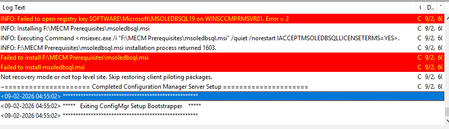
Issues to install MECM 2509 (setup could not install sql rmo, configmgr installation)
Hello Team! During the install process of MECM 2509 in a Windows Server 2019 Datacenter Edition OS, it stops by getting the following error message: When i tried to manually install msoledbsql.msi to validate what the error message is, I get the following error: Also, I've already installed a version greater than the error is stating (14.51). It, in theory should continue allowing the install. My ODBC Driver 18 version installed is: So, just for test, when I do uninstall the ODBC Driver 18 knowing that the msoledbsql.msi file will be executed by the MECM installer—thereby ensuring the installer doesn't halt at that stage but proceeds with the setup—but if an ODBC driver is not already installed on the server, the MECM installation will not start; it indicates that this component must be installed in order to proceed with the MECM setup. I'm stuck, since I've already installed sqlncli.msi, msodbcsql.msi (18.5), VC_redist.x64 (14.51) , vcredist_64.exe, SharedManagementObjects.msi, VDP48.exe but failing when MEMC Install is trying to install from the Prerequisite downloaded MECM folder the msoledbsql.msi (ODBC Driver 18) again. Installer should ignore the execution of this file since I've already installed and continue with the install. I don't know what else to do. I've reviewed other forums to try to find a solution but nothing. Someone has faced with this issue in the past who can help me or anyone has any knowledge to enlighten me? Thanks in advance, guys.295Views0likes2Comments
Delivery Optimization breaking Windows 11 update downloads?
We started seeing Delivery Optimization–related issues with Windows updates after upgrading devices to Windows 11 24H2. In our SCCM environment, Windows updates begin downloading but consistently fail or stall partway through the download. In many cases, the download restarts multiple times and eventually errors out. This behavior is consistent across multiple devices and different boundaries. These same devices were patching normally prior to the 24H2 upgrade. Since moving to 24H2, patching has become unreliable, especially for larger updates. From what we’re seeing, this doesn’t look like a traditional content or boundary issue. It feels like Delivery Optimization is failing mid-transfer or not resuming downloads correctly after the OS upgrade. So far we’ve checked the following: - Boundaries and boundary groups are unchanged - Content is available and distributed correctly on DPs - No recent SCCM site or infrastructure changes - Network connectivity looks normal On the client side, we’ve been reviewing: - DataTransferService.log (downloads start but fail or restart mid-way) - DeliveryOptimization logs (showing repeated retries / stalled transfers) - CAS.log and LocationServices.log (content location looks normal) - WUAHandler.log (update detection looks fine) Overall, detection and policy seem healthy — the issue appears during the actual download phase. Has anyone else seen Delivery Optimization downloads stall or fail during Windows patching after upgrading to Windows 11 24H2? If so, did you find a specific DO setting, policy change, or workaround that stabilized patching?2.2KViews0likes3CommentsDelivery Optimization breaking Windows 11 update downloads?
We started seeing Delivery Optimization–related issues with Windows updates after upgrading devices to Windows 11 24H2. In our SCCM environment, Windows updates begin downloading but consistently fail or stall partway through the download. In many cases, the download restarts multiple times and eventually errors out. This behavior is consistent across multiple devices and different boundaries. These same devices were patching normally prior to the 24H2 upgrade. Since moving to 24H2, patching has become unreliable, especially for larger updates. From what we’re seeing, this doesn’t look like a traditional content or boundary issue. It feels like Delivery Optimization is failing mid-transfer or not resuming downloads correctly after the OS upgrade. So far we’ve checked the following: - Boundaries and boundary groups are unchanged - Content is available and distributed correctly on DPs - No recent SCCM site or infrastructure changes - Network connectivity looks normal On the client side, we’ve been reviewing: - DataTransferService.log (downloads start but fail or restart mid-way) - DeliveryOptimization logs (showing repeated retries / stalled transfers) - CAS.log and LocationServices.log (content location looks normal) - WUAHandler.log (update detection looks fine) Overall, detection and policy seem healthy — the issue appears during the actual download phase. Has anyone else seen Delivery Optimization downloads stall or fail during Windows patching after upgrading to Windows 11 24H2? If so, did you find a specific DO setting, policy change, or workaround that stabilized patching?935Views0likes1Commentdeployment script fails with division through zero when deploying
I created an installation script with this batch line: setup.exe -s -l1031 -f1".\Provi75inst.iss" This is put into a install.bat file that gets deployed with the software package. I tested it with admin-rights and the software installs fine. When I depoloy it through system center and run it in my softwarecenter, I get this error: 0xC0000094 (-1073741676) I researched that it is a "division through zero" error. What the heck. Does anyone know what is going on here? Is there a difference running the installation in SYSTEM context? Due to company restrictions I can't use PSEXEC to verify this. Any idea?255Views0likes0CommentsExisting required application deployments policy is not sent to devices
I have couple hundred applications in SCCM/MCM that are set to required and whenever there is a new device is built, all these required applications automatically get installed. I am on 2503 and 5 days ago i started seeing this issue. But if modify that deployment with current date and time then the application gets deployed right away if i run Application Deployment evaluation cycle. I also tested by deleting the existing deployment and created a new required deployment and run Application Deployment evaluation cycle then the application installs right away. The problem seems like the Primary server is not sending the policy to the client for existing deployments. The application compliance that we see for every deployment under Monitoring for all the devices moved to Error with Success. Not sure why this is happening. All these changes i noticed in the last one week. A week ago all these Already Compliant and Success status device count is under Success tab. Let me know if you have any suggestions.929Views0likes6CommentsApplications deployed on device based collection are missing from devices.
Hey guys, In my SCCM environment we are facing an issue. Its a co-managed environment where apps are deployed via SCCM. All of a sudden the apps deployed on Device based collection are not reaching the end user devices. The policies related to these app are also not reaching the device. The compliance status for these apps also went down even though if it is installed on the device the SCCM reports as Non-Compliant\Error. Has anyone faced this issue or can help me to identify what could be causing the issue.668Views0likes6CommentsQuestion About Moving SCCM Partially Out of Intune
Good afternoon, I've been given an environment that currently has SCCM integrated into InTune. Our department head would like to partially remove our servers from being managed by InTune, but still be managed by SCCM. Is such a thing possible? If so, could you link what documentation is available to lead me into that? I appreciate it!326Views0likes1Comment