rights management
126 Topics
Device Stuck on Restart Screen After Update - Error Code: ATTEMPTED WRITE TO READONLY MEMORY
Hi everyone, I’m experiencing an issue with my Windows device that started after a recent update. For the past three days, my device has been stuck on a restart screen with the following error message: Your device ran into a problem and needs to restart. We'll restart for you. For more information about this issue and possible fixes, visit https://www.windows.com/stopcode If you call a support person, give them this info: Stop Code: ATTEMPTED WRITE TO READONLY MEMORY I’ve tried restarting the device multiple times, but it keeps returning to this screen. I’m unable to access my system or troubleshoot further. Has anyone else encountered this issue after an update? Any suggestions on how to resolve this would be greatly appreciated. Thank you in advance for your help!
ERP decommissioning
Hello, We have the problem of decommissioning unmaintained ERPs from the acquisition. We replaced them with the group's standards. Details : - IFS version 8.0 on WS 2008 - DB Server 2012 on AWS Finance asks us to keep them accessible for the next 10 years on isolated servers. Guaranteeing access for the next 10 years to software that no one in IT knows anymore with older technologies seems impossible to me or at least very difficult. Do you have similar issues and if so how do you respond? Thank you for your return.
What the different values are when I look for label.)Settings or get-Label | fl
I'm doing (or trying to do) a lot of digging into labels. I get a ton of information when I run commands like Get-Label -Identity Labelname | fl. or (Get-Label -Identity LabelName.)settings, but nothing that tells me what that fields represent. Some of it I can make some solid guesses, but is there any reference I can use that actually details what information these commands are providing? Even what I've seen in Git-Hub leaves me guessing. Tia! Jeff
Differentiaing between different tenants Do not forward emails
Is there a way to identify emails which emails were protected using our tenants do not forward permissions versus another tenants do not forward permissions. We need to block our own emails from being sent externally but the not ones that we have received and are replying back too. I tried reviewing the message headers specifically the MSIP labels and do sometimes see a different SiteID compared to ours. But i have seen some emails that we received from an external party that we are replying too which then has our SiteID instead of theirs. thanksHow to Ad Hoc External Share Office 365 Document with unlimited number times of access?
I need help to share a Microsoft Office Document with external users that their access is unlimited within expiry period. Is this possible? Is there a limit on how many times external users can access same document (within expiry period)?Curious about lock symbol
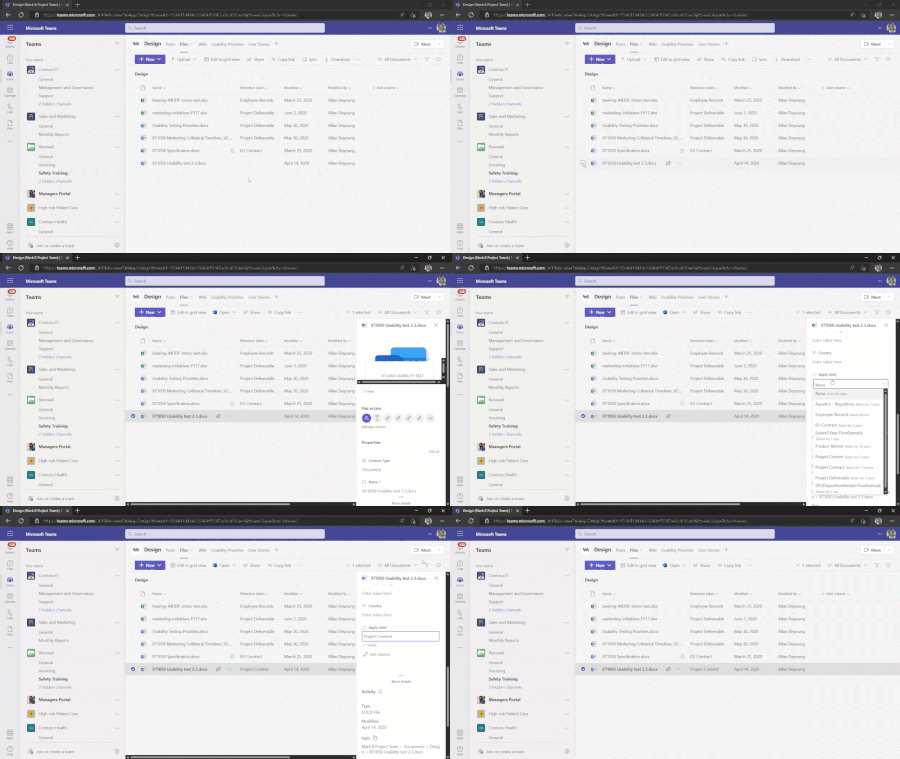
Maybe it's a pointless question, but I've read about applying sensitivity and retention labels today and I stumbled over this GIF here: You can see, on the Document "XT1050 Specification.docx", there is a little lock symbol. I'm asking myself where this is coming from and how I can configure the same. Is it possible that it has smth to do with the records management system? Article where I found this GIF: https://learn.microsoft.com/en-us/microsoft-365/compliance/create-apply-retention-labels?view=o365-worldwide#applying-retention-labels-using-microsoft-365-groups Thanks for your help and additional information.Solved3.2KViews0likes3Comments
Processing Records Management Events using document metadata values
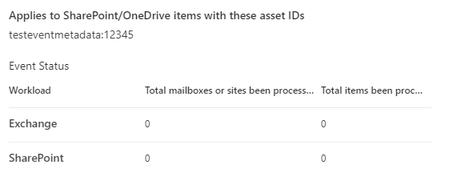
I have been trying, unsuccessfully, to process a document as part of a Purview Records Management Event by referencing a metadata value (as opposed to the Asset ID). Does anyone have experience successfully pulling this off? Here's what I've done: Created a Record Label which is triggered based on an event, and published the label to a site Labeled the document with the label, and populated a Single Line of Text column called testeventmetadata with the value 12345 In SharePoint Admin Search, identified the column as a crawled property (ows_testeventmetadata) and mapped it to a new managed property I created (testeventmetadata). Created a new Event in Purview Records Management referencing the Event Type associated with the label. For "Applies to SharePoint/OneDrive items with these asset IDs", entered testeventmetadata:12345 Over three days later, and the document has not been processed (see image). Appreciate any help in getting this to work. For reference, https://joannecklein.com/2020/01/22/sharepoint-custom-metadata-and-event-based-retention/, but using Power Automate vs the UI.
How to know which Process Is Making SMB Requests On Windows
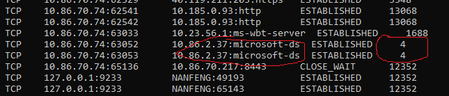
When user access a NAS using Windows Explorer, or use Winword.exe to open a file in NAS, from netstat, it always show the process ID of the connection between Windows and NAS is 4, which is SYSTEM. So is there any API which we can know the original SMB request comes from Explorer or Winword? We want to find out exact caller, and disable if the requestor is from a non-allowed process. Btw, in SMBv1 protocol, there is a Process-Id, which can be used to know original requestor. But after SMBv2, this field is reserved.Information Protection Labels and OneDrive
Howdy! Recently we implemented the security and compliance center protections (AIP/MIP/DLP). One issue we have run into, that is slightly self-inflicted. We had to change two of our labels to remove the encryption option. However I have found out that when you do that, any files that were already labeled using that label, will retaing the RMS protection template and protection. I can remove the protection on-prem, but the big issue is now doing so to any/all files in our users OneDrive locations. OneDrive is used for folder redirection for our end-users documents folders. Is there a way to essentially run Set-AIPFileLabel -Remove Protection on OneDrive files?AIP Custom Permissions Pop-up window issue
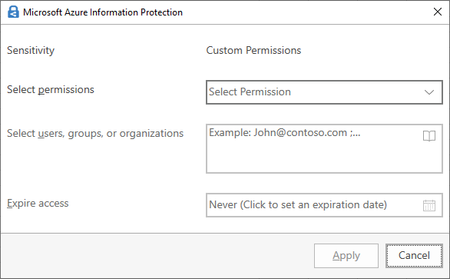
I noticed that custom permission windows changed around 2 weeks ago, to the old RMS window. The weird thing what happening is I can temporarily fix the issue by resetting AIP settings, but after the Office app restart (close-open) I`m getting old, RMS (Screen #2) windows instead of normal (Screen #1) custom permission window. Also, every time I create a new doc (Word, Excel, PowerPoint) it is taking while to retrieve the policy from the server (Screen #3) Screen #1 - Normal Window Screen #2 - RMS Screen #3 - Policy1.6KViews0likes2Comments