retention policy
88 Topics
Objects in a Retention Policy populated by Adaptive Scopes
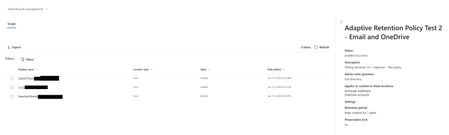
I need a way to get all users in a retention policy that is populated by an adaptive scope. I can get all the members of the scope, and I can show that the policy uses that adaptive scope. But I know my audience. They will want to see that the users are actually in the policy. They will probably even want to see that it matches the users in the adaptive scope. In the GUI, I can click on an adaptive retention policy and click on "policy details". This will show all the users that the policy applies to and the date/time they were added, if they were removed from the policy, etc. And I can even export that. How can I get this same information via PowerShell? It's going to be important because, as you can see, there's a big difference in the date/time added. they were all in the adaptive scope BEFORE this policy was created, but it still took nearly 24 hours for all users to be added. Which is fine, and typical, but if a user gets added to the adaptive scope and does not have the policy applied to them within 24 hours, we need to know this. The goal is as much automation as possible, with checks and balances in place. Checks and balances require gathering information. That's going to require getting this information via PowerShell.530Views0likes7Comments
BC SharePoint External File Storage view threshold exceeded
I recently set up External File Storage in Business Central. The view and folder structure were automatic, and the file links and communication between the two applications seems tenuous. Very quickly I ended up with a view threshold exceeded error in the SharePoint library. I was told that this is a known issue and Microsoft suggested the below mitigations. I plan to do the indexing when I don't have users logged in. I simplified the default view. I can't apply a retention policy in BC because the associated table is not included in the allowed tables. I'll give some thought to the Azure Blob storage option. My question, however, is what do they mean by "Partition attachments across multiple libraries"? This option intrigues me but how do I do that without breaking the file link between BC and SP? TIA. Recommended Mitigations Action Purpose Index key columns on the BC-managed library Enables filtered views past 5,000 Simplify default view (remove sorting/grouping/lookup columns) Avoids unnecessary joins that trigger LVT Partition attachments across multiple libraries (per company/environment/year) Keeps each library under threshold Apply BC attachment retention/archival Controls long-term volume Consider Azure Blob/Files for high-volume scenarios No equivalent list-view constraint226Views0likes1Comment
How much of your Microsoft 365 environment can you actually see at once?
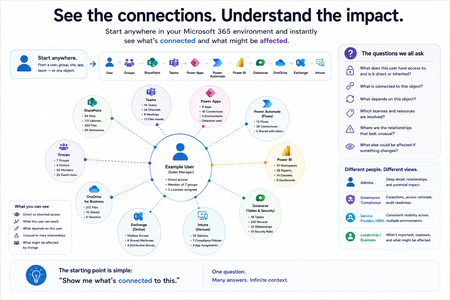
Not how many users you have. Not how many sites, teams, apps or flows you have. How much of it can you actually see connected together? I've been working across Microsoft 365 environments for a while, and I kept running into the same thing. There is no shortage of information. If anything, there is probably too much of it. Users, groups, permissions, SharePoint, Teams, Power Apps, Power Automate, Power BI, Dataverse, OneDrive, Exchange, Intune, licensing, configuration... It's all there. But when you're actually trying to understand how everything fits together, it can be a different story. You open one blade. Find something. Open another. Cross-check it. Go back. Open something else. Before long, you're jumping between different parts of the tenant trying to build the bigger picture in your head. And if you're working with larger environments, that gets difficult pretty quickly. The information isn't necessarily missing. The relationships between the information are what can be difficult to see. That got me thinking about a slightly different question: Instead of "where do I find this information?" "Show me what's connected to this." That's where VisibleState started. Start anywhere. Follow the connections. Imagine starting with a single user. Instead of seeing that user simply as a record with a list of properties, imagine being able to explore the relationships around them: User → Groups → SharePoint → Teams → Power Apps → Power Automate → Power BI → Dataverse → OneDrive → Exchange → Intune Then the questions become different: What does this user have access to? Is that access direct or coming through a group? What resources are connected to them? What depends on something they're associated with? Which licenses are involved? Are there relationships that look unusual? If something changes, what else might be affected? Those questions aren't necessarily about finding another piece of information. They're about putting information that already exists into context. A report can tell you that something exists. A connected view helps you understand what it is connected to. Illustrative example below — not a real customer environment. I'm not suggesting Microsoft 365 doesn't already give us this information Quite the opposite. Microsoft 365 already gives administrators an incredible amount of information and tooling. The thing I've been thinking about is what happens when you want to look across those boundaries. Sometimes I don't want another export. I don't want another list. I don't necessarily want another dashboard. I want to start with something I'm looking at and ask: "What's connected to this?" And then keep following the trail. That's the idea I'm exploring with VisibleState. The interesting part is what happens when you change the viewpoint The same relationships can be useful for completely different reasons. For example: Administrators may want to understand access, permissions and dependencies. Security and governance teams may want to find unusual relationships or exceptions. Compliance teams may need to understand who can access something and why. People managing multiple environments may want a consistent way to understand what's there without rebuilding the picture manually every time. Leadership may not need to see the graph at all. They may simply want to know what's important, what's exposed and what could be affected. It's still the same underlying environment. You're just looking at it from a different angle. And that's where I think things get interesting. Where I'm at with it VisibleState started as something I was building to make my own work easier. I was spending a lot of time investigating environments, tracing access and putting information together for reports. The individual tasks weren't necessarily difficult. It was the jumping between different places and reconstructing the bigger picture that took the time. So I started building something that would let me approach the environment through the relationships instead. It's grown quite a bit from where it started, and I'm continuing to build it. I'm not posting this as a product launch, and I'm not looking for people to sign up. I'm genuinely interested in whether the problem I'm seeing is familiar to other people working with Microsoft 365. So I'm curious... If you could start with any object in your Microsoft 365 environment and immediately see what it's connected to, where would you start? Would it be: Users and access Groups and permissions SharePoint and Teams Power Apps, Power Automate, Power BI and Dataverse Licensing and resources Governance and unusual relationships Something completely different Maybe you've already got a good way of doing this. Maybe you still find yourself jumping between different services and piecing things together manually. Or maybe I'm looking at the problem from the wrong direction. What's the one relationship in your Microsoft 365 environment that you wish you could see instantly?193Views0likes0CommentsData Lifecycle Management Adds Support for Planner Retention Policies
From August 2026, Microsoft 365 tenants can apply retention policies to Planner Tasks. We began our preparation to create a retention policy for Planner tasks by writing some PowerShell to test the likely effect of retention. The code scans Microsoft 365 Groups for groups with plans and checks each plan for tasks that would be removed by a retention policy. It’s amazing what some PowerShell can do… https://office365itpros.com/2026/07/28/planner-tasks-retention/117Views0likes0CommentsMicrosoft Releases Cmdlet to Retrieve Disposition Review Items
The Get-ReviewItems cmdlet (in the Exchange Online management module) is available to export details about disposition review items in either a pending or disposed state. It’s possible that you don’t care very much about records management, retention labels, or disposition processing, but if you do, you’ll be glad that the new cmdlet exists. https://office365itpros.com/2023/04/10/disposition-review-items-export/3.8KViews1like10CommentsGet-AdaptiveScopeMembers doesn't show the SiteURL for OneDrive
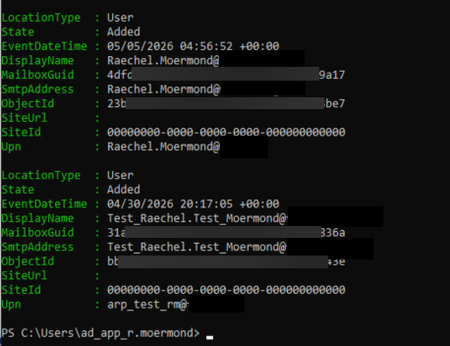
I am working through reporting for Adaptive Scopes and Adaptive Retention policies. I'm so close. But I discovered a problem with my script in that when people return to the company after their account has been deleted, they get a new OneDrive URL. This is expected. While they can have the same email address as an inactive mailbox, they cannot have the same OneDrive URL as an inactive URL. Since we keep all data for a minimum of 7 years, it is possible for a UPN to be the "owner" of 2 or more OneDrive URLs (one active and the others are from previous accounts). I have no easy way of seeing which OneDrive URL is active short of looking for digits at the end of the URL and taking the highest digit. But, what I want to know, is why isn't it here? Why doesn't "Get-AdaptiveScopeMember" return the SiteURL for the user? I thought maybe it was because my test user didn't have a OneDrive site when the account was added to the scope, so I added my actual user account to the scope and it shows the same thing. Is SiteURL only for SharePoint sites and not OneDrive sites? This makes no sense. Does it just take more time to show up? what's the time frame on that?226Views0likes2Comments
Exchange online retention policy
Hello, We are using Microsoft Purview to setup an Exchange retention policy through Data LIfecycle Management. We are wanting to do a gradual rollout, we don't want do apply it to everyone all at once. It looks like in the policy settings you can apply it to individual mailboxes. I'm wondering if we can instead setup a mail-enabled security group and add users to that for the policy to apply to them. Is that possible? Thanks in advance.Solved238Views0likes1Comment
Purview-Retention Policy for Private channels
I have retention policy for Standard & Shared channels together with 2 Years retention period to keep posts for 2 years and remove after that period. Don’t have any policy for Private channels posts/messages, so posts will be available indefinitely . With this https://www.microsoft.com/en-in/microsoft-365/roadmap?id=500380from Microsoft my private channels will also part of the same policy which is applied for standard & Shared channels . in this case how i can retain the posts from private channels indefinitely . Please suggest300Views0likes1CommentCompliance licenses at tenant level
Hi, We are a small organization of about 200 employees, and we have following requirements. DLP policies configuration at Exchange, OneDrive, SharePoint BYOD security Users should not be able to send files outside the org And so on as we evaluate We already have M365 Business Premium. However, after researching we figured out that M365 Business premium will alone not solve our requirements. May be compliance license will. We want to apply security policies at tenant level in our organization but definitely do not want every user to get licenses as this will be expensive for us and there is no requirement at all for our users. The question is, Is there a way to solve the above scenario?760Views1like3Comments