remote desktop services
73 Topics
CfExecute(TRANSFER_PLACEHOLDERS) returns E_INVALIDARG inside an FSLogix profile container
We develop a Cloud Files sync provider. When the sync root lives in a user profile that FSLogix redirects to a per-user VHDX container, some FETCH_PLACEHOLDERS callbacks cannot be answered: every CfExecute(CF_OPERATION_TYPE_TRANSFER_PLACEHOLDERS) for them fails with E_INVALIDARG (0x80070057), including the error completion. The request stays pending until the platform cancels it after about 60 s, and the application that triggered it (File Explorer, Office and Edge background processes, line-of-business apps) hangs for that time. The callback is raised by a name lookup of a non-existent child (`CreateFileW` / `GetFileAttributesExW` on `<dir>\missing.txt`) inside a placeholder directory with on-demand population enabled, and nobody has had that directory open for about one to two minutes. The same callback raised by a directory enumeration is answered fine every time. A lookup on a directory opened a few seconds earlier is fine too. A standalone PowerShell script (own throwaway sync root, no third-party software) reproduces it on a clean Windows Server 2022 (20348.5761, October 2026 CU) with FSLogix 26.08 (3.26.826.17182) for a user with a profile container. The same script on the same server, ten minutes later, as a local user in the "FSLogix Profile Exclude List": all answers accepted. Also reproduced on Windows Server 2022 20348.3328 and 20348.5622 and on Windows Server 2025 26100.1742 with profile containers; not reproducible on the same builds without FSLogix, with a sync root on a plain VHDX volume or a mount point, or on Windows 11. The OS patch level and the FSLogix release did not make a difference in our tests. Waiting, an attributes-only open of the directory, or omitting the correlation vector, request key and sync status from CF_OPERATION_INFO do not help. If the provider opens the directory with FILE_LIST_DIRECTORY (and may close it again) before answering, or after the rejection and then resends the byte-identical answer, CfExecute returns S_OK. CfUpdatePlaceholder(DISABLE_ON_DEMAND_POPULATION) on the directory has the same effect. We ship the directory open as a workaround. Is this a known issue for a Cloud Files sync root inside an FSLogix-redirected profile? Script and both logs (reproduced / not reproduced, same server): https://gist.github.com/pdupont1/85cc0b4a708a784db03087bdcdbe74c8 Full write-up with the environment matrix and all tested variants on https://learn.microsoft.com/en-us/answers/questions/6039901/cfexecute-transfer-placeholders-returns-e-invalida89Views0likes1Comment
Remote desktop services (RDS) Gateway Server
Remote desktop services (RDS) Gateway Server detecting internal users in monitoring tab under gateway manager. Internal Users are getting flagged and connecting through gateway server. All users are connected with vpn from different sites of office.1.3KViews0likes1Comment
TSplus as an alternative to RDS without paying RDS license fees to microsoft
Hello, We are evaluating whether to use TSplus (https://www.terminalserviceplus.eu/) as an alternative to Microsoft RDS/Terminal Server. According to TSplus we can not install or uninstall the RDS role, so we do not use RDS CALs and use TSplus CALs. This way it would not be necessary to pay for Windows Remote Desktop licenses. Is this correct? I can't find any information from Microsoft about it reading documentation. As I see it is correct that using TSPlus without installing Microsoft RDS it would not be necessary to pay Remote Desktop licenses. Could someone confirm me that it is so?28KViews0likes19CommentsIssue with winlogon on Remote Desktop Services:
We are investigating intermittent session establishment failures on Windows Server 2019 servers used as CyberArk PSM / RDS hosts. At unspecified intervals, new privileged sessions fail to establish or are disconnected during the initial session/logon phase. The issue is intermittent and affects new sessions. Existing sessions may continue to work. The strongest and most consistent correlation identified so far is: Microsoft-Windows-TerminalServices-LocalSessionManager/Operational – Event ID 36 Application / Microsoft-Windows-Winlogon – Event ID 4005 We observed that TerminalServices-LocalSessionManager Event ID 36 can occur without a subsequent Winlogon Event ID 4005. However, every observed Winlogon Event ID 4005 is correlated with TerminalServices-LocalSessionManager Event ID 36 in the same incident window. This suggests that Event ID 36 is a consistent precursor or required condition for the Winlogon 4005 cases. Environment Operating system: Windows Server 2019 Role: CyberArk PSM / RDS session host Issue type: intermittent failure during new RDP/PSM session initialization Impact: affected users cannot establish privileged sessions or are disconnected during session startup Similar issue exists on previous windows server 2012 R2 and was fixed : August 16, 2016 – KB3179574 (During virtual channel management, a deadlock condition occurs that prevents the RDS service from accepting new connections.) https://support.microsoft.com/en-us/topic/august-2016-update-rollup-for-windows-8-1-and-windows-server-2012-r2-d472b5d5-4b3a-8e6e-c22a-f62fed604caf I'm looking forward for any ideas how to resolve this issue. Many thanks!!363Views0likes2Comments
Replacing our Server 2016 RDS with Server 2022 RDS
Hi All, I have a Server 2016 terminal server. I set it up a while ago obviously, and I have 10 2016 RDS CALS installed in the RD license manager. We are part of a domain, and I have a group policy assigned to our current RDS server with lots of user options like session limit, printer redirection, max profile size, etc. I created a new Server 2022 VM and installed the RDS role and all it's features. But for some reason, it doesn't appear to be configuring the services. I add the roles via Server Manager once installed, the computer reboots when the server comes back up, Server Manager starts and says the install is complete. But when I go to the Remote Desktop services section in Server Manager, I get this message: "A remote Desktop Service deployment does not exist in the server pool. To create a deployment, run the Add Roles and features wizard and select the Remote Desktop Services installation option." From looking around on the Internet, at step 3. there should be a configuration step where Server Manager starts and configures the RD gateway, license manager, etc. I also found some articles on the Internet about disabling IPv6 or making sure the server is a member of a domain. I've already tried those things and it's still not helping. I also removed all the Roles and readded, but it still behaves the same. The configuration step doesn't start on reboot and no RDS server. I also installed a web certificate and installed it on the server from my CA. Is there a better way to do this? I haven't worked with RDS in a long time. Here's some event viewer messages Event ID 1306 Remote Desktop Connection Broker Client failed to redirect the user domain\administrator. Error: NULL Event 102 The Remote Desktop Gateway service requires a valid Secure Sockets Layer (SSL) certificate to accept connections. Ensure that you have obtained a valid SSL certificate, and then bind (map) the certificate by using RD Gateway Manager. For more information, see "Obtain a certificate for the RD Gateway server" in the RD Gateway Help. The following error occurred: "259" Event ID 2056 The Remote Desktop Connection Broker server could not enumerate the targets for the provider named NULL from the database. Pooled virtual desktop collection name: NULL Error: Logon to the database failed. Event ID 85 The Remote Desktop license server could not be registered as a service connection point in Active Directory Domain Services (AD DS). Ensure that there is network connectivity between the license server and AD DS. To register the license server as a service connection point in AD DS, use Review Configuration in the RD Licensing Manager tool.Solved1.1KViews0likes2CommentsRename .rdp filename before it downloads from RDWeb
When we download published applications and desktops from our remote desktop servers' RDWeb, names are like "cpub-<appli>-<collection>-CmsRdsh.rdp". Is there a way to change this default download name only to "<appli>-<collection>.rdp" (with powershell for exemple) ? Thanks, JoeSolved6.7KViews0likes8Comments
Cameras To Redirect Custom RDP Property Does not Work
In mstsc.exe, under Local Resources > More.. there is an option for Video capture devices. Which lists my webcam and Devices that I plug in later. I have determined that this option the an RDP file is the string camerastoredirect:s:* So what I have done is ran the following command on my Connection Broker so that this line will be added to rdp file generated by the feed. Set-RDSessionCollectionConfiguration -CollectionName $CollectionName -CustomRdpProperty "camerastoredirect:s:*" When I run Get-RDSessionCollectionConfiguration I see the value has been added to CustomRdpProperty along with "use redirection server name:i:1" which seems to be a default on all collections. What I am trying to solve is, why does my custom RDP property not apply to the RDP files that are downloaded.46KViews1like12CommentsConfiguring session timeout for Remote Desktop Services web client (HTML5)
Is anyone aware of a way to customize the session timeout in the remote desktop services web client (HTML5)? An issue our users have been experiencing is if they are in a long running remote desktop session and they experience a disconnect, clicking the "reconnect" button on the pop up they receive doesn't do anything. They also can't navigate back to the main menu to select their session collection to reconnect. The fix is they need to click refresh and log in again, it appears that the cause is that the users' login session to the remote desktop web client has timed out. Ideally, we'd like to customize the session timeout to be a long value so they could get through a whole work shift without their existing authentication session being timed out.95Views0likes0CommentsRemote Desktop Services Deployment fails with exceptions
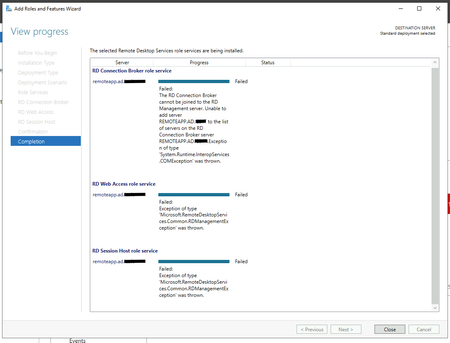
I'm trying to deploy Remote Desktop Services on a single server on Windows Server 2019 Standard. I've tried both Standard Deployment and Quick Start with a Session-based desktop development but I'm getting the following error during the installation: Unable to add server REMOTEAPP.AD.DOMAIN.COM to the list of servers on the RD Connection Broker server REMOTEAPP.AD.DOMAIN.COM..Exception of type 'System.Runtime.InteropServices.COMException' was thrown. I searched for some hint about this problem but I had not find anything useful. I cannot even find any useful log into the events log, and I tried one more time after reinstalling the server from scratch. Could you help me please? Thank you very much!27KViews0likes3CommentsQuser hangs and how to find the citrix load index equivalent
Dear all, at first, I was mostly active in a german forum, but most experts of it don't speak german... so I think in english I get more contact to admins with good knowledge. But could you give me some hints which foum, community here is the most activ one for questions on topics Windows Server, Remote Desktop Services and Active Directory? I found this sites and I am not sure how to select the right one: https://learn.microsoft.com/en-us/answers/tags/301/remote-desktop https://learn.microsoft.com/en-us/answers/tags/220/windows-server https://techcommunity.microsoft.com/t5/windows-server/ct-p/Windows-Server https://techcommunity.microsoft.com/t5/windows-server-for-it-pro/bd-p/WindowsServer Now to my current question on Remote Desktop Services: We have a farm with over 30 rdsh. Since some weeks we have login issues. We encountered, that we also have issues with getting session information with the "quser" command. The prompt hangs and no output is done. We have no idea why this happens. Did anybody seen this before? Second question: Some years ago we had Citrix Terminalservers. There was a thing called load index. The Citrix TS put up their load to the max value of 10000 during a logon process from a user. Afterwards it comes down to a lower value based on some math rules for ressources and so on. I haven't found any command in RDS to get a value alike the load value. Is RDS doing something similar to the load index like Citrix? Where can I get this value? How does a rdsh prevent too many logins at the same time? If we force simultaneously logons the user gets a message with i assume is in english "remote desktop services utilized" (in german Remotedesktopdienste ausgelastet). And also the quser command seems to take a "short break" and the output comes some seconds later. Best regards, Stefan388Views0likes0Comments