remote desktop services
72 Topics
Issue with winlogon on Remote Desktop Services:
We are investigating intermittent session establishment failures on Windows Server 2019 servers used as CyberArk PSM / RDS hosts. At unspecified intervals, new privileged sessions fail to establish or are disconnected during the initial session/logon phase. The issue is intermittent and affects new sessions. Existing sessions may continue to work. The strongest and most consistent correlation identified so far is: Microsoft-Windows-TerminalServices-LocalSessionManager/Operational – Event ID 36 Application / Microsoft-Windows-Winlogon – Event ID 4005 We observed that TerminalServices-LocalSessionManager Event ID 36 can occur without a subsequent Winlogon Event ID 4005. However, every observed Winlogon Event ID 4005 is correlated with TerminalServices-LocalSessionManager Event ID 36 in the same incident window. This suggests that Event ID 36 is a consistent precursor or required condition for the Winlogon 4005 cases. Environment Operating system: Windows Server 2019 Role: CyberArk PSM / RDS session host Issue type: intermittent failure during new RDP/PSM session initialization Impact: affected users cannot establish privileged sessions or are disconnected during session startup Similar issue exists on previous windows server 2012 R2 and was fixed : August 16, 2016 – KB3179574 (During virtual channel management, a deadlock condition occurs that prevents the RDS service from accepting new connections.) https://support.microsoft.com/en-us/topic/august-2016-update-rollup-for-windows-8-1-and-windows-server-2012-r2-d472b5d5-4b3a-8e6e-c22a-f62fed604caf I'm looking forward for any ideas how to resolve this issue. Many thanks!!277Views0likes2Comments
Replacing our Server 2016 RDS with Server 2022 RDS
Hi All, I have a Server 2016 terminal server. I set it up a while ago obviously, and I have 10 2016 RDS CALS installed in the RD license manager. We are part of a domain, and I have a group policy assigned to our current RDS server with lots of user options like session limit, printer redirection, max profile size, etc. I created a new Server 2022 VM and installed the RDS role and all it's features. But for some reason, it doesn't appear to be configuring the services. I add the roles via Server Manager once installed, the computer reboots when the server comes back up, Server Manager starts and says the install is complete. But when I go to the Remote Desktop services section in Server Manager, I get this message: "A remote Desktop Service deployment does not exist in the server pool. To create a deployment, run the Add Roles and features wizard and select the Remote Desktop Services installation option." From looking around on the Internet, at step 3. there should be a configuration step where Server Manager starts and configures the RD gateway, license manager, etc. I also found some articles on the Internet about disabling IPv6 or making sure the server is a member of a domain. I've already tried those things and it's still not helping. I also removed all the Roles and readded, but it still behaves the same. The configuration step doesn't start on reboot and no RDS server. I also installed a web certificate and installed it on the server from my CA. Is there a better way to do this? I haven't worked with RDS in a long time. Here's some event viewer messages Event ID 1306 Remote Desktop Connection Broker Client failed to redirect the user domain\administrator. Error: NULL Event 102 The Remote Desktop Gateway service requires a valid Secure Sockets Layer (SSL) certificate to accept connections. Ensure that you have obtained a valid SSL certificate, and then bind (map) the certificate by using RD Gateway Manager. For more information, see "Obtain a certificate for the RD Gateway server" in the RD Gateway Help. The following error occurred: "259" Event ID 2056 The Remote Desktop Connection Broker server could not enumerate the targets for the provider named NULL from the database. Pooled virtual desktop collection name: NULL Error: Logon to the database failed. Event ID 85 The Remote Desktop license server could not be registered as a service connection point in Active Directory Domain Services (AD DS). Ensure that there is network connectivity between the license server and AD DS. To register the license server as a service connection point in AD DS, use Review Configuration in the RD Licensing Manager tool.Solved1.1KViews0likes2Comments
Configuring session timeout for Remote Desktop Services web client (HTML5)
Is anyone aware of a way to customize the session timeout in the remote desktop services web client (HTML5)? An issue our users have been experiencing is if they are in a long running remote desktop session and they experience a disconnect, clicking the "reconnect" button on the pop up they receive doesn't do anything. They also can't navigate back to the main menu to select their session collection to reconnect. The fix is they need to click refresh and log in again, it appears that the cause is that the users' login session to the remote desktop web client has timed out. Ideally, we'd like to customize the session timeout to be a long value so they could get through a whole work shift without their existing authentication session being timed out.85Views0likes0Comments
Quser hangs and how to find the citrix load index equivalent
Dear all, at first, I was mostly active in a german forum, but most experts of it don't speak german... so I think in english I get more contact to admins with good knowledge. But could you give me some hints which foum, community here is the most activ one for questions on topics Windows Server, Remote Desktop Services and Active Directory? I found this sites and I am not sure how to select the right one: https://learn.microsoft.com/en-us/answers/tags/301/remote-desktop https://learn.microsoft.com/en-us/answers/tags/220/windows-server https://techcommunity.microsoft.com/t5/windows-server/ct-p/Windows-Server https://techcommunity.microsoft.com/t5/windows-server-for-it-pro/bd-p/WindowsServer Now to my current question on Remote Desktop Services: We have a farm with over 30 rdsh. Since some weeks we have login issues. We encountered, that we also have issues with getting session information with the "quser" command. The prompt hangs and no output is done. We have no idea why this happens. Did anybody seen this before? Second question: Some years ago we had Citrix Terminalservers. There was a thing called load index. The Citrix TS put up their load to the max value of 10000 during a logon process from a user. Afterwards it comes down to a lower value based on some math rules for ressources and so on. I haven't found any command in RDS to get a value alike the load value. Is RDS doing something similar to the load index like Citrix? Where can I get this value? How does a rdsh prevent too many logins at the same time? If we force simultaneously logons the user gets a message with i assume is in english "remote desktop services utilized" (in german Remotedesktopdienste ausgelastet). And also the quser command seems to take a "short break" and the output comes some seconds later. Best regards, Stefan374Views0likes0Comments
Unable to install RDS roles on windows server 2019
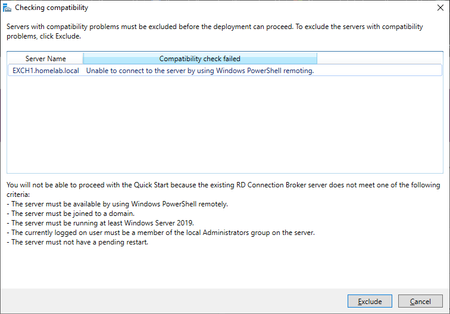
Problem: Per my knowledge all requirements listed above, checks out: Domain Admin is also member of local admin group: a) What is causing this problem? b) How can I fix it? C) This is a fresh install of server 2019 Any help would be appreciated, thanks!659Views0likes0CommentsRemote desktop server licensing - product types do not contain my OS version
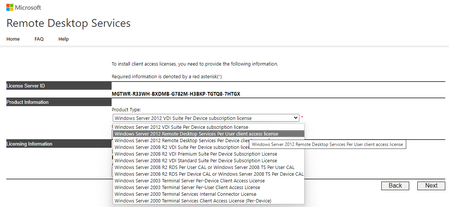
The newest version available is only 2012. And if I select it (2012 per user), the licensing server won't work properly. It says: The Remote Desktop Session Host server is in per-user licensing mode and numbered redirector mode, but the license server does not have any installed licenses with the following attributes: Product version: Windows Server 2022 Authorization mode: Per user I don't know whether it is a bug or I did something wrong?924Views0likes0Comments
Problem with kb KB5018411 on domain controllers
After we install KB5018411 on WS 2016 domain controllers, we cannot authenticade rdp connections using dns name in mstsc against servers and client, in network capture we see Kerberos errors 1039 9.056341 10.4.1.6 10.4.1.72 KRB5 268 KRB Error: KRB5KDC_ERR_PREAUTH_REQUIRED then 1031 9.054642 10.4.1.6 10.4.1.72 KRB5 155 KRB Error: KRB5KDC_ERR_TGT_REVOKED and that is occur everytime we can acces rdp with dns name connection with ip address in mstsc client works edit here is the same problem on reddit https://www.reddit.com/r/sysadmin/comments/y5sbvv/kb5018411_installed_friday_cant_rdp_to_terminal/10KViews0likes3CommentsServer 2019 RD-Connectionbroker Rolle broken after Windows Update
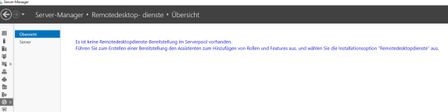
Hi, we have a RD session deployment with 1 Connection Broker/Web Access, 8 Session Hosts for RD and 1 Session Host for Apps and 1 License Server. All Servers are VM´s on VMware running Server 2019 DC running perfect for a year now. Some Weeks ago after an Windows update i noticed that i was no longer able to see and configure the deployment in Server Manager on the Connection Broker (I can see and in parts manage the deployment from other Servers Server Manager) Deployment is still working and users are able to connect, load balancing also works. On The Connection Broker it just says: "Es ist keine Remotedesktopdienste-Bereitstellung im Serverpool vorhanden. Führen Sie zum Erstellen einer Bereitstellung den Assistenten zum Hinzufügen von Rollen und Features aus, und wählen Sie die Installationsoption "Remotedesktopdienste" aus." Powershell get-rdserver output: PS C:\Windows\system32> get-rdserver get-rdserver : Der RD-Verbindungsbrokerserver ist nicht verfügbar. Stellen Sie sicher, dass Sie eine Verbindung mit dem RD-Verbindungsbrokerserver herstellen können. In Zeile:1 Zeichen:1 + get-rdserver + ~~~~~~~~~~~~ + CategoryInfo : NotSpecified: (:) [Write-Error], WriteErrorException + FullyQualifiedErrorId : Microsoft.PowerShell.Commands.WriteErrorException,Get-RDServer Eventlog: ID1280 "Die Remotedesktopdienste konnten keine Verknüpfung mit dem Verbindungsbroker auf dem Server "VSTSBro01.xxx.de" herstellen. Fehler: Die aktuelle asynchrone Nachricht wurde vom asynchronen Verteiler gelöscht, da eine neue Nachricht vorhanden ist, die die aktuelle Nachricht überschreibt." ID2056 "Der Remotedesktop-Verbindungsbrokerserver konnte die Ziele für den Anbieter "NULL" nicht aus der Datenbank auflisten. Name der in einem Pool zusammengefassten virtuellen Desktopsammlung: NULL Fehler: Die Anmeldung bei der Datenbank ist fehlgeschlagen." Things i tried so far: Configuring Connection Broker HA, WID got successfull migrated to dedicated VM with SQL Server But cause the connection Broker is not available i couldnt add a second connection broker. Restoring Connection Broker VM from Backup, after restore i could see and manage the deployment again but had to reboot the VM after Domain Trust reset. Update got installed with that and Problem is the same again. Update that got installed at that time: Edge Stable 103 x64 Build 103.0.1264.49 2022-07 Cumulative Update for Windows Server 2019 for x64 based Systems KB5015811 I guess something broke the connection to the WID and its no longer able to load the information. But why is it able to show the deployment on other servers? First pic Broken CB second pic other Server Any Ideas how to fix that? Thx!11KViews0likes2CommentsOutlook 2021 Phänomen in Verbindung mit Server 2019 und FSLogix
Guten Tag Liebe Community, ich habe hier aktuell einen Fall der mich Haare verlieren lässt. Zur Umgebung: RDS-Umgebung mit FSLogix (Funktioniert an sich Super!) FSLogix: Aktuelle Version (2.9.8171.14983) Windows Server 2019 komplett durchgepatcht (Komplette Umgebung ist WS2019) 3x Terminalserver Office LTSC 2021 aktueller Patch (16.0.14332.20279) 32bit (32bit wird benötigt wegen DATEV) Exchange Online User Arbeiten ausschließlich auf den RDS Hosts -> Client Computer sind Intel NUCs und ThinClients (Alles Win10) Zum Problem: Haben letztens ein Upgrade von Office 2016 auf 2021 bekommen. Ich also: Office 2016 mittels OffScrub Tool deinstalliert und Office 2021 installiert mithilfe des Office Bereitstellungstools. Office funktioniert, nur Outlook nicht zu 100%. Hier haben wir folgendes Problem: Viele User bekommen keine Verbindung zu ihrem Postfach -> Outlook versucht die Moderne Auth. zu öffnen und bekommt das nicht hin, das Fenster schließt sich direkt. Ich habe schon etliches Versucht: EnabelADAL 1/0 WAMOverride... etc., div. Tools seitens MS ausgeführt und und und. Bei der Basis Auth. kommt man sogar in einen Login-Loop. Wenn man ein neues Outlook Profil anlegt, schafft Outlook es nicht mal in die Cloud zu verbinden. "Es konnte keine Sichere Verbindung hergestellt werden" Witzig: wenn man die @x.onmicrosoft.com Adresse nimmt, geht das ganze -> man kann sich da einiges hintricksen -> Ist aber absolut nicht Sinn der Sache und führt letztendlich wieder in die selbe Problematik. Ich habe dann die Userprofile Neuangelegt -> Outlook läuft -> Aber nur auf einem der 3 Terminalservern, auf welchem Outlook aktuell Funktioniert ist reines Glück. Hat hier wer Erfahrung, eventuell sogar das selbe Problem gehabt oder hat mir einen Tipp welche Einstellungen ich noch Prüfen kann? Ich danke Vorab!!! Ich habe hier schon etliche Zeit verbracht und sehe vor lauter Bäumen den Wald nicht mehr.3.4KViews0likes4Comments