purview
25 TopicsClose the gaps: layered data protection with Microsoft Purview across endpoint, browser, and network
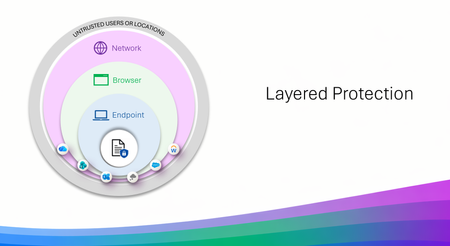
Three layers that work like a good team and slides to show it Data Loss Prevention (DLP) is not new, many use it daily without ever even knowing it, but with AI bringing faster results for productivity so does the risk of data leakage. That is where we take a layered approach, meeting the end user exactly where they are working, on a device, or in a browser, or through that cute cat Office add-in that had to be installed. But don't think of layered protection as three products but more as three specialists who are each excellent at their own job and have the good sense not to try doing everyone else's. Endpoint DLP lives on the device. USB and removable media, clipboard, print, restricted apps. It carries the deepest classification support, EDM, fingerprinting, OCR, and it works offline, which turns out to be more useful than it sounds at 30,000 feet. Browser Data Security lives in the session, inline in Edge for Business, checking content before an upload or a form submission. It is the most precise layer for AI prompts and for activity happening inside a managed web app, where nothing else is standing close enough to help. Network Data Security lives on the wire, via Entra Global Secure Access or a third-party SASE. It handles traffic that never touches a browser at all, desktop apps, Office add-ins quietly phoning a friend, and it is the layer that supports inbound classification of content coming back from cloud and AI apps. Each one has natural technical boundaries, and those are a design decision rather than an oversight. A network proxy is never going to have strong opinions about a USB stick. An endpoint agent is not positioned to unwrap an encrypted API call from a third-party add-in. Ask any one of them to cover all three domains and you would end up with something slower and less capable at each. Deployed together, though, the edges line up rather nicely. That is the entire premise of layered protection, and it is what I built this asset to show. What is actually in the slides A coverage view across all three layers. Common activities — removable media, RDP sessions, add-in API calls, in-session copy and paste, inbound AI content, classification depth, inline prompt inspection — matched to the layer best positioned for each. Six scenario walkthroughs. Realistic situations traced attempt by attempt, including one determined individual who tries three separate routes to get the same file to a consumer AI service. A departing employee and a USB drive. A contractor on a personal laptop. Files headed to personal cloud storage. Each shows which layer engages, and why. Deployment flows you can follow. Prerequisites, permissions, policy names, conditions, actions. Both browser patterns (managed device with unmanaged apps, unmanaged device with managed apps) and both network paths (Entra GSA, and third-party SASE including Netskope and iBoss). Four reference architectures. Traffic flow diagrams for each browser and network model — what gets evaluated, where the Purview verdict comes from, where enforcement lands. Collection policies explained thoroughly. The unsung plumbing underneath all of it. Anatomy, the full flow from event source to Activity Explorer, Insider Risk Management, eDiscovery, and Data Security Posture Management (DSPM), plus the operational details that are much nicer to learn about in a deck than in production. The parts people keep coming back to The coverage view is usually where planning conversations start. It gives everyone a shared picture of what is deployed today and what a sensible next step looks like; adding the browser layer to an existing Endpoint DLP footprint, say, or bringing in the network layer to extend coverage to add-ins and desktop apps. The scenario walkthroughs are where it tends to click for a wider audience. Following one situation through several routes and watching a different layer step in at each turn, does more for the story than any static diagram I have drawn. And the deployment flows are genuinely meant to be executed. Everyone is written to run against a pilot group first, with Conditional Access in report-only mode in production until you have confirmed the behavior. Please do that part. Your future self will appreciate it. Who it is for Architects scoping a deployment. Partners running workshops. Admins with Endpoint DLP already humming along who are working out what comes next. Anyone who would like a single starting point instead of a browser window that has stopped showing page titles. Take whatever is useful. Pull individual slides into your own narrative or run the whole thing end to end it was built to be borrowed. Things to keep in mind Several capabilities in here are in preview or Pay-As-You-Go backed, and network-layer coverage depends on supported SASE/SSE integrations and how traffic is routed. The deck flags this as it goes. Check current availability on Microsoft Learn, and with your SASE provider for the network layer. Now the fun The full slide set is at https://aka.ms/purviewlayeredprotection. It is a living reference, and it will keep evolving with the product. If it helps you plan something, or if there is a scenario you would like to see in the next version, I would love to hear about it.1.2KViews4likes0CommentsMicrosoft Purview Referential Architecture Diagrams
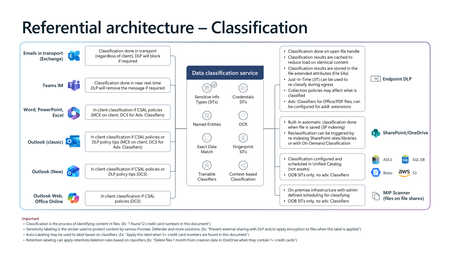
Microsoft Purview architecture diagrams provide a reference view of how classification, sensitivity labelling, Data Loss Prevention (DLP), Insider Risk Management, and Microsoft 365 Copilot protections work together across Microsoft 365 workloads. They illustrate how organisations can consistently identify, label, and protect sensitive data across endpoints, email, collaboration services, browsers, and AI‑assisted workflows—without prescribing a single deployment model. Classification generates sensitivity signals, labels express organizational protection intent, and DLP enforces that intent in real time across devices, apps, and services. Together, these patterns show how Copilot inherits existing security controls so AI‑generated content remains governed within the same compliance boundaries as organizational data.20KViews23likes9CommentsExtend Microsoft Purview data protection to AWS Bedrock agents for cross-cloud AI governance
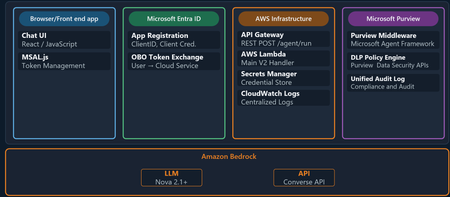
Organizations are moving fast with AI, and many of those AI workloads are not staying in one cloud. A team might use Microsoft 365 and Microsoft Purview for governance and in addition to Microsoft Foundry they may still choose to run an AI agent on AWS Bedrock or on the Google Cloud Platform. The technical challenge is straightforward: how do you keep one consistent set of data security, governance, and compliance controls when the agent itself runs outside Microsoft Azure? This is where Microsoft Purview becomes the central policy engine for your data estate. In this post, we show why that matters and then walk through a practical example: an expense approval agent running on Amazon Bedrock, protected by Microsoft Purview Data Loss Prevention (DLP) policies. ExpenseApprovalAgent" details of the Agent blade Why Purview should be the central policy engine Most organizations do not want separate policy stacks for every cloud, every model endpoint, and every app team. That leads to duplicated controls, inconsistent enforcement, and audit gaps. The better model is to separate where workloads run from where policy decisions are made. That is the value proposition for Microsoft Purview in cross-cloud AI scenarios. Purview gives you: A consistent policy layer for sensitive information types such as credit card numbers, Social Security numbers, financial data, and other regulated content. A governance plane that can extend beyond Microsoft-hosted workloads into multi-cloud environments. A compliance framework with auditability, policy traceability, and a familiar operational model for security and compliance teams. A way to apply data-aware controls to AI interactions, not just to storage locations. In practical terms, that means the same organization that already trusts Purview to govern Exchange, SharePoint, Teams, and Copilot can use Purview to govern prompts and responses in a Bedrock-based agent as well. The key architectural shift is this: your app does not need to invent its own data policy engine. It can call Purview at the points where risk exists. What this Bedrock agent demonstrates The sample solution in this blog is a cross-cloud AI pattern: The frontend is a single-page browser-based chat app. Users authenticate with Microsoft Entra ID via MSAL. The backend runs in AWS Lambda. The model is Amazon Bedrock using Nova 2 Lite. Microsoft Purview evaluates prompts and model responses for DLP policy violations. This matters because it proves a broader point: Microsoft Purview can govern AI interactions even when the model and compute are not running in Azure. The core architecture As shown above the end-to-end flow follows this pattern: A user signs in through Microsoft Entra ID from the frontend. The frontend sends the user's access token and prompt to an API endpoint in AWS. The Lambda function exchanges that token using the On-Behalf-Of flow so Purview can evaluate under the signed-in user's identity. Purview scans the full prompt for sensitive information before the model is called. If the prompt is allowed, the Lambda function sends the request to Amazon Bedrock. Purview scans the model response before it is returned to the user. The frontend shows the result along with a Purview evaluation badge. That gives you two strong governance controls: In-line data loss prevention enforcement, which can block risky requests before they ever reach the model. Response-time enforcement, which can stop sensitive data from being returned even if a model generates it. The implementation also uses the user's identity for policy evaluation. That is important because governance decisions should reflect who is asking, not just what application is running. Why this pattern is useful for security, governance, and compliance teams There are three reasons this pattern is worth paying attention to. First, it aligns policy with risk rather than with hosting location. The compute might run in Lambda and the model might be in Bedrock, but Purview still remains the policy decision point. Second, it improves operational clarity. Security teams do not have to learn a different governance toolchain for each AI stack. They can keep using Purview concepts, policy models, and audit workflows. Third, it supports real-world adoption. Most large enterprises are hybrid and multi-cloud already. A governance pattern that only works for one vendor's runtime is not enough. Policy definition in Purview Two polices are needed to enforce DLP-a collection policy for Enterprise AI Apps and a DLP policy Collection policy 2. DLP policy Follow the steps outlined here to create the DLP policy for Enterprise AI Apps. Sample provided: purview-api-samples/DLPforCustomAIApps at main · microsoft/purview-api-samples To replicate this scenario, follow this link to the official GitHub repo: purview-api-samples/AWSBedrock at main · microsoft/purview-api-samples Once deployed, you will have: An AWS Lambda function that calls Amazon Bedrock. A browser frontend that authenticates with Microsoft Entra ID. Microsoft Purview evaluating both prompts and responses. A demo flow where safe prompts succeed and sensitive prompts are blocked. With the App and agent deployed, now comes the moment when the architectural value becomes clear. The model runtime is AWS Bedrock, but the policy decision is still coming from Microsoft Purview. Below screenshot shows the prompt containing sensitive information being blocked based on the policy evaluation by Purview. Minimal code integration requirements using the SDK Below is the code needed to perform the integration between Purview and Bedrock to perform the in and outbound inspection of content destined to and from the Bedrock model. Results of Purview’s verdict presented to user in the App UI Review governance evidence in Purview Data Security Posture Management Summary The bigger story here is not just that Microsoft Purview can protect an Amazon Bedrock agent. It is that organizations can centralize data security, governance, and compliance policy even while their AI architecture becomes more distributed across multiple clouds. That is the operational win. Developers keep the freedom to choose the best runtime and model platform. Security and compliance teams keep a central policy engine they already understand and trust. AI applications can be multi-cloud, but your data protection model does not have to be fragmented. Additional resources Configure Microsoft Purview - purview-sdk | Microsoft Learn Microsoft Purview Developer Platform Documentation - purview-sdk | Microsoft Learn1.1KViews1like1Comment
Enhancements to Device Status API & Logged-In User Email in Endpoint DLP
1. The Real‑World Problem Endpoint DLP analyst Faced (What Was Missing Earlier) Before the introduction of the Device Status API enhancements and logged‑in user visibility, Endpoint DLP teams consistently struggled in below discussed areas: Device Visibility Was Fragmented and Manual - Customers repeatedly told us: We know some devices are unhealthy, but we don’t know who owns them. We export the onboarding table to Excel every week just to understand drift. By the time we detect a policy issue, the user is already blocked or impacted. In practice, this meant: Device onboarding views were static snapshots, not operationally actionable. Admins relied on manual Excel exports to track onboarding, drift, and health. Reporting pipelines were brittle and always out of date. 2. Device Status API: Why Customers Asked for This (Beyond “Reporting”) The Hidden Cost of Excel‑Driven Operations as earlier, customers had to: Export device onboarding data manually. Rebuild dashboards every time they needed updated insight. Repeat this process weekly or even daily for compliance and SOC reviews. This approach failed at scale and created blind spots during incidents. When a device policy sync failed or appeared unhealthy, admins had no real‑time, view to answer basic questions like: Is this device configured correctly? Is the OS or Defender version lagging? Is the issue widespread or isolated? 3. What the Improvement Unlocks (New Operational Reality) From Static Views to Continuous Monitoring with the Device Status API: Device health, configuration status, policy sync state, OS version, and Defender version become query able signals Customers can power custom reporting and Advanced Hunting queries that are always current SOC and Endpoint teams finally share a single source of device truth This fundamentally changes how customers monitor Endpoint DLP not as a setup task, but as a living control plane. The Device Status API directly addresses this gap by making device‑level status continuously available through Advanced Hunting, allowing customers to build living dashboards instead of static reports. 4. The Old Workflow (Customer Pain) Historically, when a device showed: Policy Sync Failed Unhealthy Configuration mismatch Admins had to: Leave the Purview console Open Microsoft Defender for Endpoint or Intune Correlate device IDs or names Identify the user Start remediation This context‑switching cost time, accuracy, and confidence. 5. The New Reality: User Context Where It Matters Admins can now see who is logged in directly on the device onboarding page, aligning Windows with the macOS experience like: Immediate user context during device issues. Faster outreach and remediation. One unified investigative surface. What used to require three portals and multiple teams now happens in One Place. 6. When Customers Actually Needed This Data (But Didn’t Have It) This improvement wasn’t driven by curiosity it was driven by failure points in production. Some of the common customer scenarios listed below: Scenario Before Now / After Improvement Scenario 1: Quarterly Compliance Reviews Teams exported Excel files days before audits, resulting in stale data. Auditors questioned the reliability of reports. Advanced Hunting queries power live compliance dashboards. Reports are defensible because the data is always current. Scenario 2: Incident Post‑Mortems Teams struggled to answer whether devices were healthy at the time of the incident or if policies were enforced versus just configured. Reviews relied on assumptions. Device status, policy sync state, and OS/Defender versions are query able facts. Incident reviews shift from guesswork to evidence‑based analysis. Scenario 3: Silent Policy Drift Devices drifted due to OS updates, sensor lag, or configuration changes. Issues surfaced only after a DLP violation occurred. Policy drift becomes detectable before enforcement failures. Endpoint DLP acts as a reliability signal rather than a last‑line alarm. 7. New enhancement on Device Status API Device status API provides admins with access to device level information to integrate onboarded device information to custom reporting or use in advanced hunting queries. It has helped admins track down users associated with devices instead reaching out to Entra, on-premises Active Directory, or Intune team. During troubleshooting, if a device is not receiving policies on time, the device API allows quick identification of the device owner and assists in enabling always-on diagnostics or collecting logs directly from the device via Purview console. 8. Steps to capture User UPN Admin can find the device status by login to Security.microsoft.com as security admin. Click on Investigation and responses > Hunting > Advanced hunting. Device data can be found under DLPInfo JSON Column in the Deviceinfo table 3. Once we run above or any custom query as per requirement, you would see below as response. 4. Click on the loggedonuser field and expand the right-side information and look for DLPUPN under inspect record. 9. User login details on the Purview onboarding page Admins now can see who is currently logged in on the device onboarding page. This update aligns the Windows experience with macOS, allowing admins to respond quickly if necessary. In the past, when a device displayed a "Policy Sync Failed" or "Unhealthy" status, it was necessary to switch to Microsoft Defender for Endpoint (MDE) or Intune to identify the affected user. With this update, all relevant information is now accessible in a single view, streamlining the process. Benefits - Admins gain faster confirmation of device ownership and user context without extra investigation. It simplifies troubleshooting onboarding or policy issues by surfacing the user alongside other device insights like status and IP. No impact on users or DLP policies occurs, and it's enabled by default with no action required. 10.Steps to find User UPN on Purview admin console Login to Purview.microsoft.com with compliance admin > Select settings > Device onboarding > Select device Final Takeaway: Why This Matters More Than It First Appears "These enhancements evolve Endpoint DLP from a static, deployment‑centric control into a continuously observable, user‑context aware security signal, significantly reducing investigation time, operational overhead, and trust gaps at scale"367Views0likes0Comments
Set Up Endpoint DLP Evidence Collection on your Azure Blob Storage
Endpoint Data Loss Prevention (Endpoint DLP) is part of the Microsoft Purview Data Loss Prevention (DLP) suite of features you can use to discover and protect sensitive items across Microsoft 365 services. Microsoft Endpoint DLP allows you to detect and protect sensitive content across onboarded Windows 10, Windows 11 and macOS devices. Learn more about all of Microsoft's DLP offerings. Before you start setting up the storage, you should review Get started with collecting files that match data loss prevention policies from devices | Microsoft Learn to understand the licensing, permissions, device onboarding and your requirements. Prerequisites Before you begin, ensure the following prerequisites are met: You have an active Azure subscription. You have the necessary permissions to create and configure resources in Azure. You have setup endpoint Data Loss Prevention policy on your devices Configure the Azure Blob Storage You can follow these steps to create an Azure Blob Storage using the Azure portal. For other methods refer to Create a storage account - Azure Storage | Microsoft Learn Sign in to the Azure Storage Accounts with your account credentials. Click on + Create On the Basics tab, provide the essential information for your storage account. After you complete the Basics tab, you can choose to further customize your new storage account, or you accept the default options and proceed. Learn more about azure storage account properties Once you have provided all the information click on the Networking tab. In network access, select Enable public access from all networks while creating the storage account. Click on Review + create to validate the settings. Once the validation passes, click on Create to create the storage Wait for deployment of the resource to be completed and then click on Go to resource. Once the newly created Blob Storage is opened, on the left panel click on Data Storage -> Containers Click on + Containers. Provide the name and other details and then click on Create Once your container is successfully created, click on it. Assign relevant permissions to the Azure Blob Storage Once the container is created, using Microsoft Entra authorization, you must configure two sets of permissions (role groups) on it: One for the administrators and investigators so they can view and manage evidence One for users who need to upload items to Azure from their devices Best practice is to enforce least privilege for all users, regardless of role. By enforcing least privilege, you ensure that user permissions are limited to only those permissions necessary for their role. We will use portal to create these custom roles. Learn more about custom roles in Azure RBAC Open the container and in the left panel click on Access Control (IAM) Click on the Roles tab. It will open a list of all available roles. Open context menu of Owner role using ellipsis button (…) and click on Clone. Now you can create a custom role. Click on Start from scratch. We have to create two new custom roles. Based on the role you are creating enter basic details like name and description and then click on JSON tab. JSON tab gives you the details of the custom role including the permissions added to that role. For owner role JSON looks like this: Now edit these permissions and replace them with permissions required based on the role: Investigator Role: Copy the permissions available at Permissions on Azure blob for administrators and investigators and paste it in the JSON section. User Role: Copy the permissions available at Permissions on Azure blob for usersand paste it in the JSON section. Once you have created these two new roles, we will assign these roles to relevant users. Click on Role Assignments tab, then on Add + and on Add role assignment. Search for the role and click on it. Then click on Members tab Click on + Select Members. Add the users or user groups you want to add for that role and click on Select Investigator role – Assign this role to users who are administrators and investigators so they can view and manage evidence User role – Assign this role to users who will be under the scope of the DLP policy and from whose devices items will be uploaded to the storage Once you have added the users click on Review+Assign to save the changes. Now we can add this storage to DLP policy. For more information on configuring the Azure Blob Storage access, refer to these articles: How to authorize access to blob data in the Azure portal Assign share-level permissions. Configure storage in your DLP policy Once you have configured the required permissions on the Azure Blob Storage, we will add the storage to DLP endpoint settings. Learn more about configuring DLP policy Open the storage you want to use. In left panel click on Data Storage -> Containers. Then select the container you want to add to DLP settings. Click on the Context Menu (… button) and then Container Properties. Copy the URL Open the Data Loss Prevention Settings. Click on Endpoint Settings and then on Setup evidence collection for file activities on devices. Select Customer Managed Storage option and then click on Add Storage Give the storage name and copy the container URL we copied. Then click on Save. Storage will be added to the list. Storage will be added to the list for use in the policy configuration. You can add up to 10 URLs Now open the DLP endpoint policy configuration for which you want to collect the evidence. Configure your policy using these settings: Make sure that Devices is selected in the location. In Incident reports, toggle Send an alert to admins when a rule match occurs to On. In Incident reports, select Collect original file as evidence for all selected file activities on Endpoint. Select the storage account you want to collect the evidence in for that rule using the dropdown menu. The dropdown menu shows the list of storages configured in the endpoint DLP settings. Select the activities for which you want to copy matched items to Azure storage Save the changes Please reach out to the support team if you face any issues. We hope this guide is helpful and we look forward to your feedback. Thank you, Microsoft Purview Data Loss Prevention Team4.7KViews6likes2CommentsDeploy scalable ring‑fenced Purview operations with Administrative Units
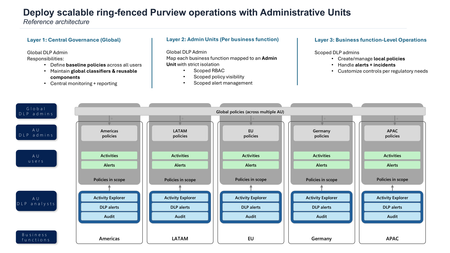
As Microsoft Purview deployments mature, many organisations encounter the same scaling challenge: how do you decentralize operations without fragmenting governance or losing visibility? Administrative Units (AUs) provide a native way to solve this by enabling ring‑fenced operations—allowing teams to operate independently within clearly defined boundaries, while preserving central oversight. This post focuses on the why behind using Administrative Units in Microsoft Purview, with a particular emphasis on scalable, ring‑fenced operations. We’ll walk through three reference architectures that illustrate how Administrative Units support real‑world operating models—without requiring multiple tenants or separate DLP platforms. note: this article and visuals will focus on Administrative Units support in Purview Data Loss Prevention. However, Administrative Units are supported in additional solutions of Microsoft Purview. Refer to Administrative units in Microsoft Purview | Microsoft Learn for more details and support. Why Administrative Units matter for scalable operations Many large organisations operate with decentralized compliance and DLP teams, often aligned to regions, business units, or regulated functions. Historically, this led to one of two sub‑optimal patterns: Multiple, disconnected DLP solutions or tenants Centralized teams managing policies and alerts for parts of the business they don’t own Administrative Units change this model by allowing organisations to: Partition users (and supported resources) into logical units Assign restricted administrators who can only see and act within their unit Apply both global and AU‑scoped policies together, with predictable behavior From a Purview perspective, this enables true business function autonomy, enforced through RBAC and data visibility boundaries, while keeping global services—such as classification—centralized. Reference architecture 1: Layered governance with ring‑fenced operations Scenario An organisation wants to migrate from multiple legacy DLP solutions into Microsoft Purview while preserving independent operations for each business function or region. Architecture highlights This model introduces three distinct layers: Central governance (Global) Global administrators define baseline policies applicable across the tenant Shared services such as classifiers and reusable components remain central Central teams retain cross‑tenant monitoring and reporting capabilities Administrative Units (per business function) Each business function or region is mapped to an Administrative Unit RBAC, policy visibility, and alert management are strictly scoped to the AU Policies created here only affect users within that unit Business function‑level operations Scoped DLP admins manage local policies Alerts and incidents are handled by the owning team Controls can be tuned to meet specific regulatory or operational needs Why this matters This architecture enables a phased migration: Start with a single entity Gradually scale across additional business functions Avoid policy sprawl by consolidating and retiring legacy configurations Crucially, tenant‑wide limits and global services remain unchanged, ensuring consistent performance as scale increases. Reference architecture 2: Ring‑fencing user activity visibility to sub‑business functions Scenario “We have dedicated DLP analysts for executives. DLP alerts and activities for these users must only be visible to that team.” Architecture highlights This model refines the first architecture and allowing to have DLP analysts for a subset of users only. Executive users are placed into a dedicated Administrative Unit representing a subset of users of a business unit. Policies can be published to multiple Administrative Units (ex: Americas + Americas - Execs) In this model: Some DLP administrators may be assigned to multiple AUs so they can publish policies across them Users must belong to a single AU to ensure clean visibility boundaries Why this matters This pattern is particularly effective for: Executive monitoring HR or Legal teams Highly sensitive populations It delivers strict separation of duties without duplicating policies or creating isolated tenants, and aligns with how Purview scopes alerts, activity explorer, and audit data when Administrative Units are used. Reference architecture 3: User activity visibility for multi‑AU users Scenario Some users operate across multiple business functions—for example, executives or shared service leaders—while still requiring controlled visibility for analysts. Architecture highlights User activities are stamped with the sum of all Administrative Units the user belonged to at the time of the activity Scoped DLP administrators: Can only create policies affecting users within their assigned AU. However the sum of their policies will be applicable. Scoped DLP analysts: See all activities for users in their AU, even if those activities were generated by policies scoped to a different AU. Why this matters This model ensures: No loss of investigative context for analysts Predictable visibility when users span multiple organizational boundaries Continued enforcement of AU‑based separation of duties It also reinforces a key principle: Administrative Units control visibility and management scope — not the existence of the underlying activity data. Once a user's in scope of a policy, its related activities/alerts are visible to DLP analysts allowed to review this user's activities. When not to use Administrative Units Administrative Units are a powerful enabler for decentralized, ring‑fenced operations—but they are not required in every Purview deployment. You may choose not to introduce Administrative Units in the following situations: Single, centralized compliance team. If one team owns all policy creation, alert triage, and investigations across the organisation—and there is no requirement to restrict visibility—Administrative Units add limited value. In this model, global role groups already provide sufficient control. No need for visibility or management separation. Administrative Units are primarily about scoping visibility and permissions. If all administrators are expected to see all users, alerts, and activities, AU‑based scoping may introduce unnecessary complexity without operational benefit. Early or small‑scale Purview deployments. Organisations at an early stage of Purview adoption—running a small number of global policies—may find it simpler to start without AUs and introduce them later as operating models mature. Administrative Units do not change tenant limits or global services, so adoption can be phased over time. Requirements driven purely by policy targeting. If the primary requirement is targeting users dynamically for policy application (rather than restricting administrator access or visibility), adaptive scopes alone may be sufficient. Administrative Units become relevant when who can see and manage data is as important as which users are in scope. In short, Administrative Units are best introduced when organisations need to scale operations with clear ownership boundaries, not simply to organise users. Centralized vs. Decentralized Functions in a Ring‑Fenced Operating Model A scalable Microsoft Purview operating model relies on a deliberate split between functions that remain centralized at the tenant level and those that are decentralized to business functions or regions via Administrative Units (AUs). This balance enables autonomy without fragmentation, preserving global consistency while allowing teams to operate independently within defined boundaries. Functions that Remain Centralized Certain capabilities are intentionally retained at the global (tenant) level to ensure consistency, performance, and governance across the organisation. These functions are not delegated to Administrative Units: Global governance and baseline policy definition Central teams define tenant‑wide baseline policies that apply consistently across all users, regardless of AU membership. This ensures minimum protection standards and avoids divergent interpretations of risk. Shared services and reusable components Core services such as classifiers and other reusable components remain centralized to prevent duplication, reduce administrative overhead, and maintain consistent detection behavior across the tenant. Cross‑tenant monitoring and reporting Central teams retain visibility across Administrative Units for monitoring, reporting, and oversight purposes, ensuring that decentralization does not result in blind spots at the organizational level. Tenant‑wide limits and platform behavior Administrative Units do not alter tenant‑wide service limits or global platform characteristics. Keeping these aspects centralized ensures predictable performance and scalability as additional business functions are onboarded. Functions that Are Decentralized via Administrative Units Operational responsibility is decentralized to business functions or regions by mapping them to Administrative Units, with strict scoping enforced through RBAC and data visibility boundaries: Policy creation and management scoped to the AU Business function teams can create and manage policies that only affect users within their Administrative Unit, allowing controls to be tailored to local regulatory or operational requirements without impacting other parts of the organisation. Scoped visibility of alerts, activities, and incidents Administrators and analysts assigned to an AU can only see alerts, activities, and incidents for users in that unit. This enforces separation of duties and prevents unintended access to sensitive data belonging to other functions. Local alert handling and incident response Decentralized teams own the investigation and remediation of alerts generated within their AU, enabling faster response times and clearer accountability. Operational tuning per business function Controls can be adjusted within an AU to reflect specific risk tolerances, regulatory obligations, or operational realities, without creating policy sprawl or requiring separate tenants. Why This Split Matters By clearly separating centralized governance and shared services from decentralized, AU‑scoped operations, organisations can scale Purview deployments in a phased and controlled manner—starting with a single business function and expanding over time—while maintaining consistent governance, visibility, and performance across the tenant. Key takeaways Administrative Units in Microsoft Purview are not just a permissions feature—they are an operating model enabler. Used correctly, they allow organisations to: Scale decentralized operations with confidence Enforce ring‑fenced visibility and management boundaries Combine global consistency with local autonomy For organisations planning large‑scale Purview deployments or consolidating legacy compliance tooling, Administrative Units provide a foundational architecture for sustainable growth. Learn more Administrative units in Microsoft Purview (presentation) Administrative units in Microsoft Purview | Microsoft Learn1.1KViews1like1Comment
Priority Cleanup V2: Faster, Simpler Data Purging for Exchange Online
Enhancements Achieved with Exchange Priority Cleanup V2 Priority Cleanup (Use priority cleanup to expedite the permanent deletion of sensitive information from mailboxes | Microsoft Learn) was introduced to provide administrators with a powerful tool for permanently deleting mailbox content, even when under retention or eDiscovery hold, to address scenarios such as data spillage and urgent removals. Priority Cleanup addressed a key need in Exchange Online by allowing hold overrides. Through real-world use, we received valuable insights regarding the approval process, deletion speed, and reviewer experience. These learnings have guided our ongoing enhancements, ensuring that the solution evolves to better meet customer needs for efficiency and ease of use while maintaining robust security and compliance standards. What's New in Priority Cleanup V2 Priority Cleanup V2 is currently in the planning stage. We’re sharing the proposed updates early to gather feedback before we begin implementation. The goal is to address the core limitations of V1 with enhancements focused on speed and simplicity. Faster Data Deletion & Simplified Approval Workflow: We’re proposing to streamline the process to two key checkpoints: Policy enforcement approval when moving from simulation to active mode (requires approval from a different Priority Cleanup admin). We’re proposing to minimize approval overhead by removing unnecessary review stages. Disposition review by eDiscovery admins will be required only for mailboxes under eDiscovery hold. For other mailboxes, items will be permanently deleted soon after the Priority Cleanup policy is applied to speed up processing from days to hours. This would reduce the number of required users with admin privileges from four to two. Controlled Purge Limits: Administrators will be able to efficiently manage substantial purges by securely processing deletions in batches, with a configurable limit of up to 100 items per mailbox per ELC run. A default limit of 100 items is applied, with the ability to adjust this value through an organization‑level configuration. This configurable limit provides an additional safeguard for system operations while offering flexibility to meet varying organizational needs. Note: A default limit of 100 items will apply, with the ability to adjust this value via an organization-level configuration. V1 vs V2 Feature Comparison Feature V1 Behavior V2 Improvement Deletion Speed Multi-stage process taking 6+ days for small purges Significantly faster with immediate deletion for non-hold mailboxes Approval Workflow 3-stage approval (Priority Cleanup Admin, Retention Admin, eDiscovery Admin) 2-stage approval (policy enforcement + eDiscovery review only when needed) Proposed Improvements in Admin Experience and Control Streamlined Policy Management: We are considering making policies easier to enable or disable directly from the main list view, potentially through a simple toggle, so administrators would no longer need to use the setup wizard for this task. Enhanced Review Interface: Proposed updates include adding new, informative columns to the interface, such as a dedicated Mailbox/Site column to help identify the source location. We are also looking at providing clearly labeled date fields to indicate when items were received or created, which would replace the potentially confusing ExpiryDate label. Comprehensive Audit Trails: It is proposed that every action would be thoroughly documented with a unique Cleanup ID. This ID could then be used in Audit Search to locate all events related to a specific cleanup operation, helping to simplify verification and post-incident analysis. Note: Priority Cleanup V2 enhancements are specific to Exchange Online. These changes do not affect Priority Cleanup for OneDrive and SharePoint (PC ODSP), including its rollout timelines or behavior. Key Benefits for Administrators Priority Cleanup V2 delivers tangible improvements across the entire data purging workflow. Accelerated Deletion: Requests for data removal are fulfilled much faster, enabling urgent incidents to be resolved within hours rather than days, and minimizing risk exposure. Reduced Administrative Overhead: Coordination requirements are simplified, decreasing the number of users involved from four to two in most cases, which makes Priority Cleanup V2 more practical for smaller teams. Enhanced Transparency: Improved user interface labels and robust audit logs help administrators clearly understand what data is being deleted and who authorized the action. Maintained Security and Compliance: Segregation of duties is preserved so that no single individual can delete protected content alone, supporting security and compliance requirements. Availability and Rollout Priority Cleanup V2 is currently in development with rollout planned for the end of 2026. As with all Exchange Online features, we will publish a Microsoft 365 Roadmap item and send Message Center notifications to affected tenants before general availability We Want Your Feedback Priority Cleanup V2 represents a significant evolution based on customer feedback from V1 users who emphasized the need for faster, simpler data purging without compromising security. We've addressed the core pain points around speed, approval complexity, and admin experience, but we know there's always room for improvement. We'd love to hear your thoughts: Does the simplified approval workflow meet your security requirements? What visibility or reporting capabilities would make you more confident in using Priority Cleanup for urgent data removal scenarios? Your feedback directly shapes how we prioritize future enhancements. Please share your experiences and suggestions through your regular Microsoft support channels or customer success contacts. Together, we can continue refining Priority Cleanup to better serve your data governance needs. Aniket Gupta, Mehul Kaushik, Victor Legat & Purview Data Lifecycle Management Team1.9KViews1like13CommentsData Security Posture Reports
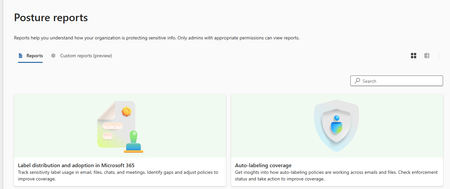
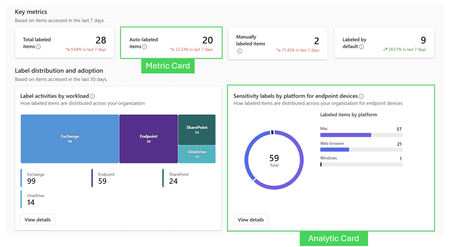
Proving Your Data Security Posture with Confidence Microsoft Purview Posture Reports help organizations prove (not just assume) that their data security controls are working. They provide a clear, outcome‑based view of how effectively sensitivity labels and Data Loss Prevention (DLP) policies are protecting sensitive data across Microsoft 365. Rather than focusing on individual events or alerts, Posture Reports answer a higher‑level question: Are our data protection controls consistently applied and enforced across the organization? We designed Posture Reports to give security, compliance, and business leaders a defensible, measurable view of data security posture, especially critical as organizations adopt Copilot and other AI tools. Purview reporting offers unified data security insights, helping teams identify and address top risks quickly. By consolidating intelligence, it highlights vulnerabilities so you can take prompt action. With contextual information and measurable results, Purview streamlines responses to threats, improves resilience, and supports a proactive security strategy. Microsoft Purview reporting dashboards drive security decisions because they convert massive, fragmented security telemetry into decision‑ready insights: what’s happening, where the risk is, whether controls are effective, and what to do next. For insights on customizing these reports, check out this article. Where can I access these reports? Three Locations: Purview.microsoft.com -> Information Protection -> Reports Purview.microsoft.com -> Data Loss Prevention -> Posture Reports Purview.microsoft.com -> DSPM -> Reports Posture Reports Basics The out-of-box (OOB) reports are built with a combination of Metric and Analytic cards. Note: these reports are refreshed hourly. What is a Metric Card? What is an Analytic Card? Metric cards are designed to highlight a single, high‑level value or KPI and are also the foundation for building custom cards that combine metrics with trend context. Analytics cards provide richer visualizations that help users explore patterns and trends in the data. What they do: A Metric card is used to create a card that pairs a primary metric with its historical trend This allows users to answer not just “What is the value?” but also “Is it improving or declining?” Metric cards are commonly used for adoption, growth, and compliance health indicators These cards focus on showing trends over time What they do: Show distributions, breakdowns, or trends over time Enable comparison across locations, labels, or workloads Support investigation and analysis rather than just reporting These are useful when you need a visual representation rather than a single metric. Display data using charts such as bars, lines, or other visual formats These cards are commonly used for trend analysis, distribution views, and comparative reporting. Both make patterns easier to understand. Report Insights The following table goes into each OOB report and breaks down different viewpoints to help understand how to use them. Report Where it shows Data Security Decision Intent Why What it shows Key Metrics Filter by Label distribution and adoption in Microsoft 365 DSPM Reports Information Protection Reports Expand auto labeling to high volume unlabeled areas Simplify or consolidate confusing labels Look for high label coverage areas as additional enforcement opportunities Prioritize training/auto-labeling in areas with low label adoption Label coverage is the foundational signal for downstream controls Label activities by workload Sensitivity labels by platform for endpoint devices Sensitivity label usage Label activities by application methods Total labeled items Auto-labeled items Manually labeled items Labeled by default How applied Activity Location Platform Sensitivity label Sensitive info type Policy Rule How applied detail Sensitive info type confidence User Auto-labeling coverage DSPM Reports Information Protection Reports Which auto-labeling polices to promote from audit to enforce Where false positives need tuning before enforcement Which sensitive data types are under-protected Whether auto-labeling can safely scale further Can we trust our classification signal enough to automate protection? Auto-labeling by enforcement (which are in sim mode vs. enforcement mode) Auto-labeled items by policies Top auto-labeling policies (most active auto-labeling policies by number of items they have labeled) Auto-labeling policies by platform for endpoint devices Total labeled items Auto-labeled items Auto-labeled emails Auto-labeled files How applied Activity Location Platform Sensitivity label Sensitive info type Policy Rule How applied detail Sensitive info type confidence User Sensitivity Label Changes DSPM Reports Information Protection Reports Whether to restrict or justify label downgrades Where insider risk controls may be needed (users downgrading heavily) Which labels need stronger default enforcement? Whether user behavior is increasing data exposure Label changes are often an early warning signal of oversharing or misuse Sensitivity label transition trends (timelines for label upgraded/downgraded/removed over time) Sensitivity label removed across workloads (where labels have been removed) Types of Sensitivity labels downgraded (to which sensitivity labels items were often downgraded) Sensitivity label downgrade methods (Analyze sensitivity label downgrades by application method/workload. Dual chart helps identify if this is happening manual or automatic) Sensitivity label downgrades by user (which users are most frequently downgrading) Labels upgraded Labels removed Labels downgraded Labels downgraded manually How applied Activity Location Platform Sensitivity label Sensitive info type Policy Rule How applied detail Sensitive info type confidence User Top users triggering DLP Policies DSPM Reports Data Loss Prevention Posture Reports Whether activity reflects risky behavior or broken workflows Which users or roles need targeted controls or guidance If DLP policies are too broad or too noisy If insider risk investigations should be warranted or considered Distinguish Real risk vs policy misalignment vs. normal business activity DLP Policies Triggered by Users (DLP rule match per rule) Unique users involved in triggers Total users with repeated triggers Policy Location (Workload) Endpoint Device Activity Most triggered DLP Rules or Activities DSPM Reports Data Loss Prevention Posture Reports Which policies need tuning or scoping Where enforcement can be strengthened safely Which risks are systemic vs. isolated Whether DLP is actually aligned to sensitive data High volume DLP rules should drive prioritization, not alert fatigue Top DLP Rules Triggered DLP Rules Triggered by Device Activity (most common endpoint activities triggered) Total rules triggered Unique users involved in triggers Total protective actions taken Policy Location (Workload) Endpoint Device Activity Most triggered DLP policies DSPM Reports Data Loss Prevention Posture Reports Are my highest‑priority policies aligned to real user behavior Shows whether your most critical policies are: Actively protecting data, or rarely triggered (possibly mis-scoped or irrelevant) Which DLP policies are most actively protecting sensitive data, is this the highest risk? DLP Policies Triggered by Workload Total policy trigger volume Unique users involved in triggers Total rules triggered Policy Location (Workload) Endpoint Device Activity Customer Use Cases What are some customer concerns Posture Reports address OOB? Use Case Situation Guidance Labeling & auto-labeling program rollout: “Are we increasing coverage and preventing drift?” Customer situation: A customer is rolling out sensitivity labels and auto-labeling. Leadership asks: “Are we labeling more content?” Security asks: “Are sensitive items still unprotected?” And compliance asks: “Are users downgrading labels?” In posture reports, Information Protection coverage includes label distribution/adoption, auto-labeling posture, and posture drift through label transitions (e.g., label downgrades). This maps directly to “coverage + drift + enforcement” conversations. The built-in IP posture set also calls out label distribution and adoption, auto-labeling policy coverage, and sensitivity label activity as core reports. For “active data” posture, the design intent explicitly includes questions like “What % of my active data estate is labeled vs not labeled?” and “What %/count of unlabeled data has sensitive info?” and “How is labeling protection trending over 30 days?”: perfect for proving program progress (or identifying gaps). DLP tuning & noise reduction: “Which policies/rules are actually firing, and who’s tripping them?” Customer situation: The DLP admin is overwhelmed: policies exist, but they don’t know which ones are actually driving volume (or pain), and which users are repeatedly triggering violations. They need to prioritize tuning based on real-world triggers. Surfaces most triggered DLP rules, most triggered DLP policies, and top users triggering DLP policies. This is directly aligned to the operational question “Are our policies effective?” The service-description blurb explicitly frames DLP posture reports as highlighting most triggered rules, highest-volume policies, and top policy violators. This is exactly what admins use to decide what to tune first. Helps teams move from anecdotal “DLP is noisy” to a ranked view of where to focus (policy/rule/user). CISO Reports, “Are we safer this quarter?” posture readout Customer situation: A CISO (or compliance leader) needs a repeatable, executive-ready snapshot of how the organization is protecting sensitive data, without stitching together audit logs, Activity Explorer screenshots, and spreadsheets. Posture Reports are explicitly positioned as “executive-ready visibility” across Information Protection + DLP. Provides OOB, executive-ready visibility into data protection posture across Information Protection and Data Loss Prevention, so the CISO can answer “Is Purview doing what we intend it to do?” and “Where are the gaps?” quickly. Enables a consistent monthly/quarterly narrative from built-in metrics and trends, with hourly refresh called out as a customer/partner value driver (great for “freshness” credibility in leadership reviews). Uses a rolling window approach; guidance is to save/export what you want to retain for future reference (great for recurring readouts). Frequently Asked Questions (FAQs) Question Guidance What is the least permission required to see Posture Report section for DLP? Information Protection Reader We can see Activity Explorer details inside the reports in a non-simplified view, where all confidential information is visible. If someone has the Security Reader role, will they be able to see these things? Security Reader can see Activity Explorer content surfaced inside Posture Reports, including user/activity-level details that may expose sensitive metadata. If you want a role that can view posture reports but not see confidential item-level signals, Security Reader is not the safe minimum; Information Protection Reader is. Why are our DLP "Device Posture" reports are not in the Posture Reports and only on the DLP Overview page? It will move. Right now, the traffic on home page is high, so we launched there. There will eventually be a deep clone into our "Posture Reports" section, however, it will take some time before it shows up. Can I get reports going back longer than 30 days? We're working on increasing this number but at this time, the reports go back a max of 30 days. Is there any impact on tenant performance when enabling new reporting features? How quickly will reports populate after enabling the feature? No significant impact is expected. If labeling, scanning, and/or DLP policies are already active, reports populate instantly when the feature is enabled (assuming E5 is in place). No additional intrusive operations are performed on the tenant. Can we customize these reports? We have a current public preview in place for posture report customization. Stay tuned for more updates as we continue to build out Microsoft Purview Reporting. Co-Authors: Kevin Kirkpatrick and Jane Switzer1.2KViews1like1CommentData Security Posture Reports (Custom Workspace and Charts)
For more insights on OOB Reports, check out this article. Overview: NOW IN PUBLIC PREVIEW Microsoft Purview Posture Reports provide a clear, outcome‑based view of how effectively data protection controls, such as Sensitivity Labels and Data Loss Prevention (DLP) policies, are working across Microsoft 365. Rather than focusing on individual alerts or isolated events, Posture Reports help organizations answer a higher‑level, executive‑ready question: Are our data protection controls consistently applied and actually reducing risk at scale? Posture Reports transform complex telemetry from Audit logs, Activity Explorer, and policy enforcement into measurable, defensible insights that security, compliance, and business leaders can act on with confidence. Building on the out‑of‑the‑box experience, Custom Posture Reports enable teams to create scenario‑specific views tailored to their organization’s risk priorities. Key capabilities include: Custom dashboards with drag‑and‑drop sections and cards Built‑in and custom metric or chart cards powered by Activity Explorer data Flexible filtering to support focused investigations and reporting Tips: Start with clear questions, then choose cards that answer them Avoid overcrowding reports; fewer, well‑chosen cards are more effective Use metric cards for status, analytics cards for understanding Treat custom reports as living assets, iterate as needs evolve This allows security teams to move beyond one‑size‑fits‑all reporting and build views aligned to their unique data protection strategy. Preview note: As this feature is in Preview, capabilities, terminology, and UX may change, and not all scenarios are fully documented yet. Key Concepts Where can I access these reports? Three Locations: Purview.microsoft.com -> Information Protection -> Reports Purview.microsoft.com -> Data Loss Prevention -> Posture Reports Purview.microsoft.com -> DSPM -> Reports (CUSTOM COMING) What is a Custom Report? A Custom Report is a user‑created report container where you assemble one or more cards to visualize Information Protection–related data (for example, labeling, classification, or protection activity). Unlike the built‑in reports, custom reports are designed to be adaptable to different audiences and questions. Typical use cases include: Tracking adoption of sensitivity labels over time Monitoring where sensitive data is most concentrated Creating executive‑friendly, KPI‑style summaries Building analyst views for deeper investigation Core Actions in the Custom Reports Experience Add Report creates a new, empty report canvas. This is the starting point where you define: The report name and purpose Create custom reports with your preferred cards and analytics. Add section is used to create a logical grouping within a custom report. A section acts as a container that helps organize cards on the report canvas into meaningful groupings based on purpose, audience, or storyline. What a section does How sections are used Provides structure to a report by grouping related cards together Improves readability and navigation, especially in reports with multiple cards Helps separate different analytical themes within the same report A report can contain one or more sections Each section can include multiple cards (metric cards, chart cards, analytics cards, or custom cards) Sections are added before cards, serving as the layout framework for the report Add Card lets you place a visualization or metric onto the report canvas. Each card answers a specific question, such as “How much data is labeled Confidential?” or “Where is sensitive content growing fastest?” Cards are the building blocks of custom reports and can be mixed and matched within the same report. Permissions: in order to create these reports, you must have permissions to create labels and DLP policies. Built‑in (OOB – Out of the Box) cards: Custom reports include two built‑in card types that can be added to sections: Metric cards – predefined cards used to display key metrics and trends Analytics cards – predefined cards that provide deeper analytical insights Note: In addition to built‑in cards, you can add custom cards (such as metric‑based or chart‑based custom cards) to tailor the report to your scenario. What is a Metric Card? What is an Analytic Card? Metric cards are designed to highlight a single, high‑level value or KPI and are also the foundation for building custom cards that combine metrics with trend context. Analytics cards provide richer visualizations that help users explore patterns and trends in the data. What they do: A Metric card is used to create a card that pairs a primary metric with its historical trend This allows users to answer not just “What is the value?” but also “Is it improving or declining?” Metric cards are commonly used for adoption, growth, and compliance health indicators These cards focus on showing trends over time What they do: Show distributions, breakdowns, or trends over time Enable comparison across locations, labels, or workloads Support investigation and analysis rather than just reporting These are useful when you need a visual representation rather than a single metric. Display data using charts such as bars, lines, or other visual formats Custom cards allow you to define tailored views aligned to your organization’s unique questions. What they do: Focus on specific scenarios not covered by default cards Combine dimensions or filters relevant to your business context Adapt reporting to regulatory, regional, or operational needs When to use them: Organization‑specific KPIs Regulatory or audit‑driven reporting Advanced scenarios that go beyond standard dashboards Custom cards are especially useful for mature programs where built‑in reports are no longer sufficient on their own. Custom Card Configuration The following example illustrates how a metric‑based custom card can be configured to track adoption trends. Scenario: Track adoption of the Confidential sensitivity label over the last 30 days. Card type: Custom card (built from a Metric card) Metric configuration Filters applied What this card shows Metric: Number of items labeled Confidential Time range: Last 30 days (custom) Display format: Compound (shows total count with trend direction) Sensitivity label: Confidential Workload: SharePoint The current total number of items labeled Confidential Whether labeling activity is increasing or decreasing over the last 30 days A focused view of adoption for a specific label and workload This type of custom card is well‑suited for adoption tracking, executive summaries, and ongoing compliance health monitoring. Metric card configuration: Metric cards currently surface up to 7 days of data, providing recent context for the selected metric. Custom surfaces up to the last 30 days of data. You can choose different display formats, such as: Number – a raw count or value Percentage – a proportional view of the metric Compound – a combination of value and trend for quick interpretation You can apply filters to limit the data set to specific criteria (for example, a particular label, location, or workload), allowing the metric to reflect a targeted scenario rather than all data Chart cards are used to visualize data as a graphical chart and can be created as custom cards when you need a visual representation rather than a single metric. Click on Chart Card and under Chart card configuration, select the primary activities: Sensitivity Label Then define the Chart Type Based on the configuration options shown in the UI, the following chart types are available: Vertical bar – compares values across categories using vertical bars; commonly used for side‑by‑side comparisons Horizontal bar – compares values across categories using horizontal bars; useful when category labels are long Pie – shows proportional distribution of values across categories Donut – similar to a pie chart, with a central area that improves readability Line chart – visualizes trends or changes over time Selecting the appropriate chart type helps ensure the custom card clearly communicates the intended insight and improves overall report readability. These cards are commonly used for trend analysis, distribution views, and comparative reporting. Both make patterns easier to understand. Real World Example The business goal this report is addressing is to prove security value and risk reduction, especially to leadership and stakeholders, by tying data protection investments to measurable outcomes. Primary Business Goal: demonstrate that the organization’s data protection controls are effective in reducing financial data risk. The report shows that sensitive financial data is not only being found, but consistently labeled and enforced through DLP, validating that controls are working as intended. Supporting Business Objectives Executive assurance & trust Provide leadership with evidence that compliance and security controls are actively protecting financial data, not just configured. Risk reduction validation Show that financial SITs are being systematically identified and governed, reducing exposure and improper data handling. Value justification for security investments Correlate auto labeling and DLP outcomes to demonstrate ROI on Purview, labeling, and policy investments. Operational confidence Confirm that auto‑labeling policies are accurately detecting sensitive data at scale and triggering appropriate DLP enforcement. Audit and compliance readiness Establish defensible proof that sensitive financial data is discovered, classified, and protected consistently across the environment. Step 1: Create a report, add a name, and description Step 2: Add a section called Key Outcomes (title and description) and add metric cards to show the data at a glance. Step 3: Add another section. Include the following two out of the box charts available. Step 4: Add another section with the out of the box charts Step 5: Add the last section that ties everything together. One out of the box chart and another custom chart. Step 6: for the custom chart above, Do a vertical bar, pivot (the groupings at the bottom of the chart) to Activity. Then, add filters (Sensitive info type: the SITs and Activity: DLPRuleMatch. The report highlights key outcomes, label adoption, application areas, and auto labeling policies. It identifies the main SITs used in labeling and connects them to DLP, demonstrating that the admin's data security measures are effective, particularly with financial information. Using AI to simplify insights This AI integration builds on Microsoft Purview’s existing reporting stack (Posture Reports, Activity Explorer and Audit) and introduces AI-assisted interpretation, summarization, and report composition to reduce manual analysis and accelerate decision-making. To access the report AI Summary: Click on the report and open “View Details” AI will prepare and summarize the report. AI Report Components Executive Summary Delivers a high level, leadership friendly narrative of the most important insights. Highlights overall posture, major risks, and notable improvements or regressions. Summarizes overall activity (for example, total labeled items and dominant platforms) Calls out major observations and limitations (such as lack of trend comparison due to retention) Provides a concise interpretation of what the data means at a point in time This section answers: “What happened, and what should I know without reading the full report?” Key metrics This section provides the essential quantitative data that forms the foundation of the report. Establishes a baseline that can be tracked over time Quantitative measures such as: Number of policy triggers or Label adoption rates Lists the primary counts, categories, and time range used for analysis Clarifies what measurements are available and which are not (such as trends) This section answers: “What are the exact numbers this report is based on?” Distribution Breakdown This section shows how activity is distributed across categories or dimensions. Breaks total activity into meaningful segments (for example, Mac vs. Web Browser) Displays proportional impact using counts and percentages Helps identify concentration areas or imbalances across platforms This section answers: “Where is activity happening the most?” Trend Analysis Evaluates changes over time when historical data is available. Compares current activity to prior periods Highlights increases, decreases, or stability in behavior Clearly calls out when trend analysis is not possible due to data limitations This section answers: “is behavior improving, worsening, or staying the same over time?” Key Findings Synthesizes insights derived from metrics, distributions, and trends. Interprets the data rather than restating it Identifies notable patterns, gaps, or risks (for example, platform skew or low adoption) Connects observations to possible operational or policy implications. This section answers: “What stands out as important or concerning?” Assessment Provides an overall evaluation of the security or compliance posture Combines findings into a holistic judgment Assesses scope, coverage, and effectiveness of current practices Describes whether the posture is sufficient or limited This section answers: “How healthy is our current posture?” Status Summarizes the assessment into a simple outcome indicator. Recommendations Guides next steps based on observed gaps and risks. Suggests practical actions to improve coverage or effectiveness. Aligns recommendations to best practices and product capabilities. Prioritizes changes that reduce risk and improve consistency. This section answers: “What should we do nex References Provides traceability and supporting documentation. Links to authoritative Microsoft documentation used to inform recommendations Allows readers to validate guidance or explore implementation details This section answers: “Where can I verify or learn more?” Full AI Report Summary Summary Posture Reports represent a shift from security configuration to security outcomes. They empower organizations to confidently answer critical questions about risk, readiness, and return on security investment, especially in an AI‑driven world. As reporting continues to evolve, Posture Reports will play a foundational role in how customers prove, improve, and communicate their data security posture.1.2KViews1like1CommentAI‑Powered Troubleshooting for Microsoft Purview Data Lifecycle Management
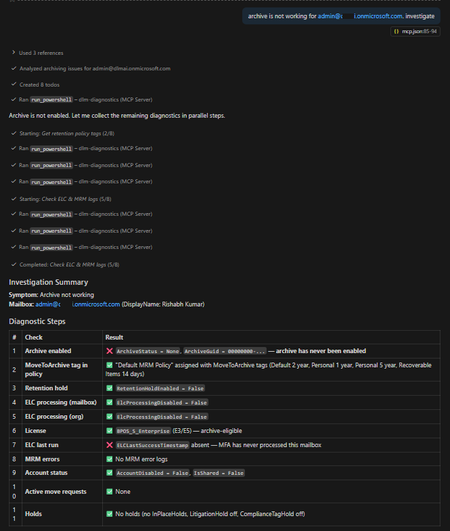
Announcing the DLM Diagnostics MCP Server! Microsoft Purview Data Lifecycle Management (DLM) policies are critical for meeting compliance and governance requirements across Microsoft 365 workloads. However, when something goes wrong – such as retention policies not applying, archive mailboxes not expanding, or inactive mailboxes not getting purged – diagnosing the issue can be challenging and time‑consuming. To simplify and accelerate this process, we are excited to announce the open‑source release of the DLM Diagnostics Model Context Protocol (MCP) Server, an AI‑powered diagnostic server that allows AI assistants to safely investigate Microsoft Purview DLM issues using read‑only PowerShell diagnostics. GitHub repository: https://github.com/microsoft/purview-dlm-mcp The troubleshooting challenge When you notice issues such as: “Retention policy shows Success, but content isn’t being deleted” “Archiving is enabled, but items never move to the archive mailbox” The investigation typically involves: Connecting to Exchange Online and Security & Compliance PowerShell sessions Running 5–15 diagnostic cmdlets in a specific order Interpreting command output using multiple troubleshooting reference guides (TSGs) Correlating policy distribution, holds, archive configuration, and workload behavior Producing a root‑cause summary and recommended remediation steps This workflow requires deep familiarity with DLM internals and is largely manual. Introducing the DLM Diagnostics MCP Server The DLM Diagnostics MCP Server automates this diagnostic workflow by allowing AI assistants – such as GitHub Copilot, Claude Desktop, and other MCP‑compatible clients – to investigate DLM issues step by step. An administrator simply describes the symptom in natural language. The AI assistant then: Executes read‑only PowerShell diagnostics Evaluates results against known troubleshooting patterns Identifies likely root causes Presents recommended remediation steps (never executed automatically) Produces a complete audit trail of the investigation All diagnostics are performed under a strict security model to ensure safety and auditability. What is the Model Context Protocol (MCP)? The Model Context Protocol (MCP) is an open standard that enables AI assistants to interact with external tools and data sources in a secure and structured way. You can think of MCP as a “USB port for AI”: Any MCP‑compatible client can connect to an MCP server The server exposes well‑defined tools The AI can use those tools safely and deterministically The DLM Diagnostics MCP Server exposes Purview DLM diagnostics as MCP tools, enabling AI assistants to run PowerShell diagnostics, retrieve execution logs, and surface Microsoft Learn documentation. More information: https://modelcontextprotocol.io Diagnostic tools exposed by the server The server exposes four MCP tools. 1. Run read‑only PowerShell diagnostics This tool executes PowerShell commands against Exchange Online and Security & Compliance sessions using a strict allow list. Only read‑only cmdlets are permitted: Allowed verbs: Get-*, Test-*, Export-* Blocked verbs: Set-*, New-*, Remove-*, Enable-*, Invoke-*, and others Every command is validated before execution. Example: Archive mailbox not working Admin: “Archiving is not working for john.doe@contoso.com” The AI follows the archive troubleshooting guide: 1 Step 1 – Check archive mailbox status 2 Get-Mailbox -Identity john.doe@contoso.com | 3 Format-List ArchiveStatus, ArchiveState 4 5 Step 2 – Check archive mailbox size 6 Get-MailboxStatistics -Identity john.doe@contoso.com -Archive | 7 Format-List TotalItemSize, ItemCount 8 9 Step 3 – Check auto-expanding archive 10 Get-Mailbox -Identity john.doe@contoso.com | 11 Format-List AutoExpandingArchiveEnabled Finding The archive mailbox is not enabled. Recommended action (not executed automatically): 1 Enable-Mailbox <user mailbox> –Archive All remediation steps are presented as text only for administrator review. 2. Retrieve the execution log Every diagnostic session is fully logged, including: Command executed Timestamp Duration Status Output Admins can retrieve the complete investigation as a Markdown‑formatted audit trail, making it easy to attach to incident records or compliance documentation. 3. Microsoft Learn documentation lookup If a question does not match a diagnostic scenario – such as “How do I create a retention policy?” – the server falls back to curated Microsoft Learn documentation. The documentation lookup covers 11 Purview areas, including: Retention policies and labels Archive and inactive mailboxes eDiscovery Audit Communication compliance Records management Adaptive scopes 4. Create a GitHub issue (create_issue) create_issue lets the assistant open a feature request in the project’s GitHub repo and attach key session details (such as the commands run and any failures) to help maintainers reproduce and prioritize the request. Example: File a feature request from a failed diagnostic ✅ Created GitHub issue #42 Title: Allowlist should allow Get-ComplianceTag cmdlet Category: feature request Labels: enhancement URL: https://github.com/microsoft/purview-dlm-mcp/issues/42 Session context included: 3 commands executed, 1 failure Security and safety model Security is enforced at multiple layers: Read‑only allow list: Only approved diagnostic cmdlets can run No stored credentials: Authentication uses MSAL interactive sign‑in Session isolation: Each server instance runs in its own PowerShell process Full audit trail: Every command and result is logged No automatic remediation: Fixes are never executed by the server This design ensures diagnostics are safe to run even in sensitive compliance environments. Supported diagnostic scenarios The server currently includes 12 troubleshooting reference guides, covering common DLM issues such as: Retention policy shows Success but content is not retained or deleted Policy status shows Error or PolicySyncTimeout Items do not move to archive mailbox Auto‑expanding archive not triggering Inactive mailbox creation failures SubstrateHolds and Recoverable Items growth Teams messages not deleting Conflicts between MRM and Purview retention Adaptive scope misconfiguration Auto‑apply label failures SharePoint site deletion blocked by retention Unified Audit Configuration validation Each guide maps symptoms to diagnostic checks and remediation guidance. Getting started Prerequisites Node.js 18 or later PowerShell 7 ExchangeOnlineManagement module (v3.4+) Exchange Online administrator permissions Required permissions Option Roles Notes Least-privilege Global Reader + Compliance Administrator Recommended, covers both EXO and S&C read access. Single role group Organization Management Covers both workloads but broader than necessary. Full admin Global Administrator Works but overly broad, not recommended. Exchange Online (Connect-ExchangeOnline): cmdlets like Get-Mailbox, Get-MailboxStatistics, Export-MailboxDiagnosticLogs, Get-OrganizationConfig Security & Compliance (Connect-IPPSSession): cmdlets like Get-RetentionCompliancePolicy, Get-RetentionComplianceRule, Get-AdaptiveScope, Get-ComplianceTag Exchange cmdlets require EXO roles; compliance cmdlets require S&C roles. Without both, some diagnostics will fail with permission errors. Why both workloads? The server connects to two PowerShell sessions: The authenticating user (DLM_UPN) needs read access to both Exchange Online and Security & Compliance PowerShell sessions. MCP client configuration The server can be connected to IDE like Claude Desktop or Visual Studio Code (GitHub Copilot) using MCP configuration. Include this configuration in your MCP config JSON file (for VS Code, use .vscode/mcp.json; for Claude Desktop, use claude_desktop_config.json) { "mcpServers": { "dlm-diagnostics": { "command": "npx", "args": [ "-y", "@microsoft/purview-dlm-mcp" ], "env": { "DLM_UPN": "admin@yourtenant.onmicrosoft.com", "DLM_ORGANIZATION": "yourtenant.onmicrosoft.com", "DLM_COMMAND_TIMEOUT_MS": "180000" } } } } Summary The DLM Diagnostics MCP Server brings AI‑assisted, auditable, and safe troubleshooting to Microsoft Purview Data Lifecycle Management. By combining structured troubleshooting guides with read‑only PowerShell diagnostics and MCP, it significantly reduces the time and expertise required to diagnose complex DLM issues. We invite you to try it out, provide feedback, and contribute to the project via GitHub. GitHub repository: https://github.com/microsoft/purview-dlm-mcp Rishabh Kumar, Victor Legat & Purview Data Lifecycle Management Team2.2KViews2likes0Comments