project
752 Topics
Regarding the usage of PjAssignmentField in Microsoft Project
Hello, the following code is placed in the ThisAddIn class of a Project VSTO add-in. I want to execute other code when the field Text1 corresponding to the resource assigned under a task changes. The problem I am currently encountering is: When the Text1 corresponding to the resource assignment under a task changes, the message box "OK" does not pop up. However, in the "Resource Usage" view, when the Text1 of the task assignment under a resource changes, the message box "OK" does pop up. I hope experts can provide guidance. Private Sub ProjectBeforeAssignmentChange(asg As MSProject.Assignment, Field As MSProject.PjAssignmentField, NewVal As Object, ByRef Cancel As Boolean ) Handles Application.ProjectBeforeAssignmentChange If Field = MSProject.PjAssignmentField.pjAssignmentText1 Then MsgBox("OK", vbExclamation) End If End SubSolved179Views0likes2Comments
MS Project Master file won’t allow Duration/Deadline edits
I’m troubleshooting an unusual issue with a long-standing Microsoft Project Master/consolidated file containing multiple linked subprojects. After replacing one subproject with its latest monthly version, certain fields within that subproject cannot be edited from the Master file. Specifically, I cannot edit fields such as Duration or Deadline, while other fields, such as Text and Baseline fields, can still be edited normally from the Master. I’m sensing the theme has to do with fields that require calculation. More context: This issue arrived after we migrated MPP files from a cloud server to an on-prem server. Previous month’s Cloud server MPP file works fine in the Consolidated environment The master file creates the issue when I replace the cloud-based MPP with the current month on-prem version. Troubleshooting completed: The subproject works normally when opened directly. I created a brand-new blank MPP to use as the Master file and inserted the exact same subproject. Duration and Deadline are editable through the new Master. In the new consolidated file and repeated the normal download from on-prem/replacement process. Everything works correctly. The problem therefore appears to follow the existing Master MPP, rather than the subproject. F9/recalculation does not resolve the issue. The existing Master has been used for a long time and contains multiple inserted/linked subprojects and external relationships. Important constraint: I want to avoid rebuilding the Master or use a repair method that regenerates existing task UIDs. A higher-level consolidated schedule relies on the existing UIDs.500Views0likes3CommentsData access after Project Online (PWA) retirement
As the retirement of Project Online (PWA) approaches, some questions have come up regarding what will happen to the data and related content. I’d like to ask if anyone has information or guidance on the following points: What happens to the data currently stored in Project Online after the retirement date? Will this data still be available for viewing, export, or migration after that date? If so, for how long? Regarding the SharePoint sites linked to PWA, will they remain available? Will it still be possible to access or modify their content? Does Microsoft plan to publish official guidance on this transition? Any references or practical experiences on this topic would be greatly appreciated.4.2KViews1like16Comments
MS PROJECT 2019 UPDATE and Purchasing Options
HI We are currently using Microsoft Project Professional 2019 desktop version, but we are facing challenges with its reporting limitations. Specifically, the software can only display a maximum of 75 rows in its reports. As our weekly reports often exceed this limit, we find ourselves spending considerable time on manual entries. For our monthly reports, we can manage the filtering process to avoid this limitation, but the weekly reports require a hierarchical structure to display task statuses, and unfortunately, there is no workaround for this constraint. While researching this issue, I found discussions indicating that the 2025 version of Microsoft Project can display up to 150 rows, which would help us address our challenges. I have a couple of questions: 1. Does the new version of Microsoft Project 2025 indeed support the display of up to 150 rows? 2. What is the best approach for upgrading: subscription or standalone? 3. Could you provide pricing information and tell us where we can obtain it? Thank you! Best regards, Teshome HPU PMO Office403Views0likes1CommentMicrosoft Project / Planner question
Hello, new to this so I hope I've posted this question in the right place. I have been emailed a Microsoft Project .mpp file. At present I don't have the correct software to open and amend this file. I am exploring whether I need to but an online subscription or make a one off purchase. the online subscription option suggests that I need to subscribe to Microsoft Planner. My queries is, will this allow me to import/load the file I've been emailed to allow me to edit it? If it doesn't presumably my only option is to make the one off purchase? Many thanks in advance if there is anyone that can assist.4.8KViews0likes4Comments
Project Accelerator de Microsoft
I am running some tests with the Project Accelerator tool. I assigned a Planner Plan 1 trial license based on the documentation and previous guidance. At the beginning of February 2026 everything was working correctly, and I was able to view tasks inside the Project Accelerator application. However, as of today (February 25, 2026), the task view no longer loads, and I receive a Microsoft authentication error. It seems as if the system is now blocking access to the plan view even though the Planner Plan 1 license is still active. My question is: Have the licensing requirements changed recently?271Views0likes0Comments
Project Changing % Complete when entered
Why does MS Project change the % Complete value entered? We have a task with a Start date of 11/12/25 and Finish date of 1/20/27. The duration is 223.9 days based on a 4 day/10 hrs per day calendar (it is a long lead time material procurement task). The status date is 1/5/26 and the task has an Actual Start of 11/12/25. When I enter 10 in the % complete column and hit enter, Project changes this to 0%. When I enter 15 in the % complete column and hit enter, Project changes this to 5%. When I enter 50 in the % complete column and hit enter, Project changes this to 44%. I believe % Complete is either calculated or entered, but it seems if you enter a value in this field, Project shouldn't change it. What causes Project to change your % Complete value entered, and how do you get Project to display the desired % Complete for a task like this?755Views0likes4CommentsIs there a way to graphically highlight all of the tasks under a summary?
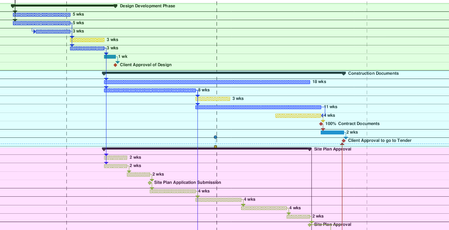
Looking to create what would essentially be a coloured background for all of the tasks in the gantt chart, under a summary. Been looking online and watching tutorials, but cant find what I am looking for. The image shows what I am trying to do (was done after the fact with a PDF reader, would prefer to do it straight in MS project).460Views0likes1Comment