profiles
43 Topics
CfExecute(TRANSFER_PLACEHOLDERS) returns E_INVALIDARG inside an FSLogix profile container
We develop a Cloud Files sync provider. When the sync root lives in a user profile that FSLogix redirects to a per-user VHDX container, some FETCH_PLACEHOLDERS callbacks cannot be answered: every CfExecute(CF_OPERATION_TYPE_TRANSFER_PLACEHOLDERS) for them fails with E_INVALIDARG (0x80070057), including the error completion. The request stays pending until the platform cancels it after about 60 s, and the application that triggered it (File Explorer, Office and Edge background processes, line-of-business apps) hangs for that time. The callback is raised by a name lookup of a non-existent child (`CreateFileW` / `GetFileAttributesExW` on `<dir>\missing.txt`) inside a placeholder directory with on-demand population enabled, and nobody has had that directory open for about one to two minutes. The same callback raised by a directory enumeration is answered fine every time. A lookup on a directory opened a few seconds earlier is fine too. A standalone PowerShell script (own throwaway sync root, no third-party software) reproduces it on a clean Windows Server 2022 (20348.5761, October 2026 CU) with FSLogix 26.08 (3.26.826.17182) for a user with a profile container. The same script on the same server, ten minutes later, as a local user in the "FSLogix Profile Exclude List": all answers accepted. Also reproduced on Windows Server 2022 20348.3328 and 20348.5622 and on Windows Server 2025 26100.1742 with profile containers; not reproducible on the same builds without FSLogix, with a sync root on a plain VHDX volume or a mount point, or on Windows 11. The OS patch level and the FSLogix release did not make a difference in our tests. Waiting, an attributes-only open of the directory, or omitting the correlation vector, request key and sync status from CF_OPERATION_INFO do not help. If the provider opens the directory with FILE_LIST_DIRECTORY (and may close it again) before answering, or after the rejection and then resends the byte-identical answer, CfExecute returns S_OK. CfUpdatePlaceholder(DISABLE_ON_DEMAND_POPULATION) on the directory has the same effect. We ship the directory open as a workaround. Is this a known issue for a Cloud Files sync root inside an FSLogix-redirected profile? Script and both logs (reproduced / not reproduced, same server): https://gist.github.com/pdupont1/85cc0b4a708a784db03087bdcdbe74c8 Full write-up with the environment matrix and all tested variants on https://learn.microsoft.com/en-us/answers/questions/6039901/cfexecute-transfer-placeholders-returns-e-invalida12Views0likes1Comment
Wrong profile name in taskbar for different profiles.
Profile name in taskbar is different than the name in the browser- I have more 5-6 different profiles and I have properly named them in browser settings. but when I pin the same profile icon on taskbar, the name gets saved like "Profile X" For Example - Name is like "Profile 2" Meanwhile in the Settings it's like this-139Views0likes0CommentsHow to Remove Old Memberships from a user?
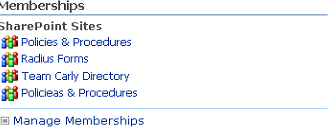
Hello Everyone: I'm new to SharePoint and have been experimenting with SharePoint 2007 (I know... ancient). I've kind of gotten myself into quite the unusual bind and need some help getting out. The Back story: I began experimenting with SharePoint 2007 about a week or two ago and had several failed deployments. After each failed attempt at doing one thing or another, I would delete the site collections, sites, and SSPs associated with it along with the SQL Server databases. Now that I've finally gotten it working (hopefully) the failed attempts are showing up in one of my user's "My Links" and "my memberships" on their My Site. How in SharePoint Server 2007 do I go about cleaning up these things? Also I seem to have created 2 sites called "Policies & Procedures" and thus need to de-link the test version from the current version. to see what I'm referencing, see the screenshots If possible, I'd prefer to not have to start over or delete the AD user since I'm also using CRM. Any thoughts?530Views0likes0CommentsSync Profile Preferences sites?
I don't know if this is possible, but I noticed when I add sites to the profile preferences section in settings it doesn't sync across to my other devices so I have to add the sites on each computer, even though I have the same profiles on each. Would it be possible to sync these too? I'm talking about this section (excluded my sites for privacy reasons): Thanks! Katherine582Views3likes0Comments
MSIX AppAttach FSLogix Profile issue between packaged app versions
Has anyone experienced the following scenario: Application (PowerBI) packaged as MSIX and delivered via App Attach: Package Name: PowerBI-2.104.702.0.MSIX Delivered via App Attach to AVD FSLogix Profile created, and Application user data stored path: \\CLIENTNAME.file.core.windows.net\fslogix\$GUID_username%\Profile_User_name.vhdx\ Profile\AppData\Local\Packages\PowerBI-2.104.702.0\LocalCache\Local\Microsoft\Power BI Desktop (or similar) End user can access application, app profile data is retained to FSLogix and works as expected between sessions, retaining app settings etc. Now, a new version is required: Package Name: PowerBI-2.104.941.0.MSIX Delivered via App Attach to AVD FSLogix Profile created, and Application user data stored path: \\CLIENTNAME.file.core.windows.net\fslogix\$GUID_username%\Profile_User_name.vhdx\ Profile\AppData\Local\Packages\PowerBI-2.104.941.0\LocalCache\Local\Microsoft\Power BI Desktop (or similar) So, between the different versions of the same Application, I am not able to access the roaming profile application data from the original package, forcing my users to have to re-configure the application afresh for the new release. I could just repackage the new version using the EXACT SAME name, but this makes it impossible to differentiate between packages, and also does not meet any version control naming conventions. Has anyone come across this before, and has anyone discovered a viable solution? Thanks NickSolved2.4KViews0likes2Comments
Block SSO for specific Edge profiles
Is it possible to block SSO for specific profiles in Edge? Here's my use case: I have a separate M365 tenant for development and testing. I am signed in to my computer with my work account, and I want to create Edge profiles for the user accounts I use to sign in to my dev tenant. I create a new profile, and when prompted to sign in and sync data, I enter the credentials for a dev tenant account. However, when I browse to, say, https://portal.office.com, I get automatically signed in with my work account. Ideally, I would like Edge to perform SSO using the credentials I entered for the dev tenant account when I set up the Edge profile, but I would settle for a way to block Edge from passing through the credentials for my work account.Solved8.9KViews0likes3Comments
How to retrieve History for related websites ? User Profile as solution isn't programming-immune...
Because History View As-Is don't have filtering, I create Profile to browse websites so that I can view history on related websites; however, to get more (such as Path Name), I need to access History File; which unfortunately is not Profile specific. Is it possible for History file profile-specific without involving non-Microsoft apps such as SQLite DB? My company policy is to avoid programming.... Thanks Ahead!501Views0likes0CommentsCrash when switching profiles in Dev?
Anyone else have issues when switching profiles when all Edge (dev) windows crash? It doesn't happen all the time and after the crash if I relaunch Edge Dev version 95.0.1020.5 and then switch to the profile that I was originally planning on switching to it does not crash that second time. However later on during the day it will crash when switching to a different profile. Currently I'm averaging about 3-4 crashes a day as I switch profiles a lot. Has been occurring for the past couple of weeks.1.3KViews0likes1CommentOn-premises sync for AD users not working
Hi, we want to use the On-premises sync of AD users in our enterprise (> 10.000 users). Unfortunately, it doesn't work. The error message in "edge://sync-internals" is the following: Error Type: DISABLED_BY_ADMIN Action: STOP_SYNC_FOR_DISABLED_ACCOUNT Error Description: Microsoft Information Protection service is disabled The thing is, the feature used to work back when it was first integrated into Edge. At some point (M86 or M87) it stopped working. We have configured serveral group policies, including: RoamingProfileSupportEnabled: 1 RoamingProfileLocation: Path on a network share ConfigureOnPremisesAccountAutoSignIn: 1 NonRemovableProfileEnabled: 1 ForceSync: 1 I tried installing the Microsoft Azure Information Protection client. Now, Edge sometimes says that sync is enabled, but a profile.pb never gets generated. When I restart the browser, sync is disabled again.4.1KViews0likes4Comments