profiles
43 Topics
CfExecute(TRANSFER_PLACEHOLDERS) returns E_INVALIDARG inside an FSLogix profile container
We develop a Cloud Files sync provider. When the sync root lives in a user profile that FSLogix redirects to a per-user VHDX container, some FETCH_PLACEHOLDERS callbacks cannot be answered: every CfExecute(CF_OPERATION_TYPE_TRANSFER_PLACEHOLDERS) for them fails with E_INVALIDARG (0x80070057), including the error completion. The request stays pending until the platform cancels it after about 60 s, and the application that triggered it (File Explorer, Office and Edge background processes, line-of-business apps) hangs for that time. The callback is raised by a name lookup of a non-existent child (`CreateFileW` / `GetFileAttributesExW` on `<dir>\missing.txt`) inside a placeholder directory with on-demand population enabled, and nobody has had that directory open for about one to two minutes. The same callback raised by a directory enumeration is answered fine every time. A lookup on a directory opened a few seconds earlier is fine too. A standalone PowerShell script (own throwaway sync root, no third-party software) reproduces it on a clean Windows Server 2022 (20348.5761, October 2026 CU) with FSLogix 26.08 (3.26.826.17182) for a user with a profile container. The same script on the same server, ten minutes later, as a local user in the "FSLogix Profile Exclude List": all answers accepted. Also reproduced on Windows Server 2022 20348.3328 and 20348.5622 and on Windows Server 2025 26100.1742 with profile containers; not reproducible on the same builds without FSLogix, with a sync root on a plain VHDX volume or a mount point, or on Windows 11. The OS patch level and the FSLogix release did not make a difference in our tests. Waiting, an attributes-only open of the directory, or omitting the correlation vector, request key and sync status from CF_OPERATION_INFO do not help. If the provider opens the directory with FILE_LIST_DIRECTORY (and may close it again) before answering, or after the rejection and then resends the byte-identical answer, CfExecute returns S_OK. CfUpdatePlaceholder(DISABLE_ON_DEMAND_POPULATION) on the directory has the same effect. We ship the directory open as a workaround. Is this a known issue for a Cloud Files sync root inside an FSLogix-redirected profile? Script and both logs (reproduced / not reproduced, same server): https://gist.github.com/pdupont1/85cc0b4a708a784db03087bdcdbe74c8 Full write-up with the environment matrix and all tested variants on https://learn.microsoft.com/en-us/answers/questions/6039901/cfexecute-transfer-placeholders-returns-e-invalida12Views0likes1Comment
Allow removal of "Connected to Windows" accounts from Edge profiles
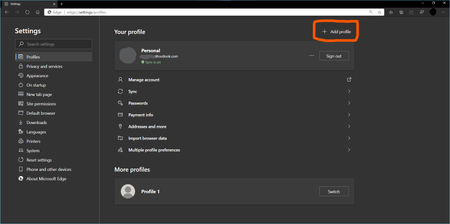
I love being able to create multiple profiles for the various accounts and services I have to use, I am now up to 7. It's great to be able to separate them and just utilize sso to do what I need without constantly having to login to each admin console. The problem is that every once in a while, my "Connected to Windows" account get associated with a profile and it becomes a royal nuisance. The only way I have seen to fix it is to delete the profile and start over and that hasn't always worked. On any profile, you can "Sign-Out" or "Sign-Out and Forget" a non-Connected to Windows account. I would like to see the option to "Remove from this Profile" option for the Connected to Windows account. It would also be great if when setting up a new profile there was a more streamlined process to add a work account that won't let the company manage the pc and is only for this application. Perhaps after adding one work account to Edge, the default should be reversed?Solved62KViews11likes34CommentsMicrosoft's Support Statement Around Replicated User Profile Data
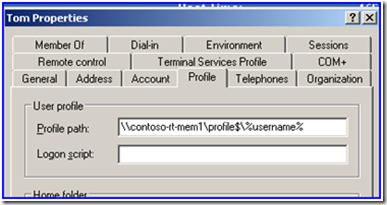
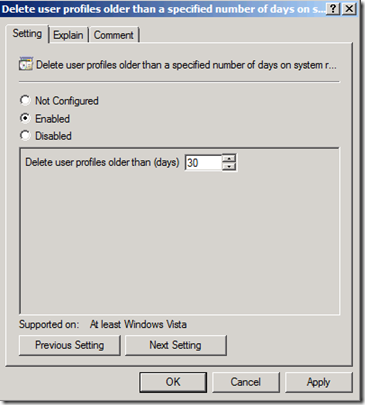
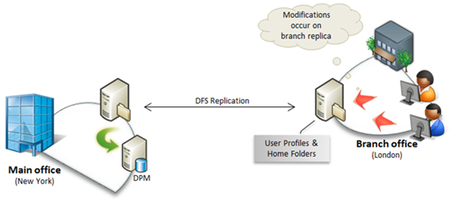
First published on TechNet on Sep 01, 2010 [Note from Ned: this article was created and vetted by the Microsoft development teams for DFS Replication, DFS Namespaces, Offline Files, Folder Redirection, Roaming User Profiles, and Home Folders.26KViews0likes0Comments
Wrong profile name in taskbar for different profiles.
Profile name in taskbar is different than the name in the browser- I have more 5-6 different profiles and I have properly named them in browser settings. but when I pin the same profile icon on taskbar, the name gets saved like "Profile X" For Example - Name is like "Profile 2" Meanwhile in the Settings it's like this-139Views0likes0CommentsHow to Remove Old Memberships from a user?
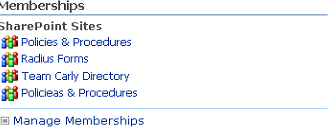
Hello Everyone: I'm new to SharePoint and have been experimenting with SharePoint 2007 (I know... ancient). I've kind of gotten myself into quite the unusual bind and need some help getting out. The Back story: I began experimenting with SharePoint 2007 about a week or two ago and had several failed deployments. After each failed attempt at doing one thing or another, I would delete the site collections, sites, and SSPs associated with it along with the SQL Server databases. Now that I've finally gotten it working (hopefully) the failed attempts are showing up in one of my user's "My Links" and "my memberships" on their My Site. How in SharePoint Server 2007 do I go about cleaning up these things? Also I seem to have created 2 sites called "Policies & Procedures" and thus need to de-link the test version from the current version. to see what I'm referencing, see the screenshots If possible, I'd prefer to not have to start over or delete the AD user since I'm also using CRM. Any thoughts?530Views0likes0CommentsSmart 💡 Idea: use Automatic Profile Switching in Edge to create a Container like experience
The description for containers or multi-containers in Firefox is this: https://support.mozilla.org/en-US/kb/containers Multi-Account Containers is a Firefox add-on that lets you separate your work, shopping or personal browsing without having to clear your history, log in and out, or use multiple browsers. It's an improved version of the Containers feature built into Firefox Nightly and the completed Firefox Containers Test Pilot experiment. What are Containers? Container tabs are like normal tabs except that the sites you visit will have access to a separate slice of the browser's storage. This means your site preferences, logged in sessions, and advertising tracking data won't carry over to the new container. Likewise, any browsing you do within the new container will not affect your logged in sessions, or tracking data of your other containers. Back to the Microsoft, in Edge browser, we have profiles, we can create multiple profiles and give them custom names we can create offline profiles or we can connect those profiles to online Microsoft accounts (free or work accounts) Edge also has other features (in Canary and Dev channels at the moment of writing this) Automatic profile switching Multiple profile preferences the description text says: Automatic profile switching feature detects links being opened in incorrect Microsoft account profiles and guides users to correct work, school or personal profile by showing a prompt that lets user switch to correct profile. So, now consider all that's been said above, there is an opportunity here. Microsoft Edge already has the base and fundamental features to have a container experience, the only things left to be done are some tweaking. How? Container/multi-container in Firefox is basically an add-on. I've been testing Firefox nightly in the past few months as my default browser and used containers extensively, I've also been using Edge browser and multiple profiles and I'm 100% sure this can happen. Microsoft (i.e Edge browser team) kindly need to improve the Automatic profile switching. so what I mean is, this feature that can already detect links and switch/open them in a different/correct profile, now it needs to Also be able to switch/open links that the user manually specifies. Edge team need to simplify the profiles that are going to be used for container. the profiles used for containers need to share the same installed extensions, favorites, history etc but when it comes to cookies, site cache etc they should be isolated. So for Example, I want all of the links coming from Facebook.com domain to be opened in a profile that's named "Facebook". I want all of the links coming from Twitter.com domain to be opened in a profile called "Twitter" and so on. this is Exactly how multi-container in Firefox works, users specifies a list of addresses and websites and they are automatically opened in their own container, separate from the other containers and the main browsing session, but still in the same window. each container is opened as a tab, next to other tabs, Not in a separate window. so one of the tweaks that I mentioned that need to happen is that Edge should let us open links from different profiles in the same window. currently it can't and each profile is opened in a separate window. so once Edge is able to open Tabs belonging to different profiles in the same window (next to other tabs), those tabs can be colored and marked with a feature that is already available in Edge, called "Tab Groups", the job of which is to put different tabs together and give them a specific color and name. in the screenshot above, I'm showing the end goal and what I hope to happen. so the group "Facebook" with the Cyan color means those tabs belong to a Different profile in Edge that is called "Facebook, but are in the same Edge window next to other tabs that belong to other profiles. I really believe this is totally possible and achievable. let me know what you think and if there is something that can improve this in case I missed it, please comment down below. thank you Deleted MissyQ please review and let the team know? 🙏18KViews15likes15Comments