private messaging
69 Topics
[Help]Tips on how to chat with live customer service
How can I chat with live customer service and the technical team to get their assurance that Microsoft will fix the issue or is currently investigating it, such as the file history log problem? For example, these two posts: Windows 11 to KB5101684 File History bug | Microsoft Community Hub Win 10/11 file history is malfunctioning after an update why hasn't Microsoft fixed this issue yet? | Microsoft Community Hub230Views0likes1CommentMailbox automatically Pinning every new incoming email - Desktop and Mobile
I have a user that, whenever they receive a new email, that email will automatically pin to the top of their inbox. We have tried to recreate the outlook profile Adjust and create mail rules to not pin emails Modify settings within webmail Remove all flags and all disable all setting pertaining to flagging and pinning Reset customization reset nav panes reinstalled office Tested in the "new outlook" On the mobile side, Deleted all mail profiles Installed the outlook app instead of the ios mail app made sure he has no specific mailbox retention or policies that would apply a setting like this This issue has been going on for months with no sign of being fixed. pretty much nothing at all has stuck and the issue persists. I am a systems admin, so i have the ability work on this from the backend. My entire team is just at a loss with this issue.185Views0likes1CommentMailbox automatically Pinning every new incoming email - Desktop and Mobile
I have a user that, whenever they receive a new email, that email will automatically pin to the top of their inbox. We have tried to recreate the outlook profile Adjust and create mail rules to not pin emails Modify settings within webmail Remove all flags and all disable all setting pertaining to flagging and pinning Reset customization reset nav panes reinstalled office Tested in the "new outlook" On the mobile side, Deleted all mail profiles Installed the outlook app instead of the ios mail app made sure he has no specific mailbox retention or policies that would apply a setting like this This issue has been going on for months with no sign of being fixed. pretty much nothing at all has stuck and the issue persists. I am a systems admin, so i have the ability work on this from the backend. My entire team is just at a loss with this issue.219Views0likes1Comment
Issue with "Edit with Paint 3D" Functionality
I have recently encountered an issue with Paint 3D. When I try to edit a picture using Paint 3D by right-clicking on the photo and selecting "Edit with Paint 3D," I am unexpectedly prompted to choose an app to open the file instead of Paint 3D launching directly. Has anyone else experienced this problem, or does anyone have any insights on why this might be happening and how to resolve it? Thank you for your assistance! Following was done: Reinstall Paint 3D Open Microsoft Store: Go to the Start menu and open the Microsoft Store. Search for Paint 3D: In the search bar, type "Paint 3D." Reinstall Paint 3D: If the app is installed, you can click "Open." If it’s not installed or you suspect it might be corrupted, click "Install" or "Get" to reinstall it. Ensure Paint 3D is Enabled Open Settings: Press Win + I to open Settings. Go to Apps: Navigate to "Apps" and then "Apps & features." Find Paint 3D: Scroll through the list of installed apps to find "Paint 3D." Ensure It’s Enabled: If you find it, make sure it’s not disabled. If it is, re-enable it. Associate Image Files with Paint 3D Manually Right-click on the Image File: Right-click on an image file. Select Properties: Choose "Properties" from the context menu. Change the Default Program: In the Properties window, click the "Change" button next to "Opens with." Manually Find Paint 3D: Click "More apps" if Paint 3D is not listed. Scroll down and click "Look for another app on this PC." Navigate to C:\Program Files\WindowsApps and look for the Paint 3D executable. Note that you may need administrative permissions to access this folder. Use the Default Apps Settings Open Settings: Press Win + I to open Settings. Go to Apps: Navigate to "Apps" and then "Default apps." Reset Default Apps: Scroll down and click "Reset" under "Reset to the Microsoft recommended defaults." Change Defaults Manually: After resetting, try setting Paint 3D as the default app for your image files again. Check for System Updates Open Settings: Press Win + I to open Settings. Go to Update & Security: Navigate to "Update & Security." Check for Updates: Click "Check for updates" and install any available updates. Sometimes updates can fix issues with system apps like Paint 3D. 1. Check if Paint 3D is Installed Correctly Open PowerShell as Administrator: Press Win + X and select "Windows PowerShell (Admin)." Check Installation: Enter the following command to check if Paint 3D is installed: powershell Copy code Get-AppxPackage *Microsoft.MSPaint* | Select Name, PackageFullName If Paint 3D is listed, it’s installed. If not, proceed to reinstall it. Reinstall Paint 3D: Uninstall Paint 3D using PowerShell: powershell Copy code Get-AppxPackage *Microsoft.MSPaint* | Remove-AppxPackage Reinstall from the Microsoft Store: Open the Microsoft Store, search for "Paint 3D," and install it. 2. Reset Paint 3D Open Settings: Press Win + I to open Settings. Go to Apps: Navigate to "Apps" > "Apps & features." Find Paint 3D: Scroll down and select "Paint 3D." Advanced Options: Click on "Advanced options." Reset: Click the "Reset" button. This will reset Paint 3D to its default state. 3. Create a New User Profile Open Settings: Press Win + I to open Settings. Go to Accounts: Navigate to "Accounts" > "Family & other users." Add Someone Else to This PC: Click on "Add someone else to this PC." Create a New User: Follow the prompts to create a new user account. Log In: Log out of your current account and log in with the new user account. Check if Paint 3D works correctly in the new profile. 4. Repair Windows Using DISM and SFC Open Command Prompt as Administrator: Press Win + X and select "Command Prompt (Admin)" or "Windows PowerShell (Admin)." Run DISM: Enter the following command to repair the Windows image: powershell Copy code DISM /Online /Cleanup-Image /RestoreHealth Wait for the process to complete. Run SFC: Enter the following command to check and repair system files: powershell Copy code sfc /scannow Wait for the process to complete and restart your computer.29KViews1like11Comments
D365 Licensing vs Security Roles – Why can users access data without the required license?
I am working as a Power Apps developer in a Dynamics 365 environment that has the Field Service module enabled. In the same environment, some users only have Sales licenses. I assigned a security role that provides read access to the Warehouse table to a user with a Sales license. The user is able to access and read the data successfully, even though they do not have a Field Service license. This makes me unclear about how licensing is enforced in Dynamics 365. If security roles alone can grant access to tables, how do licenses actually restrict functionality? Why is it necessary to purchase additional licenses if users can still access data through security roles? Could someone clarify how licensing enforcement works in this scenario and what the best practice is?247Views0likes1Comment
Question About Events, Azure, Copilot and Microsoft widgets
Hello! I am overly enthusiastic to learn more about this company, and I saw three events I'd like to attend in person as I cannot do anything online, I apologize. Does anyone know if there really is this Microsoft event on March 6th in Redmond? If not where is it as It is not coming up on the list or I cannot find it. I searched for azure events and about three came up, but after I scroll and the mouse timer comes up, nothing appears, is anyone interested in describing more about azure technology to me and how it works? I'll never tell! My last question is there is an event bsides seattle, I'm so confused is it at a hotel and how do you register because it's not listed on this platform. I wish I could do the online events like this was training, but it's better to do things in person always because it's more authentic. I tagged this as avatar, if you do not know anything about me just my love of tech what would my avatar be?188Views0likes1Comment
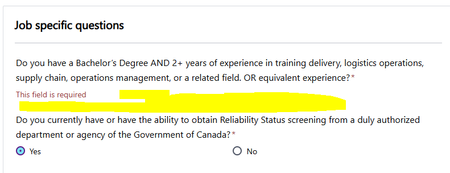
Radio buttons aren't functioning for a mandatory question in job application with Job ID - 200027012
Hi All, Yes and No radio buttons are missing for a mandatory question in one of the job application on Microsoft careers, without which application cannot be submitted, details as below Job ID - 200027012 Role - Inventory and Asset Technical Trainer Can anyone please look into this. I've raised the same concern yesterday night about 12hrs back, but it got disappeared, if possible can anyone let me know where to find my previous raised concerns.236Views0likes3CommentsMy Tech Community Inbox is broken
The badge on the envelope icon said I had 9 unread messages, but when I clicked on it I just got a blank list with a "loading" animation. It disappears after a minute or so, but nothing loads. I tried sending myself a test message, and now the badge says I have 10 unread messages, but the inbox still isn't working. Thanks.Solved375Views1like5CommentsOutlook Group Contacts
In Classic Outlook I have a Group Contact to send a church newsletter to members from my personal email, without giving everyone access to contacts, calendars etc. I would like to do this in the New Outlook but Groups seem to set up new group email address and giving full access to everyone. Is there any way to continue as I did with Classic Outlook?Solved160Views0likes1Comment