policy
17 Topics
What permissions are needed to create teams from a template?
Hi there! I'm trying to create a new classroom team in Teams, but neither my normal account or my GA account has permissions to create teams from templates, nor from another team. The options are greyed out and the tooltip says I don't have permission. The "from scratch" option is completely missing, only "From a group" is available. I've ensured that both accounts have a license (Education A3) and the appropriate permissions in the Teams Admin Portal (where I can create normal teams from scratch with my admin account no problem). Am I missing something? Are there any more permissions required? I've tried both in a browser and in the desktop app.1.3KViews0likes1CommentMS Teams policy doesn't work as it is set
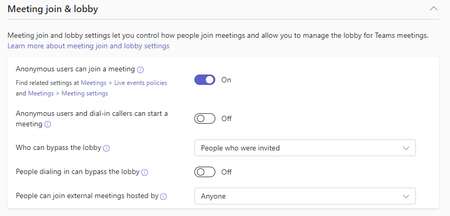
hi, we have the Meeting join & lobby settings like this: the problem is that some users if they create a meeting, their all invited participants land in the lobby. Yes - we have a few policies, and yes all have the same settings regarding Meeting join & lobby. Do you have any idea what's wrong?672Views0likes1CommentTeams on smartphone should only ring if connected to company WLAN
Hello, I have a client who wants to switch to Teams with their telephony. The company would like to have the following for certain people: - The smartphone should only receive incoming calls when connected to the company WLAN. However, if you are outside the network, you should simply be able to make calls, but not receive calls. Is there a way to configure this? So far I have found this from Skype for Business, where you can set a policy with WifiOndly. https://learn.microsoft.com/de-de/powershell/module/skype/set-csteamsmobilitypolic New-CsTeamsMobilityPolicy -Identity "Test-WifiOnly" -IPVideoMobileMode WiFiOnly Grant-CsTeamsMobilityPolicy -Identity email address removed for privacy reasons -PolicyName "Test-WifiOnly". However, this policy does not work in my tests either. What options are there for configuring this?1.1KViews0likes1Comment
Unable to add tabs to channel scheduled meetings
Hey all, we noticed that for mostof our users the "+" symbol to add a new tab, e.g. Polls app, to a scheduled channel meeting is missing. It's not available in the pre-meeting experience and during. I couldn't find anything policy related and it's not a client cache issue as the behaviour is the same in the web client. Any ideas what could be causing this? Thanks.Solved1.1KViews0likes2CommentsUsers to accept Usage Policy for Teams?
This is related to a feature in Yammer that we would like to apply to Teams, if possible. In the Yammer admin center, you can add verbiage for a Usage Policy and there is a checkbox "Require users to accept policy during sign up and after any changes are made to the policy". This means when someone opens Yammer (or Viva Engage in Teams), a pop up window displays with the Usage Policy text and a button "I accept" that they must click before proceeding to Yammer/Engage. My question is, is this same type of functionality available in Teams? Can we make it so when someone opens their Teams client, a pop up window displays with a policy they must accept? If this isn't possible, is there some other way to display a policy in the Teams app somewhere that everyone would see?Solved1.4KViews0likes2Comments
Einschränken von sichtbaren Apps im Teams App Store
Seit der Änderung MC350372 / Roadmap ID 84469 können alle Nutzer des Unternehmens alle in Teams verfügbaren Apps einsehen und beantragen. Dies würden wir gerne verhindern / einschränken. Leider ist diese Änderunge standardmäßig aktiv und wir wissen nicht, wie wir sie deaktivieren können. Gibt es eine Option hierfür? https://supersimple365.com/user-requests-for-apps-in-teams-store/2KViews0likes2CommentsTeams policy to limit user meeting access to certain number of members from specific group
I have a scenario that I need some assistance figuring out. We have a group of 7 individuals within our organization. These individuals are not allowed to have more than 50% of them in any one given place without previously scheduled meetings and agendas, physically or digitally. I need to configure a way that will not allow more than 3 of those individuals to be in the same Teams meeting together. Is it possible to create a policy to do this?1.2KViews0likes1Comment
File sharing with annonymous during video meeting
Does anyone know if it works below? We disabled Teams option that “annoymous can join the meeting” because it may cause data leakage during Video conference with external resources. Also our Onedrive / Sharepoint file sharing policy is that “Allowing file sharing at the organization level” so we restrict external file sharing. but As far as I know, Teams file sharing is based on Onedrive and Sharepoint policy if we enable “Annoymouse can join the meeting” option,In this case, our employees won't be able to share confidencial files to annoymouses during the video meeting. is this correct? Could you please provide us some clue or simulation result saying that It is true? I would like to have clear evidence it would be great if I can find an official answer from Microsoft. Thank you for your help.Solved1.6KViews0likes4CommentsAdding personal account is not allowed
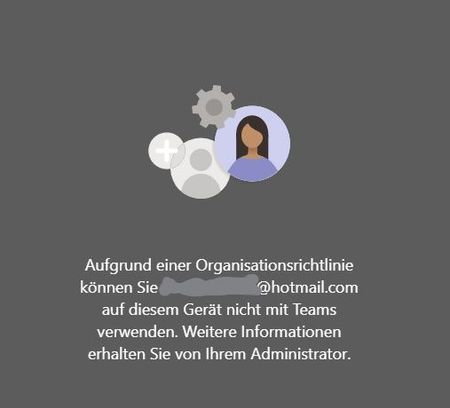
Hello everyone Since MS is rolling out its new Teams UI and features like adding a personal account next to your business account, I would like to give it a try but sadly failed with following error message. The message is in german but it says something like: "Due to an organization policy, you cannot use 'xy@hotmail.com' with teams on this device." So yeah, which policy is here meant? I'm a Global Administrator in our M365 environment and it drives me crazy that I can't find this policy. Also, I can't find any similar problems or documentations about this. Can anyone help? Thanks very much.6.4KViews0likes5Comments
Recording Policy is set to onedrive, but recordings still saved in stream
Hello all, we had after knowing about this upcoming changed the storage location of the policys to Onedrive, but the recordings are still saved to Stream. Do i need to do something else for saving the recordings in Onedrive? Thanks in advance.1.9KViews0likes5Comments