policy
96 Topics
Chrome extension managed storage policy
Hi there, I've developed a chrome extension and now we want to deploy it using Intune. Force install of extension works great but I can't pass managed data to the extension. Here is the scheme: { "type": "object", "properties": { "apiKey": { "title": "API Key", "description": "An API key to communicate with server.", "type": "string" } } } This is the policy that I created in Intune: OMA-URI: ./Device/Vendor/MSFT/Policy/Config/Chrome~Policy~googlechrome~3rdparty~extensions~eagefwefpbjpewefliifpgfgoewfknnmk~policy Data type: String Value: {"apiKey":"mykey123"} But it doesn't appear in chrome://policy and when I get policies in my code with: const result = await chrome.storage.managed.get(null); The result is empty! What is the problem here? And how to fix it?498Views0likes1CommentIntroducing the Azure Resource Manager MCP Server!
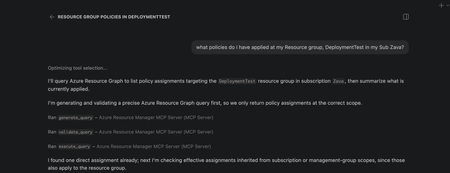
We're super excited to announce the public preview of the Azure Resource Manager MCP Server! This is a remote MCP server that provides tools to give AI agents first-class access to Azure infrastructure operations through Azure Resource Manager (ARM). AI agents can now be equipped with tools to generate, validate, execute Azure Resource Graph (ARG) queries and tools to deploy and manage ARM template deployments. This server is able to generate and execuite queries that return data across all your Azure resource types! At its core, this server is built to help AI agents interact with Azure resources seamlessly. What this means for you Ask natural language questions about your Azure estate to your agents and get real time, accurate answers backed with an ARG query Deploy and manage infrastructure easily by having AI deploy ARM templates for you Monitor deployment status and catch issues before they escalate Ability to build more advanced AI agents that understand your Azure environment What You Can Do Today Generate, Validate, and Execute Azure Resource Graph Queries from Natural Language No need to struggle with writing KQL from stratch! Describe what you need, and the MCP server tool generates Azure Resource Graph queries that match your intent. You ask an AI Agent: "Find all virtual machines in my subscription that don't have managed disks". It uses the tool and returns: A ready-to-execute ARG query without manual KQL writing. These queries spans across all your azure resource types so can learn and navigate across any type! Deploy, monitor and cancel ARM Templates Pass an ARM template, and the MCP server kicks off the deployment targeted to an existing resource group scope. Monitor the deployment by getting status about it and even cancel it if you decide its not doing what you need it to. Here is the complete list of the tool available in this preview: generate_query validate_query execute_query create_template_deployment get_arm_template_deployment_status cancel_arm_template_deployment Real-World Scenarios Infrastructure Compliance Audit "Show me all resources created in the last 30 days that don't have required tags." - The MCP server generates and executes the query, returning resources that need remediation. Your team can then fix them programmatically or through Copilot. Rapid Infrastructure Provisioning "Using this ARM template <path to template>, deploy a secure storage account with HTTPS-only access, private endpoints, and Standard_LRS replication to my production resource group." This will take an existing ARM template and deploy it to a resource group scope. Policy Compliance Check "Check if all resources in my subscription comply with the latest policy applied to it." - The MCP server generates and executes the query, returning resources that are non-compliant. Your team can then take corrective actions programmatically or through Copilot. Building Agents with Azure Resource Manager MCP Server The MCP server's tools can be integrated into custom agents you build with GitHub Copilot. What this means is you can create custom agents that automatically check compliance, track changes in a scope, or ensure all resources have a particular tag applied to them! Getting Started Prerequisites VS Code installed Valid Azure account with appropriate permissions GitHub Copilot subscription Installation Install the MCP Server Open https://aka.ms/JoinARMMCP VS Code launches automatically Click Install under Azure Resource Manager MCP Server Sign in with your Azure credentials If you hit any authentication issues see Troubleshooting Guide in our repo Check tools are enabled in Chat Open Chat in VS Code (View > Chat) Click Configure Tools Ensure the six Azure Resource Manager MCP Server tools are enabled Start Using It Ask Copilot a question about your Azure resources or infrastructure needs The MCP server handles the rest Governance & Security The Azure Resource Manager MCP Server respects your Azure permissions and governance policies. All operations run in the context of your signed-in user. Additionally you can apply Azure Policies to prevent deployments via the MCP Server. Find more details in the README of our documentation repo. What's Next? We are actively expanding the capabilities of the Azure Resource Manager MCP Server! The Server will expand to include: Additional ARM API capabilities with ARM Enhanced query generation and optimization Support for additional MCP clients beyond VS Code, next up: Claude Get Feedback We want to hear from you. Try the public preview and share your feedback. Found a bug? Or have a feature request? Open an issue on GitHub at https://aka.ms/ARMMCPIssue Resources - 📖 Full Documentation – Complete setup and usage guide - 🔗 Install Now – Get started with the public preview - 🐛 Report Issues – Share feedback and bugs - ❓ FAQ – Common questions answered - 🛠️ Troubleshooting – Resolve common issues Try It Today The Azure Resource Manager MCP Server public preview is available now. Visit https://aka.ms/JoinARMMCP to install and start automating your Azure infrastructure with AI. What agents will you build with these tools? We can't wait to see how you'll use this. Steven Bucher PM on Azure Resource Manager and Azure Governance[Now Generally Available] Customizable Security Baseline Policies in Machine Configuration!
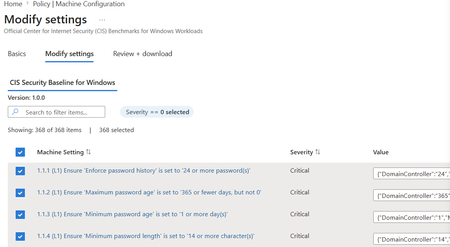
Background: Azure Machine Configuration remains committed to enabling greater security and simplicity in at-scale server management for all Azure customers. Machine Configuration (previously known as Azure Policy Guest Configuration) enables both built-in and custom configuration as code allowing you to audit and configure OS, app, and workload level settings at scale, both for machines running in Azure and hybrid Azure Arc-enabled servers. We're excited to announce the General Availability of Customizable Security Baselines in Azure Policy and Machine Configuration. What began as a Public Preview is now a mature, production-grade capability that empowers you to tailor industry security benchmarks to your organization's unique compliance standards across both Azure and Arc-connected machines, at scale. This release moves the experience from "useful" to "everyday default." Standards coverage has expanded, the customization and assignment flow is faster, full lifecycle management is now possible directly from the Azure Portal, and a new Overview page gives you a single pane of glass into which parts of your estate are unprotected. What is Baseline Customization? The core experience remains: tailor security standards through the Modify Settings wizard under Policy > Machine Configuration. You can enable, exclude, or adjust rules from existing benchmarks, apply organization-specific parameters, and export your custom configuration as a downloadable JSON file. Each baseline JSON file serves as a reusable, declarative artifact, ideal for policy-as-code workflows, version control, and CI/CD integration. What's New? GA brings four substantive shifts to the customizable baselines experience: broader standards coverage, a faster path from customization to deployment, lifecycle management directly in the portal, and a new Overview page that surfaces compliance gaps at the subscription level. Together, these changes reflect what we heard from early customers during Preview: that custom baselines need to live alongside the rest of their governance workflows, not in a one-time wizard. This cloud-native approach continues to embody Microsoft's Secure by Design and Secure by Default principles, with a sharper focus on the operational reality of running compliance at scale. Built-in Policy Standards Coverage GA expands what you can customize and where it's supported. Standard Status Notes CIS Benchmarks for Linux Generally Available Expanded distribution coverage since Public Preview. See the full list of supported distros in the official documentation. [NEW!] CIS Benchmarks for Windows Public Preview Initial release covers L1 settings for WS2025 Domain Controller and Member Server roles. Azure Compute Security Baseline for Windows Generally Available Now supports customization for Windows Server 2016 and 2019, in addition to 2022 and 2025. Azure Compute Security Baseline for Linux Generally Available Aligned with Azure Compute recommendations across supported Linux distributions. Key Scenarios Faster Time to Deployment The customization-to-assignment path is now a single continuous flow. You can: Skip the JSON download step entirely. Baseline settings are auto-populated into the Azure Policy assignment flow, so you no longer have to download a JSON file, browse for it, and upload it back. The settings ride with you from Modify Settings straight into Assign Policy. Use the improved settings editor. Role-specific values (Domain Controller, Member Server) and formatted inputs render cleanly in the UX, with validation that prevents malformed parameters from reaching the policy assignment. Still export when you need to. The JSON download remains available for teams that want to commit baselines to source control, share with reviewers, or pipe through CI/CD. The net result: what used to take a multi-step download-and-reupload sequence is now a few clicks inside one blade. Lifecycle Management in the Portal Compliance baselines are not write-once artifacts. They evolve as benchmarks update, as your controls tighten, and as your estate changes. GA introduces two capabilities that treat baselines as living configuration: Import and Modify. From the Definitions tab under Machine Configuration, you can now import an existing baseline JSON and iterate on it directly in the portal. This closes the loop between policy-as-code workflows and ad-hoc edits, so you no longer have to choose between version-controlled artifacts and in-portal convenience. Edit Settings on existing Assignments. The Assignments tab now supports updating an active baseline assignment in place. You can refine rules, adjust role-specific values, or exclude controls without tearing down and re-creating the assignment. All you have to do is select the policy assignment and the "Edit Settings" button should be enabled. Together, these turn baselines into something you maintain, not something you set and forget. New Overview Page: See Where You're Unprotected A new Overview page on Policy > Machine Configuration gives you subscription-level visibility into where Machine Configuration is enabled and where it isn't. For each subscription it surfaces status (At Risk, Not Enabled, Enabled), machines missing prerequisites, machines with prerequisites in place, and total eligible machines. From the same view you can enable Machine Configuration on selected subscriptions to onboard eligible VMs and activate baseline auditing in a single action. This shifts the first question from "is this one machine compliant?" to "which corners of my estate aren't even being assessed yet?", which is usually the more consequential gap. Integration and Automation Security baselines continue to integrate into your DevOps pipelines and configuration management workflows. Each baseline produces a declarative settings catalog (JSON) that can be versioned and deployed using Azure CLI, ARM templates, Bicep, and CI/CD automation, ensuring reproducible, traceable compliance configurations across environments. Availability Customizable security baselines are now generally available in all public Azure regions, Azure Government, and Sovereign Clouds. Getting Started Prerequisites Before you begin: Deploy the Azure Machine Configuration prerequisite policy initiative. (This installs the required Guest Configuration extension on supported VMs.) You can also do this in a single action from the new Overview page. Ensure your Azure subscription or management group includes supported Windows or Linux VMs. Have sufficient permissions (Owner or Resource Policy Contributor) to create and assign custom policy definitions. Step-by-Step Guidance Check your coverage on the Overview page to see which subscriptions are unprotected and onboard them with one click. Select a baseline from the Definitions tab in Machine Configuration or use Import and Modify to iterate on an existing baseline JSON. Modify settings to enable, exclude, or parameterize rules to match your internal policies. Assign the policy directly from the wizard. Settings are auto populated into the assignment flow, no JSON upload required. Iterate when needed. Use Edit Settings on the Assignments tab to refine active baselines in place. Review compliance results to track outcomes in Azure Policy, Azure Resource Graph, or the Guest Assignments page. Learn More Azure Machine Configuration security baselines official documentation CIS Benchmark for Windows Server (Preview) documentation CIS Benchmark for Linux documentation Azure Windows Baseline and Azure Linux Baseline documentation Please note that the use of Azure Machine Configuration on Azure Arc-enabled servers will incur a charge.[Public Preview] Introducing Customizable Security Baseline Policies in Machine Configuration
Background: Azure Machine Configuration remains committed to enabling greater security and simplicity in at-scale server management for all Azure customers. Machine Configuration (previously known as Azure Policy Guest Configuration) enables both built-in and custom configuration as code allowing you to audit and configure OS, app, and workload level settings at scale, both for machines running in Azure and hybrid Azure Arc-enabled servers. We’re excited to announce Public Preview support for Customizable Security Baselines in Azure Policy and Machine Configuration. This feature empowers you to tailor industry security benchmarks—such as CIS benchmarks for Linux or Azure Security Baselines for Windows and Linux —to align with your organization’s unique compliance standards across both Azure and Arc-connected machines. This feature builds on top of our existing audit baseline capabilities for Windows and Linux. Now you can create, parameterize, and assign custom baselines at scale, enabling continuous compliance visibility across your entire environment. Learn more about how to get started here: Customize Security Baselines with Azure Policy and Machine Configuration. What's New? Customizable security baselines in Azure Policy and Machine Configuration bring a powerful new way to assess, monitor, and improve your security posture across both Windows and Linux servers. Built on industry benchmarks such as the Center for Internet Security (CIS) and Microsoft’s own Azure Compute Security Baselines, this capability enables you to adapt compliance frameworks to your organization’s specific needs — all while maintaining a consistent governance model across Azure and hybrid environments. By passing custom baseline parameters directly into Azure Policy, you can represent internal controls at scale, ensuring that compliance reflects your enterprise’s unique standards and regulatory requirements. This cloud-native approach embodies Microsoft’s Secure by Design and Secure by Default principles — ensuring your workloads stay compliant, wherever they run. Key Scenarios Baseline Customization Tailor your security standards through the Modify Settings wizard under Policy > Machine Configuration. You can: Enable, exclude, or adjust rules from existing benchmarks Apply organization-specific parameters Export your custom configuration as a downloadable JSON file Each baseline JSON file serves as a reusable, declarative artifact—ideal for policy-as-code workflows, version control, and CI/CD integration. Assign Audit Policies When you assign a baseline via Azure Policy, it automatically: Evaluates configurations against your defined standards Reports compliance in near real time Surfaces findings in Azure Policy, Azure Resource Graph, and the Guest Assignments view This integrated visibility helps IT administrators, security teams, and auditors track compliance status with minimal overhead. Integration and Automation Security baselines integrate seamlessly into your DevOps pipelines and configuration management workflows. Each baseline produces a declarative settings catalog (JSON) that can be versioned and deployed using: Azure CLI ARM templates Bicep CI/CD automation This ensures reproducible, traceable compliance configurations across environments. Supported Standards Standard Description CIS Linux Benchmarks Official CIS Benchmarks for Azure-endorsed Linux distributions, matching the latest CIS versions. Azure Compute Security Baseline for Windows Applies security controls for Windows Server 2022 and 2025, aligned with Azure Compute guidance. Azure Compute Security Baseline for Linux Enforces consistent controls aligned with Azure Compute recommendations. Availability Customizable security baselines are available in all public Azure regions. NOTE: Support for Azure Government and Sovereign Clouds will be added in a future release. These environments are not included in the current Public Preview. Getting Started Prerequisites Before you begin: Deploy the Azure Machine Configuration prerequisite policy initiative. (This installs the required Guest Configuration extension on supported VMs.) Ensure your Azure subscription or management group includes supported Windows or Linux VMs. Have sufficient permissions (Owner or Resource Policy Contributor) to create and assign custom policy definitions. Step-by-Step Guidance Select a baseline from the Machine Configuration tab in Azure Policy. Modify settings to enable, exclude, or parameterize rules to match your internal policies. Download JSON to export your customized baseline configuration file for programmatic and repeatable customization. Assign the policy which can be deployed through the Azure portal, CLI, or your CI/CD pipeline. Review compliance results to track outcomes in Azure Policy, Azure Resource Graph, or the Guest Assignments page. Coming Soon Leverage baseline customization to gradually remediate server security non-compliance using Azure Policy! Join the waitlist here: https://aka.ms/BaselineRemediationWaitlist Learn More Azure Machine Configuration security baselines official documentation CIS Benchmark for Linux documentation Azure Windows Baseline and Azure Linux Baseline documentation Please note that the use of Azure Machine Configuration on Azure Arc-enabled servers will incur a charge.
Announcing Public Preview for Essential Machine Management
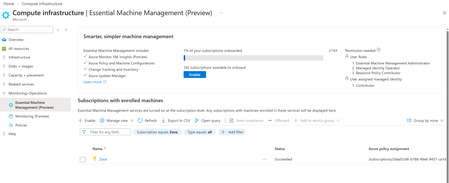
Managing servers and VMs across Azure, on premises, and multi-cloud environments often means turning on core capabilities—monitoring, updates, inventory, and configuration—through separate setup experiences. We’ve heard feedback that this makes it harder to get visibility into machine state and take actions. We’re excited to announce the public preview of Essential Machine Management experience within Compute Infrastructure Hub—a new entry point in Azure that streamlines onboarding for machines at scale and enables basic management capabilities. Start once at subscription scope, get a clear view of what’s turned on, and move from setup to operations faster across your Azure and cloud and hybrid estate. What is Essential Machine Management? Essential Machine Management is a centralized onboarding experience that helps customers enroll their machines into a set of selected cloud-native management services from Azure in a simple, scalable way, Instead of enabling monitoring, updates, inventory, and configuration independently per machine, Essential Machine Management allows you to enroll entire subscriptions at once, including both Azure Virtual Machines and Azure Arc–enabled servers. These services are pre-configured with best practices, enabling customers with out-of-the-box value right away. Once enrolled, current and future machines in the selected subscriptions are automatically onboarded to the enabled management services, helping ensure consistent visibility and operational coverage from day one. What management capabilities are enabled? Using Essential Machine Management, you can quickly onboard machines to multiple Azure management capabilities, including: Monitoring insights and recommended alerts for machine health and performance Azure Update Manager to help keep machines secure and compliant Change tracking and inventory for visibility and auditability Machine configuration for managing in-machine configuration, compliance and security Azure Security baseline policy is a set of tailored rules to assess your machine's security posture These services help keep your infrastructure secure and healthy. How much does it cost? Azure VMs: For Azure Virtual Machines only, capabilities enabled by Essential Machine Management are provided at no additional charge. Azure Arc-enabled servers: For Azure Arc-enabled servers with Windows Server Software Assurance, Windows Server PayGo, and Windows Server Extended Security Updates, capabilities enabled by Essential Machine Management are provided at no additional charge. For all other Arc-enabled servers, Essential Machine Management will be priced at $9 per server per month once billing is enabled. See more details here. Getting started If you manage Azure VMs or Arc-enabled servers and are looking to simplify how you onboard and manage machines at scale, Essential Machine Management feature is now available for you to try in public preview. Check out the preview in the Azure Portal under Compute infrastructure --> Monitoring + Operations --> Essential Machine Management (preview): Check out Essential Machine Management now and reach out to machineenrollmentsupport@microsoft.com for any feedback or support. Learn more about Essential Machine Management here.Automating Windows Server Licensing Benefits with Azure Arc Policy
Introduction: Managing Windows Server benefits licensing across hybrid environments can be challenging. Azure Arc combined with Azure Policy simplifies this by automatically enforcing licensing compliance. This blog explains how the provided policy works and how to deploy it. Why implement this policy? Automating Windows Server Licensing Benefits with Azure Arc Policy ensures that all eligible machines are seamlessly enabled for essential management services, including Azure Update Manager, Best Practice Assessment, Change Tracking, Inventory, and Windows Admin Center integration. For organizations managing hundreds or thousands of servers, manual enablement can be time-consuming and error prone. This policy continuously monitors your environment, automatically identifying newly added machines and highlighting those missing the required benefits, so you can maintain compliance and streamline operations at scale This learn document detail the benefits available when Windows Server is connected via Azure Arc, especially for machines with Software Assurance or subscription licenses: https://learn.microsoft.com/en-us/azure/azure-arc/servers/windows-server-management-overview?tabs=portal Note – Ensure that your organization has the proper Software Assurance Benefits to cover the machines that are being assigned. Please reference this link for billing information Windows Server Management enabled by Azure Arc - Azure Arc | Microsoft Learn "Customers need to explicitly attest for their Azure Arc-enabled servers or enroll in Windows Server pay-as-you-go to be exempt from billing for these services. Eligibility isn't inferred directly from the enablement to Azure Arc. Eligibility is not inferred from licensing status for the Azure Arc-enabled SQL Server instances that may be connected to an Azure Arc-enabled." Policy Purpose and Logic The policy ensures Arc-enabled Windows Servers are licensed correctly. It evaluates machines based on OS type, license status, and conditions for Software Assurance or Pay-As-You-Go. If compliance is missing, a remediation policy deploys the appropriate license profile. Key Conditions Applies to resources of type Microsoft.HybridCompute/machines with osType = windows. Checks if licenseProfile.licenseStatus equals Licensed. Uses existenceCondition to determine if the machine should have SA or PAYG licensing based on osSku and licenseChannel. Deployment Details The policy uses DeployIfNotExists effect. It deploys licenseProfiles under the Arc machine resource. Two scenarios are handled: Pay-As-You-Go: If licenseChannel contains 'PGS', productProfile.subscriptionStatus is set to Enabled. Software Assurance: If licenseChannel does not contain 'PGS', softwareAssuranceCustomer is set to true. The Policy The policy is located in GitHub (Link) and AzPolicyAdvertiser (Link). Download the policy files to be used in the following steps. Policy Description For 2025 server, if license type is Pay-as-you-go, then this will check the Pay-as-you-go box in license menu. If 2025 and not Pay-as-you-go license or not 2025 server then check Software Assurance box. This policy only checks Windows Server resources and will NOT check unlicensed servers How to Deploy the Policy After downloading the policy file, use Az PowerShell to create and assign the policy: #Create policy definition New-AzPolicyDefinition ` -Name "activate-azure-benefits-for-windows-arc-machines" ` -DisplayName "Activate Azure Benefits for Windows Arc Machines" ` -Policy 'azurepolicy.json' ` -ManagementGroupName "<MyManagementGroup>" ` -Mode Indexed #Assign policy definition $Policy = Get-AzPolicyDefinition -Name 'activate-azure-benefits-for-windows-arc-machines' -ManagementGroupName "<ScopeOfDefinitionCreation>" New-AzPolicyAssignment ` -Name "activate-arc-benefits" ` -DisplayName "Activate Azure Benefits for Windows Arc Machines" ` -PolicyDefinition $Policy ` -Scope "/providers/Microsoft.Management/managementGroups/<MyManagementGroup>" ` -Location 'eastus' ` -IdentityType 'SystemAssigned' # Optional use subscriptions instead of management groups. # or "/subscriptions/<SubscriptionId>" You can also copy and paste the contents of the policy into the portal or use a policy-as-code solution of your choice. Compliance The compliance blade of the Azure Policy will show the machines that do not abide by the policy definition. In this example many of the machines are not enabled for the Windows Server Benefits. The next step will be to use remediation tasks to enable these machines. On the Policy Remediation blade, you can initiate a remediation task to add the machines to enable the Azure Arc Benefits. Choose between the two radio button options for remediating all the selected locations, a single location, or select specific resources to remediate. When the Remediate button is pressed, a task is summitted and a notification will be displaced when the task is completed. The process may take some time and a status of In Progress will be displayed until the status changes to Complete. After this is completed go back and look at the Azure Arc Benefits – Windows Server Blade and you will see the machines activated. Note on Pay-as-you-go enablement When a Windows machine is deployed using Pay-as-you-go, as an example a new Windows Server 2025 machine, the status of the license after creation will be “Unlicensed” as shown below. The policy is not evaluating Unlicensed machines. The machine will need to have the Pay-as-you-go with Azure check box checked at least one time to “License” the machine. After the machine is Licensed the License details will show: Now if the machine would have the benefits removed in the future by unchecking the box, the machine will be audited with the policy. As an example, the Arc machine would show that the License type is Pay-as-you-go, Licensed, Disabled (for the Azure Benefits). Summary This policy automates Windows Server licensing for Arc-enabled machines. It ensures compliance by deploying license profiles for Software Assurance or Pay-As-You-Go scenarios. Deploying this policy reduces manual effort and enforces consistent licensing across your hybrid environment.There needs to be a policy to enable Edge Secure Network
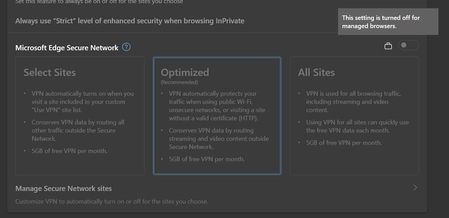
As soon a single policy is set for Microsoft Edge, either through group policy or registry, the Edge Secure Network becomes unavailable. There needs to be a policy to enable it again. Using a registry key or local policy to control Edge doesn't mean it's controlled by an organization or personal Microsoft accounts are not used.3.2KViews3likes5Comments
Azure Update Manager to support CIS hardened images among other images
What’s coming in by first week of August: Azure Update Manager will add support for 35 CIS hardened images. This is the first time that Update Management product in Azure is supporting CIS hardened images. Apart from CIS hardened images, Azure Update Manager will also add support for 59 other images to unblock Automation Update Management migrations to Azure Update Manager. What’s coming in September: After this release, another batch of 30 images will be added support for. Please refer to the article below to check the details of which images will be supported. Below 35 CIS images will be supported by Azure Update Manager by first week of August. Please note Publisher for all these images is center-for-internet-security-inc. Offer Plan cis-windows-server cis-windows-server2016-l1-gen1 cis-windows-server2019-l1-gen1 cis-windows-server2019-l1-gen2 cis-windows-server2019-l2-gen1 cis-windows-server2022-l1-gen2 cis-windows-server2022-l2-gen2 cis-windows-server2022-l1-gen1 cis-windows-server-2022-l1 cis-windows-server-2022-l1 cis-windows-server-2022-l1-gen2 cis-windows-server-2022-l2 cis-windows-server-2022-l2 cis-windows-server-2022-l2-gen2 cis-windows-server-2019-v1-0-0-l1 cis-ws2019-l1 cis-windows-server-2019-v1-0-0-l2 cis-ws2019-l2 cis-windows-server-2016-v1-0-0-l1 cis--l1 cis-windows-server-2016-v1-0-0-l2 cis-ws2016-l2 cis-windows-server-2012-r2-v2-2-1-l2 cis-ws2012-r2-l2 cis-rhel9-l1 cis-rhel9-l1 cis-rhel9-l1-gen2 cis-rhel-8-l1 cis-rhel-8-l2 cis-rhel8-l2 cis-rhel-7-l2 cis-rhel7-l2 cis-rhel cis-redhat7-l1-gen1 cis-redhat8-l1-gen1 cis-redhat8-l2-gen1 cis-redhat9-l1-gen1 cis-redhat9-l1-gen2 cis-ubuntu-linux-2204-l1 cis-ubuntu-linux-2204-l1 cis-ubuntu-linux-2204-l1-gen2 cis-ubuntu-linux-2004-l1 cis-ubuntu2004-l1 cis-ubuntu-linux-1804-l1 cis-ubuntu1804-l1 cis-ubuntu cis-ubuntu1804-l1 cis-ubuntulinux2004-l1-gen1 cis-ubuntulinux2204-l1-gen1 cis-ubuntulinux2204-l1-gen2 cis-oracle-linux-8-l1 cis-oracle8-l1 Apart from CIS hardened images, below are the other 59 images which will be supported by Azure Update Manager by first week of August: Publisher Offer Plan almalinux almalinux-x86_64 8_7-gen2 belindaczsro1588885355210 belvmsrv01 belvmsrv003 cloudera cloudera-centos-os 7_5 cloud-infrastructure-services rds-farm-2019 rds-farm-2019 cloud-infrastructure-services ad-dc-2019 ad-dc-2019 cloud-infrastructure-services sftp-2016 sftp-2016 cloud-infrastructure-services ad-dc-2016 ad-dc-2016 cloud-infrastructure-services hpc2019-windows-server-2019 hpc2019-windows-server-2019 cloud-infrastructure-services dns-ubuntu-2004 dns-ubuntu-2004 cloud-infrastructure-services servercore-2019 servercore-2019 cloud-infrastructure-services ad-dc-2022 ad-dc-2022 cloud-infrastructure-services squid-ubuntu-2004 squid-ubuntu-2004 cognosys sql-server-2016-sp2-std-win2016-debug-utilities sql-server-2016-sp2-std-win2016-debug-utilities esri arcgis-enterprise byol-108 byol-109 byol-111 byol-1081 byol-1091 esri arcgis-enterprise-106 byol-1061 esri arcgis-enterprise-107 byol-1071 esri pro-byol pro-byol-29 filemagellc filemage-gateway-vm-win filemage-gateway-vm-win-001 filemage-gateway-vm-win-002 github github-enterprise github-enterprise matillion matillion matillion-etl-for-snowflake microsoft-ads windows-data-science-vm windows2016 windows2016byol microsoft-dsvm ubuntu-1804 1804-gen2 netapp netapp-oncommand-cloud-manager occm-byol nginxinc nginx-plus-ent-v1 nginx-plus-ent-centos7 ntegralinc1586961136942 ntg_oracle_8_7 ntg_oracle_8_7 procomputers almalinux-8-7 almalinux-8-7 procomputers rhel-8-2 rhel-8-2 RedHat rhel 8_9 redhat rhel-byos rhel-lvm79 rhel-lvm79-gen2 rhel-lvm8 rhel-lvm82-gen2 rhel-lvm83 rhel-lvm84 rhel-lvm84-gen2 rhel-lvm85-gen2 rhel-lvm86 rhel-lvm86-gen2 rhel-lvm87-gen2 rhel-raw76 redhat rhel 8.1 redhat rhel-sap 7.4 redhat rhel-sap 7.7 redhat rhel 89-gen2 southrivertech1586314123192 tn-ent-payg Tnentpayg southrivertech1586314123192 tn-sftp-payg Tnsftppayg suse sles-sap-15-sp2-byos gen2 suse sles-15-sp5 gen2 talend talend_re_image tlnd_re thorntechnologiesllc sftpgateway Sftpgateway veeam office365backup veeamoffice365backup veeam veeam-backup-replication veeam-backup-replication-v11 zscaler zscaler-private-access zpa-con-azure Below images will be supported in September: Publisher Offer Plan aod win2019azpolicy win2019azpolicy belindaczsro1588885355210 belvmsrv03 belvmsrv001 center-for-internet-security-inc cis-rhel-7-v2-2-0-l1 cis-rhel7-l1 center-for-internet-security-inc cis-rhel-7-stig cis-rhel-7-stig center-for-internet-security-inc cis-win-2016-stig cis-win-2016-stig center-for-internet-security-inc cis-windows-server-2012-r2-v2-2-1-l1 cis-ws2012-r2-l1 cloudrichness rockey_linux_image rockylinux86 Credativ Debian 8 microsoftdynamicsnav dynamicsnav 2017 microsoftwindowsserver windowsserver-hub 2012-r2-datacenter-hub 2016-datacenter-hub MicrosoftWindowsServer WindowsServer-HUB 2016-Datacenter-HUB ntegralinc1586961136942 ntg_cbl_mariner_2 ntg_cbl_mariner_2_gen2 openvpn openvpnas access_server_byol rapid7 nexpose-scan-engine nexpose-scan-engine rapid7 rapid7-vm-console rapid7-vm-console suse sles 12-sp3 suse sles-15-sp1-basic gen1 suse sles-15-sp2-basic gen1 suse sles-15-sp3-basic gen1 gen2 suse sles-15-sp4-basic gen2 suse sles-sap 12-sp3 15 gen2-15 suse sles-sap-byos 15 suse SLES-SAP-BYOS 15 suse sles-sap-15-sp1-byos gen1 Tenable tenablecorenessus tenablecorenessusbyolBlock Microsoft from running experiments in the Microsoft Edge browser
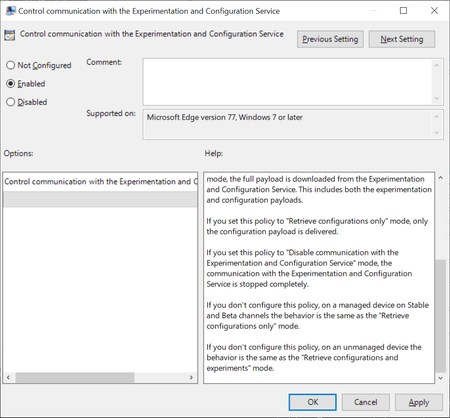
Browsers like Firefox, Chrome or Microsoft Edge come with built-in functionality to run experiments. Browser makers like Mozilla or Google may enable or disable features or changes in select browsers; this is often used to A-B test features or get early feedback on new implementations. While most users may not even notice that experiments are running in their browsers, it happened in the past that experiments caused issues. The latest case was revealed in November when administrators from around the world reported that a Chrome experiment would crash browsers in organizations worldwide. Negative side-effects of experiments are a problem for home users and business users alike, and it is often desirable to disable or block experiments from being downloaded and run. Microsoft distinguishes between controlled feature rollouts and experiments in the company's new Chromium-based Microsoft Edge web browser. Both are made available to part of the user base when they start to roll out but similarities end here. Microsoft notes: Microsoft Edge builds have features and functionality that are still in development or are experimental. Experiments are like CFR, but the size of the user group is much smaller for testing the new concept. These features are hidden by default until the feature's rolled out or the experiment's finished. Experiment flags are used to enable and disable these features. System administrators may use the "Control communication with the Experimentation and Configuration Service" on pro and Enterprise editions of Windows 7, 8.1 or 10 to prevent experiments in the browser. Here is what is needed for that: Get the latest Microsoft Edge policy file from the Microsoft Edge Insider website. It is likely that the policies will become available natively eventually when Edge is released and integrated in Windows. Extract the file (first a cab, then a zip). Open Windows > Admx. Copy the two .admx template files to C:\Windows\PolicyDefinitions\. Open the language folder that matches the system language and copy the .adml files to the corresponding language folder of C:\Windows\PolicyDefinitions\ Open Start, type gpedit.msc and hit the Enter-key to open the Group Policy Editor. Consult this Docs page on the Microsoft website for additional scenarios, e.g. when domain controllers are used. Open Computer Configuration > Administrative Templates > Microsoft Edge. Open the policy "Control communication with the Experimentation and Configuration Service" policy. Set the policy to Enabled. Set it to either "Retrieve configurations only" or "Disable communication with the Experimentation and Configuration Service". Retrieve will download configuration payloads only, disable won't download or enable them. The behavior of not configuring the policy differs depending on whether it is a managed or unmanaged device. Managed devices will download the configuration only while unmanaged devices will retrieve configurations and experiments. Source9.3KViews0likes4CommentsEmpower Smarter AI Agent Investments
This curated series of modules is designed to equip technical and business decision-makers, including IT, developers, engineers, AI engineers, administrators, solution architects, business analysts, and technology managers, with the practical knowledge and guidance needed to make cost-conscious decisions at every stage of the AI agent journey. From identifying high-impact use cases and understanding cost drivers, to forecating ROI, adopting best practices, designing scalable and effective architectures, and optimizing ongoing investments, this learning path provides actionable guidance for building, deploying, and managing AI agents on Azure with confidence. Whether you’re just starting your AI journey or looking to scale enterprise adoption, these modules will help you align innovation with financial discipline, ensuring your AI agent initiatives deliver sustainable value and long-term success. Discover the full learning path here: aka.ms/Cost-Efficient-AI-Agents Explore the sections below for an overview of each module included in this learning path, highlighting the core concepts, practical strategies, and actionable insights designed to help you maximize the value of AI agent investments on Azure: Module 1: Identify and Prioritize High-Impact, Cost-Effective AI Agent Use Cases The journey begins with a strategic approach to selecting AI agent use cases that maximize business impact and cost efficiency. This module introduces a structured framework for researching proven use cases, collaborating across teams, and defining KPIs to evaluate feasibility and ROI. You’ll learn how to target “quick wins” while ensuring alignment with organizational goals and resource constraints. Explore this module Module 2: Understand the Key Cost Drivers of AI Agents Building on the foundation of use case selection, Module 2 dives into the core cost drivers of AI agent development and operations on Azure. It covers infrastructure, integration, data quality, team expertise, and ongoing operational expenses, offering actionable strategies to optimize spending at every stage. The module emphasizes right-sizing resources, efficient data preparation, and leveraging Microsoft tools to streamline development and ensure sustainable, scalable success. Explore this module Module 3: Forecast the Return on Investment (ROI) of AI agents With a clear understanding of costs, the next step is to quantify value. Module 3 empowers both business and technical leaders with practical frameworks for forecasting and communicating ROI, even without a finance background. Through step-by-step guides and real-world examples, you’ll learn to measure tangible and intangible outcomes, apply NPV calculations, and use sensitivity analysis to prioritize AI investments that align with broader organizational objectives. Explore this module Module 4: Implement Best Practices to Empower AI Agent Efficiency and Ensure Long-Term Success To drive efficiency and governance at scale, Module 4 introduces essential frameworks such as the AI Center of Excellence (CoE), FinOps, GenAI Ops, the Cloud Adoption Framework (CAF), and the Well-Architected Framework (WAF). These best practices help organizations accelerate adoption, optimize resources, and foster operational excellence, ensuring AI agents deliver measurable value, remain secure, and support sustainable enterprise growth. Explore this module Module 5: Maximize Cost Efficiency by Choosing the Right AI Agent Development Approach Selecting the right development approach is critical for balancing speed, customization, and cost. In Module 5, you’ll learn how to align business needs and technical skills with SaaS, PaaS, or IaaS options, empowering both business users and developers to efficiently build, deploy, and manage AI agents. The module also highlights how Microsoft Copilot Studio, Visual Studio, and Azure AI Foundry can help your organization achieve its goals. Explore this module Module 6: Architect Scalable and Cost-Efficient AI Agent Solutions on Azure As your AI initiatives grow, architectural choices become paramount. Module 6 explores how to leverage Azure Landing Zones and reference architectures for secure, well-governed, and cost-optimized deployments. It compares single-agent and multi-agent systems, highlights strategies for cost-aware model selection, and details best practices for governance, tagging, and pricing, ensuring your AI solutions remain flexible, resilient, and financially sustainable. Explore this module Module 7: Manage and Optimize AI Agent Investments on Azure The learn path concludes with a focus on operational excellence. Module 7 provides guidance on monitoring agent performance and spending using Azure AI Foundry Observability, Azure Monitor Application Insights, and Microsoft Cost Management. Learn how to track key metrics, set budgets, receive real-time alerts, and optimize resource allocation, empowering your organization to maximize ROI, stay within budget, and deliver ongoing business value. Explore this module Ready to accelerate your AI agent journey with financial confidence? Start exploring the new learning path and unlock proven strategies to maximize the cost efficiency of your AI agents on Azure, transforming innovation into measurable, sustainable business success. Get started today