Microsoft Edge PDF Reader - signature validation warning for official signatures
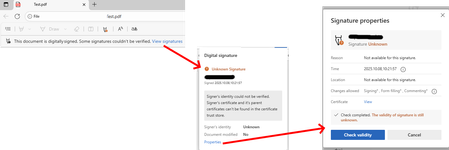
Since the last edge update we are running into the following issue, which triggers support tickets on our side. It seems that the edge internal PDF Reader now supports validation of digital PDF signatures. This new feature however is incomplete and causes a lot of confusion for edge users. "Official" signatures are labeled as "Unknown Signature" and "The validity of the signature is still unknown": "Official signatures" means qualified signatures from members of the EUTL - the European trust list as defined in ETSI TS 119 612 („Trusted Lists“): [...] the European Commission publishes a central list with links to the locations where the national trusted lists are published as notified by Member States. This central list, called the List Of Trusted Lists (LOTL), is available in both a human readable format and in a format suitable for automated (machine) processing XML. Parts of the edge PDF reader seems to come from *dobe itself which adds additional confusion since in their products (*dobe reader, acrobat etc) the signatures are correctly verified. They support this list for several years now (next to their own AATL list). I tried to find out whether this feature is 'work-in-progress' or it is a bug however the last published roadmap is quite old and doesn't give helpful information regarding this aspect. So my question is: Is full support of PDF signature validation including support of the EUTL planned and if so when?1.3KViews1like1CommentCan someone guide me on how to extract specific pages from a PDF without messing up the formatting?
I have a large PDF document, but I only need a few pages from it for a project. I tried using some online tools, but the formatting got messed up, fonts changed, and sometimes images shifted. I want a clean and reliable way to split or extract pages without losing quality. Any good suggestions?"627Views0likes5Comments
How do you handle sensitive PDF files in Edge without third-party cloud uploads?
Hi everyone, When working with sensitive PDF documents (like financial or personal files), most online PDF editors require uploading files to third-party cloud servers. This raises obvious privacy and security concerns for many users. The most reliable way to maintain data privacy today is using Client-Side Browser Processing (WebAssembly & JavaScript), where operations run entirely inside the local browser memory without transmitting any data over the internet. Key advantages of pure client-side processing: Total Privacy: Zero file transfers or external server logs. Instant Speed: Processing relies on your local CPU, bypassing slow upload/download waiting times. No Software Installation: Works directly inside browsers like Microsoft Edge. For those looking for a practical example of this architecture, https://pdfdocflow.com is a free tool offering 24 browser-based tools (merging, splitting, compressing, watermarking, and signing) operating 100% locally with zero server uploads. How do you usually handle sensitive PDFs while browsing, and do you prefer client-side web tools over installing dedicated software?183Views0likes0CommentsAccess fixes released in Version 2603 (Build 19822.20114)
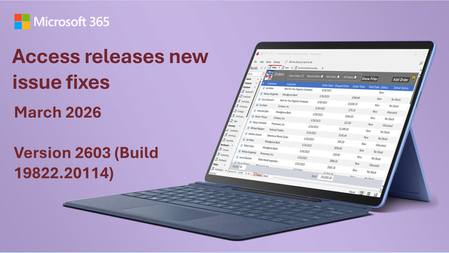
Here's a summary of bug fixes in the latest version of Access: Bug Name Issue Fixed Edge Browser Control didn't navigate from code when inside a tab control When the Edge Browser control was hosted in a tab control, calls to the Navigate method from VBA succeeded, but the control didn’t refresh to show the new page. Switching tabs forced the refresh. The control now refreshes automatically after navigation, even when it’s hosted in a tab control. Some Unicode characters displayed incorrectly in Quick Import Certain extended Unicode characters were displayed as squares when importing data using Quick Import. These characters are now displayed correctly. Modern Chart titles truncated in Print Preview When viewing a report containing Modern Charts in Print Preview, chart titles might be truncated. Chart titles now render correctly in Print Preview. Some Unicode characters displayed incorrectly in exported object names When exporting an object whose name contained certain extended Unicode characters, the sheet name in the exported file displayed the characters incorrectly. These characters are now preserved correctly during export. Some Unicode characters displayed incorrectly in error messages for long object names When renaming a database object to a name that was too long, the error message displayed certain extended Unicode characters incorrectly. These characters now display correctly in error messages. Standard colors in Access didn't match other Office apps The standard color palette in Access used different color values than other Office applications like Word and Excel. For example, the standard red in Access was #ED1C24 instead of the updated Office standard red #EE0000. The color palette has been updated to match the rest of Office. Field.Properties("Precision") and Properties("Scale") on a query column caused the query to execute Accessing the Precision or Scale properties of a field in a query's Fields collection caused the query to execute. This was a regression that broke add-ins and code that enumerate field properties, since query execution can be expensive and have side effects. These properties are now returned without executing the query. Toggle filter button in status bar didn't work when no records were displayed When a form filter resulted in no matching records, clicking the Toggle Filter button in the status bar to remove the filter had no effect. The button now properly removes the filter even when the filtered result set is empty. PDF files with capitalized extension didn't render in Edge Browser Control When navigating to a PDF file using the Edge Browser control, if the file extension was capitalized (e.g., ".PDF" instead of ".pdf"), the file contents were rendered as raw text instead of as a formatted PDF document. The extension comparison is now case-insensitive. Monaco SQL editor inserted blank lines in multi-line comments When switching between Design View and SQL View, the Monaco SQL editor inserted blank lines between each line inside /* multi-line comment */ blocks. This affected both local and passthrough queries. The editor now preserves the original comment formatting. Please continue to let us know if this is helpful and share any feedback you have.910Views2likes2CommentsSharing: PDF readers that support Purview labels
As I was researching on Adobe Acrobat reader and Sensitivity labels, I decided to check if the common alternative PDF readers out there are able to support Purview MIP Sensitivity labels. There is already a published documentation on this for SharePoint-Compatible PDF readers that supports Microsoft IRM: https://learn.microsoft.com/en-us/purview/sp-compatible-pdf-readers-for-irm (last updated Nov-2023) but I wanted to see if these same PDF readers supports the ability for end-users to use/ select labels similar to that of Adobe Acrobat As of 11-June-2025; atleast one of them clearly do: Nitro PDF: Yes. Documentation shows that users can see and use the sensitivity labels. PDF -X.change Editor: Yes. Documentation show that users can see and use the sensitivity labels. (check the official website, I can't hyperlink it because the site is blocked. FOX PDF editor: No. Documentation only states RMS and not clear if it show Purview labels. This is for F.O.X.I.T editor (spelled without the ".") but for some reason there is a community ban on that word and it won't allow me to post the full name PDFescape: No. Sumatra PDF: No Okular: No If there are other PDF readers that I've missed, I encourage you list it down in the comment below. Would love to grow this list.1.8KViews5likes4Comments
Edge pdf text addition = massive file size increase
As of today, when I add just a small amount of text (20-30 characters) to a pdf and save, the file size increases from 66KB to 55,000KB ... never happened before. I've reported to Microsoft but they have no solutions. Any ideas to get around? Saving as a separate file has same result. Thanks6.6KViews20likes31Comments
Feature Request: PDF Layer Support in the new Adobe PDF Engine for Edge
Beschreibung: Mit der Umstellung des integrierten PDF‑Viewers in Microsoft Edge auf die Adobe Acrobat PDF‑Engine (Rollout ab 2023, vollständige Ablösung des Legacy‑Engines bis Juni 2026) ist es entscheidend, dass wichtige Profi‑Funktionen nicht verloren gehen. Ein zentraler Wunsch vieler Anwender ist die vollständige Unterstützung von PDF‑Layern. Gerade in technischen Bereichen – etwa bei CAD‑Zeichnungen, Bauplänen oder Schaltbildern – sind Layer unverzichtbar, um Inhalte gezielt ein‑ oder auszublenden und komplexe Dokumente verständlich darzustellen. Wir bitten darum, sicherzustellen, dass die neue Adobe‑Integration in Edge auch diese Layer‑Funktionalität nativ unterstützt. Ohne diese Funktion bleibt Edge für professionelle PDF‑Workflows eingeschränkt und zwingt Nutzer weiterhin zu Dritt‑Viewern. Use‑Case‑Beispiele: Elektrotechnik: Kabelpläne mit Layern für Signal‑, Strom‑ und Steuerleitungen Architektur: Baupläne mit Layern für unterschiedliche Gewerke (Elektro, Sanitär, Statik) Dokumentation: Technische Handbücher mit optionalen Layern für Detailansichten Eine native Layer‑Unterstützung würde die neue Adobe‑Engine in Edge deutlich aufwerten und den Einsatz für Fachanwender erheblich verbessern. gb-EN Description: With Microsoft Edge transitioning its built‑in PDF viewer to the Adobe Acrobat PDF engine (rollout starting in 2023, legacy engine removed by June 2026), it is crucial to ensure that key professional features are not overlooked. One of the most requested capabilities is full support for PDF layers. In technical fields – such as CAD drawings, construction plans, or electrical schematics – layers are essential to selectively show or hide content and make complex documents easier to understand. We kindly ask that the new Adobe integration in Edge natively supports PDF layers. Without this functionality, Edge remains limited for professional PDF workflows and forces users to rely on third‑party viewers. Use‑Case Examples: Electrical engineering: cable diagrams with separate layers for signal, power, and control lines Architecture: construction plans with layers for different trades (electrical, plumbing, structural) Documentation: technical manuals with optional detail layers Native layer support would significantly enhance the Adobe PDF engine in Edge and make it far more valuable for professional users.414Views1like3CommentsEdge Pdf Viewer does not support page=Fit (only FitV or FitH works)
Dear community, I found that the Edge Pdf Viewer does not allow to display a pdf so that its first page fully fits into the window (no part of the PDF is out of the viewport). You can use the following URL to verify: https://creativelab.berkeley.edu/wp-content/uploads/2019/12/1920X1080-HORIZONTAL-template.pdf#page=1&view=Fit Test Case 1 When the window width gets too small, the window will display a horizontal scrollbar instead of scaling the pdf to fit the width: Test Case 2 When the window height gets too small, the window will display a vertical scrollbar instead of scaling the pdf to fit the height: When I use either FitV or FitH, the respective behaviour is as expected. But I need to combine both behaviours, and thus Fit would be the right option, which seems to be ignored by Edge. When I test the same parameters in other Browsers that use a Chromium engine, it works. Microsoft Edge Version 141.0.3537.85 (Official Build) (64-Bit) Windows 11 Thanks for any advice and thoughts! If there is a dedicated place to create a bug report, please let me know.239Views0likes0CommentsEdge Read Aloud feature fails on landscape PDF documents with tables.
I've encountered an issue with the Read Aloud feature in Microsoft Edge when opening PDF documents in landscape orientation that contain tables. The Read Aloud option is available and can be activated, but it gets stuck loading indefinitely and never starts reading. No error message is shown. In contrast, the same feature works perfectly with portrait-oriented PDFs, even when those PDFs include tables. I tested this on both Windows and macOS with up-to-date Edge versions. The issue appears to be consistent and not OS-specific. My clients use tables in landscape PDFs for better readability and formatting. It’s unclear whether the problem is due to the landscape orientation alone or the combination of landscape + tables. However, tables in portrait PDFs do not cause any issues. Has anyone else experienced this behavior? Is there a known fix or workaround? Would appreciate any feedback or confirmation from the Edge team.200Views0likes0Comments