partner question
17 Topics
Partner credits (billing profile redemption): Cost Analysis shows $0 everywhere
Hi all, I'm a Microsoft partner (MAICPP, Partner Success Core) and I'm stuck on cost visibility for the Azure credit benefit. Has anyone run into this with the new redemption model? Redeemed the $2,400 Azure credit in Sep 2026 through the new Partner Center flow, where credits are deposited directly onto an MCA billing profile. No separate "sponsored" subscription was created. The credit sits on the billing profile and applies to the subscriptions under it. The subscription runs Azure DevOps and Microsoft Fabric. The problem Billing profile > Payment methods > Azure credits shows the credit as Active, with about $320 already consumed (balance around $2,079). Cost Analysis shows $0.00 for everything, at both subscription scope and billing account scope. Services appear in the breakdown, but every value is zero and Actual cost shows "--". So the credit is clearly being drawn down, but I can't see what is consuming it. What I already know / tried I know Cost Analysis doesn't show credits themselves, but it should still show pre-credit usage cost for an Azure plan subscription. The older threads about Sponsorship subscriptions (MS-AZR-0036P) and microsoftazuresponsorships.com seem to describe the legacy model, not this one. I've seen that Microsoft documents a "Transactions" view on the credit resource for MAICPP credits issued after Aug 1, 2026, but I'm still checking it. Questions Has anyone on the new billing profile model seen Cost Analysis stay at $0 while credits were consumed? Did it eventually fix itself? Where did you finally get per-resource usage? The credit Transactions page, the usage CSV on the invoice, the Cost Details or Consumption APIs, or a support ticket? If you opened a billing ticket, what did support say? Is this expected or a bug? Any tips for budgets or alerts while credits are active, so usage doesn't burn silently? Thanks!119Views1like1Comment
Unable to purchase a Partner Benefits Package
I'm the Global Admin for our organization (entrusted GmbH) registered in the Microsoft AI Cloud Partner Program, but I'm unable to purchase a Partner Benefits Package — the role required per documentation, "Microsoft AI Cloud Partner Program Partner Admin," cannot be assigned in User Management (no such option/checkbox is visible; only the existing Global Admin role shows). Additionally, when trying to open the Membership/Offers page, I repeatedly get errors: Error ID 2100001, CorrelationId f6d255f8-842c-43e5-a044-9a2f97edd3ef, 29 Sep 2026 06:11:05 GMT Second error, CorrelationId 27805d5f-546c-44c8-9929-5ec4e873a6f, 29 Sep 2026 06:14:35 GMT Goal: Purchase a Partner Success Core Benefits Package. Please advise, either by assigning the missing role or by resolving the access error. Additionally, the support ticket form itself is broken — the required 'Workspace' dropdown shows 'No results found' and cannot be typed into, so I cannot submit a ticket through the standard flow either.66Views1like0Comments
Why is the Microsoft partner support so pathetic.
We have been raising support requests through Partner Center, but the resolutions we receive from the support team are often just links to publicly available documentation that we can already access ourselves. If we were able to fully understand and resolve the issue through those articles, there would be no need to contact support in the first place. It seems the third-party support team does not fully understand the concern being raised, and the responses are usually generic line items with documentation links, which is not acceptable. How do we get beyond these front line partner support team and connect with actual partner teams from Microsoft to get the issues resolved. I’m not sure if other partners are also facing similar experiences with Partner Support, unresolved issues, or inadequate responses.Solved277Views1like2Comments
Multichannel Support - EA's and Direct CSPs
If you go to this article, https://learn.microsoft.com/en-us/partner-center/multichannel, you will see that it states near the bottom the following: “For a customer who already has a subscription to Microsoft Azure from another channel (such as Advisor, Open, or EA), create a new Azure subscription in Partner Center, manually enter the subscription details, and then cancel the individual services or the entire subscription. Azure CSP can coexist with different channels.” Well, we have a customer on an Enterprise Agreement (EA) through SHI, and my company is a direct CSP. So, I am wondering if anyone out there can answer the following: 1) Can you please elaborate on how we as a Direct CSP executes this process? 2) Will we be able to recognize revenue from this? 3) Any other critical pieces of information I should know? Any help you can provide would be greatly appreciated. Thanks! SteveSolved1.9KViews0likes8CommentsAzure Build and Modernize AI Apps infographic protected
Hello! I am reaching out because I am trying to use an Infographic from Build and Modernize AI Apps Azure Resources. In specific a PMC Marketing Campaign. The infographic is not working as expected, it is protected by Information Rights Management and I cannot request access either. https://partner.microsoft.com/es-MX/asset/collection/build-and-modernize-ai-apps#/ Hope you can bring some light into this! Thanks!338Views0likes4Comments
Azure marketplace offer questions
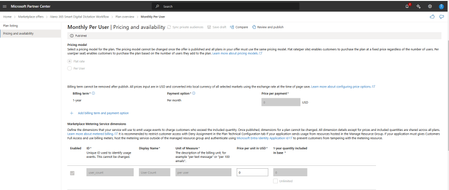
I have created an Azure Marketplace offer with a flat fee pricing model and added dimensions, where the usage is based on the user count. The payment is set to a monthly schedule. Example I have configured a dimension in my Azure Marketplace offer to calculate billing based on the number of users in my SaaS application. For example: If the SaaS application has 10 users, the billing will be calculated as 10 users × $19 = $190. If the user count changes (e.g., from 10 users in January to 8 users in February), I will report the updated user count as usage. This ensures the billing reflects the exact number of active users each month. Questions: How it will work on Azure Marketplace offer and per the below offer plan and how invoice will be generated? If I report usage daily, will the charges be calculated on a daily basis, or will they be aggregated for the month? Do I need to send usage on daily basis or once in a month? Where can I view the total usage reported to date in the Azure portal? Below is screenshot of my test plan673Views1like3CommentsAzure Specialization Query
Hello, We are a solutions partner that is looking at obtaining a couple of advanced specializations in the Azure tracks. I have a couple of queries that I think are unclear from the checklists: In the case of required evidence from customer projects for the various controls in the audit checklist, is it acceptable to have evidence from multiple customers for the various controls? Or do we need to satisfy the requirements across all controls for the same set of customers? Believe that customer projects cited across Module A and B can be different. Pls confimr my understanding. Is there a standard template available from/recommended by MSFT that is available for documentary evidence? Asking this for assets like Project Plan, Functional Specifications, Solution Design Documents, Architectural Diagram etc Also are all of these required evidences mandatory for fulfilling the requirement of each control? Or do we provide some of them? I know this post is long, but any direction/guidance here would be sincerely appreciated. Thx!992Views1like4Comments
Work with Unmanaged Accounts – France
Hello everyone, I am trying to find a sales representative who I can discuss a customer opportunity with. The customer is unmanaged and located in France. In the US, there is a Partner-led Sales Resource <mailto:email address removed for privacy reasons> that works with such requests. Is there anything similar in the EMEA? Your help would be much appreciated 🙂347Views0likes2CommentsBefore linking you must first complete at least one exam or certification
Dear Microsoft Microsoft partners gains awesome insights from learners skilling progress AND certifications under Insights in Partner Center! Hence we guide our learners when "creating" their personal Microsoft Learn accounts to associate to the partnership - already when creating the Learn account. Both to do the association to get the ESI-discount (now that association is also needed to have users showing up in ESI-insights unfortunately, as this change interferes with other processes to cross-check ESI users with actually associated accounts to the partnership) as well as associating to our partnership (already when creating the account, for FUTURE tracking in MAICPP programs!) Why have you now made also this dramatically change for your partners, that interferes with our smoothly working processes? I assume you didn´t even check with the partner community before making this change! "Before linking your Microsoft Learn profile to your Partner Center account, you must first complete at least one exam or certification in your Microsoft Learn profile." This and other recent changes really complex an already complex management of the partnership and fulfilment/maintenence of MAICPP! Gabriel Yttermalm Alliance Manager Microsoft for Digital Services Europe (business line of Orange Business)289Views0likes0Comments