partner center
13 TopicsLand Your Offer - Anatomy of Revenue Generating Partner Offer - Part 1 - Copilot in 30
Copilot in 30: A Ready-Made Marketplace Offer to Grow Your SMB Practice Thirty days. Twenty-five users. One repeatable offer that turns AI curiosity into a long-term customer relationship. Small and medium businesses know AI matters. What they lack is a trusted guide and a low-risk way to start. Copilot in 30 gives you both: a $0, 25-user, 30-day Microsoft 365 Copilot Business trial from Microsoft, wrapped in a structured journey that only a partner can deliver. Package it as a Microsoft Marketplace offer and you have a scalable on-ramp to every SMB customer in your base — and to the managed services that follow. Start Here: Why Publishing on Microsoft Marketplace Matters Microsoft Marketplace is Microsoft's partner-focused business platform, designed to help you reach more customers and simplify how you sell. A published offer gives your practice a permanent, discoverable storefront in the place customers already look for Copilot help. More importantly, an offer turns your expertise into something repeatable. Instead of scoping every engagement from scratch, you define the journey once — activities, timeline, deliverables — and run it across dozens of customers. Professional service and managed service offer types are available in Partner Center, so the same offer can carry both the 30-day journey and what comes after it. The SMB Opportunity Hiding in Plain Sight SMB customer segment is still early in their AI journey. These are organisations with 300 or fewer users on Microsoft 365 Business Basic, Standard or Premium — typically without an in-house AI team. That combination is exactly where partners win: high demand, limited internal capacity, and a customer base large enough that a well-designed, repeatable offer scales far beyond what bespoke projects can. Why Copilot Is the Right First AI Step for SMBs Microsoft 365 Copilot Business is the cost-effective Copilot add-on built for SMB customers, delivering the same capabilities as Microsoft 365 Copilot inside the apps their people already use — Outlook, Teams, Word, Excel and PowerPoint. No platform overhaul, minimal training, immediate relevance. Copilot is also the on-ramp. Once a team works confidently with Copilot, the natural next steps are agents, automated workflows and Copilot Cowork — each one deepening the customer's dependence on the partner who guided them there. Meet Copilot in 30: 25 Users, 30 Days, $0 Copilot in 30 is a limited-time, CSP partner-led Microsoft 365 Copilot Business trial for SMB customers with fewer than 300 employees. The essentials: What the customer gets: 25 Microsoft 365 Copilot Business seats for 30 days at $0, transacted through CSP New Commerce (Product ID CFQ7TTC0MM8R · SKU 006Z) Who qualifies: Customers on Microsoft 365 Business Basic, Standard or Premium with no paid Microsoft 365 Copilot today — one trial per customer How long it runs: Available to transact until 31 December 2026 What happens at Day 30: The trial auto-converts to a paid subscription unless renewal settings are changed, with a 7-day cancellation window What Microsoft provides: A launch kit, campaign materials, setup guidance, the Copilot Success Planner and conversion guidance Microsoft supplies the licences and the assets. The offer — and the customer relationship — is yours. Your Role: The Guide Who Turns a Trial Into a Habit A trial alone rarely changes behaviour. A guided trial does. Your job across the 30 days is to make sure 25 people experience real value in real work, and that the sponsor can see it. Before Day 0 — pick the right customers, become "Customer Zero" by using Copilot in your own business, secure a named sponsor and Copilot admin, and build a 30-day success plan with agreed measures. Day 0 — transact the trial, set the paid renewal quantity and term, complete admin setup, assign all 25 licences and run the kick-off with starter prompts. Days 1–28 — lead a weekly scenario (Outlook, Teams, Apps, Agents), review Copilot Analytics, re-engage low-activity users and capture proof points in the customer's own words. Days 29–30 — run the outcome and ROI review, confirm the paid offer and open the expansion and consumption conversation. Every touchpoint is partner expertise the customer cannot get from a licence alone — and every one moves the decision at Day 30 from "should we?" to "how much more?" Inside the Offer: Activities, Timeline and Deliverables Below is the full activity plan behind the offer, ready to drop into your own offer description or statement of work. ID Stage Activity Trial day (of 30) Key deliverables — Pre-req Customer eligibility (Copilot Business trial) Before Day 0 Active M365 Business base licence; no paid M365 Copilot; one $0 trial per customer; CSP New Commerce transactable; offer open to 31 Dec 2026 I1 Identify Build the prioritised target list Pre-trial Tier A/B target list from ASPX and Cloud Ascent; 50–300 eligible seats I2 Identify Confirm eligibility and trial fit Pre-trial Eligibility check: M365 Business base licence, no paid Copilot, one trial I3 Identify Launch the acquisition campaign Pre-trial Campaign email sent; briefing delivered; responses triaged into pipeline I4 Identify Be Customer Zero: complete microskilling Pre-trial Microskilling complete; internal Copilot experience; team briefed P1 Plan Confirm sponsor and success measures Pre-trial Named sponsor and admin; 25 trial users; agreed success measures P2 Plan Build the 30-day success plan Pre-trial Personalised Success Planner output; weekly scenarios; admin and user views P3 Plan Confirm technical and compliance readiness Pre-trial Minimum requirements verified; data and compliance review; blocker log A1 Activate Transact the trial in CSP New Commerce Day 0 25-seat, 30-day, $0 trial ordered (CFQ7TTC0MM8R · SKU 006Z) A2 Activate Configure the paid renewal settings Day 0 Renewal quantity, term and billing set; Cowork usage-based billing if in scope A3 Activate Complete admin setup and assign licences Day 0 Recommended settings on; 25 licences assigned (starts the clock) A4 Activate Run the kick-off and share starter prompts Day 0 Kick-off email; starter prompts; four-week prompt series scheduled X1 Experience Week 1 · Outlook — catch up and communicate Days 1–7 Week 1 prompts landed; first-week activation rate reviewed X2 Experience Week 2 · Teams — meetings that run themselves Days 8–14 Copilot Analytics checkpoint; recaps adopted; low-activity users re-engaged X3 Experience Week 3 · Apps — create in minutes Days 15–21 App scenarios and proof points; week 3 training gate before day 30 X4 Experience Week 4 · Agents — unlock the next level Days 22–28 Role-built agents trialled; 30-day usage trends from the admin centre C1 Convert Outcome review, paid offer and expansion plan Days 29–30 ROI review; 50-seat offer confirmed in 7 days; wave 2 plan; consumption conversation opened Land Your Offer: What One Customer Is Worth The table below is the revenue anatomy of one Copilot in 30 engagement — and it shows that the money is not in the trial, but in what the trial sets up. Item Value Detail Offer duration 30 days Trial clock runs Days 1–30; identify, plan and Day 0 setup precede it Trial offer 25 seats M365 Copilot Business · 30 days · $0 · one per customer · to 31 Dec 2026 CSP incentive — 25 seats (K) $0.32K 5.0% direct bill (2.5% M365 CSP Core + 2.5% Strategic Product Accelerator Tier 1) on 25 M365 Copilot Business seats x $21/mo† ≈ $6.3K/yr; indirect reseller 2.5% ≈ $0.16K Conversion target 50 seats Lead with 50 paid seats at conversion; sets up the wave 2 expansion plan CSP incentive — 50 seats (K) $0.63K 5.0% direct bill (Core + SPA Tier 1) on 50 M365 Copilot Business seats x $21/mo† ≈ $12.6K/yr; indirect reseller 2.5% ≈ $0.32K Frontier Accelerate deployment funding (K) $2.5K Microsoft Commercial Incentives funding for the Copilot deployment engagement when the conversion lands with 50 paid seats†; funds the deployment and adoption work that leads into managed services † Illustrative estimates from the offer plan. Confirm current incentive rates, funding and eligibility in Partner Center. Three streams stack on top of each other: CSP incentive — earned on every paid Copilot Business seat from the moment the trial converts, and growing again when the customer expands from 25 to 50 seats. Frontier Accelerate deployment funding — $2,500 available when you lead the conversion with 50 paid seats, paying for the deployment work that makes the expansion stick. Managed services — the recurring engagement described in Day 31 and Beyond, which is where the largest and most durable share of revenue lives. Now multiply. Everything above is the anatomy of a single customer. Landing the offer means running it across every eligible customer in your base — and you don't need to guess who they are. Partner Center's growth insights reporting, available through the AI Business Solutions & Security Insights (ASPX) dashboard, gives you account-level Copilot eligibility, seat whitespace, free Copilot Chat usage and adoption signals for the customers you already manage. To turn that export into a ranked target list, my colleague Brian O'Shea has built a Copilot for 30 Power BI dashboard that sits over your ASPX data and scores each customer on a 0–100 priority scale from eligible seats, whitespace, free-to-paid potential and opportunity signals — so your first cohort is the ten customers most likely to convert, not the first ten who reply. How the Offer Fits Together: From Trial Inputs to Proof of Value The offer runs left to right in three layers: Trial inputs — 25 users, 30 days, $0 CSP trial SKU; an SMB with 50–300 eligible Microsoft 365 seats; no paid Copilot today; a Business Basic, Standard or Premium base; one trial per customer to 31 Dec 2026; a named sponsor and Copilot admin; auto-conversion to paid unless changed. Five stages — Identify (I1–I4), Plan (P1–P3), Activate (A1–A4), Experience (X1–X4) and Convert (C1, T1, T2, W2). Each stage produces a concrete output the sponsor can see. Proof of value — a prioritised list and campaign responses; agreed use cases and success measures; a provisioned trial with 25 licences assigned; weekly usage from the Microsoft 365 admin centre; adoption proof points in the customer's words; paid conversion confirmed in Partner Center — and a named wave 2 expansion beyond the first 25. The highlighted activities — admin setup (A3), Week 4 agents (X4), 25→50 paid seats (T1), Frontier Accelerate funding (T2) and the wave 2 expansion plan (W2) — are where the engagement stops being a project and starts becoming an ongoing relationship: managed services, agent build-out, Copilot Studio and Copilot Cowork follow-on once the trial converts. Day 31 and Beyond: Managed Services That Keep Delivering The end of the trial is the start of the real engagement. Package these as standing services in your offer: Copilot adoption management — monthly Copilot Analytics business reviews, prompt and scenario refreshes, champion programme and onboarding for each new wave of users Licence and expansion management — take the customer from 25 to 50 paid seats and on to wave 2, aligning renewals, terms and billing as the footprint grows Agent build-out — design, build and maintain role-based agents with Copilot Studio for sales, service, finance and operations scenarios surfaced in Week 4 Copilot Cowork enablement and governance — introduce consumption-based Cowork scenarios, set budgets and cost controls, and report on usage each month Security, compliance and readiness — keep data protection, permissions and governance in step with expanding AI use, including a path to Microsoft 365 Business Premium Quarterly value reviews — refresh success measures, capture new proof points and agree the next expansion plan with the sponsor Each of these is a recurring, outcome-based service rather than a one-off project — and each keeps you positioned as the customer's AI partner as their needs grow. Ready to Build Your Copilot in 30 Offer? Download the Copilot in 30 launch kit and Microsoft 365 Copilot Partner FAQ from the Microsoft AI Cloud Partner Program. Be Customer Zero — run Copilot and the microskilling series inside your own business first. Publish your offer in Partner Center as a professional service (the 30-day journey) with a managed service follow-on (Day 31 and beyond). Pick your first cohort — customers with 50–300 seats on a Microsoft 365 Business plan and no paid Copilot today. Transact your first trial through CSP New Commerce (Product ID CFQ7TTC0MM8R · SKU 006Z) and set the paid renewal on Day 0. Book the Day 30 review before Day 1 — so the conversion and expansion conversation is already on the calendar. The window closes on 31 December 2026. The customers are already in your base. Publish the offer and start the clock. Resources From AI curiosity to Copilot adoption in 30 days — Microsoft Partner Blog Copilot in 30 Launch Kit — partner GTM playbook, customer trial guide, invitation and weekly prompt emails, admin setup guidance Build Your 30-Day Copilot Success Plan Copilot Success Planner Walkthrough video Partner Skilling Hub | Microskilling for Copilot in 30 Power BI Dashboard that integrates with your ASPXi Partner Data · By Brian O'Shea Create compelling customer business cases558Views2likes1CommentScaling Seller Impact with ASPX Insights: From Data Access to AI-Driven Execution
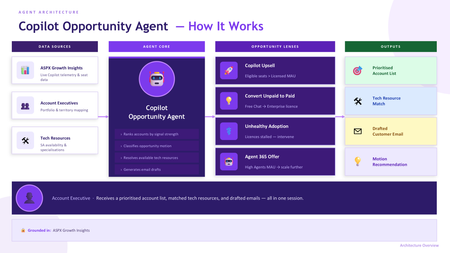
ASPX Insights in Partner Center Most sellers are not constrained by opportunity; they are constrained by time and signal. With up to 70% of effort spent on administrative work, portfolio coverage continues to expand while insight quality declines. Sellers are forced to manually interpret fragmented telemetry across multiple systems, slowing decision-making and reducing precision in where they focus. The result is missed revenue signals, delayed interventions, and inconsistent execution at scale. Productivity is not just about efficiency, it is about enabling every seller to consistently identify and act on the highest-value opportunity, in real time. To drive consistent, data-led growth across Security and AI Business Solutions, partners should connect to ASPX Insights within Partner Center. This provides direct access to adoption propensity models, customer telemetry, and actionable account-level insights across Microsoft 365 Copilot, E7, and Agent 365 scenarios. Access to ASPX Insights is only the starting point. The real value comes from how you operationalise that data and surface it directly to sellers in the flow of work. The most effective pattern is to build a lightweight “opportunity agent” that connects to ASPX data via API and translates telemetry into clear actions. This ensures your sales teams have the right conversation with the right customer at the right time - Conversations that are backed by intelligent insights to help guide your customer's on their AI and security journey. The Architecture ASPX Insights is powered by Partner Center data and exposes rich telemetry and propensity signals that can be accessed programmatically. This allows partners to move beyond dashboards and embed insights directly into seller workflows. As demonstrated in internal adoption patterns, partners can connect to ASPX via API and pull Customer-level adoption and usage telemetry Copilot, Security, and Agent usage signals Propensity scores for expansion, adoption, and conversion Licensing, whitespace, and engagement indicators The M365 Partner API – AI Business Solutions & Security Insights allows partners to ground an agent in real, actionable data rather than static pipeline assumptions. By pulling live telemetry and seat-level signals directly into the agent, the solution continuously reflects actual customer usage patterns - who is adopting, who is stalled, and where there is untapped potential. This means opportunity identification is no longer based on periodic reporting or manual interpretation, but on near real-time behavioural insight. As a result, account prioritisation, upsell motions, and intervention strategies are driven by evidence rather than instinct, enabling account teams to act with precision and focus on the highest-impact opportunities across their portfolio. The agent should act as a translation layer between raw telemetry and seller action. The goal is not to expose more data, but to remove ambiguity and tell the seller exactly where to focus. A simple architecture looks like this: Data layer Ingest ASPX Insights data via API on a daily or scheduled basis. Optionally store monthly snapshots to track trends and smooth out variability. This creates both real-time signal and historical context. With the data layer you have a couple of options. You can integrate directly into Partner Centre ASPX Insights by using the API. This is technically complex and may have a longer lead time to see results. Alternatively, to see results with less complexity, you can simply download snapshots of the data monthly from ASPX Insights in Partner Centre. This is manual but easy to achieve and offers a shorter time to value for your agent. Scoring layer Use ASPX propensity outputs directly or combine them with your own logic to rank accounts across a small set of opportunity lenses Expansion ready (Copilot scale) Conversion ready (free to paid) At risk (low adoption vs paid licenses) Transformation ready (Agent 365 and advanced AI scenarios) These align directly with the machine learning models and signals already surfaced in ASPX. Action layer Translate scores into next best actions Who to engage Why now What motion to run (sell, enable, expand, govern) This is where agents create value. Sellers should not see raw dashboards. They should see prioritised accounts and recommended actions. Internal Adoption Path The key design principle is simple: bring insight into the tools sellers already use. CRM integration Push ranked accounts and recommendations directly into CRM as opportunities, tasks, or account insights. This ensures data becomes part of pipeline management, not a separate activity. Copilot / Agent interface Expose the agent through Microsoft 365 Copilot or a custom chat interface where sellers can ask Which customers should I prioritise this week Which accounts are ready for Copilot or E7 expansion Where are my adoption risks The agent queries the ASPX-backed dataset and returns structured recommendations in seconds. Proactive notifications Trigger alerts based on signal changes Spikes in Copilot usage Drops in adoption for paid tenants New high-propensity accounts entering threshold This shifts sellers from reactive to proactive engagement. Portfolio dashboards (secondary) Maintain dashboards for leadership and planning, but not as the primary interaction model for sellers. Dashboards support strategy, agents drive execution. Extending into E7 and Agent 365 scenarios Once the agent is connected to ASPX, partners can extend the same model across broader solution plays E7 opportunities Use signals such as usage depth, licensing posture, and workload adoption to identify customers progressing toward advanced security and compliance requirements. The agent can flag these accounts as ready for E7-led conversations. Agent 365 opportunities Combine Copilot maturity with agent usage signals to identify customers moving beyond productivity into process automation. These are high-value transformation plays where partners should proactively engage. This ensures sellers are not operating in silos but are guided toward the next logical workload based on real behavior, not assumptions. Where to Next If you lead a partner sales team, connect to ASPX Insights and see how these insights can empower your sales teams to achieve more. Check out our ready made ASPX Insights agent in Github.1.1KViews3likes5Comments
Introducing Windows Ready Print and Modernized Driver Selection
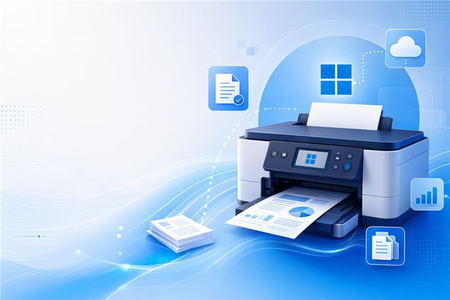
Windows Ready Print: A clearer path to modern printing on Windows Printing on Windows is evolving. As printing environments modernize, customers and partners are asking for solutions that are reliable, secure, and easy to manage across today’s devices. To reflect this shift and make the value of our platform clearer, we are evolving the Modern Print Platform under a new name: Windows Ready Print. Windows Ready Print highlights what matters most: a streamlined, dependable printing experience built for modern Windows environments. It represents our commitment to simplifying printing, aligning modern standards, and delivering consistent, forward-looking experiences for users, IT admins, and partners. Driving the transition to Windows Ready Print with driver selection controls At the core of Windows Ready Print is a transition away from legacy, third party drive-based workflows toward modern, standards-based printing with IPP (Internet Printing Protocol) using the Windows inbox IPP printer driver. Starting in July 2026, new printer installations will default to Windows Ready Print where supported, enabling a simpler and more reliable setup experience. This change reduces the need for traditional driver management and lays the foundation for a more scalable and predictable print experience. However, we recognize that not all environments can move to Windows Ready Print immediately. To ensure a smooth and flexible transition, we are introducing the ability for users to configure Windows to install their printers using Windows Ready Print (if supported) or the OEM printer driver during installation. You can find this setting under Settings > Bluetooth & Devices > Printers & Scanners > Default install printer using Windows Ready Print. This feature enables users and IT admins to control how Windows selects drivers when installing printers: When “Default install printers using Windows Ready Print” is enabled, Windows Ready Print installation is preferred When “Default install printers using Windows Ready Print” is disabled, default driver selection is used The configuration applies to new printer installations only, without affecting existing devices. To enable/disable this feature via group policy, go to: Launch Group Policy Editor Navigate to Local Computer Policy -> Administrative Templates -> Printers Find and select 'Configure Windows Ready Print driver ranking' -> double click to open it Select 'Enabled' (if you wish to enable Windows Ready Print driver selection) or 'Disabled' (if you wish to explicitly disable Windows Ready Print driver selection). Select Apply Select OK How driver selection configuration works with Windows protected print mode When you enable "Default install printers using Windows Ready Print”, new printer installations will default to Windows inbox IPP printer driver when supported. When you enable Windows protected print mode, printers are exclusively installed with Windows Ready Print. Devices that do not support Windows Ready Print cannot be installed. Note: When you’ve enabled Windows protected print mode, you cannot disable "Default install printers using Windows Ready Print".11KViews1like3CommentsPitch Maker Agent: Turn Copilot Chat Signals into Microsoft 365 Copilot Deals
Executive Summary Customers are already using free Copilot Chat at scale, but adoption is often ungoverned and disconnected from the Microsoft 365 workloads where measurable productivity and risk controls live. The Pitch Maker Agent (BETA) helps partners convert Partner Center Copilot growth opportunity signals into customer-ready narratives—reducing pitch preparation from days to minutes and improving consistency across stakeholders (replace with your measured baseline). What it enables (partner outcomes) Turn raw usage signals into an executive business case with clear opportunity, risk, and next steps. Standardize value conversations across IT and business buyers while keeping customer context specific. Accelerate conversion from exploration to governed deployment by anchoring on Microsoft 365 workloads. Why it’s different Evidence-led: uses Partner Center Copilot growth opportunities (ASPX) signals rather than generic prompts. Buyer-ready: outputs a structured narrative (not a feature list) designed for executive alignment and action. Inputs required Partner Center Copilot growth opportunities export (all columns) for the target customer. The Opportunity: From AI Exploration to Enterprise Direction The move from free Copilot Chat to Microsoft 365 Copilot is a timing advantage: customers have intent and familiarity, but need a governed path that ties AI to real work in Teams, Outlook, Excel, and beyond. Advisory gap: translate usage metrics into business insight executives can fund. Governance gap: balance opportunity with security, compliance, and lifecycle controls. Workflow gap: connect AI usage to measurable outcomes inside Microsoft 365 workloads. How the Agent Works (BETA) The Agent follows a simple, repeatable flow to generate an executive-ready pitch narrative from Partner Center Copilot growth opportunity signals. See the agent in action below. In three steps Upload the Partner Center Copilot growth opportunities export (all columns). Run the Agent to translate usage signals into a customer-specific executive narrative. Use the generated business case, recommendations, and next steps in the customer conversation. What the Output Enables Translate Partner Center signals into a fundable business case, faster. Improve executive alignment by presenting opportunity, risk, and plan in one narrative. Increase repeatability across accounts with a consistent structure and messaging. The figure below illustrates how the Agent turns usage signals into a concise, executive-ready pitch narrative and action plan. Figure 1. From Copilot Chat signals to an executive pitch narrative and next-step plan. For customers, the conversation shifts from features to outcomes—clear productivity impact, role-based change, and risk-aware governance. Deployment and Execution The Agent is delivered as a solution package and deployed through Copilot Studio with a straightforward publish-and-run flow. Prepare Partner Center ASPX export (all columns) and validate sensitivity labels. Import the solution package into Copilot Studio. Verify dependencies, publish the Agent, and enable access in Microsoft 365 Copilot and Teams. Run the guided pitch flow by uploading customer data and capturing the narrative output. The run guide provides step-by-step visuals for data preparation, import, publication, and how to use the output in customer conversations. Why This Matters for Partner Practices The Pitch Maker Agent (BETA) supports a repeatable value motion: identify opportunity, align stakeholders, and move customers from experimentation to governed Microsoft 365 Copilot adoption. Higher conversion: clearer executive rationale anchored in evidence and outcomes. Lower effort: less time drafting, more time on discovery and delivery. Better governance: built-in prompts to address risk, readiness, and controls early. Call to Action This week: 15-minute start Locate the solution package and run guide in the Agent folder. Deploy the Agent in Copilot Studio and publish to Microsoft 365 Copilot/Teams. Export Partner Center Copilot growth opportunities data and validate sensitivity labels. Upload the dataset and generate a customer-specific executive pitch narrative. Resources Helpful links to learn more and access supporting materials: Partner Center Copilot growth opportunities data GitHub repository Overview: Run guide986Views0likes0CommentsDrive profitability with personalized assistance from Partner Concierge
Accelerate your growth with Microsoft AI Cloud Partner Program Concierge, a benefit available via Solutions Partner designations and Partner Success Core or Expanded Benefits. Through Partner Concierge, a dedicated partner specialist will provide one-on-one guidance to help you work toward your goals. Build demand for your solutions, make the most of available benefits and incentives, and boost profitability in Microsoft Marketplace with actionable recommendations from trained experts. Partners who’ve activated Partner Concierge have seen impressive outcomes: one partner grew billed revenue by 150%, another made significant progress toward attaining a Solutions Partner designation while achieving co-sell status with two solutions, and a third drove a 40% increase in billed revenue with steady month-over-month growth.* Ready to turn expert assistance into your next big win? Purchase a Partner Success Core or Partner Success Expanded partner benefits package—both of which include the Partner Concierge benefit. Then, activate Concierge in Partner Center to get guidance that drives results. Explore how to attain a Partner Solutions Designation to access benefits like Partner Concierge and stand out to customers everywhere. *According to Microsoft internal data Activate Now!196Views1like0CommentsTake action: Partner Center multifactor authentication required starting August 2025
At Microsoft, trust is the cornerstone of our business, and we prioritize security and compliance in all our endeavors—but we can't achieve this alone. Our partners are vital in maintaining customer trust and are essential in raising the security standards of our ecosystem. As we strive for a safer and more secure future together, your continued support and collaboration will assist us in ensuring our products, solutions, and processes remain secure and compliant. Our research shows that the vast majority of cyberattacks can be prevented by basic cybersecurity hygiene practices, starting with multifactor authentication (MFA)—which reduces the risk of compromise by over 99%. We’re dedicated to providing updates and resources to enhance the partner experience, and that’s why we’re implementing MFA across all Partner Center UX and application programming interfaces (APIs) beginning August 2025. UX enforcement Starting on August 30, 2025, partners will be required to use MFA to sign in to the Partner Center dashboard. This means that every time you sign in, you’ll need to provide an additional verification step beyond your username and password. API enforcement By September 30, 2025, all APIs will be MFA-enabled and ready for partner testing. You’ll need to integrate MFA into API calls to make sure your organization’s systems can handle the additional authentication step. Full enforcement of MFA for APIs will begin on April 1, 2026, meaning that any API calls made without MFA will be blocked. Partners will have to update their systems to comply with the new security requirements. Eventually, all users will need to complete MFA, which involves two or more sign-in methods, when accessing Partner Center. Don’t wait until the enforcement deadlines to set up your MFA preferences—it only takes a few minutes to proactively add or update a verification method and help protect your organization from over 99% of identity-based attacks. This will not only help you avoid service disruptions—it also aligns your systems with Partner Center’s security standards. Learn more about authentication methods, as well as features and licenses, and be sure to share the details with your technical teams so you can prepare for the updates. We deeply appreciate your help in keeping our partner ecosystem secure and compliant.539Views1like0CommentsNew capabilities in Azure AI Foundry to build advanced agentic applications
Microsoft continues to evolve the technologies it offers to customers and partners so they can push the boundaries of innovation! Here is a summary of just a few announcements for Microsoft’s 50 th anniversary. Check out the blog for more! General availability of agent framework that you can use to simplify the orchestration of multi-agent systems for your customers. See how KPMG is using Semantic Kernel to orchestrate workflows among specialized agents, dramatically reducing development complexity. The advanced observability suite for evaluations, tracing, and A/B testing—giving developers unprecedented visibility into agent behaviors and outcomes. Use the observability suite to build more robust AI systems for your customers. AI Red Teaming Agent (public preview) helps uncover safety risks through comprehensive reports, tracking improvements over time. Mitigate risks in AI so your customers feel more comfortable in investing in AI and in your services. See what Accenture has to say about the AI Red Teaming Agent. With Azure AI Foundry extension for Visual Studio Code (public preview), developers can build, test, and deploy agent-based applications entirely within their Integrated Development Environment (IDE)—no context switching required. Improved developer experience leads to faster development times. And don’t forget to block out May 19-22 on your calendar to join us for Microsoft Build in Seattle!350Views0likes0CommentsDrive demand for your offers with solution area campaigns in a box
Take your marketing campaigns further with campaigns in a box (CiaBs), collections of partner-ready, high-quality marketing assets designed to deepen customer engagement, simplify your marketing efforts, and grow revenue. Microsoft offers both new and refreshed campaigns for the following solution areas: Data & AI (Azure), Modern Work, Business Applications, Digital & App Innovation (Azure), Infrastructure (Azure), and Security. Check out the latest CiaBs below and get started today by visiting the Partner Marketing Center, where you’ll find resources such as step-by-step execution guides, customizable nurture tactics, and assets including presentations, e-books, infographics, and more. AI transformation Generate interest in AI adoption among your customers. As AI technology grabs headlines and captures imaginations, use this campaign to illustrate your audience’s unique opportunity to harness the power of AI to deliver value faster. Learn more about the campaign: AI Transformation (formerly Era of AI): Show audiences how to take advantage of the potential of AI to drive business value and showcase the usefulness of Microsoft AI solutions delivered and tailored by your organization. Data & AI (Azure) Our Data & AI campaigns demonstrate how your customers can win customers with AI-enabled differentiation. Show how they can transform their businesses with generative AI, a unified data estate, and solutions like Microsoft Fabric, Microsoft Power BI, and Azure Databricks. Campaigns include: Unify your intelligent data - Banking: Help your banking customers understand how you can help them break down data silos, meet compliance demands, and deliver on rising customer expectations. Innovate with the Azure AI platform: Help your customers understand the potential of generative AI solutions to differentiate themselves in the market—and inspire them to build GenAI solutions with the Azure AI platform. Unify your intelligent data and analytics platform - ENT: Show enterprise audiences how unifying data and analytics on an open foundation can help streamline data transformation and business intelligence. Unify your intelligent data and analytics platform - SMB: Create awareness and urgency for SMBs to adopt Microsoft Fabric as the AI-powered, unified data platform that will suit their analytics needs. Modern Work Our Modern Work campaigns help current and potential customers understand how they can effectively transform their businesses with AI capabilities. Campaigns include: Connect and empower your frontline workers: Empower your customers' frontline workers with smart, AI-enhanced workflows with solutions based on Microsoft Teams and Microsoft 365 Copilot. Use this campaign to show your customers how they can make their frontline workers feel more connected, leading to improved productivity and efficiency. Microsoft 365 Copilot SMB: Increase your audience's understanding of the larger potential of Microsoft 365 Copilot and how AI capabilities can accelerate growth and transform operations. Smart workplace with Teams: Use this campaign to show your customers how to use AI to unlock smarter communication and collaboration with Microsoft Teams and Microsoft 365 Copilot. This campaign demonstrates to customers how you can help them seamlessly integrate meetings, calls, chat, and collaboration to break down silos, gain deeper insights, and focus on the work that matters. Cloud endpoints: Help customers bring virtualized applications to the cloud by providing secure AI-powered productivity and development on any device with Microsoft Intune Suite and Windows in the cloud solutions. Business Applications Nurture interest with audiences ready to modernize and transform their business operations with these BizApps go-to-market resources. Campaigns include: AI-powered customer service: Highlight how AI-powered solutions like Microsoft Dynamics 365 are transforming customer service with more personalized experiences, smarter teamwork, and improved efficiency. Migrate and modernize your ERP with Microsoft Dynamics 365: Position yourself as the right partner to modernize or replace your customers' legacy on-premises ERP systems with a Copilot-powered ERP. Business Central for SMB: Offer customers Microsoft Dynamics 365, a comprehensive business management solution that connects finance, sales, service, and operations teams with a single application to boost productivity and improve decision-making. AI-powered CRM: Help your customers enhance their customer experiences and close more deals with Microsoft 365 Dynamics Sales by making data AI-ready, which empowers them to create effective marketing content with Microsoft 365 Copilot and pass qualified leads on to sales teams. Use this campaign to show audiences how Copilot and AI can supercharge their CRM to increase productivity and efficiency, ultimately leading to better customer outcomes. Modernize at scale with AI and Microsoft Power Platform: This campaign is designed to introduce the business values unlocked with Microsoft Power Platform, show how low-code solutions can accelerate development and drive productivity, and position your company as a valuable asset in the deployment of these solutions. Digital & App Innovation (Azure) Position yourself as the strategic AI partner of choice and empower your customers to grow their businesses by helping them gain agility and build new AI applications faster with intelligent experiences. Campaigns include: Build and modernize AI apps: Help customers building new AI-infused applications and modernizing their application estate take advantage of the Azure AI application platform. Accelerate developer productivity: Help customers reimagine the developer experience with the world’s most-adopted AI-powered platform. Use this campaign to show customers how you can use Microsoft and GitHub tools to help streamline workflows, collaborate better, and deliver intelligent apps faster. Infrastructure (Azure) Help customers tap into the cloud to expand capabilities and boost their return on investment by transforming their digital operations. Campaigns include: Modernize VDI to Azure Virtual Desktop - SMB: Show SMB customers how they can meet the challenges of virtual work with Azure Virtual Desktop and gain flexibility, reliability, and cost-effectiveness. Migrate VMware workloads to Azure: Help customers capitalize on the partnership between VMware and Microsoft so they can migrate VMware workloads to Azure in an efficient and cost-effective manner. Migrate and secure Windows Server and SQL Server and Linux - ENT: Showcase the high return on investment (ROI) of using an adaptive cloud purpose-built for AI workloads, and help customers understand the value of migrating to Azure at their own pace. Modernize SAP on the Microsoft Cloud: Reach SAP customers before the 2027 end-of-support deadline for SAP S/4HANA to show them the importance of having a plan to migrate to the cloud. This campaign also underscores the value of moving to Microsoft Azure in the era of AI. Migrate and secure Windows Server and SQL Server and Linux estate - SMB: Use this campaign to increase understanding of the value gained by migrating from an on-premises environment to a hybrid or cloud environment. Show small and medium-sized businesses that they can grow their business, save money, improve security, and more when they move their workload from Windows Server, SQL Server, and Linux to Microsoft Azure. Security Demonstrate the power of modern security solutions and help customers understand the importance of robust cybersecurity in today’s landscape. Campaigns include: Defend against cybersecurity threats: Increase your audience's understanding of the powerful, AI-driven Microsoft unified security platform, which integrates Microsoft Sentinel, Microsoft Defender XDR, Security Exposure Management, Security Copilot, and Microsoft Threat Intelligence. Data security: Show customers how Microsoft Purview can help fortify data security in a world facing increasing cybersecurity threats. Modernize security operations: Use this campaign to sell Microsoft Sentinel, an industry-leading cloud-native SIEM that can help your customers stay protected and scale their security operations.4KViews2likes0CommentsPartner Blog | Partner Center Technical Corner: December 2024 edition
Welcome to the December edition of Partner Center Technical Corner. This month’s highlights include a closer look at the new Partner Center AI assistant, important security updates, and a recap of recently released capabilities. As always, you can find the most up-to-date technical roadmap and essential Partner Center resources at the end of the blog. Spotlight: Partner Center AI assistant (preview) Partner Center AI assistant (preview) enhances your Partner Center experience with the power of generative AI, offering tailored insights and intelligent suggestions to transform your everyday tasks in Partner Center into opportunities for growth and innovation. This feature is currently available in preview to partners using the English version of Partner Center. AI assistant (preview) is continually being enhanced to dive deeper into workspaces and provide an individualized experience. It is seamlessly integrated into your experience, continuing your conversations as you navigate through Partner Center. You can ask the AI assistant for help with details on a customer’s Microsoft Azure usage estimate, earnings insights over a given period, or assistance with the various memberships we offer, among many other capabilities. Responses are pulled from a rich array of sources, including Microsoft product documentation, partner program guides, and partner-specific information in Partner Center. For example, on membership queries, the AI assistant answers specific questions around the Solutions Partner designation by reviewing program rules, analyzing underlying metrics, and providing a detailed, data-driven response. The assistant can also troubleshoot missing attribution of employees in skilling scores or provide contextual recommendations to help you qualify for a Solutions Partner designation. Partner feedback: One of our preview users shared, “This is really helpful! And I am very glad to see that our AI friend will know the payment status of claims IDs now.” As needed, partners can initiate the support ticket creation process through the AI assistant panel. Continue reading here193Views2likes0Comments