outlook
108 Topics
[Community tool] Find the GPO, registry value and Intune setting for any Office ribbon button
Hi everyone, as a technical service owner for Microsoft 365 Apps, one question comes up for me again and again: which policy actually controls this button or option? The information is all there – in the Office ADMX/ADML templates, the Office Fluent UI control ID lists, the Intune Settings Catalog and many Learn articles. But I never found it in one place, so every answer meant connecting several sources by hand. Especially when onboarding new colleagues, this costs a lot of time. So I built a free community tool for it: Office Admin Explorer https://tools.pascal-donath.de/office-admin-explorer/ How it works It's a clickable mock of Word, Excel, PowerPoint and Outlook (ribbon, File menu, Options, Trust Center). Click any element and you get: idMso and Policy ID (for customUI and the "Disable commands" policy) the ADMX policy with its exact path in Group Policy Management the registry value it writes, with ready-to-copy PowerShell or .reg the matching Intune Settings Catalog entry Cloud Policy notes, step-by-step guides and Microsoft Learn links The search covers all Office ADMX policies (2,400+) and command IDs (8,000+), including elements that aren't part of the mock. Also included Ribbon builder – hide or disable buttons, groups or tabs and export the result as customUI XML, a macro-free add-in (.dotx / .xlam / .ppam) or the "Disable commands" policy for Group Policy and Intune Deployment view – configuration.xml generator for the Office Deployment Tool User Support view – typical user problems: symptom → cause → fix Policy names and registry values are checked against Microsoft's ADMX/ADML files, and the Intune mapping against the Graph settings catalog. It runs in the browser without sign-in and is available in English and German. Please test any configuration on a lab device or pilot group first. I'd like your input How do you handle this today – ADMX search, Group Policy Search, the Intune catalog, your own documentation? Which Office settings do you get asked about most often? I'd like to add the most requested ones next. If you find a wrong or outdated entry, every entry has a "Report it on GitHub" link – corrections are very welcome. Thanks! Pascal --- *Transparency note: The tool was developed with the help of AI. The content is based on my own admin experience, and policy names, registry values and Intune mappings are validated automatically against Microsoft's official sources (ADMX/ADML templates, Fluent UI control lists, Microsoft Graph settings catalog). This is a community project and not affiliated with Microsoft.*Outlook Classic feature discrepancy
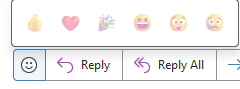
Hello Microsoft! We have some reluctant staff that refuse to move on from Outlook Classic Some staff have issues, others don't. It's very inconsistent. Was just wondering if anyone has any ideas on the following issues and why they appear for some staff and not others. No reaction button – No matter the sender of the email, Outlook Classic users cannot react to the email at all. The button should look like this: But instead it appears like this for other staff, with just a lightmode switch: Cannot add Rooms to meeting invites – Users indicated that the Rooms button, when you try to set up a meeting via Outlook Classic, does not show the list of all the meeting rooms. or how crunched the image is. It's just how it was sent to me Report button on right-click not available – In the email list, when a user tries to right click on an email to report it as phishing, they cannot. Search bar not working properly – It appears that Outlook Classic’s search bar does not recognize the names you search, maybe it’s not looking at the address book at all? It is expected to auto-fill the name with its address and then you can search for the address in the list of emails. New mail – Another annoying thing is when we try to send an email to someone, let’s say someone you haven’t sent an email to someone in a really long time outlook fails to recognize that person. There is no auto-fill in the address search, no way for it to recognize the recipient. Any assistance would be greatly appreciated
How can specific users be exempted from a tenant-scoped Microsoft 365 Apps Policy?
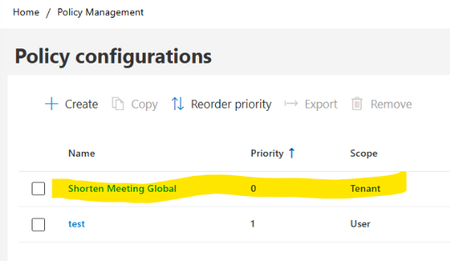
Hello, I am looking for guidance regarding Microsoft 365 Apps Cloud Policy Service behavior and policy precedence. Current configuration: In Microsoft 365 Apps Admin Center → Policy Management (config.office.com), we have the following policies: Policy 1 Name: Shorten Meeting Global Scope: Tenant Priority: 0 Configured settings: Shorten appointments and meetings = Enabled Reduce the end time of short appointments and meetings = 5 minutes Reduce the end time of long appointments and meetings = 10 minutes Policy 2 Name: Test Scope: User (Security Group) Priority: 1 Assigned only to a dedicated test group Relevant settings configured as Not Configured Observed client behavior: On corporate-managed devices, affected users receive the following registry values: HKCU\Software\Policies\Microsoft\Cloud\Office\16.0\Outlook\Options\Calendar shortenevents = End_Early endearlyshort = 5 endearlylong = 10 The Outlook option: File > Options > Calendar > Shorten appointments and meetings is greyed out. Additional validation: Using the same Microsoft 365 account on an external non-corporate device: The above registry path is not present. The Outlook option is editable. Testing performed: A user-scoped Cloud Policy was created and assigned to a dedicated security group. For the "Shorten appointments and meetings" setting, only the following options are available: Enabled Not Configured There is no Disabled option. but the Tenant policy continued to apply and the Outlook option remained locked. Questions Is there a supported way to exempt specific users from a tenant-scoped Microsoft 365 Apps Cloud Policy when the setting only supports "Enabled" and "Not Configured" and does not provide a "Disabled" option? Does Not Configured in a User-scoped policy allow evaluation to continue to the lower-priority Tenant policy? If policy precedence is changed so that: Test Policy = Priority 0 Tenant Policy = Priority 1 would the User policy potentially suppress the Tenant setting? Is there a supported way in Microsoft 365 Apps Cloud Policy Service to provide exceptions for specific users while keeping the Tenant policy as the organizational default? Has anyone successfully implemented an exclusion or override scenario for the "Shorten appointments and meetings" setting? Any guidance or documentation references would be greatly appreciated. Thank you.
Issue with viewing mode for E5 licensed users
I'm a sysadmin for a Health care provider in Sweden and we have an issue with users with an E5 license loading into Office apps in view-mode. As far as I know we are a coupe of organisations providing health care that have this same issue. Background: We have a mix of F3 and E5 licenses and sometimes the F3 licensed users need to view documents that contains info that isn't allowed to be saved in the cloud. To minimize the popups that show up when a user starts word unlicensed we have a GPO (viewer mode) that says that it should open i view-mode. Per my understanding this GPO is device based and not user based. However, this also affects the users of E5 license who regularly change workstations, easily 5-10 devices in a day. Since they should be able to view and edit documents in office apps it causes frustration and confusion when they load into view-mode and have to log out and then in again (or update license) and restart the program. Our computers devices are Microsoft Entra hybrid joined and shared computer licensing is enabled. Are there any solutions or viable workarounds for this issue? It's not complicated for users to handle but frustrating and causes a lot of tickets to the support team. Unsure if I'll be able to participate due to the time zone difference but will appreciate any and all help. /Per Ekholm
Recent message move issue in Outlook 365 shared mailbox
Starting around Monday 5/12 (could have been over the weekend) we're seeing behavior where moving an email from one folder to another in a shared mailbox is appearing to move correctly in Outlook software (classic enterprise version) but not reflecting in web view. This creates a duplicate of sorts and have to address on the web side. Same behavior with two different accounts that have access to the same shared mailbox on newest (current channel) and slightly older version of 365 software. When using python automation that has worked for months, it's now effectively creating a copy from Inbox in our In Progress folder, and a 3rd copy in Done folder. When processing cycle hits again, it's reprocessing (bad) and creating a mess of duplicates. Anyone else experiencing this or have any idea what may have happened or how to resolve? Thanks jtSolved767Views0likes3Comments
Question about Team/Group Calendar
I’m curious if anyone has any answers or suggestions for the following scenario: Within my organization, I’d like to create a single M365 team containing all departments. Within MS Teams, each department would have its own Channel under that one all-encompassing team, where they could schedule meetings, communicate, share files, etc. Each department has roughly 5 team members and there are 8 departments, so let’s say this all-encompassing team will contain 40-45 members total. Each department schedules weekly status meetings. My vision is to have a single shared calendar containing weekly status meetings of all departments, and I’d like for all team members across all departments to be able to see that shared calendar, but here’s the challenge: I don’t want each team member to have all department meetings display on their own work calendar, so they’re not confused as to what meetings they actually need to join versus just be aware of, but only display meetings they are individually invited to. I would however like if they had the ability to see all team meetings if they are looking at the greater Team/Group calendar in Outlook. I also don’t want all team members to be notified about other department/channel meetings, for example if it’s cancelled or rescheduled. I only want them notified about meetings they as an individual are invited to. Is there functionality or workarounds that support this scenario? Thanks in advance!Not so Dark theme
Is there something that can be edited or is an option coming to enable a more contrasting but less harsh theme to MS365 apps and Windows? As I’ve got older I need to turn down brightness because the extremes in the current themes, White, Black, Dark Grey, are too harsh, but that doesn’t quite achieve what I need. A light grey, giving better contrast than white for those that need it but not so harsh and depressing as the dark versions, would be ideal. We’re lacking options at the light end of the spectrumWhats happens when Office Retail user signs in with Microsoft 365 account
Hi all, i have a situation where users are being migrated, so E3 some F3 but wanted to know what happens when user who is using Office 2016 Retail signs in to their Office with Microsoft 365 account that doesn't have Microsoft apps enabled or available. Does Office Retail continue to work as normal, is anything blocked or restricted? Anything to be mindful of? ThanksSolved408Views0likes2Comments
Outlook address book sort order, PhoneticDisplayName
You cannot enter PhoneticDisplayName in AdminCenter. - I would like to be able to enter the user's PhoneticDisplayName in the AdminCenter. - I would like the address book to be sorted in PhoneticDisplayName order. Isn't it possible to change the sort order by pressing the item title? Name, E-mail, Mobile No, PhoneticDisplayName