onedrive
197 Topics
OneDrive Shared Files Not Appearing in “Shared” or Windows 11 File Explorer
Hi everyone, I'm experiencing some issues with shared files in my personal OneDrive and was wondering if anyone has encountered a similar problem or knows how to fix it. Here's the situation: I've shared several Excel files with a friend. Whenever I share a file, she receives an email with a link that allows her to open and edit it without any problems. However, despite the sharing process being successful, the files don't appear in her “Shared” or “Shared with you” section, either on the OneDrive website or in the OneDrive folder on her Windows 11 PC. The only way she can access the files is by going back to the original sharing emails and clicking the links each time. I've already checked the permissions, and both read and write access are correctly configured. However, I haven't been able to find a way to make the files appear directly in her OneDrive or have them synced to her PC. Does anyone have any suggestions or know how to resolve this issue? Thanks in advance for your help!72Views0likes1Comment
OneDrive won't reinstall after Force Removal with Geek Uninstaller: existing OneDrive instance"error
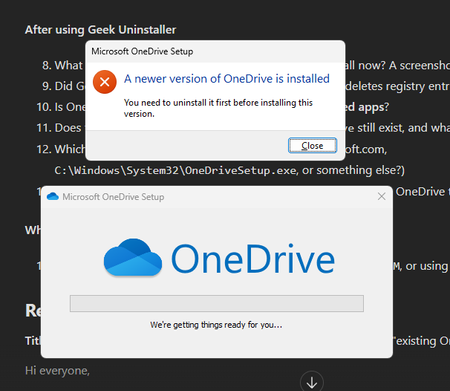
a { text-decoration: none; color: #464feb; } tr th, tr td { border: 1px solid #e6e6e6; } tr th { background-color: #f5f5f5; } Hi everyone, I have a OneDrive problem that started as a sign-in issue and has now turned into an install issue. At this point OneDrive won't reinstall on my laptop at all. Setup Laptop: my own personal device (not managed by my school), about 2 years old, Windows reinstalled several times OS: Edition Windows 11 Pro Version 25H2 Installed on 15.04.2026 OS build 26200.9457 Experience Windows Feature Experience Pack 1000.26100.360.0 Account: school Microsoft 365 account OneDrive: downloaded from the official Microsoft website The original problem When I tried to sign in to OneDrive with my school account, it got stuck in a loading loop right after I entered my email address. It never got any further, so I could never sync my files locally. We don't know what caused it, and no error code ever came up. Signing in with the same school account works fine in other apps like Teams and Outlook. Only OneDrive has the problem. I wasn't able to test with any account other than my own. What we tried with the school IT office Disconnected my school account from Windows (Settings → Accounts → Access work or school) and signed in again Uninstalled and reinstalled OneDrive Reset OneDrive with: %localappdata%\Microsoft\OneDrive\onedrive.exe /reset None of this fixed the sign-in loop. Where it broke completely Next, the IT staff removed OneDrive with Geek Uninstaller using "Force Removal". Since then, the OneDrive installer from the Microsoft website won't run. It says there is already a OneDrive instance on the PC that has to be removed first: Current state OneDrive is not listed under Settings → Apps → Installed apps The folder %localappdata%\Microsoft\OneDrive no longer exists So I can't find any visible trace of OneDrive, but the installer still thinks it's installed I haven't run sfc /scannow or DISM yet, and I haven't tested with a new Windows user What I'm looking for I'd really like to avoid reinstalling Windows again, especially since OneDrive might fail the same way afterwards. I'm hoping for either: A way to clean up whatever is left of OneDrive so it installs properly again, or A workaround to use my OneDrive files locally (in File Explorer, not only in the browser) Thanks to everyone who reads this. I hope it helps others with the same problem too. -Kemal :)Solved207Views0likes6Comments
Recuperação do Onedrive não funciona.
Não sei o que aconteceu, mas nos dias 04 e 08, dois dias que não acessei meu onedrive, milhares de arquivos meus foram deletados. Foram parar na lixeira, tentei de várias formas restaurá-los, mas o onedrive não permite restaurar todos de uma vez e depois de horas tentando, percebi que nunca iria conseguir terminar. Resolvi tentar a restauração do onedrive para o dia 04/09 as 00h00, mas a restauração nunca funciona, para pelo meio do caminho e a todo instante pede nova autenticação, tornando também inviável a recuperação dos arquivos. Não posso perdê-los e amanhã é o prazo de retenção dos arquivos e isso se tornará irreversível. Preciso de ajuda URGENTE para resolver esse problema, pois nada está funcionando e não encontro respostas para solucioná-lo. Tenho várias imagens de tela gravadas provando que depois de horas, nunca sai do 0% e também das constantes solicitações de verificação que impedem a restauração de forma funcional. Espero realmente que resolvam esse problema e restaurem meu onedrive por completo para o dia 04/09 as 00h00 ou precisarei tomar as medidas necessárias por terem eliminado definitivamente meus arquivos sem que eu tivesse a chance de recuperá-los. Agradeço a atenção e aguardo providências URGENTES!250Views0likes2Comments
MCP Integration for OneDrive/SharePoint
Hi OneDrive Team, I'm reaching out to explore Model Context Protocol (MCP) server integration for OneDrive and SharePoint. I am looking to integrate OneDrive/SharePoint data access into ThoughtSpot application using MCP solution. Are there existing MCP server implementations (official or community-driven) for OneDrive/SharePoint? If available, what are the connection endpoints and authentication details needed to set up the MCP server? If no MCP server currently exists, are there any upcoming plan on this and is there any alternate recommended approach present. Also could you please provide a SPOC from your team who can support further discussions and technical guidance on this integration? I'd like to schedule a follow-up conversation to explore the best path forward and discuss the use case. Thanks in advance for your help.201Views0likes0CommentsOneDrive stuck on "Processing 7 changes" for weeks. Can't identify what the 7 files are.
After upgrading from windows 10 to 11 and reinstalling onedrive several weeks ago, it got stuck "processing 7 changes". It was actually more than 7 at first, but I was able to find some of the files that were stuck and deleting them reduced the number to 7. But now I can't find the last 7 that are stuck processing. The files I managed to find had the wheel icon that indicates they are syncing, but I can't find any more files with that icon now. I have thousands of files in thousand of folders/subfolders, so I can't manually check every folder to see if a file has the syncing icon. Other than that everything seems to be working. Onedrive syncs new files and downloads files on demand correctly. It's just that "processing 7 changes" message never goes away. If Onedrive named the files it was trying to process, I could easily go to them and delete or replace them, but there doesn't seem to be a way to identify the files.309Views0likes1CommentWorking with ONE DRIVE
Good evening, everyone. I’d like to ask a few questions about OneDrive: If I have OneDrive active and am working on a Word document stored on my local drive, when I finish and click "Save," where is it saved—locally or on OneDrive? If I pause synchronization with OneDrive—or, better yet, uninstall the OneDrive app—what happens to the files currently in the OneDrive cloud? Will they be lost? I would appreciate your feedback. Regards. Luis Fernando.222Views0likes2Comments
OneDrive desktop client continues to experience authentication problems
We're currently investigating a widespread OneDrive desktop client authentication issue affecting many users. Initially, users experienced continuous login prompt loops. In cases where authentication succeeded, OneDrive would repeatedly connect and disconnect, asking users to re-enter their credentials multiple times. We've already attempted: Resetting OneDrive Uninstalling and reinstalling the client Removing and recreating Windows Credential Manager entries Signing users out and back into Microsoft 365 None of these steps resolved the issue. A key finding is that OneDrive Online (browser access) works normally while connected to the corporate network. Users can access their files through the web without issue. However, the OneDrive desktop client continues to experience authentication problems. Today we identified an interesting workaround: when users connect through an external network (such as a mobile hotspot), OneDrive immediately authenticates and syncs successfully. Once we go back on the corporate network and reset OneDrive, the issue returns. No firewall, VPN, or known network configuration changes have been made, and current reviews have not shown any obvious blocked traffic. Given that: OneDrive Online works internally The desktop client fails internally The desktop client works externally (hotspot) We're trying to determine what network, authentication, proxy, DNS, SSL inspection, Conditional Access, or Microsoft 365 endpoint-related issue could be impacting the OneDrive desktop client specifically. Has anyone encountered similar behavior or have recommendations on where to investigate next?625Views0likes2Comments
OneDrive embedded PowerPoint slides showing blank page or error
I embed PowerPoint files from OneDrive into eLearning courses using the standard embed links. As of today, all of them have stopped working. All my embedded PowerPoint slides are currently down across several live eLearning courses. What I've tried: Tried in a private/incognito browser window - still broken Created a brand new embed link from scratch - still broken Tried a completely different PowerPoint file - still broken So it doesn't seem to be a problem with one specific file or link - it's affecting all my embeds at once. What I see: Sometimes the page shows: "Something went wrong. This is a temporary issue, so try again in a few minutes." with reference codes: Ref A: 137479770EE248B2BD8767C1500F6314 Ref B: SG2EDGE2019 Ref C: 2026-08-25T04:41:15Z Other times the page just loads completely blank, with no error message at all. I also checked the browser's technical console, and it shows one of the files OneDrive needs to display the slides is failing to load (a 404 error on Microsoft's side), which is likely why the page won't display anything. Has anyone else run into this, or is there a known issue being tracked? Happy to share more detail if it's useful.472Views1like5Comments
OneDrive Access Issue – User Unable to Access OneDrive Despite Multiple Troubleshooting Attempts
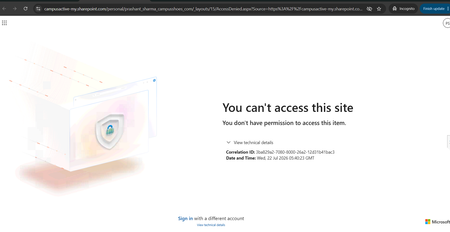
Hello Community, We are facing an issue with a user who is unable to access their OneDrive. Whenever the user tries to access OneDrive, the same error message continues to appear (screenshot/error attached). We have already performed the following troubleshooting steps: Removed and re-assigned the Microsoft 365 license. Executed the required PowerShell commands and confirmed that the user has a valid OneDrive URL and access permissions. Verified OneDrive and SharePoint settings from the SharePoint Admin Center. Used Microsoft Support and Recovery Assistant (SaRA) and reviewed the recommendations provided. Attempted to re-provision the user's OneDrive site. Despite completing all the above steps, the issue persists and the same error continues to be displayed. Additional Information: User has a valid Microsoft 365 license assigned. OneDrive service is enabled for the user. SharePoint Online is functioning normally for other users. Re-provisioning OneDrive did not resolve the issue. Has anyone encountered a similar issue or can suggest additional troubleshooting steps to identify the root cause? Any guidance would be greatly appreciated.644Views0likes2Comments
Missing data
I recieved several emails from Microsoft that were legit. I was advised I am 290+ GB over my quota for 5GB I realize my Clipchamp was saving to my personal OneDrive NOT my business OneDrive (where I have 5TB) Anyway, I opened a ticket with Microsoft and they confirmed my personal OneDrive has 1GB of data in it -- not 290+ Looks like my data vanished... Can you please contact me and help with resolution?118Views0likes1Comment