office 365
42 Topics
I am Facing Microsoft form related issue
I am Facing Microsoft form related issue, I can see when I am downloading a Excel copy some columns are blank. This is my survey form, and I cannot add manually however this will reflect manipulation in data, as this is technical glitch need assistant from your side on urgent basis381Views0likes1Comment
Insights from Copilot have stopped working for us
We're all licensed (verified) with M365 Copilot, and for about the last week, one of our workhorse intake forms has stopped working with regards to the "Insights from Copilot" feature. When we attempt to refresh the insights, it presents the message, "Your form has XX responses. Copilot is analyzing the data to provide insights.", then spins for about 30 seconds, and then presents the error, "The insights haven't been generated successfully. Please try again." We're syncing responses to an Excel workbook, and that seems fine, but after about a week these "insights" just started failing in this fashion. We've done basic troubleshooting like trying InPrivate browsing, cache clearing, and since we are only at about 100 responses for this particular small form we're not hitting any limits. Regardless, it's wedged stuck in this state. I reported it via the M365 Admin portal and received the usual "No issues found" reply. 🙄 Anyone else seeing this problem? Does anyone actually use this feature? 😜599Views0likes2Comments
"File Upload" Option not available for external users.
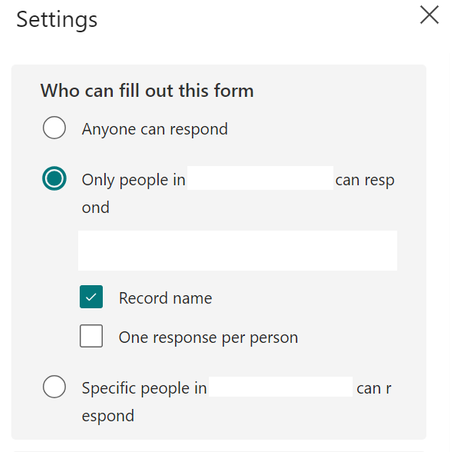
"File upload" option is only available when set Microsoft Forms “Only people in my organization can respond” or “Specific people in my organization can respond” is the selected setting. When we set, "Anyone can Respond" the option "Upload File" greyed out8.4KViews0likes2Comments
Forms Moving file location of document uploaded and connecting workbooks to sync responses
I have a Microsoft form i made to enter all of our vehicle maintenance and parts into to track it by vehicle as we have 11 vehicles. I Have a upload button on the bottom of form so I can upload from our Dropbox to save all the receipts/invoices/photos of parts to with each entry on the spreadsheet. I need to adjust some of my folders (sub folder) where the files live on Dropbox. will doing this break the uploaded document or will it still be able to be viewed from the excel spreadsheet that is downloaded from Microsoft forms Second Question: I need to auto populate the form responses from the workbook it syncs to that saves on our SharePoint through our office 365 subscription and have it linked to the Vehicle Tracking Workbook that lives in Dropbox in our vehicle file so when the workbook is opened on Dropbox the form responses added in via Microsoft form copies the new entries to the historical page on the Dropbox version. How can i easily sync the two workbooks together315Views0likes1CommentSyncing Forms and excel
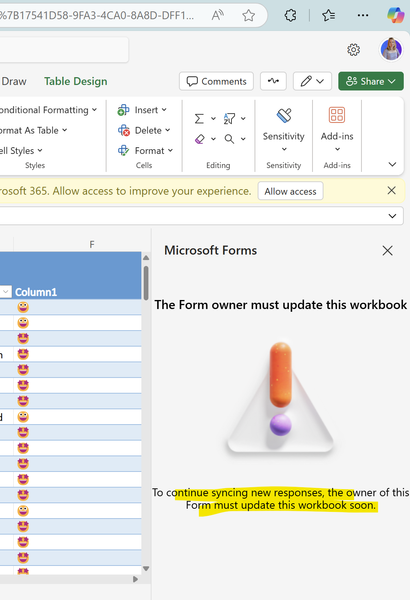
Hello, I am having trouble syncing Forms and excel. It says the owner of the Form needs to update the Form. I created this form in a Teams Group many years ago. I am still owner of the group. I checked in Network and I found that the Group is the owner of the Form. I found the Azure AD ID there. Please advice so we can sync the Form. ssfs119Views0likes1CommentUpload file option is freezed while creating a new form.
Answer is in the settings, you need to change who can fill this form, if you have selected Anyone, the upload function will not work for security/malware issues. Also, if you select only people from my organization, then it will start working fine. BR Hitesh Ved 8390703219703Views0likes2Comments
HEX code field greyed out after new MS forms update
Hiya, My MS forms updated to (what I believe is now) the latest version of Microsoft but since the new update, the HEX code field to personalise the background colour is greyed out and can't be selected. (screenshot attached) When I view this on existing forms that I had already changed the colour on, it allows me to update it, but any new forms or forms that are still only set to the default colour, doesn't allow me to update it. Is this a bug or is there a new feature I need to turn on somewhere? Is anyone else having this issue? This option is imperative for any forms I create to ensure I follow my companies brand guidelines. Thanks SophieSolved998Views0likes2Comments
Error "the operation cannot be performed because the object has been deleted
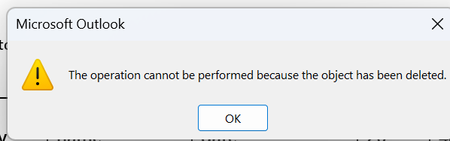
Microsoft office home & Business 2021 and Microsoft office LTSC stand 2021 happening intermittent error. after finishing typing a reply email and clicking the reply button, an error prompt appears. The user needs to close the email, reopen it, and retype the message. i have did window update, update office, repair office, disable add-in, re-install office, create new outlook profile. Anyone can help?1.1KViews0likes3CommentsIncrease response rate?
Curious if anyone has any tips on how to increase engagement and response rate with surveys via Microsoft Forms? I've previously used Typeform and it's definitely catchy and a dynamic experience ... curious if anyone has tried to replicate that in MS forms or has any tips to share.Solved1.1KViews1like4Comments