office 365
6372 Topics
User Forms not displaying correctly in MS365 Excel for Mac
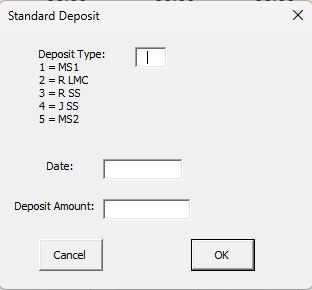
I need some help. I developed a simple budgeting system in Excel many years ago, which revolves around a spreadsheet with sheets for each account. I built three user forms to allow for a Deposit (which is distributed among the accounts based on data in the summary sheet); Single Entry (which can be either a credit to or debit from a specific account), and a Transfer (which takes an amount from one account and transfers it to another. Here are pictures of the three User Forms as displayed on my Windows machines (whether running Office 2019 Excel or MS 365 Excel for Windows): The key is that the Single Entry and Transfer forms display a list of accounts that can be selected from. The problem I am having is that when I try to do this in MS 365 FOR MAC, the lists of accounts are not displayed and cannot be selected from (only a blank box appears). The Deposit form, which has no list to select from, works perfectly fine, so it's not a general problem with macros. Fortunately, even after the file is opened and edited on Mac, it can be reopened back on a Windows machine and still works properly there. I know that there are limitations in Excel for Mac with regard to building User Forms, but I didn't see anything specifically described that would create this situation. I'm wondering if perhaps it might be a font issue?? I built these years ago and have used them for many years without problems. I'm pretty sure I can come up with another way to do this, but I was hopeful that someone out there might have a simple solution for me?? I moved from Office 2019 to MS 365 specifically to allow me to use a Mac, so this is really throwing a monkey wrench in my plans!!! Thanks to all for your consideration!!50Views0likes2Comments
Pivot Table sorting is not working. Name are sorting like month names.
I have a pivot table with Names and Data for each name. I select the LastName column as the first Row in the pivot table. Excel sorts the name March to the top of the list thinking it is a data with the month of March. I have made sure there are no hidden characters, turned off custom sort lists. Nothing works. This is a serios issue because if I need data for Mr March and scroll down to where it should be, I would conclude ther is no data for him. This should work as expected and not have to try some work around like i was an IT expert. Nothing has worked even applying the knowledge I have about programming. Any ideas?Solved50Views0likes5CommentsExcel Nested Arrays: Find the Nesting Depth of Uniform and Ragged Arrays ARRDEPTH() & ISRAGGED()
Hey everyone! I’ve been diving deep into Excel’s new nested arrays features lately, and I absolutely love the flexibility they bring to data structuring. However, managing them can get a bit tricky, so I figured I’d build some specialized tools to handle them seamlessly. Public Interfaces & Arguments =ISRAGGED(array) Argument Description Default Behavior array Target nested structure to validate. Required =ARRDEPTH(array, [is_ragged]) Argument Description Default Behavior array Target nested structure to measure. Required [is_ragged] TRUE: Scans all branches for the deepest path. FALSE: Speed test on the first path only. FALSE (Omitted) TL;DR (What makes it tick): Function Name Type What It Does ARRDEPTH Public UI Returns nesting depth. Supports deep checking or fast linear testing. ISRAGGED Public UI Structural validator. Returns TRUE if array branches have uneven nesting. ANALYZE_NESTING Hidden Core Engine Multi-process recursive parser that tracks tree structure geometries. LINEARDEPTH Hidden Utility High-speed depth checker that evaluates the first element path exclusively. You can get both functions from my GitHub Gist: https://gist.github.com/Medohh2120/9cdf939036942c9672c57ccd6de696d3284Views1like6CommentsHow to Use Checkboxes and In-Cell Lists for Interactive Project Tracking in Excel (Microsoft 365)
If you are using Excel solely for basic data entry, you are missing out on modern interactive capabilities available in Microsoft 365. Two standout features—Checkboxes and In-Cell Lists—make it much simpler to build dynamic status dashboards, track completion rates, and manage categorical values directly within cells. Below is a breakdown of how to implement both features in real business scenarios. 1. Interactive Checkboxes & Task Trackers When managing a project template or task list, you can replace plain text inputs with functional checkboxes. - Inserting Checkboxes: Select the target range in your task table and insert a checkbox from the ribbon. - Creating a Dynamic Status Column: A checked box returns TRUE, while an unchecked box returns FALSE. You can leverage this directly using a standard IF statement (for example, in cell F3 referencing checkbox cell D3): =IF(D3, "Completed", "Pending") Copy this formula down using Ctrl + D. Toggling the checkbox will instantly flip the status between Completed and Pending. - Calculating Real-Time Completion Percentages: To display an overall completion rate across all tasks: 1. Add a summary cell at the top of your sheet. 2. Use COUNTIF alongside COUNTA: =COUNTIF(D3:D20, TRUE) / COUNTA(D3:D20) 3. Format the cell as Percentage (%). Whenever a task is checked off, your completion metric updates automatically, giving teams and stakeholders immediate visibility into project progress. 2. In-Cell Lists for Skill and Tag Management Instead of creating messy text strings or sprawling columns to capture multiple skills or tags per employee: - Select the relevant cell under your dataset. - Go to Insert > List. - Enter your values (such as Power BI, SQL, Python). - Hit Enter. Hovering over the cell reveals the clean, consolidated list directly in place, keeping your dataset structured and readable.100Views0likes0CommentsExcel can still use legacy “Move and Size with Cells” checkboxes — but can no longer create them
Excel Can Still Use “Move and Size with Cells” Form Checkboxes — But It Can No Longer Create Them A reproducible Excel compatibility regression hiding inside legacy Form Controls For years, I have used Excel workbooks containing hundreds of Form Control checkboxes attached to product rows. These checkboxes behaved exactly as you would expect: - change the row height, and the checkbox stays inside that row; - filter the worksheet, and the checkbox disappears together with its product; - remove the filter, and the checkbox returns to the correct row; - no overlapping controls; - no “click one checkbox, activate another” behaviour. Recently, while rebuilding one of these workbooks in Excel 2024 LTSC, I discovered something very strange. The old checkboxes still work perfectly. But if I delete one and recreate it — even using the same VBA code that originally created the controls — Excel creates a different kind of placement behaviour. After a full day of controlled testing, XML inspection and A/B workbook comparison, the problem became clear: Excel can still read, display, save and execute legacy Form Control checkboxes using true “Move and size with cells” behaviour — but current Excel cannot recreate that same state for a newly created Form Control checkbox through the normal UI or VBA object model. That is not just inconvenient. For existing business workbooks, it is a serious backward-compatibility problem. The simple VBA code that used to work The original controls were created with ordinary Excel VBA: Set myCBX = wks.CheckBoxes.Add( _ Top:=cell.Top, _ Left:=cell.Left, _ Width:=cell.Width, _ Height:=cell.Height) Nothing exotic. No custom event engine. No ActiveX. No external add-in. Just a standard Excel Form Control checkbox positioned exactly over a cell. The workbook contains roughly 1,000 of these controls. The old ones still behave correctly today. The problem starts only after deleting them and creating new ones. What changes? In the Excel UI, the difference is immediately visible. For an original legacy checkbox: Format Control → Properties shows: Move and size with cells The option is selected, although it is greyed out. For a newly created checkbox in current Excel: Move but don’t size with cells is selected instead. That already suggests something changed internally. But the real evidence is inside the .xlsm package. The OOXML tells the story I created two controlled test workbooks: Workbook A Original legacy Form Control checkboxes that behave correctly. Workbook B The same workbook, but the checkboxes were deleted and recreated in current Excel using the original VBA logic. The internal OOXML differs. The working legacy controls contain placement information equivalent to: moveWithCells="1" sizeWithCells="1" and use genuine two-cell anchoring. The newly generated controls are instead stored using one-cell-style placement semantics, including: <xdr:twoCellAnchor editAs="oneCell"> The important part is not merely the XML syntax. The resulting behaviour is observably different. With the legacy control, both ends of the object are anchored to the worksheet grid. With the newly created control, Excel effectively preserves the control size while cells move underneath it. That distinction becomes disastrous when rows are resized, hidden or filtered. Why filtering exposes the problem Imagine a checkbox sitting on row 50. With the legacy behaviour: Checkbox ↔ Row 50 boundaries When row 50 changes size, the checkbox changes with it. If row 50 is filtered out, the control disappears with the row. When the row becomes visible again, the control is still exactly where it belongs. With the newly generated control, its dimensions are not tied to both cell boundaries in the same way. After repeated resizing and filtering, controls can begin to overlap. That leads to one of the worst possible spreadsheet UI failures: You click the checkbox you can see, but another checkbox receives the click. For a workbook containing hundreds or thousands of rows, this makes the controls unreliable. “Just use .Placement = xlMoveAndSize” That was the obvious first solution. Excel VBA defines: xlMoveAndSize as the placement mode where an object moves and resizes with cells. So I tested: myCBX.Placement = xlMoveAndSize and: myCBX.Placement = 1 I also tested placement through the corresponding Shape: ws.Shapes(myCBX.Name).Placement = xlMoveAndSize And through a ShapeRange. And through DrawingObjects. And even the commonly suggested workaround: Group controls → set Group.Placement = xlMoveAndSize → Ungroup None of these recreated the original internal state in Excel 2024 LTSC. The workbook continued to serialize the new controls differently. This matches long-standing Microsoft guidance that Form Control checkboxes do not normally support “Move and size with cells” as an editable option, while ActiveX checkboxes do. And yet — this is the important part — existing legacy Form Control checkboxes in real workbooks can still possess and use that state. The most revealing experiment I then modified the OOXML manually. I took the newly generated workbook and patched the checkbox placement metadata to match the working legacy controls: moveWithCells="1" sizeWithCells="1" with proper two-cell anchoring and without the one-cell override. Then I reopened the workbook in Excel 2024 LTSC. And it worked. Immediately. No custom VBA reposition engine. No ActiveX. No workaround running continuously. The same Excel installation that would not create this state through VBA had absolutely no problem: - reading it, - displaying it, - saving it, - resizing the controls with rows, - and filtering them correctly. That is the key finding. The Excel rendering and file engines still fully understand this checkbox state. The missing part is the supported creation path. So is this an unsupported feature or a compatibility regression? Microsoft has historically documented Form Control checkboxes as not supporting “Move and size with cells” in the normal UI. That makes the situation unusual. The issue is not simply: “Excel removed a documented checkbox feature.” The stronger and more accurate statement is: Excel supports a legacy Form Control state in existing workbooks, continues to execute it correctly, but no longer provides an ordinary supported mechanism to reproduce that same state for a replacement control. For users maintaining long-lived Excel systems, the difference is academic. If an old control is accidentally deleted, replacing it with an apparently identical Form Control changes the behaviour of the workbook. That is a backward-compatibility problem. Why not switch to ActiveX? ActiveX checkboxes support richer placement behaviour. But that creates another problem. Microsoft now disables ActiveX controls by default in Microsoft 365 and Office 2024 for security reasons. When ActiveX is disabled, users cannot create new ActiveX objects or interact with existing ones. So the official alternatives are hardly attractive: Legacy Form Controls Lightweight and reliable — but cannot reproduce this legacy placement state normally. ActiveX Supports more control behaviour — but is now a legacy security-sensitive technology disabled by default in current Office. New in-cell checkboxes Architecturally much better — because the checkbox is part of the cell and represents TRUE/FALSE. But Microsoft’s own documentation currently lists the feature for: - Excel for Microsoft 365 - Excel for Microsoft 365 for Mac not Excel 2024 LTSC. That leaves perpetual Office users in an uncomfortable middle ground. This is where the product story becomes difficult to defend I am not claiming that Microsoft intentionally removed this behaviour in order to sell subscriptions. There is no evidence for that claim. But the resulting user experience is still hard to justify: 1. Excel can execute the legacy checkbox behaviour. 2. Excel can preserve it. 3. Excel can save it. 4. Excel accepts a manually patched workbook containing it. 5. Excel’s current object model does not provide a reliable way to recreate it. 6. The modern replacement — native in-cell checkboxes — is documented for Microsoft 365 rather than Excel 2024 LTSC. 7. The other legacy alternative, ActiveX, is now disabled by default for security reasons. For users maintaining mature Excel applications, this is a poor migration path. Why this matters beyond checkboxes This is not really a story about one checkbox property. It is about the contract users expect from long-lived productivity software. Excel workbooks are often not disposable documents. They can be: - product-management systems, - pricing tools, - engineering calculators, - operational forms, - purchasing systems, - inventory tools, - reporting applications, - or business processes maintained for ten or twenty years. When Excel continues to support the execution of an old document feature but silently prevents users from recreating an equivalent object, maintaining those systems becomes unnecessarily difficult. Backward compatibility should mean more than: “The file still opens.” It should also mean: “A user can maintain the workbook without reverse-engineering its OOXML package.” What Microsoft could do There are several reasonable fixes. Option 1 — Restore proper placement support Allow: CheckBox.Placement = xlMoveAndSize to generate the same placement state that Excel already understands for legacy controls. Option 2 — Expose the existing capability If the engine already supports it, expose “Move and size with cells” again for Form Control checkboxes. Option 3 — Provide a migration path Make the new in-cell checkbox functionality available to perpetual Excel releases as well, or provide an official conversion tool from legacy Form Controls to cell checkboxes. Option 4 — At minimum, document the limitation If this legacy state is intentionally read-only for compatibility, document it clearly. Currently, a user can spend hours debugging VBA without realizing that two visually identical Form Control checkboxes can have fundamentally different internal placement semantics. A workaround exists — but users should not need it The workaround I eventually used was to modify the .xlsm OOXML package so that newly generated controls use the same anchor metadata as the working legacy controls. That solved the problem immediately. But manually patching Office XML should not be necessary to restore behaviour that Excel itself already supports. It is a useful proof of concept. It is not an acceptable product-level solution. The reproducible evidence I have retained minimal A/B test workbooks demonstrating the problem: OLD Original Form Control checkboxes with correct legacy placement. NEW The same workbook after deleting and recreating the controls. The differences can be reproduced and inspected directly in the workbook OOXML. I would be happy to provide the files to Microsoft Excel engineering. Final thought Excel’s reputation was built partly on extraordinary backward compatibility. That is why companies still trust .xls and .xlsx files created years — sometimes decades — ago. This case shows an uncomfortable edge of that compatibility: Excel remembers how to use an old feature, but appears to have forgotten how to create it. When the workaround is to unzip an .xlsm, manually alter OOXML placement records, rebuild the package and reopen it in Excel — and Excel then works perfectly — it is difficult to argue that the capability itself is gone. The engine still knows how. The user simply no longer has a supported button or VBA path to ask for it. Microsoft, please give that capability back — or provide a proper migration path. Sources Microsoft documentation for native cell-based checkboxes: https://support.microsoft.com/en-us/excel/using-check-boxes-in-excel Microsoft-hosted discussion on Form Control checkbox limitations: https://learn.microsoft.com/en-us/answers/questions/4813119/is-there-a-way-to-assign-a-checkbox-to-a-cell Microsoft documentation on ActiveX controls being disabled by default: https://support.microsoft.com/en-us/office/vba/activex-controls-are-disabled-by-default-in-microsoft-365-and-office-2024280Views0likes3Comments
Office Excel Scripts needs interactive debugging capabilities
Office Excel Scripts needs interactive debugging capabilities, including breakpoints, watch variables, step-through execution, and inspection of worksheet state. These features would significantly improve development productivity and eliminate the need for workarounds such as temporary Return statements, logging to cells, or artificial delays. Debugging complex scripts involving row insertions, looping logic, and worksheet modifications is unnecessarily difficult without modern debugging tools. I love Scripts, but it needs to be debugged. We have debugging capabilities in VBA, but NOT Office Scripts. Please Help.224Views1like3CommentsTwo-finger touchpad swipe doesn't scroll the sheet tab strip in Excel (works fine everywhere else)
Hi all, I'm running into an odd, very specific touchpad issue in Excel and wanted to check if others have found a workaround. Setup: - Lenovo ThinkPad T490, Windows 11 - Microsoft 365 Excel (desktop) - Precision touchpad The issue: Two-finger horizontal swipe scrolling works perfectly everywhere else — browser, Word, File Explorer, and even inside the Excel worksheet grid itself (scrolling columns left/right works fine). However, the same two-finger swipe does NOT scroll the sheet tab strip at the bottom of the workbook when there are more tabs than fit on screen. I have to click the small navigation arrows (◄ ◄| |► ►) one at a time instead, which is slow with 20+ sheets. I tested this in a blank new workbook and in Excel Safe Mode (excel /safe) — same result both times, so it doesn't seem to be a corrupted file or an add-in. Worksheet content scrolling works fine in both cases; only the tab strip itself doesn't respond to the swipe gesture. For comparison, on an HP laptop I tested, the same gesture does scroll the tab strip, so I suspect it might come down to how HP's touchpad driver translates gestures vs. the generic Windows Precision Touchpad driver on the ThinkPad, but I'm not certain. Has anyone found a way to get two-finger swipe to scroll the sheet tabs specifically, either through an Excel setting, a touchpad driver setting, or a third-party remapping tool? Ctrl+Page Up/Down and the tab list popup work as an alternative, but I'd prefer swipe if there's a way to enable it. Thanks in advance!123Views0likes1Comment
Copilot in Excel
a { text-decoration: none; color: #464feb; } tr th, tr td { border: 1px solid #e6e6e6; } tr th { background-color: #f5f5f5; } Hi everyone, I’m starting to explore Copilot in Excel. I’m an Excel enthusiast, so I’m already quite comfortable with the application. I was wondering which Copilot features you find really useful, particularly those that save time or help solve problems. Do you also think Copilot can help beginners use Excel more easily and effectively? Thank you for sharing your thoughts and experience!215Views1like2Comments
[Reproducible] Excel crashes with Rtc.dll / 0xc0000005 on both Beta and Current Channel
Excel/Office crash that previously occurred on Beta Channel is now also happening on Current Channel I previously reported the same issue. At that time, I was using the Microsoft 365 Beta Channel, so I suspected that this might be a regression specific to a Beta build. However, the situation has now changed. I completely formatted and reinstalled Windows, then performed a fresh installation of Microsoft 365. I am now using the Current Channel, but the exact same issue is still occurring. Because of this, it is becoming difficult to consider this as simply a Beta Channel issue. Relevant videos : https://youtu.be/t1eQi1TuRjo Current environment Fresh Windows installation after full format Fresh Microsoft 365 installation Microsoft 365 Current Channel Excel version: 16.0.20430.20092 Crashes occur when working with Office files stored in OneDrive/cloud locations The behavior is very similar to the Excel and Word crashes I previously experienced on the Beta Channel In the case of Excel, Windows Event Viewer records a clear application crash. Windows Event Viewer crash information Event ID: 1000 Faulting Application: EXCEL.EXE Application Version: 16.0.20430.20092 Faulting Module: Rtc.dll Module Version: 16.0.20430.20092 Exception Code: 0xc0000005 Faulting Offset: 0x000000000024177e Excel Path: C:\Program Files\Microsoft Office\root\Office16\EXCEL.EXE Module Path: C:\Program Files\Microsoft Office\root\Office16\Rtc.dll Integrator Report ID: 44068f90-3fab-4746-9694-ed9d08c42231 The exception code is 0xc0000005, which indicates an Access Violation, and the faulting module is Microsoft's own Rtc.dll located inside the Office installation directory. Important point This is not occurring on an old Windows installation that has been used for a long period of time. On September 24, 2026, I completely formatted and reinstalled Windows, then installed Microsoft 365 from scratch. The same problem was reproduced immediately on the Current Channel. For that reason, it is difficult to explain this issue simply as being caused by old Office caches, remnants of a previous installation, or an existing Beta Channel environment. I previously encountered the same problem while using the Beta Channel and already submitted feedback to Microsoft. However, I have not received any specific response, acknowledgement of investigation, or information about the status of the issue. Now that the same type of crash is occurring on the Current Channel, this no longer appears to be limited to Beta builds. I would like Microsoft to clarify the following Is the 0xc0000005 crash involving Rtc.dll a known issue? Has Microsoft received other crash reports with the same crash signature? Why does the same issue occur on both Beta Channel and Current Channel? Are there any known issues involving Rtc.dll and Office cloud/OneDrive file handling or collaboration features? Is this issue currently under investigation? Is there any planned fix or known workaround? Most importantly, this issue has now been reproduced on a completely fresh Windows installation with a fresh Microsoft 365 Current Channel installation. Because of that, I would appreciate it if this issue could be investigated based on the actual Rtc.dll crash information rather than only suggesting generic troubleshooting steps such as reinstalling Office or Windows. If other users are experiencing the same issue, it would also be useful if they could share the following information from Windows Event Viewer: AppVersion ModuleName ModuleVersion ExceptionCode FaultingOffset I would also appreciate clarification from Microsoft as to whether this issue is currently being investigated. Full Event Viewer crash details Event ID: 1000 Source: Application Error AppName: EXCEL.EXE AppVersion: 16.0.20430.20092 AppTimeStamp: 6aafbf1b ModuleName: Rtc.dll ModuleVersion: 16.0.20430.20092 ModuleTimeStamp: 6aafb413 ExceptionCode: c0000005 FaultingOffset: 000000000024177e ProcessId: 0x3704 ProcessCreationTime: 0x1dd4bf9b3547dac AppPath: C:\Program Files\Microsoft Office\root\Office16\EXCEL.EXE ModulePath: C:\Program Files\Microsoft Office\root\Office16\Rtc.dll IntegratorReportId: 44068f90-3fab-4746-9694-ed9d08c42231275Views1like0Comments