office 365
156 Topics
Error 0x426-0x0 from KB5094126 — 3 months unresolved — ACCC & Fair Trading complaints filed
I am a Microsoft 365 Business subscriber experiencing persistent error 0x426-0x0 since June 2026 following Windows Update KB5094126 which broke OLE Automation functionality — confirmed by Microsoft's own release health documentation. Despite the following attempts to resolve this: More than 6 support calls under Case Reference 2605140030001387 Escalation to Executive Customer Relations Manager Swetha Singh Escalation to VP Lisa Sinacola and CEO Satya Nadella ACCC complaint filed — Reference REF4769926 Queensland Office of Fair Trading complaint filed — CRN 203225877721512 Microsoft has refused to permanently fix the issue, refused to apply Business subscription compensation of $129.60, and suggested I purchase additional paid support to fix a bug caused entirely by their own Windows Update. Every single morning I require 15 minutes of manual Quick Repair just to open software I pay for monthly. This has been ongoing for 3 months. Is anyone else experiencing this issue? Has anyone found a permanent fix that survives Windows updates?328Views0likes1CommentThe Case of the Self Uninstalling Office 365
My team and I have an issue that we cannot find a fix for. For what appears to be a random occurrence, we see a number of machines in our network where Office 365 will uninstall itself. We have scoured the internet trying to find a solution and although we see lots of people mentioning that this happens, the answers do not seem to fix the issue. A bit about our setup: The image we use for our machines has Office 365 preinstalled We are registering our machines into Intune but so far all Intunes is doing is tracking the devices We are also on a hybrid system for AD/AAD We have one Microsoft 365 for Windows 10 setup to push O365 but only two machines are in that group and although those 2 machines are getting Office removed, there a plenty of other people getting Office removed that are not in that group. We did try a clean uninstall of Office from one of the machines but the issue persisted and a few days later it installed itself. Most everyone is working from home and typically does not connect to the company infrastructure via VPN unless they have to. Of course, we have tried many of the solutions posted throughout the Net without finding a solution. If anyone has seen this as well and has a solution I would very much like to hear it.20KViews0likes5Comments
Read-only Powerpoint installation
I am looking to set up a computer to be attached to a large screen in a cafe and play a Powerpoint presentation on a loop. The intention is that it will not be internet-connected once set up. Powerpoint would only need to be read-only. I looked into this before and tested the suggestions to create what is basically a 'powerpoint viewer' installation using the 365 installer (also for Word and Excel if required), and it worked in testing - basically a case of installing Office with an XML script which excluded everything apart from the required programs, them some manual config including registry changes. For various reasons it didn't go ahead at that time but now (a couple of years on, probably) I need to look at it again. I documented the process the first time, but it now appears not to work. I give the steps below - of the registry changes, the first three appear to be having no effect as it's still asking for sign-in and showing as 'unlicensed'. I think the fourth one is working as the 'Share' button shows 'The service required to use this function is turned off. Check your privacy settings'. Can anyone assist with this? Are these registry settings no longer valid? I have checked that I have made them according to the details below. Thanks Steps Create an XML script with the required programs (normally some combination of Powerpoint/Word/Excel) and carry out the installation (I give the script below) Create the following Registry keys: HKLM\software\policies\microsoft\office\16.0\common\licensing!viewermode (DWord with a value of 1) HKCU\software\policies\microsoft\office\16.0\common\signin!signinoptions (DWord with a value of 3) HKCU\software\policies\microsoft\office\16.0\common\internet!useonlinecontent (DWord with a value of 0) HKCU\SOFTWARE\Policies\Microsoft\office\16.0\powerpoint\DisabledCmdBarItemsList!TCID (String with a value of 26594) (this disables the share button in Powerpoint) In one of the programs (doesn’t matter which), go to File / Account / Manage Settings. Untick all options and OK Installer script (company value removed, otherwise unchanged): <Configuration> <Add OfficeClientEdition="64" Channel="SemiAnnual"> <Product ID="O365ProPlusRetail"> <Language ID="en-gb" /> <ExcludeApp ID="Access" /> <ExcludeApp ID="Excel" /> <ExcludeApp ID="Groove" /> <ExcludeApp ID="Lync" /> <ExcludeApp ID="OneDrive" /> <ExcludeApp ID="OneNote" /> <ExcludeApp ID="Outlook" /> <ExcludeApp ID="Publisher" /> <ExcludeApp ID="Teams" /> <ExcludeApp ID="Word" /> <ExcludeApp ID="Bing" /> </Product> </Add> <Property Name="SharedComputerLicensing" Value="1" /> <Property Name="DeviceBasedLicensing" Value="0" /> <Property Name="SCLCacheOverride" Value="0" /> <Updates Enabled="FALSE" /> <AppSettings> <Setup Name="Company" Value="XXXXXXXXXXXXXXXX" /> </AppSettings> <Display Level="Full" AcceptEULA="TRUE" /> </Configuration>994Views0likes0CommentsO365 uninstall from servers
Good day everyone, So my company recently moved to O365 Apps for Enterprise, and unfortunately, one of our techs accidently deployed the package to all machines (including servers) within the company. I have attempted to use the configuration tool to create an uninstall XML with no success and have been unable to create a script to uninstall the package that was installed. We have quite a number of servers that this was installed to, and would prefer not having to log in to each one and remove O365 manually. Does anyone have any suggestions or thoughts on this to be able to assist? Thanks967Views0likes1Comment
Change UpdateChannel from Monthly Enterprise to Semi Annual Enterprise
I have some computers that are getting Monthly Enterprise updates pushed from the Microsoft 365 Apps admin center. I am trying to get these computers back to the Semi Annual Enterprise scheme, and have them downgraded to the latest release for that cadence (and to get their updates from normal source System Center). I can easily redeploy a previous version of O365 to the machines, but if i do that they jump back to wanting to upgrade to the latest Monthly Enterprise version pushed from the cloud as soon as they can. I guess this is related to the fact that the machines are associated with a servicing profile in the Microsoft 365 Apps admin center, but how do i unassociate the servicing profile for the Monthly Enterprise updates? Or what settings need to be in place, both on the client side and in the admin center? Any help is greatly appreciated924Views0likes0Comments
Administering Licenses without Email capabilities
Hi, I'm very new at this and this community. I apologize in advance if a question like this has been asked before. I'm currently helping manage the Office 365 for my organization. We are a small organization that runs preschools. Currently, we have licenses administered to school staff and directors that is associated with a Microsoft email. We currently use Samsung Android tablets to access a small variety of apps. Their main purpose of the tablets is to take pictures to add to each child's daily report. The space on tablets is limited and we are considering using Onedrive as a way to store the pictures to free up space. However, we want the license deployed to these devices not be associated with an email account. Is there a way to deploy to the devices without it?619Views0likes1Comment
Purchased o365 sub in october, however it does not appear on account
Good day all, As the title mentions, i purchased the yearly sub in October (have credit card info) and just recently while I was using Microsoft word i was told my account would expire end of march. While i tried to check in my account/billing information there is no record of o365 being purchased. How do i reach customer service to resolve this issue...?804Views0likes1CommentExchange 2013 Hybrid connection error
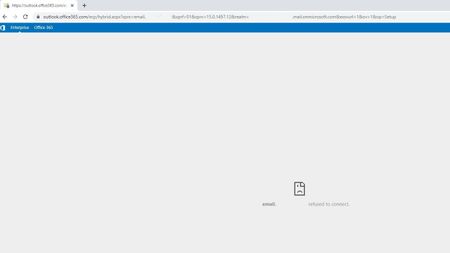
Hi all I've run the Exchange Hybrid wizard and it all seems to have gone through OK, but I'm having a few issues. When I select the hybrid link in my on prem ecp and sign in I get the following error when I click on the enterprise tab. If I click on the O365 tab it loads correctly. I assume that this is because it doesn't like the org FQDN that I specified, but have tested the migration settings in PS and they come back as OK. If I try and run a migration from the ECP i don't get the option for an online move. If I run the migration from )365 Exchange admin it shows the migration endpoint of my on prem server, but no user mailboxes show up. I've tried a migration from PS and I get an error saying that the operation could not be performed because "email address" couldn't be found on the server. I would expect this though? If I give the user an Exchange Online licence it fails because the primary mailbox already exists. Also, the HCW errors if I run it from the Exchange server as it doesn't like the SSL from outlook.office365.com. I've tried with FW and AV turned off. TLS 1.2 is set and tried with different ciphers set. If anyone has any suggestions of where else to look I would appreciate it! Thanks.642Views0likes0Comments
Error in installation: Office 2021 Pro instead of Office 365 Family is installed
Prior to signing up for Office 365 Family, in march 2022, three of my PCs had office 2021 pro installed. only one of the three PCs has its license key registered (or maybe attached) to my Microsoft account. On the other two machines, I was able to do a full uninstall, then install office 365 Family with no issues at all. When I do the full uninstall of Office 2021 pro on the linked PC; even with the help of the 'Microsoft Support and Recovery Assistant'. When I attempt to add that PC to my list of 365 Family subscriptions, the account product information says: Additionally, the linked PC does NOT show on the list of subscribed devices either. however, when I run the Microsoft Support and Recovery Assistant again; it finds only office 365 and uninstalls it, not both 365 and Pro 2021. all three PCs are Win 11 Pro 64-bit with valid product keys. The download for the 365 Family was also 64-bit for each PC. Would manually changing the license key to the 365 family key do the trick? Also, would that free the office pro-2021 key for future use? Thank you for your assistance. John Gray1.5KViews0likes1Comment
Migrating Google Workspace to O365 - creating subdomain
Hi all, I'm trying to migrate Google Workspace to O365. There is a nice step-by-step procedure but I'm not sure about one part. I follow this: https://docs.microsoft.com/en-us/microsoft-365/admin/moveto-microsoft-365/migrate-email?view=o365-worldwide What I'm not sure is about creating a sub-domain. Is it enough to create that subdomain in Google Workspace and O365? Or I must create the subdomain (e.g., http://o365.company.com/) also in "Domain Host"? Currently, I'm waiting to get the sub-domain verified in Google Workspace... I know it may take up to 24 hrs, so want to clarify the above meanwhile if it fails 🙂 I followed the recommendation of creating a subdomain from primary domain... Primary domain "company.com" and sub-domain is "o365.company.com" I've added TXT record to Domain Host undet the primary domain "company.com"797Views0likes0Comments