office 365
406 Topics
Inconsistent behaviour of AccessRuntime and Access (Developer Version) - Office 365
I am using Access Version 2608 (Build 20326.20132) and I am having big problems because of a differnt behaviour of Runtime and Full (same version). When setting a short timer (for initialisation / 10ms) within the Form_Load event, the timer starts in the "Full-Version" of Access365 immediatly after finishing the Form_Load event (not further action in the other events). The Runtime-Versions don't accept the Timer-Value I set befor in the Form_Load event. Remark: With an old version (I don't know which one, because all customer PC were updated) it works perfekt, also with AccessRuntime. A very old customer installation (16.0.18827.20164) works perfekt. What can I do, because the application is broken down at many customer sites ... and I have to solve this problem very urgent.223Views0likes7CommentsMoving Away from MS Access
The organization I work for is wanting to move away from Microsoft Access databases where possible, and we have started exploring what tools our current Access databases could be moved to. Is there a standard for what works best (Powerapps, Sharepoint, etc)? What have you found to be a good resource for guidance on this topic? Thanks!131KViews2likes82Comments
August 2026 RDP font display glitch
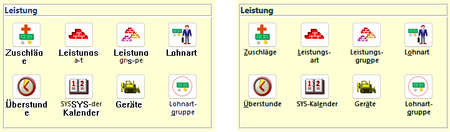
In the last days, we have received two independent reports of font display problems in our MS Access based application. The symptoms are as follows: Some labels or text boxes are shown in a legacy system font instead of the font specified in the control (Segoe UI). Also, the label/text box is shown with a white background instead of transparent. Moving the Access window "fixes" the glitch. It happens at seemingly random places in our application at seemingly random times. Both reports have in common that the Access application is running inside an RDP session. In report 1, a work-from-home user used Remote Desktop to connect to their office Windows 11 PC, and, in report 2, a user executed the application on a Windows Terminal Server. Here are a few screenshots to illustrate the problem. The left side is the glitch, the right side is how it is supposed to look. The first row shows labels, the second row text boxes in a continuous subform. Report 1 is 16.0.20228.20186, 32 bit, M365 SAEC. Report 2 is 16.0.14334.20848, 32 bit, Office 2021 LTSC. Is this a known issue, or shall we continue to collect data about this glitch? Unfortunately, we haven't found a reliable way to reproduce it, so our ability to test it with different versions is limited.Solved787Views0likes5CommentsAccess 2608 Build 20326: Line controls disappear in Print Preview
I believe there may be a regression in Microsoft Access Build 16.0.20326.20034 (64-bit) affecting Line controls in reports. I can reproduce the problem even with a completely new blank MDB database, so it does not appear to be related to an existing application. Steps to reproduce: 1.Start Microsoft Access 64-bit Build 16.0.20326.20034. 2.Create a new blank MDB database. 3.Create a new report in Design View. 4.Add a Line control to the Detail section. 5.Add a Rectangle control to the same section. 6.No VBA code or special event handling is required. 7.Select Microsoft Print to PDF as the printer. 8.Open Print Preview. Actual result: The Rectangle control is displayed correctly, but the Line control disappears in Print Preview. The problem is not specific to a particular printer. We have reproduced it with multiple printers. Expected result: Both the Line and Rectangle controls should appear in Print Preview and in the printed output. Workaround: Rolling Microsoft Access back to an earlier build immediately resolves the problem. The same MDB file and the same report then display and print the Line control correctly. We have also reproduced the issue with Build 16.0.20326.20044 (64-bit). Has anyone else been able to reproduce this with Version 2608 / Build 20326?1.8KViews3likes13Comments
Ribboncreator2021
RibbonCreator 2021 is one of the most popular tools for creating custom Microsoft Access ribbons without having to write all the Ribbon XML manually. It provides a WYSIWYG (What You See Is What You Get) editor that allows developers to create tabs, groups, buttons, menus, and icons visually, and then export the generated Ribbon XML directly into an Access database. Advantages of RibbonCreator 2021 Easy-to-use visual interface. Automatically generates Ribbon XML. Integrates VBA callbacks for Access applications. Supports custom images and built-in Office icons (idMso). Compatible with Microsoft Access 2021 and Microsoft 365. Alternative Solution Another excellent option is AccessUI Ribbon & Tree Builder, a free Access add-in that enables developers to build complex ribbons without XML knowledge. It also helps generate the required VBA callback procedures automatically. Recommendation For professional Microsoft Access development: RibbonCreator 2021 → Best for advanced customization and full control over the Ribbon interface. AccessUI Ribbon & Tree Builder → Best for rapid development and ease of use. If you are developing Access applications for end users and need a robust, mature solution, RibbonCreator 2021 is generally the better choice due to its comprehensive feature set and direct Access integration. https://ribboncreator2021.de/272Views0likes2CommentsRegression in v2605: Subform with overlapping controls breaks timer in unrelated form
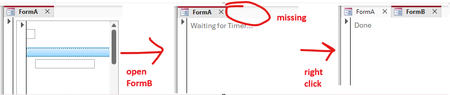
I found another issue (sorry) which might be caused by the zoom-related changes in 2605. The following repro example works fine in 2604 (Monthly Enterprise Channel) but breaks in 2605 (Current Channel). Again, this issue is unrelated to zooming itself. Prepare database The repro requires three forms and a few controls. Since those are tedious to get right manually, I wrote some VBA code to do that for us. Execute BuildRepro() in the Immediate Window to create the forms and controls. Option Compare Database Option Explicit Public Sub BuildRepro() CreateFormASubform CreateFormA CreateFormB End Sub Private Sub CreateFormASubform() Dim frm As Form Dim ctl As Control Set frm = CreateForm() Set ctl = CreateControl(frm.Name, acTextBox, acDetail, , , 345, 1140, 1746, 260) ctl.TabStop = False Const textBoxTop = 260 Set ctl = CreateControl(frm.Name, acTextBox, acDetail, , , 56, textBoxTop, 270, 270) ctl.TabStop = False Set ctl = CreateControl(frm.Name, acImage, acDetail, , , 56, 0, 270, 270) Set ctl = CreateControl(frm.Name, acCommandButton, acDetail, , , 60, 795, 5895, 260) SaveAndClose frm, "FormA_Subform" End Sub Private Sub CreateFormA() Dim frm As Form Dim ctl As Control Set frm = CreateForm() Set ctl = CreateControl(frm.Name, acSubform, acDetail, , , 100, 100, 3000, 3000) ctl.SourceObject = "FormA_Subform" SaveAndClose frm, "FormA" End Sub Private Sub CreateFormB() Dim frm As Form Dim ctl As Control Set frm = CreateForm() frm.TimerInterval = 1 Set ctl = CreateControl(frm.Name, acLabel, acDetail, , , 100, 100, 5000, 1000) ctl.Name = "my_label" ctl.Caption = "Waiting for Timer..." frm.HasModule = True frm.Module.InsertText _ "Private Sub Form_Timer()" & vbCrLf & _ " Me.TimerInterval = 0" & vbCrLf & _ " Me.my_label.Caption = ""Done""" & vbCrLf & _ "End Sub" frm.OnTimer = "[Event Procedure]" SaveAndClose frm, "FormB" End Sub Private Sub SaveAndClose(ByVal frm As Form, ByVal newname As String) Dim oldname As String oldname = frm.Name DoCmd.Save acForm, oldname DoCmd.Close acForm, oldname DoCmd.Rename newname, acForm, oldname End Sub Run repro 1. Open FormA. 2. Open FormB (while FormA is still open). Expected result: FormB opens completely, the timer runs and the label reads "Done". Actual result: FormB opens "halfway" (it's visible, but it's tab is still missing, see screenshot below) and the label still shows "Waiting for Timer...". As soon as you right-click anywhere, the form finishes opening and the timer runs, changing the label to "Done". Notes: I tried to make the repro as simple as possible. If you remove one of the controls from FormA_Subform (or enable TabStops), the problem disappears. It might have something to do with overlapping controls: If you change textBoxTop from 260 to 280, so that it no longer overlaps with the image, the problem also disappears. We need the overlapping controls because in our real code the subform is continuous and displays data at different indentation levels (like a treeview).505Views0likes9Comments
Access and SharePoint Integration May Be Broken
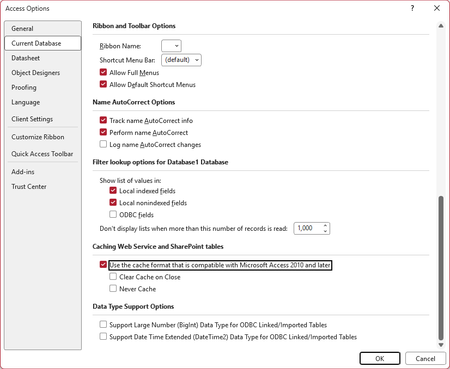
I am posting this here in the hopes that a Microsoft MVP or employee may see it, verify the issue, and report it to the right people at Microsoft. We have a fairly significant LOB application with the front-end hosted in Access and the back-end hosted in SharePoint Online lists. This application has been working well for several years. Sometime in the past few weeks (last known good date was June 23), a change in either Access or SharePoint (or maybe the Windows OneDrive sync client) seems to have broken integration between the products. When the modern cache format is enabled (the default), all SharePoint calculated columns unexpectedly show errors, as shown here (in a fresh database where I imported just one list from our site as a test): Naturally, this completely borks the application, with VB code throwing errors at startup. Using the legacy cache format, or disabling caching altogether, seems to restore functionality--(though this would come at a cost to performance): But there is a major caveat to this. Other functionality is apparently broken. We have straightforward update queries, for example, the hang indefinitely in these modes, rendering this an unacceptable work-around. I have been able to replicate this on several different PCs. Also, on several different SharePoint sites in our tenant. Currently, this is blocking work for us, and we are hoping to see it resolved as soon as possible. If anyone with knowledge of the right people at Microsoft to call attention to this, we would be grateful for any help. I am using the Access forum because the last time I tried to get help from SharePoint Online support for an Access-related query issue using SP list data, they had no idea what I was talking about. (Also, for Access database experts: please do not suggest that we avoid using calculated columns in SharePoint lists. This is a hybrid app with most of our users working with data strictly through SharePoint, and SharePoint views do not support the same features as queries do in Access. Making use of these SharePoint features are essential for these users.) Our Access version: Microsoft® Access® for Microsoft 365 MSO (Version 2607 Build 16.0.20228.20124) 64-bit Thank you in advance for any help.Solved811Views0likes16Comments
Msgbox or Modal window Crash on PC Sleep
This has been an issue for a couple of years, but I haven't spent too much time trying to solve it because I thought it would eventually go away. It hasn't and it is becoming worse as I develop other parts of my application. Situation: When a msgbox (or modal window) is open and the PC sleeps, the application hangs upon PC awake. There's no way to get out it with ending the process. To replicate: Create and save blank database Create one module with a single public test function Enter msgbox "Hang Test", vbOkOnly Hit F5 to run the code. The message box pops up. Leave it. Put PC to sleep manually with windows | power | sleep Awaken PC, Access is now frozen. GPT provides a lot of explanations for this behavior, but it doesn't make sense and must be something that can be addressed. Windows 11, Version 2606 (Build 20131.20126 Click-to-Run)139Views0likes3CommentsAccess 365 Issues
I’m running Windows 11 pro, dual monitors (200% laptop and 100% external). Quick repair did not work. Issue 1: When I open Access 365, the navigation bar is only about and inch wide. I can close it, but it only opens to an inch wide. How do I fix this. Issue 2: I opened the Contact template in Access then save copy. I want to customize the saved copy. The copy seems to be locked. I can’t make any edits like add fields and unfreeze pane. How can I edit copies of the templates include in my Access 365?73Views0likes1Comment