notifications
51 Topics
Graph API: summary field ignored for Adaptive Card message notifications/preview
Hello, Problem Summary When sending Adaptive Cards via Microsoft Graph API to Teams chats, the `summary` field in the message payload is completely ignored. This results in unhelpful generic notifications like "Card" or "Sent an attachment" instead of meaningful preview text. Environment - **API**: Microsoft Graph API v1.0 - **Endpoint**: `POST /chats/{chat-id}/messages` - **Platform**: Microsoft Teams (Desktop, Web, Mobile) - **Adaptive Card Version**: 1.5 Expected Behavior According to the https://learn.microsoft.com/en-us/graph/api/resources/chatmessage?view=graph-rest-1.0, the `summary` property should be used for: > "Summary text of the message that could be used for push notifications and summary views or fall back views" When sending a message with `summary: "🚨 Big Alert: This is a real issue"`, I expect: - ✅ Teams notification toast displays: "🚨 Big Alert: This is a real issue" - ✅ Chat list preview shows: "🚨 Big Alert: This is a real issue" - ✅ Activity feed shows: "🚨 Big Alert: This is a real issue" Actual Behavior The `summary` field has **no effect** on notifications or previews: - ❌ Notification shows generic text: "Card" or "Sent an attachment" - ❌ Chat list preview shows generic text or first TextBlock from card - ❌ Activity feed shows generic text - ❌ The `summary` field appears to be completely ignored Minimal Reproduction Request Payload ```json POST https://graph.microsoft.com/v1.0/chats/{chat-id}/messages Content-Type: application/json Authorization: Bearer {token} { "body": { "contentType": "html", "content": "<attachment id=\"card001\"></attachment>" }, "attachments": [ { "id": "card001", "contentType": "application/vnd.microsoft.card.adaptive", "content": { "type": "AdaptiveCard", "$schema": "http://adaptivecards.io/schemas/adaptive-card.json", "version": "1.5", "body": [ { "type": "TextBlock", "text": "Critical Alert", "weight": "bolder", "size": "large", "color": "attention" }, { "type": "TextBlock", "text": "Database connection has failed. Please investigate immediately.", "wrap": true } ], "actions": [ { "type": "Action.OpenUrl", "title": "View Details", "url": "https://example.com/alerts/12345" } ] } } ], "summary": "🚨 Big Alert: This is a real issue" } ``` Steps to Reproduce Create a test chat in Microsoft Teams Obtain OAuth2 token with `Chat.ReadWrite` scope Send the above payload via Graph API Observe notification/preview in Teams client **Result**: The `summary` field is ignored, notification shows generic text. Business Impact This limitation severely impacts user experience for: - **Alert/incident notifications** - Users can't identify urgency without opening the chat - **High-volume scenarios** - Users can't triage messages efficiently - **Time-sensitive operations** - Critical alerts look identical to routine messages Our team manages 200+ incident notifications daily via Adaptive Cards. Without meaningful previews, users must open every notification to assess priority, defeating the purpose of notifications. Workarounds Attempted ❌ **Setting `summary` at message level** - Ignored when attachments present ❌ **Adding preview text in `body.content`** - Overwritten by attachment ❌ **Using different `contentType` values** - No improvement ❌ **Including fallback text in Adaptive Card** - Not displayed in preview ✅ **Only working solution**: Send plain text message first, then card separately (terrible UX) Questions **Is this a bug or by design?** If by design, why does the documentation describe `summary` as useful for notifications? **Is there an alternative mechanism** to control preview text for Adaptive Card messages? **Is this being tracked internally?** This seems like a fundamental limitation for bot developers. Full Reproduction Package I've created a complete reproduction package with test scripts and detailed documentation: - Test payload JSON - Bash/PowerShell test scripts - Step-by-step reproduction guide Can share via GitHub gist if helpful for the team to investigate. Request Please either: **Fix the implementation** to honor the `summary` field for Adaptive Card messages, OR **Provide an alternative mechanism** to control notification/preview text, OR **Update the documentation** to clarify that `summary` is not supported for Adaptive Cards This is blocking our production alert system deployment. Any guidance would be greatly appreciated! ---651Views4likes1Comment
Opening a chat notification should default to a popped-out window for that chat.
Opening a chat notification should default to a popped-out window for that chat. Currently, clicking a Windows system notification for teams only ever opens the main window, changing the view from whatever files tab I was in back up and out to chats/teams/channels. This seems to run against the point of allowing separate chat windows. Another fix: allow popping-out all chats as one tabbed window, and/or combining popped-out chat windows.170Views0likes0Comments
Teams Mobile Android Auto notifies old meetings
Recently, when I connect to my vehicle with Android Auto, Teams will notify me of meetings that already occurred, many times the day before. I don't want to turn off notifications for meetings, because I do want to be notified of a current or future meeting. It is useless for Teams to notify me of meetings from yesterday. Anyone know of a solution? Thanks, Eric707Views2likes2CommentsiOS app failing to block notifications
I've noticed in recent weeks/months that the Teams app on my iPhone (v6.23.1) pings me about meetings and calls, despite being active on the desktop app (windows 11). I've got the mobile app setup to block notification when i'm active on the desktop, but the notifications still come through. Not chat/channel messages though. Just meetings and calls. Is there another settings I'm missing or is this a bug?93Views0likes0CommentsApps notification settings missing in Teams settings
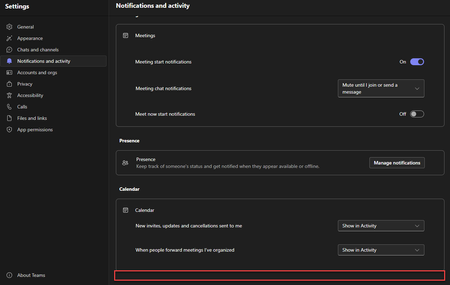
Hello Teams Community, I'm facing a strange issue with App notifications in Microsoft Teams. I've already researched this and found nothing. I've opened a Microsoft case and I'm waiting for an answer but it's taking longer than expected. So, I'm turning to you for expedited help! Scenario: You're an administrator in Teams. You've applied a setup policy for a pinned app like Viva Engage. After the policy is applied and the tool is launched, users complain that notifications are either too frequent or not frequent enough. You direct them to the Teams Notification and activity settings to control app notifications. The users go to Teams notification settings but report back to you that the App section of Teams settings doesn't exist. Problem Statement: Microsoft explicitly states in their documentation that in order for the App notifications section to appear, you must first add an app yourself within Teams and get at least one notification. But relying on users to add an app, somehow create a notification, and then remove it, just to access App notifications is impractical and would never work. Desired Outcome: I'm looking for a way to bypass this prerequisite and force the Apps section to appear in the Notifications and activity section without any user action whenever an app is pinned in the Teams admin center with a setup policy. I'm hoping this can work with any app, not just Viva Engage. Any help is appreciated. Thanks, Teams experts! -Rob3KViews3likes4Comments
ms-teams status
Hello, This might look simple but apparently it is not so please do not give any superficial suggestions. If you have practically solved it , really appreciate your help. I am using MS-teams on browser (teams.microsoft.com) I can not use MS-teams desktop app so please do not think in that direction. Now, as it is standard windows 10 box, I have several other apps opened like outlook, Visio , Textpad etc. If I am busy working on these apps for more than 10-15 mins, my ms-teams status becomes INACTIVE (yellow color) Now this is totally wrong as I have not locked the laptop or not even stepped out keeping the laptop open. I am actually working and using my keyboard and mouse every second. But still my collogues are telling me that I am INACTIVE from teams point of view. Is there any ways to keep ms-teams status GREEN by some browser-extension etc. ?? Thanks.946Views1like2Comments
Messages Delayed and Multiple Notifications in Teams Web Version
I communicate with teams from two separate organizations on teams, which requires me to be signed in to two different accounts at once. For that reason, I have to use Teams web version for one of them. In that version, I've recently starting getting delayed responses. Then, once I do get the response, I get anywhere from 3 to 10 notifications that I received a message (both from teams, and from google chrome). I guess first of all, is it possible yet to use 2 accounts at the same time in the teams installed on my PC? And if not, any idea how to fix this issue with the web version?1.1KViews0likes0Comments
Can I Make Notifications to On For Newly Created Channels?
Is there a global setting where I can make it so that all users are defaulted to receiving notifications when posts are made in a channel? Now, when I create a new channel no users receive notifications for posts, replies, etc and need to manually turn them on. Thanks!Solved3.6KViews0likes1CommentJoin button in meeting notification window in macOS is not working anymore
Hello everybody. I have "macOS 13.6.1" and "Microsoft Teams (work or school) 23285.3804.2469.4861". I've been using "Meeting start notifications" perfectly for years, but in the last few days, every time that I try to join a meeting clicking on "Join" button doesn't work. Is this happening to anyone else? My workaround is to go to Calendar view, find the meeting and join from there. Thanks for your help RegardsSolved1.3KViews0likes2CommentsNew Teams macos notification sound is generic apple sound
Our users are trying New Teams on macOS and asking how to make the notification sound the teams sound instead of the generic Apple notification sound. As I understand it, this is not customizable by the device users and the app must implement the sound. Assuming this is the case, when will Microsoft add the Teams notification sound into new teams on macos?Solved6.2KViews4likes1Comment