mtr
32 Topics
Remote Access in Pro Portal not working with Public Preview R3.6
When I try to use Remote Access via the Pro Portal, I can connect to the MTR but the image is flashing. I cant seem to have a stable session with the MTR. The screen will go to black for around 5 seconds, then it shows what is on the screen for less then 1 second. I tried it on 2 MTR devices that I have in our labo but the issue remains. When I revert the option for Public Preview back to off, I am able to connect and use Remote Access via the Pro Portal without any issue. We are using MTRoW and have the latest updates.
Town Hall forced producer view for Teams Room
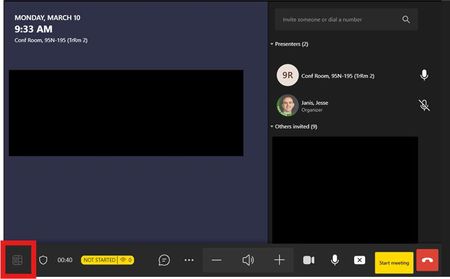
Teams room accounts added as presenters to a Town Hall are joining the meeting in the co-organizer view, no matter what role was assigned. Prior to 03/10/25, Teams Room could join as presenter and had meeting view control. Some change seems to have taken place over the weekend, and now even room accounts scheduled as external presenters are joining in the co-organizer view. The in-meeting change view button is now blocked during a the Town Hall. Has anyone else seen this or know about the change?294Views1like0CommentsDeploying Microsoft Teams Rooms via Autopilot in Self-Deployment Mode
Description: We are experiencing issues with deploying our Microsoft Teams Room (MTR) systems via Windows Autopilot in Self-Deployment Mode. Despite following the official Microsoft documentation (https://learn.microsoft.com/en-us/microsoftteams/rooms/autopilot-autologin), the device fails to complete the login process. Setup Details: Device: Certified Intel NUC, previously in use. OS Installation: Windows 11 Pro pre-installed. Autopilot Import: The device was successfully imported into Autopilot. Group Assignment: GroupTag "MTR-ConsoleName" has been correctly assigned. Dynamic Group: The device appears in the associated dynamic MTR group. Profiles and Assignments: Deployment Profile and Enrollment Status Page (ESP) are assigned to the device. Teams Room Update App: Deployed via Intune and assigned to the MTR group (also included in ESP). LAPS: Local Administrator Password Solution (LAPS) is active on the device. Teams Rooms Pro Console: The device appears in the console and has been assigned to a resource account with a Teams Room Pro license. Issue: After completing the deployment process, the device hangs on the login screen and cannot connect to the resource account. This prevents the self-deployment process from completing. Steps Already Taken to Resolve the Issue: The device has been completely removed from Intune and Autopilot and re-added. A custom device restriction policy was created to ensure the device is allowed. All Intune and Azure policies were reviewed and optimized to avoid conflicts. Despite these efforts, the issue persists. Questions: Are there specific requirements or limitations that we might have overlooked? Are additional settings or policies required to ensure the device connects to the resource account successfully? Could existing policies, such as LAPS, interfere with the login process? Are there any known issues related to Autopilot and Teams Room deployments, particularly for previously used devices? We urgently request your assistance in identifying and resolving this issue, as these MTR systems are critical for our operations. Thank you for your support!592Views0likes1CommentCan you find all your Teams Room System devices on Teams Client?
Hi, Hit to strange issue, when searching my room system devices on Teams client, I could not found all of them. Feeling is, I could find only the latest once, but not sure about that. Same issue with other users and Web App. The devices itself are working normally, but this search is lost. No help if I try to search by UPN or with display name. Any others has faced similar behavior?407Views0likes0Comments
Teams Room doesn't broadcast video if it's the first to join the meeting
We are a small association spread thinly around the world. We have two Microsoft Teams Room devices in our Washington Office. One is a Poly Studio X30 and the other is a Yealink A30. In both cases, we have experienced a behavior - almost repeatable at will - where, if the X30 or A30 joins a scheduled meeting FIRST - no video is broadcast from the room. But if the X30 or A30 joins SECOND or later - then the video from the room is seen - no problems. Similarly - if someone calls the room directly via Teams - they will see whoever is in the room. However, if the room calls someone directly - or creates a "Meet Now" meeting and adds a user - they will not see the room. This is a terrible bug. I've opened a ticket via our M365 admin portal - but my hopes are not high for that avenue of service. Thoughts?829Views0likes3CommentsMicrosoft Teams Room for Android - Improvement suggestions
Hi, there are many OEM partners which is focusing on Teams Room for Android over Teams Room for Windows. There are several benefits but it lacks in some areas compared to Windows based rooms. Is there any plans on closing in on the gaps? Many thinking about two features. The possibility to include audio while content sharing using HDMI Custom branding. Add your own wallpaper. Audio-sharing over HDMI is not a hardware limitation as it works with Zoom rooms using the same hardware. Should therefor be a easy implementation ? 😄Solved1.7KViews0likes3Comments
MTR as a recording device
Hi, I have a Lenovo Thinksmart hub in one of our meeting rooms and had a query if we could use it as a recording device. We have many meetings which we would like recorded and know that if set up early enough we can add recording to the meeting options BUT if it was an impromptu meeting we cannot find an option for the MTR to turn on recording, is this possible? Thanks6KViews0likes1CommentConvert Large Zoom Room to Microsoft Teams
I'm looking to convert a large Zoom Room to a Teams Room. We have 2 cameras (Presenter and Crowd) and multiple microphones. We use a QSC Core 110F as DSP and Control. We have 3 video outputs from the Mac computer with a video matrix to 5 video displays. Use an iPad for the Controller. It looks like I need change out the computer and ipad to a windows box and a Logitech Tap for control. Questions: 1. Does MTR support 2 cameras? 2. Does MTR support 3 video outputs? 3. What are the computer and graphic card requirements to support this configuration? Thanks for any feedback you can provide. If there is a dedicated MTR discussion, please provide a link. I've search and can not find much information on MTR, except a list of equipment which says Core i5.Solved3KViews0likes1CommentMTR-延迟十几分钟才会收到会议邀请通知
大家好, 我们安装了两个会议室,都是用的联想 thinkhub500,MTR账号,发现每次会议邀请,都会有其中一个房间(不一定是哪一个房间,两个房间随机出现)会在发出邀请后的十余分钟后才能收到会议邀请(触摸屏幕上才会出现join按钮),在发帖之前已经问过联想客服,客服那边先是让检查win10版本,如果不是21h2就先升级到21h2,但发现目前本就是21h2,后来又打给客服问,客服又让升级app版本,但显示当前app正是最新,觉得客服也是在摸石头过河,并不在知道真正的原因,所以请问大家遇到过这种情况吗?有办法解决吗?或者说这本就是个通病,用户无法自行解决只能由微软在以后的软件推送中解决?谢谢。1.3KViews0likes1Comment