mobile
13 Topics
Finding the recycling bin on Microsoft word
I have had to go on a wild goose chase, to be quite frank with you, for the recycling bin on word. I was about to lock in and have my “academic comeback”, as the bairns say on social media platforms such as TikTok and Instagram, and I was taken off my track to find this stupid recycling bin. I am still yet to find and it and I am very unhappy, not only was google no help but so was Microsoft. 1/ Micro out of 10. Very upset need I remind you. Those special documents are now swimming in the land of the meta, in the river of the Zuckerberg and I can’t do anything about it. Get with the programme Microsoft. sincerely, disappointed.114Views0likes2Comments
Ruler Feature Disappeared from Microsoft Word on Android Tablet
Hello everyone, My father recently bought a new Android tablet specifically to use Microsoft Word for his work because he relies heavily on the Ruler feature. When I first installed Word, the Ruler was available and worked perfectly. However, after restarting the tablet, it disappeared. Since then, I have uninstalled and reinstalled the app several times, tried different versions of Word, checked all the settings, and confirmed that we had an active Microsoft 365 subscription, but the Ruler is still missing. My father has also tried adjusting to different document layouts and workarounds, but unfortunately none of them are practical for his workflow. He simply cannot work efficiently without the Ruler feature. Has anyone experienced this issue? Is the Ruler still supported in Microsoft Word for Android, or has it been removed? If it's still available, is there any way to restore it or install a version that includes it? My father bought this tablet mainly for Microsoft Word, so this feature is essential for his work. Thank you for any help or clarification.312Views0likes2Comments
Word fillable forms that are mobile device compatible
I can't find any recent info on how to make word fillable forms compatible for mobile devices (so they can be completed on mobile phone). I've set up forms, and they are restricted for fillable entry only. They send via email and work on PC, but on a mobile, if opened through mobile word app, you can select but not input anything. If this worked if would save so many issues for me, but I've no idea if or how it can be done. I have read some stuff on Infopath, but this is a little beyond me. Did try it but it would not import my word fillable template. Not really keen to redesign my many forms, if I don't need to and would rather reduce number of apps/add ons if possible. Any advice?2.5KViews1like2Comments
Word on iPhone
In the past, I’ve managed to edit some documents on my iPhone in Microsoft Word. But now Microsoft is slapping me in the face with grammatical suggestions that obscure my document. I don’t want any grammatical suggestions, but I can’t figure out how to make them stop. Can anybody suggest how I can do that? Am I in the right place to ask this question? Is there another place for the iPhone app?227Views0likes3Comments
Add a signature field and restrict editing
Hi, We're looking for a way to add a signature box where a user can draw or sign while the document is restricted. The user should be able to sign using Word Online, Desktop App, Tablet and Mobile. Please let us know the best way to achieve this.774Views0likes1CommentWord 365 iOS keeps switching to Auto-Detect Headings even when switched off
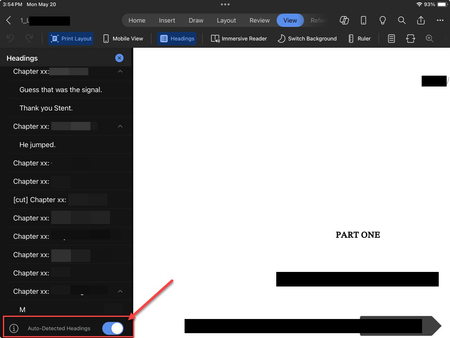
There is a bug in Word for iOS that causes the "Auto-Detect Headings" option to ALWAYS revert to on. I toggle this setting off every time I open a document, and it turns itself back on every single time I close and reopen the document. This used to be a problem in the past, was eventually fixed, but has now started happening again.375Views0likes1Comment
Clipboard unavailable Word
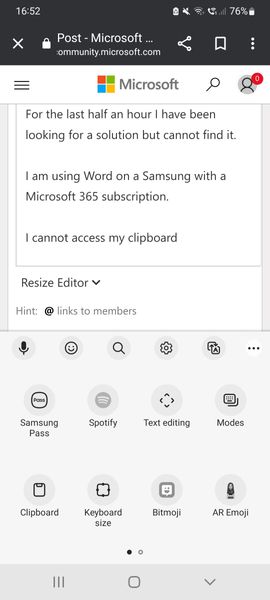
Hello For the last half an hour I have been looking for a solution but cannot find it. I am using Word on a Samsung with a Microsoft 365 subscription. I cannot access my clipboard (as shown in the screen). I can copy and paste the last item I copied in Word using the Copy, Paste & Cut options in the app, but the "Clipboard" icon is unavailable. I have tried to restart the app multiple times. It's very annoying. Thanks for your help5.2KViews3likes3Comments