microsoft
321 Topics
OneDrive Shows 6.5 GB Used Despite Empty Storage | Storage Management Issues
Hello, My Microsoft account appears to have a problem with OneDrive storage management. OneDrive continuously shows 6.5 GB used out of 5 GB (130%), even though: My Files is empty The Recycle Bin is empty Personal Vault is empty Searches do not find any large files In addition, the "Manage Storage" page fails to load and displays an "Unknown Rendering Error". The issue persists after: Signing out and back in Using Incognito/Private mode Testing on different pages and services There are also related Outlook issues: Outlook on the web reports that there is not enough storage available I can no longer send emails The Outlook desktop app fails when trying to add or configure the account At this point, neither OneDrive nor Outlook shows what is actually using the reported 6.5 GB of storage. Has anyone experienced this issue before, or does anyone know how I can get the storage usage or account data checked when the storage management page itself is broken? Thank you for any help.28Views0likes1Comment
co-managed Working flow
Hi SCCM Expert, I would like to understand how co-management works in a multi-tenant scenario. Currently, my SCCM environment manages devices from two different domains: abc.com → Integrated with ABC Intune Tenant xyz.com → Integrated with XYZ Intune Tenant To enable co-management, we configured the Cloud Attach/Co-Management settings in SCCM using a Global Administrator account from the abc.com tenant. We then created a pilot collection and added devices from both abc.com and xyz.com domains. My questions are: Since co-management was configured using credentials from the abc.com tenant, how can devices belonging to the xyz.com tenant successfully become co-managed and receive Intune workloads from their respective tenant? During the co-management enrollment process, what determines which Intune tenant a device enrolls into? Is the SCCM co-management configuration tied to the tenant used during setup, or does the device use its own Azure AD/Entra ID registration information to identify the target tenant? What is the actual trigger point for the transition from SCCM management to co-management/Intune enrollment? If devices from multiple tenants exist in the same SCCM hierarchy, how does SCCM ensure that each device is enrolled into the correct Intune tenant? Could you please help clarify the architecture and enrollment flow in this scenario?222Views0likes3CommentsCopilot, Microsoft 365 & Power Platform product updates call
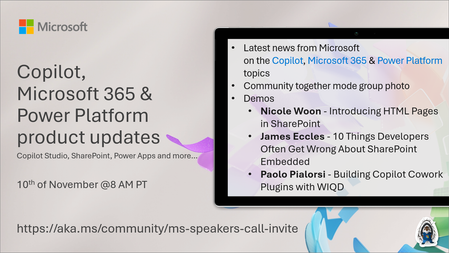
💡Copilot, Microsoft 365 & Power Platform product updates call concentrates on the different use cases and features within the Microsoft 365 and in Power Platform. Call includes topics like Microsoft 365 Copilot, Copilot Studio, Microsoft Teams, Power Platform, Microsoft Graph, Microsoft Viva, Microsoft Search, Microsoft Lists, SharePoint, Power Automate, Power Apps and more. 👏 Weekly Tuesday call is for all community members to see Microsoft PMs, engineering and Cloud Advocates showcasing the art of possible with Copilot, Microsoft 365 and Power Platform. 📅 On the 10th of November we'll have following agenda: News and updates from Microsoft Together mode group photo Nicole Woon - Introducing HTML Pages in SharePoint James Eccles - 10 Things Developers Often Get Wrong About SharePoint Embedded Paolo Pialorsi - Building Copilot Cowork Plugins with WIQD 📞 & 📺 Join the Microsoft Teams meeting live at https://aka.ms/community/ms-speakers-call-join 🗓️ Download recurrent invite for this weekly call from https://aka.ms/community/ms-speakers-call-invite 👋 See you in the call! 💡 Building something cool for Copilot, Microsoft 365 or Power Platform (Copilot Studio, SharePoint, Power Apps, etc)? We are always looking for presenters - Volunteer for a community call demo at https://aka.ms/community/request/demo 📖 Resources: Previous community call recordings and demos from the Microsoft Community Learning YouTube channel at https://aka.ms/community/youtube Microsoft 365 & Power Platform samples from Microsoft and community - https://aka.ms/community/samples Microsoft 365 & Power Platform community details - https://aka.ms/community/home 🧡 Sharing is caring!252Views0likes0CommentsCopilot, Microsoft 365 & Power Platform Community call
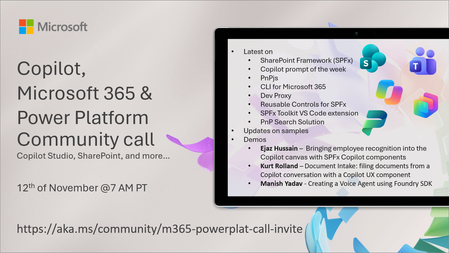
💡 Copilot, Microsoft 365 & Power Platform weekly community call focuses on different use cases and features within the Microsoft 365 and Power Platform - across Microsoft 365 Copilot, Copilot Studio, SharePoint, Power Apps and more. Demos in this call are presented by the community members. 👏 Looking to catch up on the latest news and updates, including cool community demos, this call is for you! 📅 On 12th of November we'll have following agenda: Latest news and events from Microsoft Latest on Copilot prompt of the week CommunityDays.org update Microsoft 365 Maturity model PnP Framework and Core SDK extension PnP PowerShell Script samples Copilot pro dev samples Power Platform samples Demos this time Ejaz Hussain – Bringing employee recognition into the Copilot canvas with SPFx Copilot components Kurt Rolland – Document Intake: filing documents from a Copilot conversation with a Copilot UX component Manish Yadav - Creating a Voice Agent using Foundry SDK 📅 Download recurrent invite from https://aka.ms/community/m365-powerplat-dev-call-invite 📞 & 📺 Join the Microsoft Teams meeting live at https://aka.ms/community/m365-powerplat-dev-call-join 💡 Building something cool for Microsoft 365 or Power Platform (Copilot, SharePoint, Power Apps, etc)? We are always looking for presenters - Volunteer for a community call demo at https://aka.ms/community/request/demo 👋 See you in the call! 📖 Resources: Previous community call recordings and demos from the Microsoft Community Learning YouTube channel at https://aka.ms/community/youtube Microsoft 365 & Power Platform samples from Microsoft and community - https://aka.ms/community/samples Microsoft 365 & Power Platform community details - https://aka.ms/community/home 🧡 Sharing is caring!212Views0likes0CommentsCopilot, Microsoft 365 & Power Platform Community call
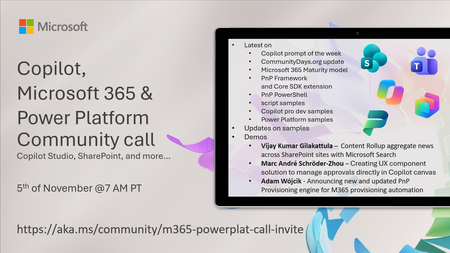
💡 Copilot, Microsoft 365 & Power Platform weekly community call focuses on different use cases and features within the Microsoft 365 and Power Platform - across Microsoft 365 Copilot, Copilot Studio, SharePoint, Power Apps and more. Demos in this call are presented by the community members. 👏 Looking to catch up on the latest news and updates, including cool community demos, this call is for you! 📅 On 5th of November we'll have following agenda: Latest news and events from Microsoft Latest on Copilot prompt of the week CommunityDays.org update Microsoft 365 Maturity model PnP Framework and Core SDK extension PnP PowerShell Script samples Copilot pro dev samples Power Platform samples Demos this time Vijay Kumar Gilakattula – Content Rollup aggregate news across SharePoint sites with Microsoft Search Marc André Schröder-Zhou – Creating UX component solution to manage approvals directly in Copilot canvas Adam Wójcik - Announcing new and updated PnP Provisioning engine for M365 provisioning automation 📅 Download recurrent invite from https://aka.ms/community/m365-powerplat-dev-call-invite 📞 & 📺 Join the Microsoft Teams meeting live at https://aka.ms/community/m365-powerplat-dev-call-join 💡 Building something cool for Microsoft 365 or Power Platform (Copilot, SharePoint, Power Apps, etc)? We are always looking for presenters - Volunteer for a community call demo at https://aka.ms/community/request/demo 👋 See you in the call! 📖 Resources: Previous community call recordings and demos from the Microsoft Community Learning YouTube channel at https://aka.ms/community/youtube Microsoft 365 & Power Platform samples from Microsoft and community - https://aka.ms/community/samples Microsoft 365 & Power Platform community details - https://aka.ms/community/home 🧡 Sharing is caring!236Views0likes0CommentsCopilot, Microsoft 365 & Power Platform product updates call
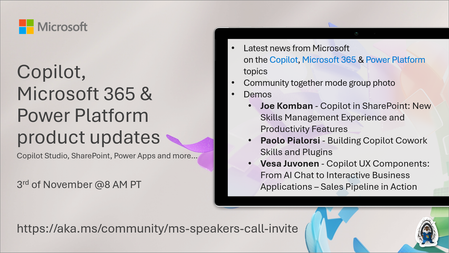
💡Copilot, Microsoft 365 & Power Platform product updates call concentrates on the different use cases and features within the Microsoft 365 and in Power Platform. Call includes topics like Microsoft 365 Copilot, Copilot Studio, Microsoft Teams, Power Platform, Microsoft Graph, Microsoft Viva, Microsoft Search, Microsoft Lists, SharePoint, Power Automate, Power Apps and more. 👏 Weekly Tuesday call is for all community members to see Microsoft PMs, engineering and Cloud Advocates showcasing the art of possible with Copilot, Microsoft 365 and Power Platform. 📅 On the 3rd of November we'll have following agenda: News and updates from Microsoft Together mode group photo Joe Komban - Copilot in SharePoint: New Skills Management Experience and Productivity Features Paolo Pialorsi - Building Copilot Cowork Skills and Plugins Vesa Juvonen - Copilot UX Components: From AI Chat to Interactive Business Applications – Sales Pipeline in Action 📞 & 📺 Join the Microsoft Teams meeting live at https://aka.ms/community/ms-speakers-call-join 🗓️ Download recurrent invite for this weekly call from https://aka.ms/community/ms-speakers-call-invite 👋 See you in the call! 💡 Building something cool for Copilot, Microsoft 365 or Power Platform (Copilot Studio, SharePoint, Power Apps, etc)? We are always looking for presenters - Volunteer for a community call demo at https://aka.ms/community/request/demo 📖 Resources: Previous community call recordings and demos from the Microsoft Community Learning YouTube channel at https://aka.ms/community/youtube Microsoft 365 & Power Platform samples from Microsoft and community - https://aka.ms/community/samples Microsoft 365 & Power Platform community details - https://aka.ms/community/home 🧡 Sharing is caring!207Views0likes0CommentsCopilot, Microsoft 365 & Power Platform Community call
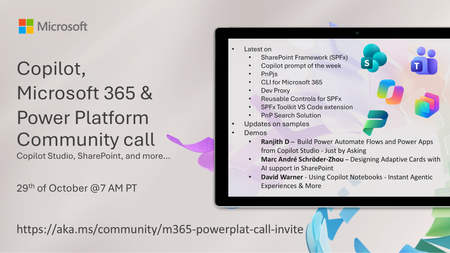
💡 Copilot, Microsoft 365 & Power Platform weekly community call focuses on different use cases and features within the Microsoft 365 and Power Platform - across Microsoft 365 Copilot, Copilot Studio, SharePoint, Power Apps and more. Demos in this call are presented by the community members. 👏 Looking to catch up on the latest news and updates, including cool community demos, this call is for you! 📅 On 29th of October we'll have following agenda: Latest on SharePoint Framework (SPFx) Latest on Copilot prompt of the week PnPjs CLI for Microsoft 365 Dev Proxy Reusable Controls for SPFx SPFx Toolkit VS Code extension PnP Search Solution Demos this time Ranjith D – Build Power Automate Flows and Power Apps from Copilot Studio - Just by Asking Marc André Schröder-Zhou – Designing Adaptive Cards with AI support in SharePoint David Warner - Using Copilot Notebooks - Instant Agentic Experiences & More 📅 Download recurrent invite from https://aka.ms/community/m365-powerplat-dev-call-invite 📞 & 📺 Join the Microsoft Teams meeting live at https://aka.ms/community/m365-powerplat-dev-call-join 💡 Building something cool for Microsoft 365 or Power Platform (Copilot, SharePoint, Power Apps, etc)? We are always looking for presenters - Volunteer for a community call demo at https://aka.ms/community/request/demo 👋 See you in the call! 📖 Resources: Previous community call recordings and demos from the Microsoft Community Learning YouTube channel at https://aka.ms/community/youtube Microsoft 365 & Power Platform samples from Microsoft and community - https://aka.ms/community/samples Microsoft 365 & Power Platform community details - https://aka.ms/community/home 🧡 Sharing is caring!287Views0likes0CommentsCopilot, Microsoft 365 & Power Platform product updates call
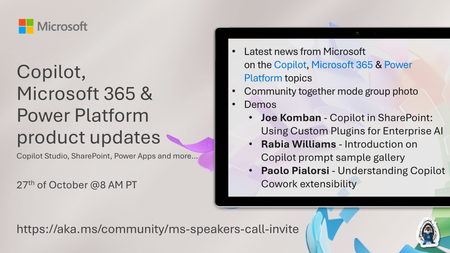
Copilot, Microsoft 365 & Power Platform product updates call concentrates on the different use cases and features within the Microsoft 365 and in Power Platform. Call includes topics like Microsoft 365 Copilot, Copilot Studio, Microsoft Teams, Power Platform, Microsoft Graph, Microsoft Viva, Microsoft Search, Microsoft Lists, SharePoint, Power Automate, Power Apps and more. 👏 Weekly Tuesday call is for all community members to see Microsoft PMs, engineering and Cloud Advocates showcasing the art of possible with Copilot, Microsoft 365 and Power Platform. 📅 On the 27th of October we'll have following agenda: News and updates from Microsoft Together mode group photo Joe Komban - Copilot in SharePoint: Using Custom Plugins for Enterprise AI Rabia Williams - Introduction on Copilot prompt sample gallery Paolo Pialorsi - Understanding Copilot Cowork extensibility 📞 & 📺 Join the Microsoft Teams meeting live at https://aka.ms/community/ms-speakers-call-join 🗓️ Download recurrent invite for this weekly call from https://aka.ms/community/ms-speakers-call-invite 👋 See you in the call! 💡 Building something cool for Microsoft 365 or Power Platform (Copilot, SharePoint, Power Apps, etc)? We are always looking for presenters - Volunteer for a community call demo at https://aka.ms/community/request/demo 📖 Resources: Previous community call recordings and demos from the Microsoft Community Learning YouTube channel at https://aka.ms/community/youtube Microsoft 365 & Power Platform samples from Microsoft and community - https://aka.ms/community/samples Microsoft 365 & Power Platform community details - https://aka.ms/community/home 🧡 Sharing is caring!263Views0likes0CommentsCopilot, Microsoft 365 & Power Platform Community call
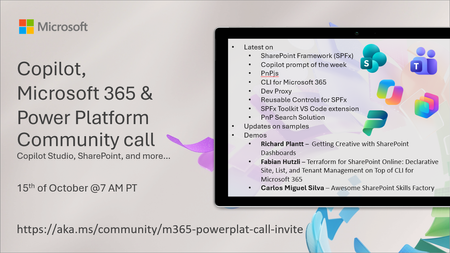
💡 Copilot, Microsoft 365 & Power Platform weekly community call focuses on different use cases and features within the Microsoft 365 and Power Platform - across Microsoft 365 Copilot, Copilot Studio, SharePoint, Power Apps and more. Demos in this call are presented by the community members. 👏 Looking to catch up on the latest news and updates, including cool community demos, this call is for you! 📅 On 15th of October we'll have following agenda: Latest on SharePoint Framework (SPFx) Latest on Copilot prompt of the week PnPjs CLI for Microsoft 365 Dev Proxy Reusable Controls for SPFx SPFx Toolkit VS Code extension PnP Search Solution Demos this time Richard Plantt – Getting Creative with SharePoint Dashboards Fabian Hutzli – Terraform for SharePoint Online: Declarative Site, List, and Tenant Management on Top of CLI for Microsoft 365 Carlos Miguel Silva – Awesome SharePoint Skills Factory 📅 Download recurrent invite from https://aka.ms/community/m365-powerplat-dev-call-invite 📞 & 📺 Join the Microsoft Teams meeting live at https://aka.ms/community/m365-powerplat-dev-call-join 💡 Building something cool for Microsoft 365 or Power Platform (Copilot, SharePoint, Power Apps, etc)? We are always looking for presenters - Volunteer for a community call demo at https://aka.ms/community/request/demo 👋 See you in the call! 📖 Resources: Previous community call recordings and demos from the Microsoft Community Learning YouTube channel at https://aka.ms/community/youtube Microsoft 365 & Power Platform samples from Microsoft and community - https://aka.ms/community/samples Microsoft 365 & Power Platform community details - https://aka.ms/community/home 🧡 Sharing is caring!360Views0likes0Comments