microsoft teams
2 Topics
Teams Annotation – “Interact with background content” option not available
a { text-decoration: none; color: #464feb; } tr th, tr td { border: 1px solid #e6e6e6; } tr th { background-color: #f5f5f5; } Hi Community, We are troubleshooting an issue where the “Interact with background content” option is not available while using annotations in Microsoft Teams. The affected users are able to: Join and host Teams meetings normally. Share their entire screen. Start Annotations successfully. Use the standard annotation tools. However, when the presenter starts annotation while sharing their own screen, the “Interact with background content” option does not appear. The users are assigned a custom Teams Meeting Policy, so we are trying to determine whether a meeting policy setting could be limiting this functionality. Has anyone encountered this scenario? Specifically, we would like to understand: Is “Interact with background content” controlled by any Teams Meeting Policy setting? Are there any dependencies on Microsoft Whiteboard, app policies, meeting policies, licensing, or tenant-level settings? Is the feature dependent on a particular Teams desktop client version or update channel? Are there any PowerShell policy parameters we should check? What would be the recommended way to determine whether this is a policy issue, tenant configuration issue, or Teams client issue? We are planning to compare the affected custom meeting policy against the Global (Org-wide default) policy and also test the affected user with the Global policy to help isolate the issue. Any guidance or experience with this behavior would be appreciated. Thanks!Create a healthy Teams environment for your VSB using the Admin app
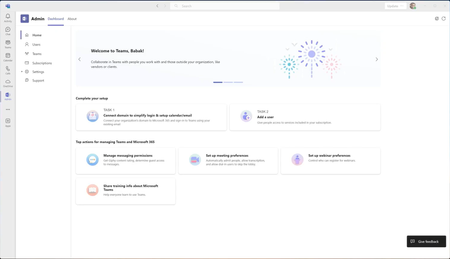
Welcome to the Teams Admin app The Teams Admin app is built especially for very small business administrators. It brings top administrator tasks, controls, learning material, and support options into one place within Teams. This allows you to complete admin tasks quickly and easily without having to juggle multiple windows and lose your flow within Teams. The app comes pre-installed and pre-pinned for very small business admins who have fewer than 25 users. If you have a larger organization and want to use the Admin app you can install it from the Teams app store. We just released a new home page experience earlier this week which bubbles up top actions that you need to take to set up a healthy Teams environment for your business. The admin app allows you to connect your existing domain and email to Teams, manage your users (including resetting passwords), manage licenses, and adjust top Teams settings for your tenant without leaving your Teams flow. We're continuing to improve the Admin app and appreciate your feedback. Please give the app a try and let us know what you think! Learn more about the Admin app.