microsoft teams
23 Topics
Teams Account picker list empty on Welcome screen?
We have a shared computer (conference room), on which people sign in into Teams with "This App only". After the meeting, they sign out. Teams restarts and shows the Welcome screen with the text "Pick an account to continue". Suddenly, this list with saved accounts is now empty. Did something changed in the last update(s) of Teams? If it is an improved security/privacy update, why is the text still shown "pick an account..." if this list remains empty?Classic Theme - Can't use dark them for meetings
Appearance settings have changed. "Always use dark theme for calls and meetings" no longer works when selecting the "Classic" theme. It does work for "Light" theme. When Classic theme is selected the "Always use..." setting is grayed out. (Light theme title bars are hard to read (extremely poor contrast) so I have been using Classic theme. Dark theme works very well in meetings, but I don't like it for anything else in Teams) Version: 26149.1201.4759.7166
Viva Engage Communities Integration Not Available
Does anyone know if Engage Communities Teams integration is still rolling out in Public Preview? I know that the GA rollout has been delayed to May. I have some users in Targeted Release and some others with Public Preview turned on, and none of them sees this feature. I've followed the steps in "Admin requirements for Viva Engage experiences in Teams" and "How to Set Viva Engage experiences in Teams" in this https://learn.microsoft.com/en-us/microsoftteams/teams-viva-experiences to no avail.
Planner App no longer showing Private/To Do tasks or Flagged Emails
I noticed that the Planner App in Microsoft Teams is no longer showing Private/To Do tasks or Flagged emails. This is true in both the Teams Desktop client as well as Teams for the Web. However, they do appear in the Planner app within the Mobile Teams app. I am on targeted release and have attached my version information. I confirmed they are still showing up for a user that is not on targeted release...so I assume there is an issue with the newest version of Teams. Does anyone else notice this?
Can't enable Public Preview on Web
Dear Community, Public Preview is enabled on an individual basis (i.e. everyone can choose for themselves via their Teams-settings whether to enable or disable Public Preview). On the desktop app this works perfectly fine and a lot of the preview features are highly appreciated. On the web application, on the other hand, the setting to turn on Public Preview is not available (i.e. it isn't displayed at all). According to my research, Public Preview should be available on the web as well. Our admin couldn't find any web-specific settings that might be responsible for the differences in availability between desktop and web. Does anyone have the same issue or know whether there are any specific settings to enable Public Preview for web as well? Or does anyone know of changes from Teams regarding the availability of Public Preview for web? Thank you for your help :)Is there a way to "Mute Member for me" in meetings
Sometimes I am in the office, and usually with my colleagues have to meeting being together in the same office and the same session. So, the people in the office hear the voice and then the reverb of the specialist who is talking. So would be great if, like "Pin for me" functionality, I could "Mute for me" a collaborator. Thanks in advance to everyone. Best regards!Compose Message toolbar reverted to an old version?!
Hi A colleague and I are both running the same version of teams (see below). I see this version they see this version I have gone through all the settings but cannot workout why they see the above version. Any suggestions would be appreciated. Thank you. Version You have Microsoft Teams version 24046.2809.2757.3796. You've got the latest version. It was last updated on 19/03/2024. The client version is 49/24021528611. Early AccessSolved
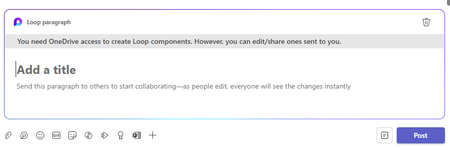
Loop Components in Channels - needs cache clear/sign-out to work
Hi, I have been testing the new Loop Components in Channels feature in Public Preview but it needs me to clear the Teams cache or sign-out to make it work. This is each time after I quit and restart Teams. The error I get is below, is this something others are seeing?