microsoft purview
668 TopicsSharePoint Online Extends Auto-Labeling of Sensitivity Labels to Cover Older Files
A new auto-label policy allows SharePoint Online to stamp unlabeled files in document libraries with default sensitivity labels with the default label. The idea is to find and protect Office and PDF files that aren’t labeled because they existed before the document library was configured with the default label and haven’t been modified since. It’s a good idea. The only weakness is that each tenant is limited to one policy of this type and the policy can only process ten sites. https://office365itpros.com/2026/11/05/auto-label-policy-default-label/25Views0likes0CommentsThe CISO Cheat Sheet to Microsoft Digital Defense Report 2026
I know we’re all busy, so I’ve pulled the most important data from this year’s Microsoft Digital Defense Report into one short read. The full report is well worth exploring, but this article focuses on the numbers and trends most relevant to security leaders. This year’s edition shows that AI is lowering the time, expertise and cost required to discover and exploit weaknesses, enabling attackers to operate with greater speed, scale and autonomy. The report describes this as AI “changing the physics of cybersecurity”: attack timelines are compressing and agentic systems are beginning to automate more of the attack lifecycle. Trend 1: Time has collapsed The clearest finding is about speed. Vulnerability discovery is increasingly running ahead of remediation, while the time from discovery to weaponisation is shrinking. In the AI era, weaponisation can follow in hours. Vulnerability discovery and weaponisation now often needs only a well-written prompt. The median time from discovery in the wild to weaponisation is below 24 hours. Vulnerabilities were on track for a record estimated 72,000 CVEs in 2026. The report expects a multi-year period in which the number of known but unpatched vulnerabilities rises sharply before eventually declining. The median time from container start to first exploit attempt is 5.3 hours. The ransomware actor Storm-1175 moved from web-facing exploitation to deploying Medusa ransomware in as little as 24 hours. CISA added over 110 CVEs to its Known Exploited Vulnerabilities catalogue between November 2025 and May 2026, most within a week of disclosure. The mismatch with enterprise reality is the uncomfortable part. The report says the disclosure-to-exploitation window has shrunk to single-digit days. Between November 2025 and May 2026, CISA added more than 110 vulnerabilities to its Known Exploited Vulnerabilities catalogue, most within a week of disclosure. In one example, Storm-1175 moved from exploiting a web-facing vulnerability to deploying Medusa ransomware in as little as 24 hours. Microsoft’s Red Team makes an important point: a patch is also a disclosure. Every fix points attackers towards the flaw it closes. As AI-assisted analysis makes reversing patches faster and more reliable, the report argues that patch velocity, not simply patch availability, becomes the control that matters. Trend 2: Attack chains are gaining autonomy The report charts a clear progression: September–November 2025: AI assists in orchestrating a campaign, as in the Anthropic-reported espionage case. April–June 2026: Full-chain autonomy is demonstrated in labs. July 2026: Real-world autonomous attacks of increasing complexity appear. Two frontier models, Mythos and GPT-5.5, completed a 32-step attack chain against an emulated enterprise with no human help. The test environment had no defenders. The UK AI Security Institute reached a similar finding independently. GPT-5.5 was the second model to solve its end-to-end corporate network attack simulation, a task AISI estimates would take a human about 20 hours. Open-weight models lag closed models at orchestrating attacks by about seven months. In the wild, early July 2026 saw the first documented automated ransomware extortion attack, named JADEPUFFER by Sysdig. Microsoft has seen AI-orchestrated intrusions that share elements with it. Initial access consistently came from internet-exposed services running known-vulnerable software. The report is measured on this point. Volumes of AI-orchestrated activity remain low. In most observed real-world operations, complex end-to-end intrusions still retain meaningful human direction. The Red Team's framing is the most useful one: AI doesn't create a new class of attack, it collapses the effort needed to find and exploit existing attack paths. Trend 3: AI has become an attack surface The report's second takeaway is that attackers are already targeting AI itself. The adoption numbers explain why. 88% of enterprises are experimenting with agents, and 82% of leaders plan broader rollouts within 12–18 months. The report cites industry projections of roughly 1.3 billion agents in production by 2028. What attackers are doing to AI systems: Four techniques accounted for roughly 90% of observed attack activity in telemetry from Azure AI workloads: malicious link injection (52%), jailbreaks (16%), tool and agent abuse (12%), and identity and credential abuse (10%). Memory poisoning: An attacker who can place content anywhere an agent reads can often place it where the agent remembers. Email is the dominant pathway the Red Team has observed. Human-in-the-loop isn't a complete control: Red team testing saw approval prompts ignored, or bypassed by a policy stored in poisoned memory. Developer tools turned against their owners: The "s1ngularity" malware hijacked locally installed AI command-line tools to hunt for secrets. It leaked about 2,000 secrets and 20,000 files across 225 victims. AI browsers: In daily use at more than 40% of organisations in Microsoft's dataset, they were the initial infection vector in incidents involving 57 malware families in a May 2026 analysis. Chat histories as a target: Malicious AI-assistant extensions reached nearly 900,000 installs and more than 20,000 enterprise tenants, harvesting AI chat histories that often contain code, architecture and credentials. The identity implications are direct. Each agent needs its own identity, not one borrowed from an employee, and a named human sponsor. The report also treats revocation latency, the time to cut off a compromised agent, as a measured outcome. Trend 4: The front door is still identity AI changes the speed and personalisation of social engineering. It hasn't changed where attacks start. Initial access in Defender Experts data: User execution: 30% Valid accounts: 20% Malicious copy-and-paste: 13% Phishing: 11% Together, user execution and valid accounts account for over half of observed activity. In incident response engagements, phishing as an initial access vector jumped from 7% to 23% year on year. The standout numbers: ClickFix: Defender saw user-pasted malicious commands on more than 1.1 million unique devices between February and early May 2026, roughly an 8x increase. AiTM: URLs accounted for 45% of the identified phishing techniques in the report’s breakdown. Separately, the share of AiTM phishing and token-theft attacks more than doubled during the first six months of 2026, although the report notes that their overall share remained comparatively small. Teams vishing: Weekly confirmed malicious volume increased 502% year on year. Per attempt, 48% of vishing calls kept the victim engaged for more than 20 seconds, and 30% lasted more than one minute. When a call succeeds, attackers can persuade the victim to install a remote-management tool and complete reconnaissance in two minutes or less. Business contact impersonation (BCI): The report introduces this term for conversations that start with a trusted-looking contact. Microsoft detected more than 46 million attacks in 12 months, with a 121% spike in April 2026. The share of first-contact messages that explicitly asked for money or documents fell from 17% to 3%. The first message is deliberately bland, like "Are you at your desk?" Password attacks declined 26% year on year, which the report describes as strong evidence that MFA and passkeys are forcing attackers to pivot. That pivot includes techniques such as fatigue attacks, AiTM phishing and token theft designed to circumvent conventional MFA. Trend 5: Attackers are inheriting trust rather than breaking in The report's headline theme is that risk is increasingly interconnected. Threats travel through the trusted relationships between identities, software supply chains, partners and cloud platforms. The numbers: Supply chain: Major open-source ecosystems saw attacks roughly every ten days, accelerating through Q2 2026. Shai-Hulud 2.0 affected 25,000 repositories. Megalodon backdoored 5,561 GitHub repositories in under six hours. Trusted signing: In May 2026, Microsoft disrupted Fox Tempest, a "malware-signing-as-a-service" operation that obtained genuine certificates for ransomware loaders and infostealers. Microsoft revoked over a thousand fraudulent code-signing certificates. Legitimate access: An unsanctioned remote monitoring tool is now one of the most reliable mid-stage indicators of a human-operated intrusion. Cloud identity: Cloud identity abuse was the most observed technique against critical infrastructure, representing 78% of the technique mix in Microsoft’s data for March to June 2026. Hybrid intrusions: The Storm-2885 case showed an attacker using a privileged cloud identity to close and downgrade security alerts. The report says identity governance and alert-handling workflows deserve Tier 0 treatment. Dwell time: DART data shows a statistically significant increase in dwell time year on year, meaning organisations took longer to detect intrusions. Ransomware shows the same ecosystem pattern. Qilin led leak-site data with 16.4% of victims, up 386%. Defender detections tell a different story, with Akira at 22%. Trend 6: Defence works best when it's connected The report is not only a catalogue of threats. The strongest defensive evidence: Disruption works. Following the March 2026 disruption, Tycoon2FA activity had fallen 95% from its November 2025 peak by June. Its share of CAPTCHA-gated phishing declined from 76% in December 2025 to 12% in June 2026. Correlation is the highest-leverage variable. The report argues that how well defenders share and correlate signals across endpoint, identity, cloud, email and network is one of the highest-leverage strategic variables under their control. AI is also changing defensive operations. The report describes AI-assisted triage, incident summarisation, hunting-query generation and detection engineering as ways to accelerate investigations and allow analysts to concentrate on higher-value work. Automated disruption can compress response time. The report says that when a correlated incident reaches a defined confidence threshold, defensive systems can automatically isolate devices, disable compromised accounts, revoke sessions or quarantine affected cloud resources. It also stresses the importance of appropriate governance and human oversight for high-risk AI actions. The report also recommends changing what leaders measure. It suggests moving from patches deployed to exposure reduced, detection coverage increased and time-to-mitigate compressed. What the MDDR recommends: ten security priorities The report starts its recommendations with the foundations: Secure by Design, Secure by Default and Secure Operations, applied through identity-centric Zero Trust. Microsoft says these keep the priorities below durable as AI adds more identities, applications, agents and dependencies to govern. Govern cyber risk at leadership level. Report identity exposure, patch latency, agent permissions, critical dependencies, dwell time and recovery readiness to the board. Defend identity as the primary control plane. Deploy passkeys and phishing-resistant MFA, reduce privilege and govern human and non-human identities. Invalidate and rotate tokens and session credentials quickly. Establish governance, visibility and data controls for AI. Keep visibility of approved AI tools, services and agents, and monitor for unauthorised or unmanaged use. Apply sensitivity-aware access and data protection to the data those systems can reach. Reduce exposure and edge risk. Continuously discover internet-facing assets and patch edge devices quickly. Centralise high-fidelity logging, enforce strong authentication and combine network visibility with threat intelligence. Focus on cross-signal correlation. Correlate endpoint, identity, cloud, application, email and network signals to detect intrusions earlier. Correlation also helps defenders anticipate attack paths and likely targets. Enact a continuous threat and vulnerability management model. Combine asset visibility, vulnerability identification, threat detection and AI-accelerated insight into a single continuous programme. Validate exposure through proactive testing. Run assume-breach exercises on cloud services, SaaS platforms, APIs and workflow automation. Prioritise them by where your highest-value data is stored, accessed or aggregated. Secure software dependencies. Harden software installation, keep a software inventory and validate provenance. Monitor packages and prepare for rapid containment. Participate in collective defence. Share actionable threat indicators and victim-informed intelligence with trusted partners and law enforcement. This supports coordinated tracking, investigation and disruption. Prepare for long-horizon technology transitions. Build a cryptographic inventory and advance post-quantum planning alongside AI governance. Read together, the numbers tell one story: the attacker’s workflow is becoming faster and less expensive. AI can shorten vulnerability discovery, exploitation, secret discovery and lateral movement, while organisations still face the slower operational work of testing, coordinating and deploying safe changes across complex environments. At the same time, agent identities can proliferate faster than organisations can inventory, govern and revoke them The defining question for boards today is not whether disruption will occur, but whether the organization can continue operating, contain harm, recover quickly, and maintain trust when it does. Source: Microsoft Digital Defense Report 2026, Version 1.1. Reporting period: July 2025–June 2026.Converting Scripts from Search-UnifiedAuditLog
Investigating the work necessary to convert PowerShell scripts based on the Search-UnifiedAuditLog cmdlet to use the AuditLogQuery Graph API shows that it’s not easy. Running audit jobs is a multi-stage process rather than running a simple cmdlet. Parameter values are now passed in a request body or different named parameters, and the properties output in the AuditData payload use a different format. This is definitely not a drop-in exercise, so it’s time to get ready by finding scripts that need to be converted. https://office365itpros.com/2026/10/27/auditlogquery-conversion/48Views0likes0CommentsMicrosoft to Retire the Search-UnifiedAuditLog Cmdlet in 2027
MC1505599 covers two big announcements. First, the AuditLogQuery Graph API is GA. Second, Microsoft will retire the heavily used Search-UnifiedAuditLog cmdlet in October 2027. Microsoft hasn’t said why they want to retire Search-UnifiedAuditLog and have tenants convert their PowerShell scripts to use the AuditLogQuery API but reducing engineering cost and complexity are probably at the heart of the matter. In any case, the conversion will cost Microsoft 365 development effort and money between now and October 2027, and that’s a bad thing. https://office365itpros.com/2026/10/19/search-unifiedauditlog-retirement/171Views0likes0Comments
Protecting Organizations from External Email Risks in Microsoft 365 Copilot
Introduction As organizations embrace Microsoft 365 Copilot (Copilot), a new category of risk emerges: what happens when Copilot grounds its responses in untrusted external emails? Messages from external or unverified senders can carry content Copilot shouldn’t rely on. A new policy in Microsoft Purview Data Loss Prevention (DLP) addresses exactly this challenge. It lets organizations ground Copilot in trusted internal email only—reducing the risk of cross-prompt injection, while keeping everyday work uninterrupted. Why This Matters: The Risk of External Email in Copilot Grounding Copilot is built to integrate deeply with your organizational data—emails, files, meetings, and more—to generate intelligent and context-aware responses. However, not all mailbox content is equally reliable. External emails—messages originating from outside your organization’s trusted domains—can introduce risks such as: Prompt injection (or cross prompt injection) attempts disguised as legitimate communication Manipulated or misleading content aimed at influencing Copilot-generated outputs Unverified information or instructions that may lead to inaccurate responses Social engineering content that could be amplified through Copilot summarization Without proper safeguards, Copilot may inadvertently reference or summarize this content, potentially impacting decision-making or exposing users to biased or manipulated information. Consider a common scenario: an employee receives a message from an outside address that looks like a routine vendor note but contains hidden text instructing any AI assistant to ignore prior guidance and surface the recipient’s recent internal updates. Later, the employee asks Copilot to "summarize my inbox." Without this policy, that external message is eligible for grounding, and its planted instructions could influence the summary. With this new policy enabled, the external email is excluded from grounding entirely—Copilot never reads it as a source, so the injected instructions have no effect. How It Works: Under the Hood The feature operates through a DLP policy configured in the Microsoft Purview portal using the "Microsoft 365 Copilot and Copilot Chat" policy location with the "Email is received from > External users" condition. Here is how Copilot enforces the policy at runtime: Metadata Evaluation: Copilot evaluates email metadata and it checks the sender’s domain against your tenant’s accepted domains to determine whether an email is internal or external. Importantly, the body of the email is not inspected—only sender metadata is evaluated. External Emails Excluded from Grounding: Emails received from an external sender are excluded from Copilot grounding (source) data. This means when a user asks Copilot to summarize their inbox or reason over recent communications, those external emails are not referenced, summarized, or cited in the response. Other Grounding Sources Remain Available: Results from other grounding sources, such as web search, Word documents, Excel files, PowerPoint presentations, and internal emails, continue to show up in Copilot responses as normal. The policy is surgical in scope. No Impact on Email Access: User access to email remains completely unchanged. Users can still read, reply to, forward, and manage all their external emails as they always have. No Impact on Mail Flow: The policy does not affect mail flow, delivery, or retention. It operates exclusively at the Copilot grounding layer, not at the transport or storage layer. Things to Keep in Mind A few points help set the right expectations before you deploy: Metadata-only evaluation: The policy evaluates sender metadata, not message content. It does not scan or analyze the body of any email. Scoped to the grounding layer: The policy affects only what Copilot can use as a grounding source. It does not change mail flow, delivery, retention, or a user’s ability to access their email. Other sources are unaffected: Internal emails, files, and web results remain available to Copilot, so most everyday scenarios are unchanged. Validate before enforcing: Assess where external email is important to business workflows, then use simulation mode to validate impact and apply the protection only where it is relevant and needed. Key Benefits for Your Organization Mitigates Cross-Prompt Injection Risk: By excluding untrusted external email from Copilot’s grounding data, organizations significantly reduce the attack surface for prompt injection attempts embedded in incoming email. Applies protection where it is needed: Organizations can use the policy when external email presents a meaningful risk to Copilot grounding, while leaving external email available in scenarios where it is relevant and trusted. Ensures Copilot Responses Are Grounded in Trusted Data: Copilot responses reflect only your organization’s internal, verified communications, building greater confidence in Copilot generated insights. Minimal Disruption to Productivity: The feature keeps everyday work uninterrupted. Users retain full access to all their emails, and Copilot continues to function using all other permitted data sources. Simple Policy-Based Administration: Configured through familiar Microsoft Purview DLP policy workflows, making it easy for compliance and security teams to deploy and manage. Transparent User Experience: Users receive clear notifications when organizational policies restrict content, maintaining trust and transparency in the Copilot experience. Prerequisites Before you begin, make sure you have: Permissions: An account with the Compliance Administrator or Data Loss Prevention administrator role, or equivalent permissions to create DLP policies in the Microsoft Purview portal. Accepted domains: Your tenant’s accepted (internal) domains configured correctly, since these determine which senders are treated as internal versus external. How to Set It Up Setting up this protection is straightforward: Sign in to the Microsoft Purview portal (https://purview.microsoft.com). Navigate to Data Loss Prevention > Policies and select + Create policy. Choose the Custom template, then Custom policy. On the Locations page, enable the Microsoft 365 Copilot and Copilot Chat location. Add a rule with the condition "Email is received from," and set the value to External users. Set the action to "Prevent Copilot from processing content". Deploy the policy in simulation (test) mode first, and review the impact to confirm only the intended external email is affected. Once validated, save and activate (enforce) the policy. Conclusion As M365 Copilot becomes central to enterprise productivity, organizations must control what data feeds its responses. This new policy features adds a critical layer of defense, grounding M365 Copilot in trusted internal data while keeping the door open to seamless collaboration. By deploying this DLP policy, you protect more than data—you protect the integrity and trustworthiness of every Copilot-generated insight your organization relies on. Ready to get started? Create the policy in simulation mode today, validate the impact, and enforce it once you’re confident—so every Copilot response your organization relies on is grounded in data you trust. Learn more: https://learn.microsoft.com/en-us/purview/dlp-microsoft365-copilot-location-learn-aboutWhy DLP for External Web Search in Microsoft 365 Copilot Matters?
Introduction Microsoft 365 Copilot (Copilot) grounds its responses in your organizational data—emails, files, chats—and, optionally, the public web. With web search enabled, Copilot fetches real-time information from the Bing search service to deliver richer, more current answers. But what happens when a user’s prompt contains sensitive data such as credit card numbers, passport numbers, or Social Security numbers? That’s where a new feature in Microsoft Purview Data Loss Prevention (DLP) becomes essential: it keeps sensitive information from reaching external web search during Copilot’s query generation, preventing inadvertent data leakage while preserving the productivity benefits of AI. At a Glance In short: admin and user toggles decide whether Copilot can search the web; Microsoft Purview DLP decides what data may leave when it does. . Admin and user toggles are binary on/off controls—they aren’t aware of sensitive data. Prevents Copilot from using external web search as a grounding source for that prompt. It does not block the prompt itself or prevent Copilot from generating a response using permitted sources. It works regardless of your web search configuration,even as a safety net if web search is disabled. The Web Search Landscape in Copilot Before diving into the DLP feature, it’s important to understand the web search controls already available in Copilot and how they interact with this DLP feature. How Web Search Works in Copilot When web search is enabled, Copilot parses user prompts and generates search queries sent to the Bing search service. These generated queries are different from the user’s original prompt—they consist of a few words informed by the prompt. Importantly: The user’s entire prompt is NOT sent to Bing (unless it’s very short) Entire Microsoft 365 files (emails, documents) are NOT included in the search query User and tenant identifiers are removed before queries reach Bing Web search queries are not used to improve Bing, create advertising profiles, or train AI models Queries are treated as customer confidential information Admin Controls for Web Search IT administrators have several options to manage web search through the "Allow web search in Copilot" policy in Cloud Policy service for Microsoft 365: Enabled in Microsoft 365 Copilot and Microsoft 365 Copilot Chat: Web search is available across all Copilot experiences. Users get the Web content toggle to control it personally. Disabled in Microsoft 365 Copilot and Microsoft 365 Copilot Chat: Web search is completely turned off. The Web content toggle is dimmed and unavailable to users. Disabled in Work mode; Enabled in Web mode and Copilot Chat: A hybrid approach where web search is blocked in Work mode (where organizational data is accessed) but available in Web mode and Copilot Chat. User-Level Control: The Web Content Toggle When the admin enables web search, users in Copilot (Work chat) have a "Web content" toggle that is ON by default. Users can turn it off to exclude web content from their Copilot responses. This toggle is NOT available in Copilot Chat. The Gap: Why Admin Controls and User Toggles Are Not Enough Here’s the critical question: What if your organization has web search enabled (for good reasons—better answers, real-time data, improved productivity) but a user inadvertently includes sensitive information in their prompt? Consider these scenarios: A user asks Copilot: "What are the compliance requirements for processing credit card number 4532-XXXX-XXXX-1234?" An employee types: "Find regulations related to passport number AB1234567 for our international transfer." A prompt includes a customer’s Social Security number while asking about tax filing procedures. In each case, if web search is enabled, Copilot might generate a search query informed by the sensitive data in the prompt. Even though Copilot doesn’t send the entire prompt to Bing, the generated search query could still be influenced by or contain fragments of sensitive information. This is the gap that DLP for external web search fills—and it works regardless of which web search configuration option your admin has chosen. The Solution: DLP Policy to Restrict Web Search When Prompts Contain Sensitive Data Microsoft Purview DLP allows you to create a policy that detects when a user’s prompt contains sensitive information types (SITs)—such as credit card numbers, passport numbers, Social Security numbers, or custom SITs defined by your organization—and automatically prevents Copilot from using external web search as a grounding source for that specific prompt. How It Works Real-Time Detection: The DLP policy evaluates each prompt in real time, checking for configured sensitive information types before Copilot generates any web search query. Surgical Blocking: Only the web search component is prevented for that specific prompt. Copilot continues to generate responses using permitted internal Microsoft 365 data sources (emails, files, chats) where applicable. Per-Prompt Enforcement: The restriction applies only to prompts that actually contain sensitive data. The next prompt from the same user (without sensitive data) will use web search normally. Supports various available SIT Types: Works with Microsoft-provided SITs (credit cards, passports, SSNs, etc.) and custom SITs defined by your organization. Clear User Notification: Users are informed that web search was restricted for their prompt due to organizational policy, maintaining transparency. Why This Feature Is Critical, Regardless of Your Web Search Configuration This is the key insight that every security and compliance team must understand: The DLP policy for external web search provides a fundamentally different layer of protection than the admin toggle or user toggle for web search. Scenario 1: Web Search Fully Enabled With web search enabled across all Copilot experiences—the most common setup—the DLP policy acts as a safety net. Normal prompts get full web-grounded answers, but the moment a prompt contains sensitive data, web search is blocked for that prompt alone. External web grounding is prevented for that prompt when the policy detects configured sensitive content. Scenario 2: Web Search Disabled in Work Mode, Enabled in Web Mode Even here, users in Web mode and Copilot Chat still have web search active. The mode-level toggle is binary (on/off) and can’t tell safe prompts from sensitive ones—so if a prompt in these modes contains sensitive data, DLP adds prompt-level, data-aware protection beyond binary web-search controls.. Scenario 3: Web Search Enabled with User Toggle Available Expecting users to toggle off web search before every sensitive prompt is unrealistic—they don’t always know when content counts as sensitive by compliance standards. The DLP policy removes that human error, detecting and blocking automatically on a per-prompt basis. Scenario 4: Even When Web Search Is Fully Disabled Even with web search disabled entirely, the DLP policy adds defense-in-depth. Configurations change, policies get modified, and new users join groups with different settings. If web search is ever re-enabled—intentionally or not—the policy keeps sensitive data protected. Comparing the Controls: A Side-by-Side View Control Scope Granularity Sensitive Data Aware? Admin Policy (Allow web search) Tenant/User Group Binary: On or Off per mode No User Web Content Toggle Individual User Binary: On or Off No DLP: Block Web Search for SITs (Recommended) Per Prompt (Real-Time) Layered defense-in-depth; Conditional Block: Only when SITs detected Yes Key Takeaway: The admin toggle and user toggle control whether web search is available. The DLP policy controls what data can be sent when web search is available. These are complementary, not overlapping controls. Prerequisites Before you configure the policy, make sure you have: Licensing: Microsoft 365 Copilot licenses for your users, plus Microsoft Purview Data Loss Prevention (included with Microsoft 365 E5 or E5 Compliance, or an equivalent plan). Permissions: An account with a role that can create DLP policies for the Copilot location, e.g. Compliance Administrator or the Purview Data Security AI Admin role. Sensitive information types: The Microsoft-provided or custom SITs you want to detect (credit card numbers, passport numbers, SSNs, and so on) identified ahead of time. How to Configure the DLP Policy Follow these steps to set up the protection in Microsoft Purview: Sign in to the Microsoft Purview portal (https://purview.microsoft.com). Go to Data Loss Prevention > Policies and select + Create policy. Select the Custom template, then Custom policy. On the Locations page, set the Microsoft 365 Copilot and Copilot Chat location to On. Add a rule with the "Content contains" > "Sensitive information types" condition and choose the SITs you want to detect (e.g., Credit Card Number, Passport Number, SSN, or custom SITs). In the same rule, set the action to "Prevent Copilot from processing content" > "Performing Web Searches". Save and turn on the policy. Policy Design note: Conditions based on sensitive information types and sensitivity labels must be configured in separate rules within the same policy. Note: DLP policy changes can take up to 4-8 hours to take effect in Copilot. Deploy in simulation (test) mode first to review the impact before you enforce the policy. Real-World Use Case: Contoso Contoso wants employees to use Copilot for productivity and has web search enabled to provide the best possible responses. However, they don’t want sensitive customer data—such as credit card numbers or national identification numbers—to be sent to external web search when Copilot grounds responses on the web. They configure a DLP policy targeting the Microsoft 365 Copilot and Copilot Chat location with a rule that detects their relevant SITs and sets the action to "Prevent Copilot from processing content" > "Performing Web Searches". Result: When a user submits a prompt containing those SITs, Copilot does not send the prompt to external web search. Copilot still returns a response grounded in internal Microsoft 365 data sources where the user has access. For all other prompts, web search works normally. Other prompts can continue to use web search, subject to applicable settings and policies Best Practices Deploy the DLP web search policy alongside your existing web search admin controls for defense-in-depth. Include both Microsoft-provided and custom SITs relevant to your industry and data classification. Use simulation mode first to understand the impact before enforcing the policy. Combine with the "Prevent sensitive information types in prompts" DLP action for comprehensive protection (note: these must be separate rules within the same policy). Regularly review DLP alerts to identify patterns of sensitive data in prompts that may indicate user training needs. Document your layered approach: admin toggle for broad control, DLP for data-aware conditional control. Conclusion The “Restrict Microsoft 365 Copilot from using external web search when prompts contain sensitive data” DLP capability fills a critical gap. Admin policies and user toggles give broad on/off control over web search availability, but they can’t tell a prompt that’s safe to ground on the web from one carrying sensitive information that must never leave your Microsoft 365 boundary. This DLP feature adds intelligent, real-time, per-prompt protection that works regardless of your web search configuration. Users keep the productivity benefits of web-grounded Copilot responses without compromising data security—a clear example of security enabling productivity rather than restricting it. Bottom line: If your organization uses M365 Copilot with web search in any capacity, this DLP policy isn’t optional—it’s essential. References DLP for Microsoft 365 Copilot, Copilot Chat and Cowork: https://learn.microsoft.com/en-us/purview/dlp-microsoft365-copilot-location-learn-about Data, Privacy, and Security for Web Search in Copilot: https://learn.microsoft.com/en-us/microsoft-365/copilot/manage-public-web-access
Two labels does not appear in outlook
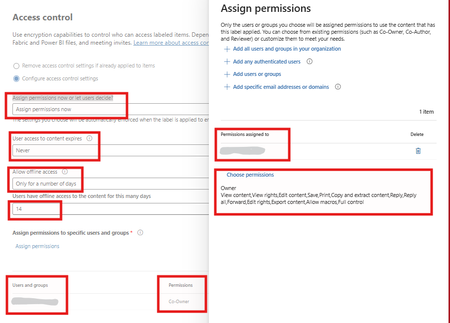
We are at the very beginning of deploying the four sensitivity labels: Public, Internal, Restricted, and Confidential. The labels are visible in Word, Excel, PowerPoint, and other Microsoft 365 apps, but they do not appear in Outlook Desktop or Outlook on the Web (OWA) for me or the pilot users. Restricted and Confidential are configured with encryption and settings for both of them are same , i know strange but that's what mgmt want refer to the attached screenshot.393Views0likes4Comments
Best Way to Exclude Delta _delta_log Folders from Purview Scans?
Hi Purview Community, We're scanning ADLS Gen2 assets with Microsoft Purview Data Map and have encountered issues with _delta_log folders being ingested as catalog assets. Initially, _delta_log folders were included in scans and were ingested into the Data Map. This appears to have introduced a large number of technical assets that are not useful for business users and may be contributing to unexpected metadata and row count discrepancies. Questions What is the recommended ignore pattern to exclude all _delta_log folders from ADLS Gen2 / Fabric scans? After updating a scan rule to exclude _delta_log, how can previously ingested _delta_log assets be completely removed from the Data Map? Is deleting the assets from Data Map sufficient? Is there a metadata purge process? Are there any known limitations where deleted _delta_log assets still affect resource sets, lineage, profiling, DQ, or row count calculations? Has anyone experienced inflated row counts or profiling results after _delta_log folders were previously scanned? For example, we're seeing significant differences between Purview-reported row counts and source system row counts even after excluding _delta_log folders and deleting the corresponding assets. Any guidance, best practices, or Microsoft documentation references would be greatly appreciated. Thanks!147Views0likes0Comments
Updating Purview DLP Sensitive Service Domain Groups with PowerShell
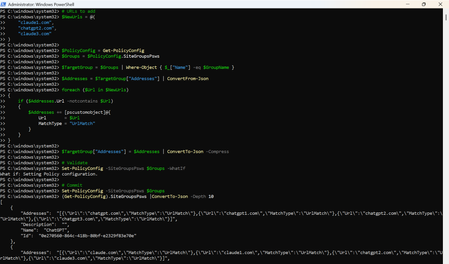
Introduction Microsoft Purview Data Loss Prevention (DLP) can use Sensitive Service Domain Groups to organize websites and other network destinations that are referenced by endpoint DLP rules. Administrators can manage these settings in the Purview portal, while PowerShell is useful when changes must be repeatable, reviewed, and validated before they are committed. This article demonstrates how to retrieve the tenant policy configuration, identify an existing group, add new URL entries only when they are not already present, validate the change, commit it, and verify the final configuration. Important The SiteGroupsPsws object contains tenant-wide endpoint restriction settings. Test the script in a non-production tenant first, export the original configuration, and use change control. Microsoft documents Get-PolicyConfig and Set-PolicyConfig for viewing and modifying endpoint restrictions, but the internal shape of individual hashtable entries can evolve. Prerequisites Requirement Guidance Permissions Use an account assigned the required Microsoft Purview permissions for the configuration being changed. Microsoft states that Get-PolicyConfig and Set-PolicyConfig require permissions in Security & Compliance PowerShell. PowerShell module Install or update the ExchangeOnlineManagement module. Security & Compliance PowerShell uses this module for connectivity. Connection Connect to Security & Compliance PowerShell by using Connect-IPPSSession before running the policy configuration cmdlets. Existing group The target Sensitive Service Domain Group must already exist. This script updates a group named Claude; it does not create the group. Change controls Run the discovery and backup commands first, use -WhatIf before commit, and retain the exported JSON for rollback analysis. Step 1: Install the module and connect Install-Module -Name ExchangeOnlineManagement -Scope CurrentUser Import-Module ExchangeOnlineManagement Connect-IPPSSession Confirm that the policy configuration can be retrieved: Get-PolicyConfig | Format-List Step 2: Discover available group names List the names exposed in SiteGroupsPsws and confirm that the target group exists before making any change. (Get-PolicyConfig).SiteGroupsPsws | Where-Object { $_.ContainsKey("Name") } | ForEach-Object { $_.Name } Step 3: Back up the current configuration Export the current SiteGroupsPsws representation before modifying the in-memory object. $BackupPath = ".\SiteGroupsPsws-backup-{0}.json" -f (Get-Date -Format "yyyyMMdd-HHmmss") (Get-PolicyConfig).SiteGroupsPsws | ConvertTo-Json -Depth 20 | Set-Content -Path $BackupPath -Encoding UTF8 Write-Host "Backup written to $BackupPath" -ForegroundColor Cyan Step 4: Define the target group and URLs $GroupName = "Claude" $NewUrls = @( "claude1.com", "chatgpt2.com", "claude3.com" ) Replace the sample values with the approved production URLs. Use only the domain or wildcard format supported by your DLP design. Step 5: Retrieve and validate the target group $PolicyConfig = Get-PolicyConfig $Groups = $PolicyConfig.SiteGroupsPsws $TargetGroup = $Groups | Where-Object { $_["Name"] -eq $GroupName } if (-not $TargetGroup) { $AvailableGroups = $Groups | Where-Object { $_.ContainsKey("Name") } | ForEach-Object { $_.Name } throw "Sensitive Service Domain Group '$GroupName' was not found. Available groups: $($AvailableGroups -join ', ')" } Complete script # Target Sensitive Service Domain Group $GroupName = "Claude" # URLs to add $NewUrls = @( "claude1.com", "chatgpt2.com", "claude3.com" ) $PolicyConfig = Get-PolicyConfig $Groups = $PolicyConfig.SiteGroupsPsws $TargetGroup = $Groups | Where-Object { $_["Name"] -eq $GroupName } $Addresses = $TargetGroup["Addresses"] | ConvertFrom-Json foreach ($Url in $NewUrls) { if ($Addresses.Url -notcontains $Url) { $Addresses += [pscustomobject]@{ Url = $Url MatchType = "UrlMatch" } } } $TargetGroup["Addresses"] = $Addresses | ConvertTo-Json -Compress # Validate Set-PolicyConfig -SiteGroupsPsws $Groups -WhatIf # Commit Set-PolicyConfig -SiteGroupsPsws $Groups Step 6: Verify the change Retrieve a fresh copy from the service rather than validating only the modified local object. $VerifiedGroups = (Get-PolicyConfig).SiteGroupsPsws $VerifiedTarget = $VerifiedGroups | Where-Object { $_["Name"] -eq $GroupName } $VerifiedAddresses = @($VerifiedTarget["Addresses"] | ConvertFrom-Json) $Verification = foreach ($Url in $NormalizedNewUrls) { [pscustomobject]@{ Group = $GroupName Url = $Url Present = ($VerifiedAddresses.Url -contains $Url) } } $Verification | Format-Table -AutoSize if ($Verification.Present -contains $false) { throw "Verification failed: one or more URLs were not found after the update." } Write-Host "Verification passed for all requested URLs." -ForegroundColor Green Step 7: Optional full configuration views # Writable PowerShell representation (Get-PolicyConfig).SiteGroupsPsws | ConvertTo-Json -Depth 20 # Service view (Get-PolicyConfig).SiteGroups Sample output The sample is illustrative. Actual service output and formatting can vary by module version and tenant configuration. Troubleshooting Symptom Recommended check Get-PolicyConfig or Set-PolicyConfig is not recognized Confirm that the ExchangeOnlineManagement module is installed and that the session was connected with Connect-IPPSSession. Access denied or authorization error Verify the administrator account has the required Purview role-group permissions, then reconnect after role propagation. Target group not found Run the discovery command and use the exact group name returned by SiteGroupsPsws. Addresses cannot be parsed Inspect the raw Addresses property before changing anything. Restore from the exported JSON if the object shape is unexpected. -WhatIf succeeds but verification fails Retrieve Get-PolicyConfig again, check for service-side errors, and confirm no competing administrator update overwrote the configuration. Summary PowerShell provides a controlled way to update Microsoft Purview DLP Sensitive Service Domain Groups at scale. The safest pattern is to discover the exact group name, export the current configuration, validate the target object, normalize and de-duplicate input, run Set-PolicyConfig with -WhatIf, commit the change, and then verify it through a fresh Get-PolicyConfig call. This validation-first workflow improves repeatability and reduces the risk of unintended tenant-wide configuration changes. References Get-PolicyConfig cmdlet reference https://learn.microsoft.com/en-us/powershell/module/exchangepowershell/get-policyconfig?view=exchange-ps Set-PolicyConfig cmdlet reference https://learn.microsoft.com/en-us/powershell/module/exchangepowershell/set-policyconfig?view=exchange-ps Security & Compliance PowerShell overview https://learn.microsoft.com/en-us/powershell/exchange/scc-powershell?view=exchange-ps Configure Endpoint DLP settings https://learn.microsoft.com/en-us/purview/dlp-configure-endpoint-settings