microsoft learn
90 Topics
Access issue with Copilot Studio in Microsoft Learn Applied Skills lab
Hello Microsoft Community, I am currently working on the Microsoft Learn Applied Skills exercise: “Create your customer service agent” using Copilot Studio. When attempting to sign in, I am using my personal Gmail account. However, I receive an error stating that personal Microsoft accounts are not supported, and I am unable to proceed with the lab. Is a Microsoft Entra ID work/school account required to access Copilot Studio for this exercise? Thanks in advance.573Views0likes2Comments
MD-102 Practice Test Does Not Prepare You for the Actual Exam + Poor Support Links
The following was edited by Copilot but is actually my own personal experience and I have read through it and found it accurate to what I wrote for it to edit to a better format: I’m posting this here because I was unable to successfully submit this feedback through the official Microsoft Credentials support channels (links either redirected to Azure support or returned a 404 error). I recently prepared for the MD-102 Endpoint Administrator certification using the official Microsoft Learn modules and the associated Practice Assessment. Based on my performance with those materials, I felt reasonably prepared going into the exam. However, the actual exam experience was significantly different from the Practice Assessment. Issue The Microsoft Learn Practice Assessment primarily uses straightforward, single-concept multiple-choice questions. In contrast, the actual MD-102 exam includes: Multi-step, scenario-based questions Questions requiring evaluation of multiple valid solutions “Best answer” decisions involving trade-offs (not just correctness) These are fundamentally different question styles and require different types of preparation. Impact This mismatch creates a false sense of readiness. Candidates who rely on official Microsoft Learn materials—including the Practice Assessment—may believe they are adequately prepared, but encounter a much more complex and different exam experience. In my case, this gap was a major factor in not passing the exam despite completing the recommended preparation resources. Additional Concern I attempted to submit this feedback through the official Microsoft Credentials support links, but encountered issues: Redirects to Azure “Support for Business” instead of certification support (https://learn.microsoft.com/credentials/support/help) Credentials support page returning a 404 error (https://learn.microsoft.com/credentials/support/) No visible feedback mechanism on the Practice Assessment page itself (https://learn.microsoft.com/en-us/credentials/certifications/modern-desktop/practice/assessment) This makes it difficult to report issues with certification preparation materials through the intended channels. Suggestions To improve the effectiveness of Microsoft Learn as an exam preparation tool: Clearly indicate that Practice Assessments are not representative of actual exam format or difficulty AND Update Practice Assessments to include: Scenario-based questions Multi-step decision questions “Best solution” style problems Provide a full-length mock exam that more closely reflects the real exam experience Add a visible feedback option directly on Practice Assessment pages Fix routing issues with Credentials support links I’m sharing this because I suspect others may run into the same issue when relying on official preparation materials.1.1KViews0likes5Comments
Msn partner hub program Invitation code inquiry
Hi , I don't have access to any publisher of msn partner hub program. But I just wanted to join it at any cost. This is very important for me join it. Please send me an invite code for it. So, I can join it. Or send me the link of any publisher so I can contact him. Please help me out to join this program. It is very essential for life fulfill my life purpose. I will thankful to you. With my best Regards862Views0likes2Comments
OneDrive for macOS documentation issue. DefaultFolder plist example is missing array wrapper
Hi everyone, The Microsoft Learn documentation for configuring the OneDrive sync app on macOS currently contains an incorrect plist example for the DefaultFolderLocation setting. Documentation page: https://learn.microsoft.com/en-us/sharepoint/deploy-and-configure-on-macos#defaultfolderlocation In the “DefaultFolderLocation” section, the current plist example shows the DefaultFolder key as a dictionary: <key>DefaultFolder</key> <dict> <key>Path</key> <string>(DefaultFolderPath)</string> <key>TenantId</key> <string>(TenantID)</string> </dict> This format does not work correctly when deployed as a managed preference/configuration profile. The setting starts working when the DefaultFolder dictionary is wrapped in an array, like this: <key>DefaultFolder</key> <array> <dict> <key>Path</key> <string>(DefaultFolderPath)</string> <key>TenantId</key> <string>(TenantID)</string> </dict> </array> Please update the Microsoft Learn documentation to include the array wrapper in the DefaultFolder plist example. The current Microsoft Learn example is confusing because administrators may deploy the documented plist exactly as shown, but the setting does not appear to work correctly until the array wrapper is added.449Views0likes2Comments
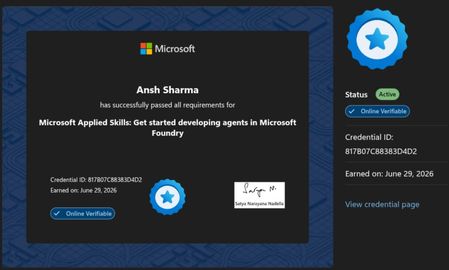
Passed Microsoft Applied Skills: Developing Agents in Microsoft Foundry
I recently completed the Microsoft Applied Skills: Get Started Developing Agents in Microsoft Foundry credential. It was a great hands-on experience with Azure AI Foundry, including deploying models, building AI agents, using Code Interpreter, and publishing an agent. If you're interested in Azure AI or Generative AI, these official Microsoft resources are a great place to start: 🔹 Microsoft Copilot https://learn.microsoft.com/copilot?wt.mc_id=studentamb_530495 🔹 Azure AI Foundry https://azure.microsoft.com/products/ai-foundry?wt.mc_id=studentamb_530495 🔹 Azure for Students https://azure.microsoft.com/free/students?wt.mc_id=studentamb_530495 🔹 Azure Free Account https://azure.microsoft.com/free?wt.mc_id=studentamb_530495 🔹 Microsoft Learn – Azure AI Training https://learn.microsoft.com/training/azure-ai/?wt.mc_id=studentamb_530495 A small request: I'm currently working toward the Microsoft Learn Student Ambassadors Community Influencer requirements. If any of these resources are relevant to you, I'd genuinely appreciate you taking a look. I hope you discover something useful for your own learning journey as well. Thank you, and happy learning!330Views0likes1CommentGreat Way to Start with Deep Learning: Introducing PyTorch Courses on Microsoft Learn
Deep Learning is one of the most popular topics amongst both students and software developers. We have recently released a learning path on Microsoft Learn that will help you get started with Deep Learning, based on one of the most popular frameworks: PyTorch.5KViews0likes1CommentA Helpful AI-Powered Learning Experience I Found While Preparing for PL-400 within Microsoft Learn
While preparing for the PL-400 (Microsoft Power Platform Developer) exam, I discovered a very useful learning feature in some Microsoft Learn modules. In a few modules, the Module Assessment appears to include AI-generated questions. What I found particularly helpful is that when I answered a question incorrectly and retook the assessment, Microsoft Learn didn't just generate completely new questions. Instead, it often brought back the concepts I had previously answered incorrectly while also introducing new questions. This approach helped me reinforce weak areas and better understand the module content rather than simply memorizing answers. It felt more like adaptive learning, where the assessment focuses on concepts that need more attention. Also, if you find this AI-generated learning experience helpful, consider using the "Provide feedback about AI-generated content" option available in Microsoft Learn. Sharing feedback can help Microsoft continue improving these learning experiences for certification candidates. Has anyone else noticed this behavior in Microsoft Learn assessments? I'd be interested to hear whether you've had a similar experience while preparing for Microsoft certifications.149Views0likes0Comments