microsoft forms
3646 Topics
Pre-fill Responses in Your Microsoft Forms
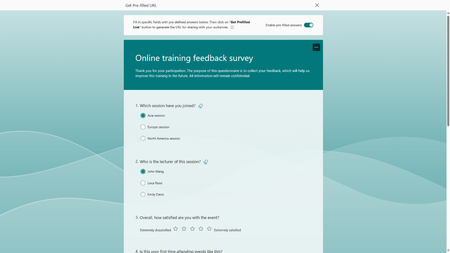
We are excited to share that Microsoft Forms now supports pre-filled links, making your data collection process more efficient and improving data accuracy. This feature not only allows you to set default answers for your questions, it empowers you to strategize how you would like the responses categorized. To help you better understand how to leverage this new feature, let's try it together with an online training feedback survey.73KViews10likes48Comments
Disable incessant nagware popups
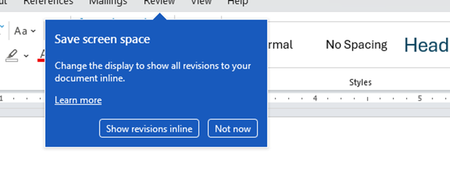
I don't know about everyone else, but I am sick and tired of the nagware pop ups in Word, Excel, PowerPoint, Outlook, etc. Every single product harasses me with pop ups trying to tell me "hey, did you know this feature was here?", "you can do this if you click that", "let me hold your hand through using products you've used for decades even though you don't want daddy Microslop to do that". This is a prime example. I keep getting the same ones again and again and again and everything I've read indicates they should only appear once. But they don't. They keep coming back like a psychotic stalker ex who wants alimony even though you were never married. How do I get this nagware to stop?!71Views0likes1CommentAllow form respondents to save and continue to fill the form later
My comment refers to this voting: https://microsoftforms.uservoice.com/forums/386451-welcome-to-microsoft-forms-suggestion-box/suggestions/18447406-allow-form-respondents-to-save-and-continue-to-fil In our company we use sharepoint and MS 365 Business every day. MS Forms is very intuitive and esasy to handle, thats great! I made a long survey on sustainability topics to our members. Then I got feedback that in many cases more than one person in the adressed member companies have to work together according to their expertise... so they need the option to save the survey, send it to another colleague who can conitnue answering the question... Right now I have to look to alternative tools to fullfill this very important option. But I would prefer to continue my survey (where I already put more than one week of effort) in MS Forms. Is there already any timeline, when Mircrosoft will implement this function? Best regards from Germany Matthias104KViews18likes54Comments
Take user to a specific URL after they click "Submit" on a Microsoft Form
Hello, I would like to know if it is possible to do the following: 1. User completes a Microsoft Form. 2. User clicks the "Submit" button. 3. Microsoft Forms redirects the user to a new URL: thisisatest.com/thank-you I've been looking in different tech forums and reading articles, and I haven't been able to find any good info on this. I couldn't find an intuitive way to set this up from the settings on Microsoft Forms either. I don't see this listed as an option. Any suggestions will be appreciated it. Thanks.13KViews0likes3CommentsIgnite Blog: Taking Forms to the Next Level with Teams and Power Automate
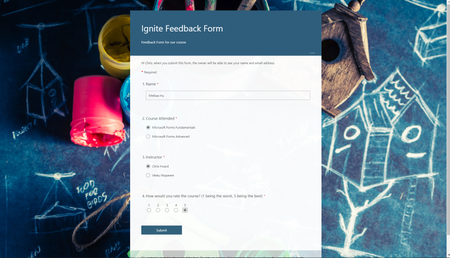
I hope you are all having a great time at Microsoft Ignite! My name is Chris Hoard, Partner Education Lead at Vuzion here in the UK. I am a Microsoft Certified Trainer Regional Lead (MCT RL) and Office Apps and Services MVP.13KViews5likes3CommentsShipped! Surveys Agent now live for customers in Microsoft 365 Copilot (Frontier program)
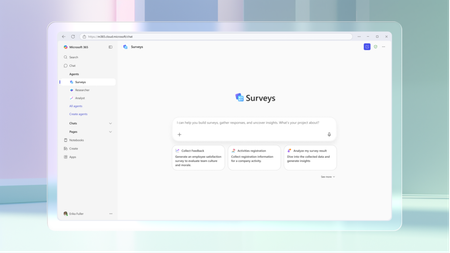
Today, we’re excited to introduce Surveys Agent in Microsoft 365 Copilot, a brand-new pre-built agent developed by Microsoft, now available through the Frontier program. Think of Surveys Agent as your personal survey expert—ready to help you from start to finish. Whether you're gathering feedback from a training session, measuring employee satisfaction, or running customer research, Surveys Agent has your back. It helps you: Draft surveys tailored to your goals so you have a shareable survey right away Refine questions to make your survey easy to use, and drive meaningful results Launch your survey with a clear plan and timeline Send invitations and reminders to boost response rates Track progress and analyze results—all through a simple chat conversation Gone are the days of piecing together multiple tools to create forms, chase replies, and interpret feedback. Surveys Agent streamlines the entire process into a simple conversational experience, making survey creation as intuitive as having a chat. While drafting your survey, you can view refinements instantly alongside the conversation. When you’re ready to launch, Surveys Agent recommends the optimal timeline and distribution channels, even preparing and sending invitations to your selected audience – all from within the same conversation. From there, the agent keeps you informed by automatically tracking response rates, sending timely reminders, or notifying when it’s ready to dive into the results. You can come back to the conversation at any point to check in on the survey’s status or analyze the responses – ask questions in chat or export your findings directly to an Excel workbook. It’s like having an intelligent assistant that helps you design better questions, launch with a plan, send reminders, and analyze results without all the heavy lifting. Surveys Agent is now available to commercial users with a Microsoft 365 Copilot license as part of the Frontier program that gives customers early access to new Copilot innovations while they’re still in development. You can find it in the Agent Store under Built by Microsoft—or jump straight in here: Surveys Agent (Frontier) - https://aka.ms/GetSurveysAgent. To learn more about Surveys Agent, go here - https://aka.ms/SurveysAgentStart. We can’t wait to see how you use it, and we’re eager to learn from your feedback as we improve the experience. Just give Surveys Agent responses a thumbs up or a thumbs down, and write your feedback – it really helps us continue to build and refine the product!4.1KViews1like1Comment
Limited to 200 submissions
The helpdesk has confirmed that I have an m365 family subscription. This would allow me to receive 1000 responses in Forms. However, when I log in to Forms with my details, only 200 answers are accepted. In addition, I get a "buy button" on the screen. In other words, Forms "thinks" that I have a free plan. Who can solve this for me?102Views0likes1Comment200 answers instead of 1000
The helpdesk has confirmed that I have an m365 family subscription. This would allow me to receive 1000 responses in Forms. However, when I log in to Forms with my details, only 200 answers are accepted. In addition, I get a "buy button" on the screen. In other words, Forms "thinks" that I have a free plan. Who can solve this for me?25Views0likes0Comments