microsoft defender for cloud
259 TopicsThe CISO Cheat Sheet to Microsoft Digital Defense Report 2026
I know we’re all busy, so I’ve pulled the most important data from this year’s Microsoft Digital Defense Report into one short read. The full report is well worth exploring, but this article focuses on the numbers and trends most relevant to security leaders. This year’s edition shows that AI is lowering the time, expertise and cost required to discover and exploit weaknesses, enabling attackers to operate with greater speed, scale and autonomy. The report describes this as AI “changing the physics of cybersecurity”: attack timelines are compressing and agentic systems are beginning to automate more of the attack lifecycle. Trend 1: Time has collapsed The clearest finding is about speed. Vulnerability discovery is increasingly running ahead of remediation, while the time from discovery to weaponisation is shrinking. In the AI era, weaponisation can follow in hours. Vulnerability discovery and weaponisation now often needs only a well-written prompt. The median time from discovery in the wild to weaponisation is below 24 hours. Vulnerabilities were on track for a record estimated 72,000 CVEs in 2026. The report expects a multi-year period in which the number of known but unpatched vulnerabilities rises sharply before eventually declining. The median time from container start to first exploit attempt is 5.3 hours. The ransomware actor Storm-1175 moved from web-facing exploitation to deploying Medusa ransomware in as little as 24 hours. CISA added over 110 CVEs to its Known Exploited Vulnerabilities catalogue between November 2025 and May 2026, most within a week of disclosure. The mismatch with enterprise reality is the uncomfortable part. The report says the disclosure-to-exploitation window has shrunk to single-digit days. Between November 2025 and May 2026, CISA added more than 110 vulnerabilities to its Known Exploited Vulnerabilities catalogue, most within a week of disclosure. In one example, Storm-1175 moved from exploiting a web-facing vulnerability to deploying Medusa ransomware in as little as 24 hours. Microsoft’s Red Team makes an important point: a patch is also a disclosure. Every fix points attackers towards the flaw it closes. As AI-assisted analysis makes reversing patches faster and more reliable, the report argues that patch velocity, not simply patch availability, becomes the control that matters. Trend 2: Attack chains are gaining autonomy The report charts a clear progression: September–November 2025: AI assists in orchestrating a campaign, as in the Anthropic-reported espionage case. April–June 2026: Full-chain autonomy is demonstrated in labs. July 2026: Real-world autonomous attacks of increasing complexity appear. Two frontier models, Mythos and GPT-5.5, completed a 32-step attack chain against an emulated enterprise with no human help. The test environment had no defenders. The UK AI Security Institute reached a similar finding independently. GPT-5.5 was the second model to solve its end-to-end corporate network attack simulation, a task AISI estimates would take a human about 20 hours. Open-weight models lag closed models at orchestrating attacks by about seven months. In the wild, early July 2026 saw the first documented automated ransomware extortion attack, named JADEPUFFER by Sysdig. Microsoft has seen AI-orchestrated intrusions that share elements with it. Initial access consistently came from internet-exposed services running known-vulnerable software. The report is measured on this point. Volumes of AI-orchestrated activity remain low. In most observed real-world operations, complex end-to-end intrusions still retain meaningful human direction. The Red Team's framing is the most useful one: AI doesn't create a new class of attack, it collapses the effort needed to find and exploit existing attack paths. Trend 3: AI has become an attack surface The report's second takeaway is that attackers are already targeting AI itself. The adoption numbers explain why. 88% of enterprises are experimenting with agents, and 82% of leaders plan broader rollouts within 12–18 months. The report cites industry projections of roughly 1.3 billion agents in production by 2028. What attackers are doing to AI systems: Four techniques accounted for roughly 90% of observed attack activity in telemetry from Azure AI workloads: malicious link injection (52%), jailbreaks (16%), tool and agent abuse (12%), and identity and credential abuse (10%). Memory poisoning: An attacker who can place content anywhere an agent reads can often place it where the agent remembers. Email is the dominant pathway the Red Team has observed. Human-in-the-loop isn't a complete control: Red team testing saw approval prompts ignored, or bypassed by a policy stored in poisoned memory. Developer tools turned against their owners: The "s1ngularity" malware hijacked locally installed AI command-line tools to hunt for secrets. It leaked about 2,000 secrets and 20,000 files across 225 victims. AI browsers: In daily use at more than 40% of organisations in Microsoft's dataset, they were the initial infection vector in incidents involving 57 malware families in a May 2026 analysis. Chat histories as a target: Malicious AI-assistant extensions reached nearly 900,000 installs and more than 20,000 enterprise tenants, harvesting AI chat histories that often contain code, architecture and credentials. The identity implications are direct. Each agent needs its own identity, not one borrowed from an employee, and a named human sponsor. The report also treats revocation latency, the time to cut off a compromised agent, as a measured outcome. Trend 4: The front door is still identity AI changes the speed and personalisation of social engineering. It hasn't changed where attacks start. Initial access in Defender Experts data: User execution: 30% Valid accounts: 20% Malicious copy-and-paste: 13% Phishing: 11% Together, user execution and valid accounts account for over half of observed activity. In incident response engagements, phishing as an initial access vector jumped from 7% to 23% year on year. The standout numbers: ClickFix: Defender saw user-pasted malicious commands on more than 1.1 million unique devices between February and early May 2026, roughly an 8x increase. AiTM: URLs accounted for 45% of the identified phishing techniques in the report’s breakdown. Separately, the share of AiTM phishing and token-theft attacks more than doubled during the first six months of 2026, although the report notes that their overall share remained comparatively small. Teams vishing: Weekly confirmed malicious volume increased 502% year on year. Per attempt, 48% of vishing calls kept the victim engaged for more than 20 seconds, and 30% lasted more than one minute. When a call succeeds, attackers can persuade the victim to install a remote-management tool and complete reconnaissance in two minutes or less. Business contact impersonation (BCI): The report introduces this term for conversations that start with a trusted-looking contact. Microsoft detected more than 46 million attacks in 12 months, with a 121% spike in April 2026. The share of first-contact messages that explicitly asked for money or documents fell from 17% to 3%. The first message is deliberately bland, like "Are you at your desk?" Password attacks declined 26% year on year, which the report describes as strong evidence that MFA and passkeys are forcing attackers to pivot. That pivot includes techniques such as fatigue attacks, AiTM phishing and token theft designed to circumvent conventional MFA. Trend 5: Attackers are inheriting trust rather than breaking in The report's headline theme is that risk is increasingly interconnected. Threats travel through the trusted relationships between identities, software supply chains, partners and cloud platforms. The numbers: Supply chain: Major open-source ecosystems saw attacks roughly every ten days, accelerating through Q2 2026. Shai-Hulud 2.0 affected 25,000 repositories. Megalodon backdoored 5,561 GitHub repositories in under six hours. Trusted signing: In May 2026, Microsoft disrupted Fox Tempest, a "malware-signing-as-a-service" operation that obtained genuine certificates for ransomware loaders and infostealers. Microsoft revoked over a thousand fraudulent code-signing certificates. Legitimate access: An unsanctioned remote monitoring tool is now one of the most reliable mid-stage indicators of a human-operated intrusion. Cloud identity: Cloud identity abuse was the most observed technique against critical infrastructure, representing 78% of the technique mix in Microsoft’s data for March to June 2026. Hybrid intrusions: The Storm-2885 case showed an attacker using a privileged cloud identity to close and downgrade security alerts. The report says identity governance and alert-handling workflows deserve Tier 0 treatment. Dwell time: DART data shows a statistically significant increase in dwell time year on year, meaning organisations took longer to detect intrusions. Ransomware shows the same ecosystem pattern. Qilin led leak-site data with 16.4% of victims, up 386%. Defender detections tell a different story, with Akira at 22%. Trend 6: Defence works best when it's connected The report is not only a catalogue of threats. The strongest defensive evidence: Disruption works. Following the March 2026 disruption, Tycoon2FA activity had fallen 95% from its November 2025 peak by June. Its share of CAPTCHA-gated phishing declined from 76% in December 2025 to 12% in June 2026. Correlation is the highest-leverage variable. The report argues that how well defenders share and correlate signals across endpoint, identity, cloud, email and network is one of the highest-leverage strategic variables under their control. AI is also changing defensive operations. The report describes AI-assisted triage, incident summarisation, hunting-query generation and detection engineering as ways to accelerate investigations and allow analysts to concentrate on higher-value work. Automated disruption can compress response time. The report says that when a correlated incident reaches a defined confidence threshold, defensive systems can automatically isolate devices, disable compromised accounts, revoke sessions or quarantine affected cloud resources. It also stresses the importance of appropriate governance and human oversight for high-risk AI actions. The report also recommends changing what leaders measure. It suggests moving from patches deployed to exposure reduced, detection coverage increased and time-to-mitigate compressed. What the MDDR recommends: ten security priorities The report starts its recommendations with the foundations: Secure by Design, Secure by Default and Secure Operations, applied through identity-centric Zero Trust. Microsoft says these keep the priorities below durable as AI adds more identities, applications, agents and dependencies to govern. Govern cyber risk at leadership level. Report identity exposure, patch latency, agent permissions, critical dependencies, dwell time and recovery readiness to the board. Defend identity as the primary control plane. Deploy passkeys and phishing-resistant MFA, reduce privilege and govern human and non-human identities. Invalidate and rotate tokens and session credentials quickly. Establish governance, visibility and data controls for AI. Keep visibility of approved AI tools, services and agents, and monitor for unauthorised or unmanaged use. Apply sensitivity-aware access and data protection to the data those systems can reach. Reduce exposure and edge risk. Continuously discover internet-facing assets and patch edge devices quickly. Centralise high-fidelity logging, enforce strong authentication and combine network visibility with threat intelligence. Focus on cross-signal correlation. Correlate endpoint, identity, cloud, application, email and network signals to detect intrusions earlier. Correlation also helps defenders anticipate attack paths and likely targets. Enact a continuous threat and vulnerability management model. Combine asset visibility, vulnerability identification, threat detection and AI-accelerated insight into a single continuous programme. Validate exposure through proactive testing. Run assume-breach exercises on cloud services, SaaS platforms, APIs and workflow automation. Prioritise them by where your highest-value data is stored, accessed or aggregated. Secure software dependencies. Harden software installation, keep a software inventory and validate provenance. Monitor packages and prepare for rapid containment. Participate in collective defence. Share actionable threat indicators and victim-informed intelligence with trusted partners and law enforcement. This supports coordinated tracking, investigation and disruption. Prepare for long-horizon technology transitions. Build a cryptographic inventory and advance post-quantum planning alongside AI governance. Read together, the numbers tell one story: the attacker’s workflow is becoming faster and less expensive. AI can shorten vulnerability discovery, exploitation, secret discovery and lateral movement, while organisations still face the slower operational work of testing, coordinating and deploying safe changes across complex environments. At the same time, agent identities can proliferate faster than organisations can inventory, govern and revoke them The defining question for boards today is not whether disruption will occur, but whether the organization can continue operating, contain harm, recover quickly, and maintain trust when it does. Source: Microsoft Digital Defense Report 2026, Version 1.1. Reporting period: July 2025–June 2026.
Monitoring work from home
My boss has asked me if there is a way to see just how "busy" people who are working from home are. I have this data in Sentinel: Entra sign-in logs Defender for Endpoint logs Office 365 logs Most, if not all, on premise AD login events Netskope (current ZTNA solution) logs I have my known office location IPs so i could just exclude those and look for activity from other IPs however many times people will work in the morning or on the way to work appearing from a non corporate IP, come into the office appearing to come from a corporate IP, and then from home again in the evening. I need a way to query Sentinel looking for people who appear to be working but not coming from Corp IP. If they came from different IPs on the same day including Corp check to see if those non Corp are before and after business hours and exclude those. Anyone know of a good query to achieve this? Or maybe a tool that can extract and generate a report?271Views0likes0CommentsSentinel - Defender XDR KQL Queries Library
Hello all, I’ve been building something over the past few weeks that I think the security community might find useful. https://goxdr.fyi is a searchable KQL query library for Microsoft Sentinel and Defender XDR. The name comes from a nickname my colleagues gave me (GoX) combined with XDR. I also picked up https://goxdr.fyi as a short and easy to remember domain for it. You can check it out here: https://goxdr.fyi The idea came from my own day to day work as someone working in IAM and SOC operations. I constantly find myself writing and refining KQL queries for threat hunting, detection engineering and incident investigation. Over time I realized I had a growing collection of queries that I kept going back to and I thought why not make these available to others? It currently has 117 queries covering identity security, BEC/AiTM detection, NTLM and LDAP attack hunting, OAuth governance, AI/Copilot security, Sentinel alert trending, SOC performance metrics and more. Some of these queries are ones I wrote from scratch based on real scenarios I encountered in production environments. Others are community queries I tested and validated in my own setup. Only the ones I found genuinely useful and that actually worked against real data made it in. Each query comes with a description explaining what it detects and why it matters, along with severity levels, platform tags (Sentinel, XDR or both) and a copy button so you can paste it directly into Advanced Hunting or use it as the basis for an Analytics Rule. The site is open source, hosted on GitHub Pages and licensed under CC BY 4.0. No sign-up, no paywall, no tracking. The source is available. I’ll keep adding queries as new scenarios come up. If there’s enough interest I’m also considering adding Cortex XQL queries for Palo Alto environments. Suggestions, feedback or ideas for new detections are always welcome. Feel free to reach out. Thanks361Views0likes0CommentsSecure containers from code to runtime | Microsoft Defender
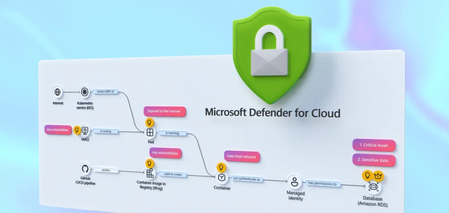
Correlate cross-cloud attacks into a single incident, catch runtime threats that image scanning misses, and block vulnerable images before they reach production. Investigate container hijacking, isolate compromised pods with Security Copilot-guided remediation, and close the loop from SOC to dev by pushing CVE fixes to GitHub and syncing resolution back to Defender. Matt McSpirit, Microsoft Azure expert, shares how to detect, investigate, and remediate container threats in one connected workflow. Expose container hijacking at runtime. Binary drift detection flags the moment a container runs anything outside its original image. Try it now. Detection to containment in one flow. Security Copilot in Defender generates your incident report, classifies the attack, and surfaces pod isolation as a guided remediation step. Check it out. Close the loop from SOC to dev. Create GitHub issues for vulnerable container dependencies, trigger Copilot’s fix as a Pull Request, and bring “resolved” status back to Defender the moment it merges. See how it works. QUICK LINKS: 00:00 — Secure containers in Microsoft Defender 01:02 — Cross-cloud incident 03:07- Runtime detection 04:10 — Investigate and build context 04:49 — Security Copilot incident report & containment 06:03 — Prevention 07:34 — Recommendations and take action 09:04 — Wrap up Link References Get started at https://aka.ms/DefenderCloudSecurity Unfamiliar with Microsoft Mechanics? As Microsoft’s official video series for IT, you can watch and share valuable content and demos of current and upcoming tech from the people who build it at Microsoft. Subscribe to our YouTube: https://www.youtube.com/c/MicrosoftMechanicsSeries Talk with other IT Pros, join us on the Microsoft Tech Community: https://techcommunity.microsoft.com/t5/microsoft-mechanics-blog/bg-p/MicrosoftMechanicsBlog Watch or listen from anywhere, subscribe to our podcast: https://microsoftmechanics.libsyn.com/podcast Keep getting this insider knowledge, join us on social: Follow us on Twitter: https://twitter.com/MSFTMechanics Share knowledge on LinkedIn: https://www.linkedin.com/company/microsoft-mechanics/ Enjoy us on Instagram: https://www.instagram.com/msftmechanics/ Loosen up with us on TikTok: https://www.tiktok.com/@msftmechanics Video Transcript: -Containers are the foundation for how modern business critical apps are built, running across Kubernetes environments and multiple clouds. These are high value targets for attackers, who are now using AI to accelerate ways to find and exploit vulnerabilities faster than humanly possible, from code to runtime. And it’s hard to respond effectively when security signals and responsibilities are fragmented across different teams and tools. The challenge isn’t just finding security issues, it’s understanding how they connect across the lifecycle from development to production. -So, rather than treating supply chain and runtime as separate problems, Microsoft Defender for Cloud brings them together into a single, unified model to catch issues early in code by identifying vulnerabilities and misconfigurations, prioritizing risk across clusters, workloads, and configurations, and detecting and responding to threats in your running containers in near real time, all while tracing them back to the source to put the right mitigations in place. So let me walk you through a multi-stage attack across a containerized environment to show this in action from the perspective of a SOC analyst. I’m in Microsoft Defender in the incidents view, filtered to container related incidents, and I can see four related to containers. -Let’s start with this one: a multi-stage incident involving multiple users. And notice this is already correlated into a single incident, not multiple alerts. You can see it’s flagged as high impact, with a critical asset label, and the crown icon in the incident graph showing asset criticality. On the left, is the attack story with alerts listed in chronological order, color-coded by severity. If we go back to the incident graph, container resources are in black, and related identities and services are in white. This is runtime threat detection correlated across layers. -In this case, Defender has detected 19 alerts for this incident in near-real time and stitched them into a single timeline. So, let’s walk through the attack. Here we can see the initial access signal was from a Kubernetes API request from a proxy IP address. Identity compromise and escalation then occurred with credentials accessed from a service principal. And finally, Defender for Cloud’s cross-cloud correlation surfaces lateral movement spanning environments, revealing a brute-force attack originating from an exposed Azure Kubernetes cluster targeting an AWS Relational Database service resource. -Back in the graph, you’ll notice a blue icon, this indicates there are related attack paths. And if we ungroup similar nodes, we see a user indicated by the blue icon, and we can pivot directly into the attack path view. Here’s where it gets interesting. This is where we connect runtime activity back to security posture and exposure. It’s concluded that the container is internet-exposed with high-severity vulnerabilities, and it’s using a managed identity to access a protected storage account. We’ll come back to this in a moment to see if we can fix the root cause. So, we can see this wasn’t just an isolated runtime event; there was a clear path from exposure to exploitation. -So let’s move on to the second incident in our queue. This is another multi-stage attack. This time focused on initial access and discovery across multiple endpoints. In the Incident Graph, we can see a number of containers were accessed. Then in the attack story, we can see they were hijacked to be used as Cryptocoin miners. Now, containers should be immutable, only running what was in the original image. But this alert shows the initial binary drift. This signals to Defender that the container is executing something it was never built to run. And if we review the activities for this alert, we can see a suspicious parent process, and a shim file being used to execute it. And if we move to the right in evidence, we can see all the details for the process, file, pod and cluster. This is where runtime detection becomes critical, because this activity isn’t visible through image scanning or posture alone. -From here, we can investigate and build full context around the attack. For that, let’s drill into our Kubernetes cluster and start hunting to take a look at the processes run, across both control plane and data plane signals. There are tables that log these events for querying, CloudProcessEvents for runtime activity and CloudAuditEvents for control plane actions. Let’s run a query in the audit events table to search for the creation of a cluster-admin role binding. This would grant full administrative access to the cluster. Here, we can see the role binding and associated subject. It confirms our assumption that the privilege escalation did happen. Next, we can leverage Security Copilot to transition from investigation to response using guided recommendations informed by the attack insights uncovered. Here, Copilot has already generated an incident report. -At the top, we have a summary of the attack from correlated signals. If we expand it, under Credential Access, we see compromised identity activity. Under Discovery, there are network scanning tools. Under Execution, we see confirmation that the container was modified to run crypto mining processes. And below that, the Triage section then lets you classify the incident as true positive, informational, or false positive with corresponding subcategories. I’ll choose a True Positive Multi-stage attack. And Copilot also suggests two remediation actions: terminate the pod to stop activity or isolate the pod to contain the threat. So let’s follow that guidance and isolate the pod. So I’ll close Copilot and return to our Incident graph, then ungroup similar nodes again. Now selecting the Pod, under Actions, I can isolate the Pod. I’ll add a reason. And then I just need to confirm. And just like that, we’ve moved from detection to investigation and containment in a single flow. -So far, we’ve focused on detecting, responding to active threats. But security doesn’t start at runtime. And this is where Defender for Cloud helps your DevOps teams harden your environment to prevent issues from reaching production in the first place. Using policies, you can put rules in place to prevent containers with issues from being deployed. So for that, in the Azure portal in Defender for Cloud, under Environment Settings, we’ll head over to our Security Rules. -Here, we’ve already created a handful of rules to deny or audit activities. For example, if I take a look at this one to block vulnerable deployments of AI applications, this rule is configured to automatically deny deployment of any image violating the policy. It’s scoped specifically to the namespace of our AI applications. In the Configurations tab, we can see that this rule is set to trigger when a container image contains a high or critical severity vulnerability, with any count higher than zero. With our policy in place, let’s test it out by attempting to deploy a container image that contains a few high-severity vulnerabilities. This is exactly what happens with supply chain attacks. For that, from Cloud Shell, I’ll run an AKS command first to get my credentials. -Now I can execute my command. I’ll paste in this Kube Control command to run an image, including its location and namespace details. And immediately, we can see that the run was denied, stating that the image contains 415 CVEs, and we allowed zero in our policy. So it’s blocked. What’s more, Defender for Cloud continuously scans what’s in your registries and running environments in near real time, surfacing the risks that matter and turning them into clear, actionable fixes. Next over in Recommendations, we can see findings identified by Defender for Cloud with several critical risks highlighted, related to the same incident that we saw earlier in the Defender portal. And these are its recommendations. -Let’s look at this one to update busybox. Looks like this version has 13 known vulnerabilities. And digging into the Remediation Insights tab, we can see more details across the development phases. The Take Action button tells us to assign an owner and to create a GitHub issue. I can create the GitHub issue from here. And if I head over to what our dev team would see in GitHub, you can see the details for the ticket, with deployment info, matching CVEs for this version, and below there, there are the remediation guidelines to mitigate the issue. From there, we can assign the issue to GitHub Copilot, and the GitHub Copilot Coding Agent will generate a draft Pull request fixing the CVEs for review. Once the pull request is actioned and complete and the version is updated, we can see that the CVEs were resolved. And finally as a developer, we can merge the pull request to get our app back into a healthy state. I’m going to return back to Microsoft Defender and our app recommendation, clicking on the GitHub issues shows that everything was resolved, and it sent the updated status back to Defender where your SOC lives. -So, that’s a hands-on look at how Microsoft Defender helps secure your container environments end to end. It doesn’t just detect security issues, it helps you to respond faster by connecting security signals across the entire lifecycle, from development through production. To learn more or get started, visit aka.ms/DefenderCloudSecurity. Be sure to subscribe to Microsoft Mechanics for the latest tech updates. And thanks for watching.792Views1like1CommentWhy UK Enterprise Cybersecurity Is Failing in 2026 (And What Leaders Must Change)
Enterprise cybersecurity in large organisations has always been an asymmetric game. But with the rise of AI‑enabled cyber attacks, that imbalance has widened dramatically - particularly for UK and EMEA enterprises operating complex cloud, SaaS, and identity‑driven environments. Microsoft Threat Intelligence and Microsoft Defender Security Research have publicly reported a clear shift in how attackers operate: AI is now embedded across the entire attack lifecycle. Threat actors use AI to accelerate reconnaissance, generate highly targeted phishing at scale, automate infrastructure, and adapt tactics in real time - dramatically reducing the time required to move from initial access to business impact. In recent months, Microsoft has documented AI‑enabled phishing campaigns abusing legitimate authentication mechanisms, including OAuth and device‑code flows, to compromise enterprise accounts at scale. These attacks rely on automation, dynamic code generation, and highly personalised lures - not on exploiting traditional vulnerabilities or stealing passwords. The Reality Gap: Adaptive Attackers vs. Static Enterprise Defences Meanwhile, many UK enterprises still rely on legacy cybersecurity controls designed for a very different threat model - one rooted in a far more predictable world. This creates a dangerous "Resilience Gap." Here is why your current stack is failing- and the C-Suite strategy required to fix it. 1. The Failure of Traditional Antivirus in the AI Era Traditional antivirus (AV) relies on static signatures and hashes. It assumes malicious code remains identical across different targets. AI has rendered this assumption obsolete. Modern malware now uses automated mutation to generate unique code variants at execution time, and adapts behaviour based on its environment. Microsoft Threat Intelligence has observed threat actors using AI‑assisted tooling to rapidly rewrite payload components, ensuring that every deployment looks subtly different. In this model, there is no reliable signature to detect. By the time a pattern exists, the attacker has already moved on. Signature‑based detection is not just slow - it is structurally misaligned with AI‑driven attacks. The Risk: If your security relies on "recognising" a threat, you are already breached. By the time a signature exists, the attacker has evolved. The C-Suite Pivot: Shift investment from artifact detection to EDR/XDR (Extended Detection and Response). We must prioritise behavioural analytics and machine learning models that identify intent rather than file names. 2. Why Perimeter Firewalls Fail in a Cloud-First World Many UK enterprise still rely on firewalls enforcing static allow/deny rules based on IP addresses and ports. This model worked when applications were predictable and networks clearly segmented. Today, enterprise traffic is encrypted, cloud‑hosted, API‑driven, and deeply integrated with SaaS and identity services. AI‑assisted phishing campaigns abusing OAuth and device‑code flows demonstrate this clearly. From a network perspective, everything looks legitimate: HTTPS traffic to trusted identity providers. No suspicious port. No malicious domain. Yet the attacker successfully compromises identity. The Risk: Traditional firewalls are "blind" to identity-based breaches in cloud environments. The C-Suite Pivot: Move to Identity-First Security. Treat Identity as the new Control Plane, integrating signals like user risk, device health, and geolocation into every access decision. 3. The Critical Weakness of Single-Factor Authentication Despite clear NCSC guidance, single-factor passwords remain a common vulnerability in legacy applications and VPNs. AI-driven credential abuse has changed the economics of these attacks. Threat actors now deploy adaptive phishing campaigns that evolve in real-time. Microsoft has observed attackers using AI to hyper-target high-value UK identities- specifically CEOs, Finance Directors, and Procurement leads. The Risk: Static passwords are now the primary weak link in UK supply chain security. The C-Suite Pivot: Mandate Phishing‑resistant MFA (Passkeys or hardware security keys). Implement Conditional Access policies that evaluate risk dynamically at the moment of access, not just at login. Legacy Security vs. AI‑Era Reality 4. The Inherent Risk of VPN-Centric Security VPNs were built on a flawed assumption: that anyone "inside" the network is trustworthy. In 2026, this logic is a liability. AI-assisted attackers now use automation to map internal networks and identify escalation paths the moment they gain VPN access. Furthermore, Microsoft has tracked nation-state actors using AI to create synthetic employee identities- complete with fake resumes and deepfake communication. In these scenarios, VPN access isn't "hacked"; it is legally granted to a fraudster. The Risk: A compromised VPN gives an attacker the "keys to the kingdom." The C-Suite Pivot: Transition to Zero Trust Architecture (ZTA). Access must be explicit, scoped to the specific application, and continuously re‑evaluated using behavioural signals. 5. Data: The High-Velocity Target Sensitive data sitting unencrypted in legacy databases or backups is a ticking time bomb. In the AI era, data discovery is no longer a slow, manual process for a hacker. Attackers now use AI to instantly analyse your directory structures, classify your files, and prioritise high-value data for theft. Unencrypted data significantly increases your "blast radius," turning a containable incident into a catastrophic board-level crisis. The Risk: Beyond the technical breach, unencrypted data leads to massive UK GDPR fines and irreparable brand damage. The C-Suite Pivot: Adopt Data-Centric Security. Implement encryption by default, classify data while adding sensitivity labels and start board-level discussions regarding post‑quantum cryptography (PQC) to future-proof your most sensitive assets. 6. The Failure of Static IDS Traditional Intrusion Detection Systems (IDS) rely on known indicators of compromise - assuming attackers reuse the same tools and techniques. AI‑driven attacks deliberately avoid that assumption. Threat actors are now using Large Language Models (LLMs) to weaponize newly disclosed vulnerabilities within hours. While your team waits for a "known pattern" to be updated in your system, the attacker is already using a custom, AI-generated exploit. The Risk: Your team is defending against yesterday's news while the attacker is moving at machine speed. The C-Suite Pivot: Invest in Adaptive Threat Detection. Move toward Graph‑based XDR platforms that correlate signals across email, endpoint, and cloud to automate investigation and response before the damage spreads. From Static Security to Continuous Security Closing Thought: Security Is a Journey, Not a Destination For UK enterprises, the shift toward adaptive cybersecurity is no longer optional - it is increasingly driven by regulatory expectation, board oversight, and accountability for operational resilience. Recent UK cyber resilience reforms and evolving regulatory frameworks signal a clear direction of travel: cybersecurity is now a board‑level responsibility, not a back‑office technical concern. Directors and executive leaders are expected to demonstrate effective governance, risk ownership, and preparedness for cyber disruption - particularly as AI reshapes the threat landscape. AI is not a future cybersecurity problem. It is a current force multiplier for attackers, exposing the limits of legacy enterprise security architectures faster than many organisations are willing to admit. The uncomfortable truth for boards in 2026 is that no enterprise is 100% secure. Intrusions are inevitable. Credentials will be compromised. Controls will be tested. The difference between a resilient enterprise and a vulnerable one is not the absence of incidents, but how risk is managed when they occur. In mature organisations, this means assuming breach and designing for containment: Access controls that limit blast radius Least privilege and conditional access restricting attackers to the smallest possible scope if an identity is compromised Data‑centric security using automated classification and encryption, ensuring that even when access is misused, sensitive data cannot be freely exfiltrated As a Senior Enterprise Cybersecurity Architect, I see this moment as a unique opportunity. AI adoption does not have to repeat the mistakes of earlier technology waves, where innovation moved fast and security followed years later. We now have a rare chance to embed security from day one - designing identity controls, data boundaries, automated monitoring, and governance before AI systems become business‑critical. When security is built in upfront, enterprises don’t just reduce risk - they gain the confidence to move faster and unlock AI’s value safely. Security is no longer a “department”. In the age of AI, it is a continuous business function - essential to preserving trust and maintaining operational continuity as attackers move at machine speed. References: Inside an AI‑enabled device code phishing campaign | Microsoft Security Blog AI as tradecraft: How threat actors operationalize AI | Microsoft Security Blog Detecting and analyzing prompt abuse in AI tools | Microsoft Security Blog Post-Quantum Cryptography | CSRC Microsoft Digital Defense Report 2025 | Microsoft https://www.ncsc.gov.uk/news/government-adopt-passkey-technology-digital-servicesAnnouncing public preview of custom graphs in Microsoft Sentinel
Security attacks span identities, devices, resources, and activity, making it critical to understand how these elements connect to expose real risk. In November, we shared how Sentinel graph brings these signals together into a relationship-aware view to help uncover hidden security risks. We’re excited to announce the public preview of custom graphs in Sentinel, available starting April 1 st . Custom graphs let defenders model relationships that are unique to their organization, then run graph analytics to surface blast radius, attack paths, privilege chains, chokepoints, and anomalies that are difficult to spot in tables alone. In this post, we’ll cover what custom graphs are, how they work, and how to get started so the entire team can use them. Custom graphs Security data is inherently connected: a sign-in leads to a token, a token touches a workload, a workload accesses data, and data movement triggers new activity. Graphs represent these relationships as nodes (entities) and edges (relationships), helping you answer questions like: “Who received the phishing email, who clicked, and which clicks were allowed by the proxy?” or “Show me users who exported notebooks, staged files in storage, then uploaded data to personal cloud storage- the full, three‑phase exfiltration chain through one identity.” With custom graphs, security teams can build, query, and visualize tailored security graphs using data from the Sentinel data lake and non-Microsoft sources, powered by Fabric. By uncovering hidden patterns and attack paths, graphs provide the relationship context needed to surface real risk. This context strengthens AI‑powered agent experiences, speeds investigations, clarifies blast radius, and helps teams move from noisy, disconnected alerts to confident decisions. In the words of our preview customers: “We ingested our Databricks management-plane telemetry into the Sentinel data lake and built a custom security graph. Without writing a single detection rule, the graph surfaced unusual patterns of activity and overprivileged access that we escalated for investigation. We didn't know what we were looking for, the graph surfaced the risk for us by revealing anomalous activity patterns and unusual access combinations driven by relationships, not alerts.” – SVP, Security Solutions | Financial Services organization Use cases Sentinel graph offers embedded, Microsoft managed, security graphs in Defender and Microsoft Purview experiences to help you at every stage of defense, from pre-breach to post-breach and across assets, activities, and threat intelligence. See here for more details. The new custom graph capability gives you full control to create your own graphs combining data from Microsoft sources, non-Microsoft sources, and federated sources in the Sentinel data lake. With custom graphs you can: Understand blast radius – Trace phishing campaigns, malware spread, OAuth abuse, or privilege escalation paths across identities, devices, apps, and data, without stitching together dozens of tables. Reconstruct real attack chains – Model multi-step attacker behavior (MITRE techniques, lateral movement, before/after malware) as connected sequences so investigations are complete and explainable, not a set of partial pivots. Reconstruct these chains from historical data in the Sentinel data lake. Figure 2: Drill into which specific MITRE techniques each IP is executing and in which tactic category Spot hidden risks and anomalies – Detect structural outliers like users with unusually broad access, anomalous email exfiltration, or dangerous permission combinations that are invisible in flat logs. Figure 3: OAuth consent chain – a single compromised user consented four dangerous permissions Creating custom graph Using the Sentinel VS Code extension, you can generate graphs to validate hunting hypotheses, such as understanding attack paths and blast radius of a phishing campaign, reconstructing multi‑step attack chains, and identifying structurally unusual or high‑risk behavior, making it accessible to your team and AI agents. Once persisted via a schedule job, you can access these custom graphs from the ready-to-use section in the graphs section in the Defender portal. Figure 4: Use AI-assisted vibe coding in Visual Studio Code to create tailored security graphs powered by Sentinel data lake and Fabric Graphs experience in the Microsoft Defender portal After creating your custom graphs, you can access them in the Graphs section of the Microsoft Defender portal under Sentinel. From there, you can perform interactive, graph-based investigations, for example, using a graph built for phishing analysis to quickly evaluate the impact of a recent incident, profile the attacker, and trace paths across Microsoft telemetry and third-party data. The graph experience lets you run Graph Query Language (GQL) queries, view the graph schema, visualize results, see results in a table, and interactively traverse to the next hop with a single click. Figure 5: Query, visualize, and traverse custom graphs with the new graph experience in Sentinel Billing Custom graph API usage for creating graph and querying graph is billed according to the Sentinel graph meter. Get started To use custom graphs, you’ll need Microsoft Sentinel data lake enabled in your tenant, since the lake provides the scalable, open-format foundation that custom graphs build on. Use the Sentinel data lake onboarding flow to provision the data lake if it isn’t already enabled. Ensure the required connectors are configured to populate your data lake. See Manage data tiers and retention in Microsoft Sentinel | Microsoft Learn. Create and persist a custom graph. See Get started with custom graphs in Microsoft Sentinel (preview) | Microsoft Learn. Run adhoc graph queries and visualize graph results. See Visualize custom graphs in Microsoft Sentinel graph (preview) | Microsoft Learn. [Optional] Schedule jobs to write graph query results to the lake tier and analytics tier using notebooks. See Exploring and interacting with lake data using Jupyter Notebooks - Microsoft Security | Microsoft Learn. Learn more Earlier posts (Sentinel graph general availability) RSAC 2026 announcement roundup Custom graphs documentation Custom graph billingSecure AI Workloads in Azure: Join Our Next Azure Decoded Session on April 8th
AI introduces new risks—like prompt injection, data leakage, and model misuse—which means security teams need visibility and guardrails that extend beyond traditional cloud controls. In our next Azure Decoded session, we’ll focus on securing AI workloads in Azure with Microsoft Defender for Cloud. Register now for the Azure Decoded session on April 8th at 12 PM PST. Bringing AI security architecture to life with Azure Decoded In the Lockdown AI workloads with Microsoft Defender for Cloud session, we move from concepts to implementation and show how these protections appear in the platform. We’ll walk through where Microsoft Defender for Cloud fits into an end-to-end AI security strategy—and how discovery, posture management, and runtime protection work together to secure AI workloads built on Azure. You’ll also see how to connect the dots across the workflow—so signals from AI resources, identity, and data controls roll up into actionable recommendations and alerts. Enable and scope the AI workloads protections in Defender for Cloud Use the Data & AI security dashboard to understand coverage and priority risks Review posture findings (CSPM) and translate them into remediation steps Investigate runtime detections (CWP) and see how they map into Microsoft Defender XDR Our goal isn’t theory for theory’s sake. It’s to help you see how AI security shows up in real architecture and real workflows—so you can apply it confidently in your own environment. Who is this session for? We built this session for practitioners who are actively working with AI in Azure, including: Developers building AI applications and agents Security engineers responsible for protecting AI workloads Cloud architects designing enterprise‑ready AI solutions If you’re balancing innovation with security and governance, this session is designed to help you translate AI security concepts into concrete steps in Azure. Before you join: Familiarity with core Azure concepts (subscriptions, resource groups, identity, networking) is helpful. You don’t need to be a machine learning expert—the focus is on securing the cloud resources and workflows that power AI solutions. From AI security concepts to platform protections If you’d like to get the most out of the session, start with the Microsoft Learn module Protect AI workloads with Microsoft Defender for Cloud. It introduces the building blocks of AI workloads in Azure and the security considerations that come with them. In the module, you’ll learn how to: Identify the layers that make up AI workloads in Azure Understand AI-specific risks, including prompt injection, data leakage, and model misuse Use Microsoft Foundry guardrails and observability to monitor and constrain model behavior See how Defender for Cloud, Microsoft Purview, and Microsoft Entra ID work together for defense in depth and governance Think of this as your foundation: it connects AI workload architecture to the controls you’ll configure in Azure, so you can protect inputs and outputs, maintain visibility, and apply governance without slowing delivery. Catch up on the previous Azure Decoded session If you missed the previous Azure Decoded session—or want a refresher—you can watch it on demand on YouTube: ▶️ Watch the previous Azure Decoded session on YouTube It’s a helpful refresher and sets the stage for the April 8 discussion. Turn learning into hands-on skills If you want to move the show, you can do this in your environment. The Microsoft Applied Skills credential, Secure AI Solutions in the Cloud, is a great next step after the Azure Decoded session. You will: Scope and enable protections for AI-related resources and workloads in Azure Validate coverage and prioritize risks using the Data & AI security dashboard Find and remediate posture gaps (CSPM) that increase exposure for AI workloads Investigate runtime detections (CWP) and understand what they mean in the context of AI workload behavior Triage AI-related alerts and incidents in Microsoft Defender XDR and decide on next steps Get started 1️⃣ Register for Azure Decoded: Lock Down AI Workloads with Microsoft Defender for Cloud 2️⃣ Watch the previous Azure Decoded session before April 8th (optional refresher) 3️⃣ Earn the Microsoft Applied Skills: Secure AI Solutions in the Cloud credential to showcase skills. The goal is to leave with something reusable: a practical sequence you can apply to new projects to confirm coverage, reduce posture gaps, and respond quickly when Defender signals suspicious activity tied to AI workloads.AI Security in Azure with Microsoft Defender for Cloud: Learn the How, Join the Session
As organizations accelerate AI adoption, securing AI workloads has become a top priority. Unlike traditional cloud applications, AI systems introduce new risks—such as prompt injection, data leakage, and model misuse—that require a more integrated approach to security and governance. To help developers and security teams understand and address these challenges, we are hosting Azure Decoded: Kickstart AI Security with Microsoft Defender for Cloud, a live session on March 18 th at 12 PM PST focused on securing AI workloads built with Microsoft Foundry and Azure AI services. From AI Security Concepts to Platform Protections A strong foundation for this session starts with the Microsoft Learn module Understand how Microsoft Defender for Cloud supports AI security and governance in Azure. This training introduces how AI workloads are structured in Azure and why they require a different security model than traditional applications. In the module, learners explore: The layers that make up AI workloads in Azure Security risks unique to AI, including prompt injection, data leakage, and model misuse How Microsoft Foundry provides guardrails and observability for AI models How Microsoft Defender for Cloud works with Microsoft Purview and Microsoft Entra ID to deliver a unified, defense‑in‑depth security and governance strategy for AI Together, these services help organizations protect model inputs and outputs, maintain visibility, and enforce governance across AI workloads in Azure. Bringing AI Security Architecture to Life with Azure Decoded The Azure Decoded: Kickstart AI Security with Microsoft Defender for Cloud session on March 18 th builds on these concepts by connecting them to real‑world architecture and platform decisions. Attendees learn how Microsoft Defender for Cloud fits into a broader AI security strategy and how Microsoft Foundry helps apply guardrails, visibility, and governance across AI workloads. This session is designed for: Developers building AI applications and agents on Azure Security engineers responsible for protecting AI workloads Cloud architects designing enterprise‑ready AI solutions By combining conceptual understanding with platform‑level security discussions, the session helps teams design AI solutions that are not only innovative—but also secure, governed, and trustworthy. Be sure to register so you do not miss out. Start Your AI Security Journey AI security is evolving quickly, and it requires both architectural understanding and practical platform knowledge. Start by exploring how Microsoft Defender for Cloud supports AI security and governance in Azure, then join the Azure Decoded session to see how these principles come together in real‑world AI workloads.