microsoft defender for cloud
258 TopicsWelcome to the Microsoft Security Community!
We have moved! Registering for webinars is now easier than ever—you can add any session directly to your calendar with a single click using the link below. Please visit: https://securitycommunity.microsoft.com/VirtualEvents/ to sign up for future webinars!53KViews7likes13Comments
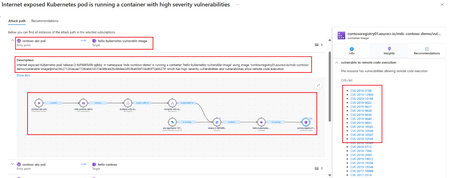
New Blog Post | Prioritize Risk remediation with Microsoft Defender for Cloud Attack Path Analysis
Prioritize Risk remediation with Microsoft Defender for Cloud Attack Path Analysis - Microsoft Community Hub Our previous blogs “A Proactive Approach to Cloud Security Posture Management with Microsoft Defender for Cloud,” and "Proacting Hunting with Cloud Security Explorer in Defender for Cloud - Microsoft Community Hub" emphasized the importance of proactive security posture management and outlined a successful organizational structure for security teams. As a follow up article here we walk you through the scenarios how to identify and mitigate the biggest security risk issues while distinguishing them from less risky issues. Cloud environments are dynamically changing and to support rapidly changing threat and business environments in near real time, security teams need to act rapidly and effectively to mitigate risks and protect sensitive data and critical systems. Though cloud security solutions detect vulnerabilities and misconfigurations, growing number of assets can mean hundreds or thousands of security recommendations, overwhelming the security professionals to remediate the risks. By using Microsoft Defender for Cloud Attack Path Analysis, organizations can gain a better understanding of the potential attack paths that an attacker may take to compromise their cloud environment. This enables security professionals to prioritize risk remediation efforts and focus their resources on the most critical vulnerabilities and risks, to improve their overall security posture. To understand the prerequisites to Identify and remediate attack paths, visit: Identify and remediate attack paths - Defender for Cloud | Microsoft Learn Security administrators can use attack path analysis for risk remediation by following these steps: Identify the Attack Paths: The first step is to identify the attack paths that an attacker might take to exploit vulnerabilities in the system. This includes mapping out the various components of the system, identifying the entry points, and analyzing the potential paths that an attacker might take. Analyze the Risks: After identifying the attack paths, the next step is to analyze the risks associated with each path. This includes evaluating the likelihood and impact of a successful attack and identifying the potential consequences for the organization. Prioritize Remediation Efforts: Based on the analysis of the risks, security administrators should prioritize their remediation efforts. This includes focusing on the most critical vulnerabilities and attack paths that present the greatest risk to the organization. Develop and Implement Mitigation Strategies: After prioritizing remediation efforts, security administrators should develop and implement mitigation strategies to address the identified vulnerabilities and attack paths. Test and Monitor: After implementing mitigation strategies, it is important to monitor the system to ensure that the vulnerabilities have been addressed and the attack paths have been closed. Security administrators need to proactively use the Attack Paths to ensure all critical paths are remediatedNew Blog Post | Proacting Hunting with Cloud Security Explorer in Defender for Cloud
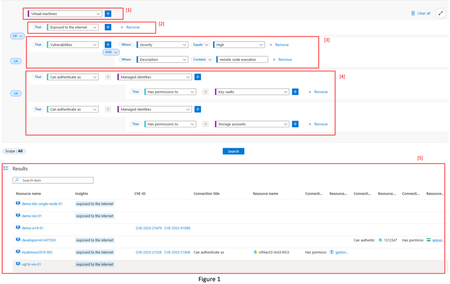
Full blog post: Proacting Hunting with Cloud Security Explorer in Defender for Cloud - Microsoft Community Hub In our previous blog “A Proactive Approach to Cloud Security Posture Management with Microsoft Defender for Cloud,” Yuri Diogenes emphasized the importance of proactive security posture management and outlined a successful organizational structure for security teams. He delved into the core elements of posture management, including monitoring secure score improvement, enforcing governance rules, and engaging in proactive hunting. Building on that discussion, we now turn our attention to the vital aspect of proactive hunting in this follow-up article. Our goal is to provide technical insights and practical tips for reducing the attack surface and minimizing the risk of compromise through proactive hunting in cloud environments. This article will demonstrate how you can utilize Microsoft Defender for Cloud's Security Explorer to conduct proactive hunting in cloud environments with maximum efficiency.New Blog Post | Microsoft Defender PoC Series – Defender CSPM
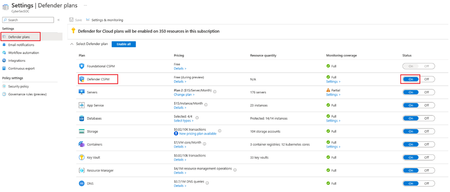
Microsoft Defender PoC Series – Defender CSPM - Microsoft Community Hub This Microsoft Defender for Cloud PoC Series provides guidelines on how to perform a proof of concept for specific Microsoft Defender plans. For a more holistic approach where you need to validate Microsoft Defender for Cloud and Microsoft Defender plans, please read How to Effectively Perform an Microsoft Defender for Cloud PoC article. Cloud Security Posture Management provides organizations with a centralized view of their cloud security posture, allowing them to quickly identify and respond to security risks, ensures compliance, and allows for continuous monitoring and improvement of cloud security posture. Defender for Cloud CSPM provides organizations with a unified view of their cloud environment across multiple cloud providers, including Azure, AWS, GCP and On-premises. Defender for Cloud offers CSPM in two plans: a free Foundational CSPM plan and a Premium Defender CSPM plan. To understand the capabilities of CSPM plans, please refer: Overview of Cloud Security Posture Management (CSPM) | Microsoft Learn. Defender CSPM plan, provides advanced posture management capabilities such as Attack path analysis, Cloud security explorer, Agentless Scanning, security governance capabilities, and also tools to assess your security compliance. Original Post: New Blog Post | Microsoft Defender PoC Series – Defender CSPM - Microsoft Community HubNew Blog Post | Prioritize Risk remediation with Microsoft Defender for Cloud Attack Path Analysis
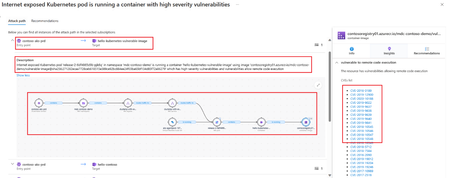
Prioritize Risk remediation with Microsoft Defender for Cloud Attack Path Analysis - Microsoft Community Hub Our previous blogs “A Proactive Approach to Cloud Security Posture Management with Microsoft Defender for Cloud,” and "Proacting Hunting with Cloud Security Explorer in Defender for Cloud - Microsoft Community Hub" emphasized the importance of proactive security posture management and outlined a successful organizational structure for security teams. As a follow up article here we walk you through the scenarios how to identify and mitigate the biggest security risk issues while distinguishing them from less risky issues. Cloud environments are dynamically changing and to support rapidly changing threat and business environments in near real time, security teams need to act rapidly and effectively to mitigate risks and protect sensitive data and critical systems. Though cloud security solutions detect vulnerabilities and misconfigurations, growing number of assets can mean hundreds or thousands of security recommendations, overwhelming the security professionals to remediate the risks. By using Microsoft Defender for Cloud Attack Path Analysis, organizations can gain a better understanding of the potential attack paths that an attacker may take to compromise their cloud environment. This enables security professionals to prioritize risk remediation efforts and focus their resources on the most critical vulnerabilities and risks, to improve their overall security posture. To understand the prerequisites to Identify and remediate attack paths, visit: Identify and remediate attack paths - Defender for Cloud | Microsoft Learn Security administrators can use attack path analysis for risk remediation by following these steps: Identify the Attack Paths: The first step is to identify the attack paths that an attacker might take to exploit vulnerabilities in the system. This includes mapping out the various components of the system, identifying the entry points, and analyzing the potential paths that an attacker might take. Analyze the Risks: After identifying the attack paths, the next step is to analyze the risks associated with each path. This includes evaluating the likelihood and impact of a successful attack and identifying the potential consequences for the organization. Prioritize Remediation Efforts: Based on the analysis of the risks, security administrators should prioritize their remediation efforts. This includes focusing on the most critical vulnerabilities and attack paths that present the greatest risk to the organization. Develop and Implement Mitigation Strategies: After prioritizing remediation efforts, security administrators should develop and implement mitigation strategies to address the identified vulnerabilities and attack paths. Test and Monitor: After implementing mitigation strategies, it is important to monitor the system to ensure that the vulnerabilities have been addressed and the attack paths have been closed. Security administrators need to proactively use the Attack Paths to ensure all critical paths are remediated Original Post: New Blog Post | Prioritize Risk remediation with Microsoft Defender for Cloud Attack Path Analysis - Microsoft Community HubSecure your AI transformation with Microsoft Security
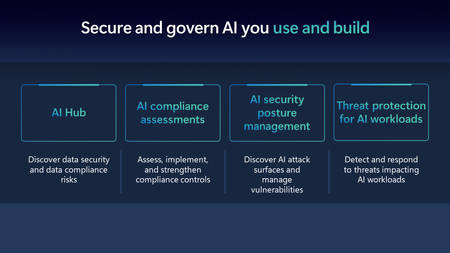
Microsoft Security is at the forefront of AI security to support our customers on their AI journey by being the first security solution provider to offer threat protection for AI workloads and providing comprehensive security to secure and govern AI usage and applications.
Extremely Slow Performance Since Defender Was Pushed on Us
Compliance, Security, Protection, and Defender are all extremely slow, with responses from screen to screen ranging from 30 seconds to multiple minutes between clicking items and waiting for Microsoft cloud to return results. I have a GB link and speed test well over 600 Mbps so it's not on my end. It appears the cutover in late January to this new "Defender" platform has been extremely detrimental to the Office portal response times in these portals. What is being done to resolve this?21KViews2likes12Comments