microsoft 365
88 Topics
Office Home & Business 2019 license no longer recognized after reinstall ("No license found")
Hello everyone, I'm looking for some help because Microsoft Support has not been able to solve this issue. I own a genuine perpetual license of Office Home & Business 2019 for Mac, linked to my Microsoft account since August 2019. The license is still listed under Services & Subscriptions, but Office no longer activates. My hardware MacBook Pro (Retina, 13-inch, Late 2012) Model: MacBookPro10,2 Intel Core i5 8 GB RAM macOS Ventura 13.7.8 Installed using OpenCore Legacy Patcher Office version originally working: 16.78 Later tested with 16.101 and 16.93 Same result on every version What happened Office had already been successfully activated and worked normally. I was able to: create documents edit documents save documents After restarting the Mac, Office suddenly requested activation again. Since then it has never activated successfully. Initially Office failed to activate with an unknown error. After completely uninstalling and reinstalling Office using Microsoft's installer, the activation process changed. I can now successfully sign in with my Microsoft account, but after authentication Office displays: "No license found for this account." My Office Home & Business 2019 license is still present in my Microsoft account under Services & Subscriptions. Even though my Microsoft account clearly owns Office Home & Business 2019 for Mac. Microsoft account The license appears correctly under: Services & Subscriptions Office Home & Business 2019 for Mac Added to my account on August 7, 2019. The website instructs me to open an Office application and sign in to activate. Everything I've already tried Uninstalled Office completely Installed Office again using Microsoft's installer Installed Office 16.78 Installed Office 16.93 Updated to Office 16.101 Removed Office containers Removed Group Containers Deleted OneAuth cache Deleted Entrabroker cache Removed activation tokens Cleared Office preferences Signed out and signed back into Microsoft account Deleted Office credentials from Keychain Reinstalled Microsoft AutoUpdate Verified no MDM profile exists Verified Internet Accounts Verified Microsoft account Microsoft Support remotely accessed my Mac and repeated all troubleshooting steps Nothing solved the issue. Additional information Running: defaults read com.microsoft.office returns: OfficeActivationLicense = NoLicense although: OfficeActivationEmailAddress = email address removed for privacy reasons is correctly detected. The activation window successfully reaches Microsoft's login page. Office now asks for my Microsoft account credentials. Authentication completes successfully. After a few seconds Office reports: "No license found for this account." It then offers only two options: Buy Microsoft 365 Use another account Microsoft Support remotely connected to my Mac, completely removed Office, installed a newer official installer, and the problem remained exactly the same. My question Has anyone experienced this after reinstalling Office 2019? Could this be: a licensing server issue? an incompatibility introduced after Office 2019 reached end of support? an activation problem related to OpenCore Legacy Patcher? something else? I would really appreciate any suggestions. Thank you very much. Additional notes: The Office license has been associated with the same Microsoft account since 2019. The same installation was successfully activated and worked normally before the problem started. The issue only appeared after restarting the Mac. Microsoft Support has already remotely accessed my computer and could not resolve the problem.
How can specific users be exempted from a tenant-scoped Microsoft 365 Apps Policy?
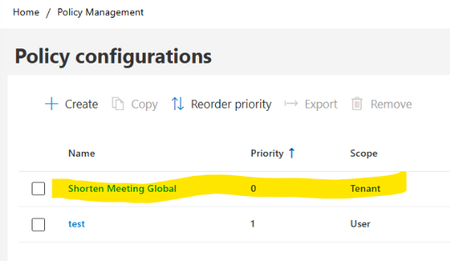
Hello, I am looking for guidance regarding Microsoft 365 Apps Cloud Policy Service behavior and policy precedence. Current configuration: In Microsoft 365 Apps Admin Center → Policy Management (config.office.com), we have the following policies: Policy 1 Name: Shorten Meeting Global Scope: Tenant Priority: 0 Configured settings: Shorten appointments and meetings = Enabled Reduce the end time of short appointments and meetings = 5 minutes Reduce the end time of long appointments and meetings = 10 minutes Policy 2 Name: Test Scope: User (Security Group) Priority: 1 Assigned only to a dedicated test group Relevant settings configured as Not Configured Observed client behavior: On corporate-managed devices, affected users receive the following registry values: HKCU\Software\Policies\Microsoft\Cloud\Office\16.0\Outlook\Options\Calendar shortenevents = End_Early endearlyshort = 5 endearlylong = 10 The Outlook option: File > Options > Calendar > Shorten appointments and meetings is greyed out. Additional validation: Using the same Microsoft 365 account on an external non-corporate device: The above registry path is not present. The Outlook option is editable. Testing performed: A user-scoped Cloud Policy was created and assigned to a dedicated security group. For the "Shorten appointments and meetings" setting, only the following options are available: Enabled Not Configured There is no Disabled option. but the Tenant policy continued to apply and the Outlook option remained locked. Questions Is there a supported way to exempt specific users from a tenant-scoped Microsoft 365 Apps Cloud Policy when the setting only supports "Enabled" and "Not Configured" and does not provide a "Disabled" option? Does Not Configured in a User-scoped policy allow evaluation to continue to the lower-priority Tenant policy? If policy precedence is changed so that: Test Policy = Priority 0 Tenant Policy = Priority 1 would the User policy potentially suppress the Tenant setting? Is there a supported way in Microsoft 365 Apps Cloud Policy Service to provide exceptions for specific users while keeping the Tenant policy as the organizational default? Has anyone successfully implemented an exclusion or override scenario for the "Shorten appointments and meetings" setting? Any guidance or documentation references would be greatly appreciated. Thank you.
Microsoft 365 Apps SHOULD NOT overwrite Office 2019/2021 one-time retail installs
I want to raise a serious concern about Microsoft 365 Apps being imposed over existing Office 2019/2021 installations that were activated with legitimate one-time installation retail keys. In our case, these are not Microsoft 365 subscriptions and they are not licenses we can simply deactivate and reactivate freely. They are one-time installation retail keys. Once the product has been installed and activated, removing Office and reinstalling it later can make the original key unusable or trigger “already used” activation problems. That is precisely why the current behavior is so damaging. We have PCs with legitimate Office 2019/2021 installations. These machines did not request a migration to Microsoft 365 Apps. However, after internet connection, Office update activity, or Microsoft account interaction, Office appears to silently update, convert, or replace the existing retail installation with the Microsoft 365 Apps version. This is not a minor inconvenience. It creates a serious licensing and operational problem: -A valid one-time Office 2019/2021 installation is replaced by Microsoft 365 Apps without clear, explicit consent. -The original retail installation is no longer cleanly usable. -Fixing the issue requires uninstalling Office, removing Click-to-Run/licensing/account leftovers, and reinstalling the previous Office 2019/2021 version. -But because these keys are one-time installation keys, that reinstall process can render the original key unusable or create activation failures. -In practice, a forced Microsoft 365 conversion can destroy the value of a legitimate one-time Office license. From a user’s perspective, this looks less like a normal software update and more like an exploitative commercial strategy: using Microsoft’s control over Office updates, account sign-ins, Click-to-Run, and activation systems to push already-paid retail users toward Microsoft 365 subscriptions. Even if Microsoft does not intend that result, the practical effect is that users who already paid for Office 2019/2021 can lose practical access to their licensed product and are then nudged toward paying again through a subscription. This should not happen. A perpetual or one-time installation Office license and Microsoft 365 Apps are different products with different licensing models. Microsoft should not silently replace or convert one into the other because a Microsoft 365 account exists on the PC, because the user signs into Office, because OneDrive is present, or because Office updates are enabled. At minimum, Microsoft should provide: -A clear opt-in confirmation before replacing, converting, upgrading, or rebranding Office 2019/2021 retail installations as Microsoft 365 Apps. -A supported way to block Microsoft 365 Apps from taking over one-time installation Office versions. -A clean removal tool that fully removes Microsoft 365 Apps, Click-to-Run leftovers, licensing remnants, and account-based activation conflicts. -A reliable way to restore the original Office 2019/2021 retail installation without invalidating or losing the original one-time key. -Clear separation between Windows account sign-in, OneDrive sign-in, Microsoft 365 entitlement, and local Office retail activation. Users who purchased legitimate one-time installation Office licenses should not be forced into Microsoft 365 Apps by unclear update behavior. If Microsoft wants users to move to Microsoft 365, that should be a deliberate, informed choice — not a silent process that leaves the user cleaning up the installation and losing access to a paid retail license. I am not asking how to install Microsoft 365. I am asking Microsoft to stop Microsoft 365 Apps from taking over valid one-time Office 2019/2021 installations without explicit consent.
[Update on Microsoft 365 Copilot Mac app issue]
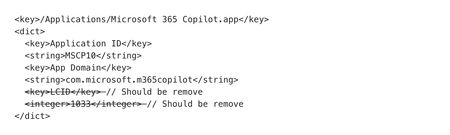
We have identified the root cause of the issue currently affecting some users on Microsoft 365 Copilot Mac app, starting with version 1.2601 released on January 27. A fix has been prepared for the same and will be delivered via Microsoft AutoUpdate (MAU) within the next 48 hours. Please note that the app may not function as expected if MAU configurations are being managed through MDM. To mitigate, tenant administrators can remove the LCID key from their MAU configuration, as illustrated below. Kindly let us know if the issue persists for you beyond this timeline.Microsoft 365 Failed to parse element: VersionOverrides on Cloud Server
A week ago, we migrated our cloud server, and after installing Office, we've been encountering continuous errors like this for different RDP users connecting: "Failed to parse element: VersionOverrides Id=7a774f0c-7a6f-11e0-85ad-07fb4824019b, DisplayName=Bing Maps, Provider=Microsoft, StoreType=Unknown, StoreId=(null) P1: Apps for Office P2: 16.0.17531.20140 P3: 0x8004323E P4: New Document" "Failed to parse element: VersionOverrides Id=bc13b9d0-5ba2-446a-956b-c583bdc94d5e, DisplayName=Suggested events, Provider=Microsoft, StoreType=Unknown, StoreId=(null) P1: Apps for Office P2: 16.0.17531.20140 P3: 0x8004323E P4: New Document" At the same time, in the Event Viewer System, repeated Schannel errors of event 36871 origin appear, like the following: An unrecoverable error occurred while creating a TLS client credential. The internal error state is 10013. The SSPI client process is OUTLOOK (PID: 70424). Any one can help us?Solved
Math Assistant in OneNote M365 no longer calculates results
I’m a mathematics professor in higher education, and I’ve relied heavily on OneNote for Windows 10 — especially its Math Assistant feature — to support my teaching. While we teach at the university level, the mathematics involved is foundational: from basic first-degree equations to partial derivatives of multivariable functions, limits, definite and indefinite integrals, 2D graphing, and inequality plots. This isn’t advanced research mathematics — it’s core material for management and accounting students. In the previous version of OneNote, I could write an equation, click “Math,” and immediately get the final result. That was extremely helpful for classroom demonstrations and student self-checking. In the current version (OneNote M365), the “Math” button still appears, and it does solve simple equations — but it fails to graph more complex functions and is significantly slower than the previous version. Is Microsoft working to restore the ability to calculate final results and draw 2D graphs reliably, as the previous version did? This feature is essential for teaching and productivity. I appreciate any clarification. Best regards, José Maria E. G. Salazar Instituto Superior de Contabilidade e Administração de Lisboa (ISCAL)User Microsoft 365 Apps Freeze when Trying to Save
Having a strange issue with one of our users when using Microsoft 365 Apps on a Windows 11 system. The original behavior reported was when he was trying to save a document to OneDrive. He gets a processing box but it never completes and the app freezes. Then he noticed if you just did a Save As from any of the Office Apps you get the blank page and the app freezes. Sometimes a reboot resolves the issue but only for a short time. Here are some items we have tried to this point: Have tried pausing synching in OneDrive repairing office 365 Reinstalling office 365 Saved to downloads > Can reopen document but when trying to save as again the page is blank. Will either have to force close in task manager or let it sit until "waiting for another application to complete an OLE action" then closing Pausing auto save to cloud in word/outlook/excel Disconnecting the OneDrive sync and re-connecting seem to work at first but after an hour or so we saw the same behavior. We decided to set him up on a brand new system and after we set things up the issue followed. We are seeing the same behavior on the new system. One item of note is we have a third laptop which has an old version of Office using the ODT installer which is working fine with his account. The other two laptops that are failing have the latest Office 365 software downloaded from the portal. Not sure if this is an issue on the backend with his account or some other type of issue. Just wanted to see if anyone has ran into this issue before. Thanks.Solved503Views0likes2Comments
Mention shared Mailboxes in Loop
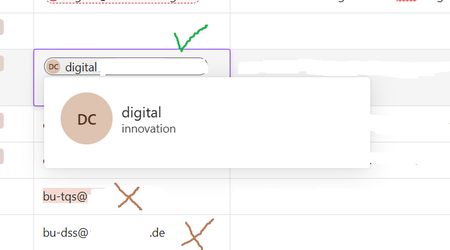
Hey, my colleague is trying to setup a list of shared mailboxes and and mentions the mailboxes with @ It works for a few mailboxes but most of them cannot be mentioned because of IT policies. I couldn't find any policy that I can change to solve this Problem. Do you guys have an idea what might cause this? I've attached some screenshots. Kind regards, MarioM365 E5/E3 terms of use
Hi All, I have a question non-tech question, and hope someone can help me here. Currently my company has M365 E5 plan, but we will be hiring people for whom E3 plan should be sufficient. Can we purchase E3 plan in the same Enterprise Agreement and use both Microsoft 365 E5 and E3 plans simultaneously within the same company? Or perhaps there is some other way, like purchasing E5 and then downgrade it to E3 – does EA allow it? I would appreciate any help. Thaks.Solved399Views0likes4Comments