microsoft 365 groups
889 Topics
Help Desk Sent Me Here...Help!
I'm getting the msg in a ribbon at the top of my excel files as follows: COULDN'T VERIFY SUBSCRIPTION Excel couldn't verify your Microsoft 365 subscription. Please make sure that you're connected to the Internet. ( I am ). we've rebooted several times, uninstalled, reinstalled etc. I can open all my excel files, but can't edit or save them. All dropdowns are "grayed" out. Microsoft Help Desk sent me here.30Views0likes1CommentHow to Set Auto-Reply for Group Mailboxes with PowerShell
Microsoft recently added the ability to set auto-reply for group mailboxes. In this article, we explain why you'd want to do such a thing and go through some PowerShell code to show how to set appropriate auto-reply messages for team-enabled Microsoft 365 Groups with PowerShell. https://practical365.com/set-auto-reply-group-mailbox-powershell/5.8KViews0likes7Comments
Office Home & Business 2019 license no longer recognized after reinstall ("No license found")
Hello everyone, I'm looking for some help because Microsoft Support has not been able to solve this issue. I own a genuine perpetual license of Office Home & Business 2019 for Mac, linked to my Microsoft account since August 2019. The license is still listed under Services & Subscriptions, but Office no longer activates. My hardware MacBook Pro (Retina, 13-inch, Late 2012) Model: MacBookPro10,2 Intel Core i5 8 GB RAM macOS Ventura 13.7.8 Installed using OpenCore Legacy Patcher Office version originally working: 16.78 Later tested with 16.101 and 16.93 Same result on every version What happened Office had already been successfully activated and worked normally. I was able to: create documents edit documents save documents After restarting the Mac, Office suddenly requested activation again. Since then it has never activated successfully. Initially Office failed to activate with an unknown error. After completely uninstalling and reinstalling Office using Microsoft's installer, the activation process changed. I can now successfully sign in with my Microsoft account, but after authentication Office displays: "No license found for this account." My Office Home & Business 2019 license is still present in my Microsoft account under Services & Subscriptions. Even though my Microsoft account clearly owns Office Home & Business 2019 for Mac. Microsoft account The license appears correctly under: Services & Subscriptions Office Home & Business 2019 for Mac Added to my account on August 7, 2019. The website instructs me to open an Office application and sign in to activate. Everything I've already tried Uninstalled Office completely Installed Office again using Microsoft's installer Installed Office 16.78 Installed Office 16.93 Updated to Office 16.101 Removed Office containers Removed Group Containers Deleted OneAuth cache Deleted Entrabroker cache Removed activation tokens Cleared Office preferences Signed out and signed back into Microsoft account Deleted Office credentials from Keychain Reinstalled Microsoft AutoUpdate Verified no MDM profile exists Verified Internet Accounts Verified Microsoft account Microsoft Support remotely accessed my Mac and repeated all troubleshooting steps Nothing solved the issue. Additional information Running: defaults read com.microsoft.office returns: OfficeActivationLicense = NoLicense although: OfficeActivationEmailAddress = email address removed for privacy reasons is correctly detected. The activation window successfully reaches Microsoft's login page. Office now asks for my Microsoft account credentials. Authentication completes successfully. After a few seconds Office reports: "No license found for this account." It then offers only two options: Buy Microsoft 365 Use another account Microsoft Support remotely connected to my Mac, completely removed Office, installed a newer official installer, and the problem remained exactly the same. My question Has anyone experienced this after reinstalling Office 2019? Could this be: a licensing server issue? an incompatibility introduced after Office 2019 reached end of support? an activation problem related to OpenCore Legacy Patcher? something else? I would really appreciate any suggestions. Thank you very much. Additional notes: The Office license has been associated with the same Microsoft account since 2019. The same installation was successfully activated and worked normally before the problem started. The issue only appeared after restarting the Mac. Microsoft Support has already remotely accessed my computer and could not resolve the problem.1.2KViews2likes9Comments
Planning a Google Workspace to Microsoft 365 Migration? What Should You Consider?
Hi everyone, Has anyone recently migrated from Google Workspace to Microsoft 365? I’m interested in knowing what challenges you faced during the migration, especially around mailbox data, calendars, contacts, user mapping, or the final cutover process. For those planning the migration, what are the key things you recommend preparing before getting started? Would like to hear your experiences and suggestions.406Views0likes4Comments
How much of your Microsoft 365 environment can you actually see at once?
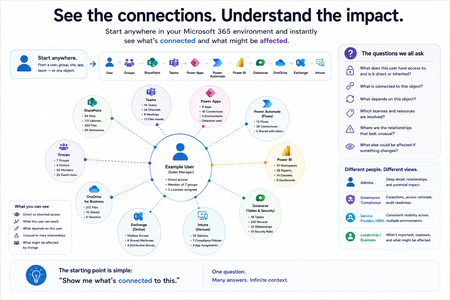
Not how many users you have. Not how many sites, teams, apps or flows you have. How much of it can you actually see connected together? I've been working across Microsoft 365 environments for a while, and I kept running into the same thing. There is no shortage of information. If anything, there is probably too much of it. Users, groups, permissions, SharePoint, Teams, Power Apps, Power Automate, Power BI, Dataverse, OneDrive, Exchange, Intune, licensing, configuration... It's all there. But when you're actually trying to understand how everything fits together, it can be a different story. You open one blade. Find something. Open another. Cross-check it. Go back. Open something else. Before long, you're jumping between different parts of the tenant trying to build the bigger picture in your head. And if you're working with larger environments, that gets difficult pretty quickly. The information isn't necessarily missing. The relationships between the information are what can be difficult to see. That got me thinking about a slightly different question: Instead of "where do I find this information?" "Show me what's connected to this." That's where VisibleState started. Start anywhere. Follow the connections. Imagine starting with a single user. Instead of seeing that user simply as a record with a list of properties, imagine being able to explore the relationships around them: User → Groups → SharePoint → Teams → Power Apps → Power Automate → Power BI → Dataverse → OneDrive → Exchange → Intune Then the questions become different: What does this user have access to? Is that access direct or coming through a group? What resources are connected to them? What depends on something they're associated with? Which licenses are involved? Are there relationships that look unusual? If something changes, what else might be affected? Those questions aren't necessarily about finding another piece of information. They're about putting information that already exists into context. A report can tell you that something exists. A connected view helps you understand what it is connected to. Illustrative example below — not a real customer environment. I'm not suggesting Microsoft 365 doesn't already give us this information Quite the opposite. Microsoft 365 already gives administrators an incredible amount of information and tooling. The thing I've been thinking about is what happens when you want to look across those boundaries. Sometimes I don't want another export. I don't want another list. I don't necessarily want another dashboard. I want to start with something I'm looking at and ask: "What's connected to this?" And then keep following the trail. That's the idea I'm exploring with VisibleState. The interesting part is what happens when you change the viewpoint The same relationships can be useful for completely different reasons. For example: Administrators may want to understand access, permissions and dependencies. Security and governance teams may want to find unusual relationships or exceptions. Compliance teams may need to understand who can access something and why. People managing multiple environments may want a consistent way to understand what's there without rebuilding the picture manually every time. Leadership may not need to see the graph at all. They may simply want to know what's important, what's exposed and what could be affected. It's still the same underlying environment. You're just looking at it from a different angle. And that's where I think things get interesting. Where I'm at with it VisibleState started as something I was building to make my own work easier. I was spending a lot of time investigating environments, tracing access and putting information together for reports. The individual tasks weren't necessarily difficult. It was the jumping between different places and reconstructing the bigger picture that took the time. So I started building something that would let me approach the environment through the relationships instead. It's grown quite a bit from where it started, and I'm continuing to build it. I'm not posting this as a product launch, and I'm not looking for people to sign up. I'm genuinely interested in whether the problem I'm seeing is familiar to other people working with Microsoft 365. So I'm curious... If you could start with any object in your Microsoft 365 environment and immediately see what it's connected to, where would you start? Would it be: Users and access Groups and permissions SharePoint and Teams Power Apps, Power Automate, Power BI and Dataverse Licensing and resources Governance and unusual relationships Something completely different Maybe you've already got a good way of doing this. Maybe you still find yourself jumping between different services and piecing things together manually. Or maybe I'm looking at the problem from the wrong direction. What's the one relationship in your Microsoft 365 environment that you wish you could see instantly?189Views0likes0CommentsUser Activity based Expiration Policy for Office 365 groups is now generally available!
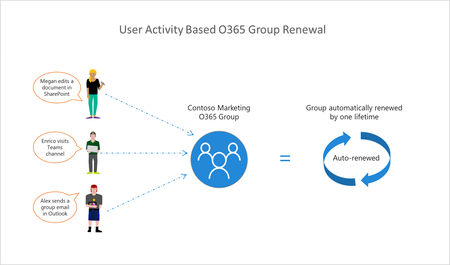
We are happy to announce the general availability of User Activity based Expiration Policy for Office 365 groups. This means any active groups covered by the expiration policy will be automatically renewed. We would like to draw your attention to a few resources available to you: Documentation will be updated shortly: https://docs.microsoft.com/en-us/office365/admin/create-groups/office-365-groups-expiration-policy https://docs.microsoft.com/en-us/azure/active-directory/users-groups-roles/groups-lifecycle THANK YOU to all private preview participants for the feedback and comments you shared in this community. Please continue share your thoughts here. Also, please feel free to reach out to us on: User Voice: Office 365 groups53KViews10likes19Comments
Microsoft 365 Apps SHOULD NOT overwrite Office 2019/2021 one-time retail installs
I want to raise a serious concern about Microsoft 365 Apps being imposed over existing Office 2019/2021 installations that were activated with legitimate one-time installation retail keys. In our case, these are not Microsoft 365 subscriptions and they are not licenses we can simply deactivate and reactivate freely. They are one-time installation retail keys. Once the product has been installed and activated, removing Office and reinstalling it later can make the original key unusable or trigger “already used” activation problems. That is precisely why the current behavior is so damaging. We have PCs with legitimate Office 2019/2021 installations. These machines did not request a migration to Microsoft 365 Apps. However, after internet connection, Office update activity, or Microsoft account interaction, Office appears to silently update, convert, or replace the existing retail installation with the Microsoft 365 Apps version. This is not a minor inconvenience. It creates a serious licensing and operational problem: -A valid one-time Office 2019/2021 installation is replaced by Microsoft 365 Apps without clear, explicit consent. -The original retail installation is no longer cleanly usable. -Fixing the issue requires uninstalling Office, removing Click-to-Run/licensing/account leftovers, and reinstalling the previous Office 2019/2021 version. -But because these keys are one-time installation keys, that reinstall process can render the original key unusable or create activation failures. -In practice, a forced Microsoft 365 conversion can destroy the value of a legitimate one-time Office license. From a user’s perspective, this looks less like a normal software update and more like an exploitative commercial strategy: using Microsoft’s control over Office updates, account sign-ins, Click-to-Run, and activation systems to push already-paid retail users toward Microsoft 365 subscriptions. Even if Microsoft does not intend that result, the practical effect is that users who already paid for Office 2019/2021 can lose practical access to their licensed product and are then nudged toward paying again through a subscription. This should not happen. A perpetual or one-time installation Office license and Microsoft 365 Apps are different products with different licensing models. Microsoft should not silently replace or convert one into the other because a Microsoft 365 account exists on the PC, because the user signs into Office, because OneDrive is present, or because Office updates are enabled. At minimum, Microsoft should provide: -A clear opt-in confirmation before replacing, converting, upgrading, or rebranding Office 2019/2021 retail installations as Microsoft 365 Apps. -A supported way to block Microsoft 365 Apps from taking over one-time installation Office versions. -A clean removal tool that fully removes Microsoft 365 Apps, Click-to-Run leftovers, licensing remnants, and account-based activation conflicts. -A reliable way to restore the original Office 2019/2021 retail installation without invalidating or losing the original one-time key. -Clear separation between Windows account sign-in, OneDrive sign-in, Microsoft 365 entitlement, and local Office retail activation. Users who purchased legitimate one-time installation Office licenses should not be forced into Microsoft 365 Apps by unclear update behavior. If Microsoft wants users to move to Microsoft 365, that should be a deliberate, informed choice — not a silent process that leaves the user cleaning up the installation and losing access to a paid retail license. I am not asking how to install Microsoft 365. I am asking Microsoft to stop Microsoft 365 Apps from taking over valid one-time Office 2019/2021 installations without explicit consent.
MS FORM NOT RECIEVING EMAIL TO SAY RESPONSE SUBMITTED
Hi i have a colleague who has an MS Form, the form lives in a group and the option of get email response when form is submitted is selected, there is no email getting created, we have unticked box, come out od the form and responded, went back into form and turned on get email response back on, but those responses are not being received. this form was functioning fine up to last thursday. the form has not been moved or renamed and its only received 350 submissions. can anyone offer any thoughts please783Views0likes4CommentsStore-published Word add-in can't read or write the open document
We published a Word add-in to the Microsoft Store and ran into something odd that I'm hoping someone here has seen before. The add-in installs and opens fine. Signing in, the chat assistant, browsing our documents, moving between tabs ; all of that works. The problem is anything that has to actually read or change the open Word document. Pulling a doc in from our Sync tab, dropping in a template, running a compliance check on the current document ; none of it does anything. No error, no message, it just doesn't happen. So basically if a feature only shows stuff or talks to our own server it's fine, but the second it needs the actual document, nothing. A few things I'm trying to figure out: - Is this a known thing with Store-installed add-ins vs when you're just testing it? - Any good way to see why those actions are failing when nothing shows up on screen? Happy to share more detail. Thanks in advance.