microsoft 365 copilot
386 TopicsCopilot — ошибка генерации изображений (Windows/Web)
Здравствуйте, коллеги. При генерации изображений в Copilot результат часто отсутствует, даже при простых промптах. Вместо картинки возвращается пустой ответ. Ожидаемое поведение: Изображение должно быть создано либо должен появиться отчёт о причине сбоя. Фактическое поведение: Изображение не создаётся, возвращается пустой ответ. Предложение: Если изображение не сгенерировано из‑за ошибки, нужно указывать причину и предлагать решение. Например: Если модель не поняла формулировку промпта. Если формулировки вступают в конфликт друг с другом. В таких случаях пользователь должен быть информирован и получить подсказку, как исправить запрос. Это позволит экономить время и использовать Copilot в профессиональных сценариях5Views0likes0CommentsNot able to continue editing in Outlook
Hi all, I start interacting with M365 Copilot Chat and then I want to proceed editing in Outlook. When trying to edit I get the following message in outlook. (sorry in Spanish, but basically says i don't have Copilot). I checked admin configuration and not sure what´s wrong. I have the paid licence, etc. Any help is appreciated. Thanks70Views1like2CommentsOverview of Copilot solutions and Key Benefits
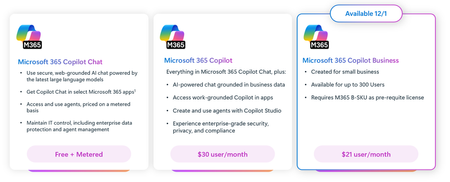
Copilot isn’t one-size-fits-all. Each solution addresses different organizational needs. Here’s what they do—and why they matter. Microsoft 365 Copilot Chat is a conversational experience on web and mobile that delivers quick, context-aware answers from organizational data. It provides quick, context-aware answers from organizational data, improving responsiveness across departments while supporting mobile work scenarios. Microsoft 365 Copilot is an AI assistant built into Word, Excel, PowerPoint, Outlook, and Teams. It accelerates document creation, data analysis, and presentations and helps you catch up on meetings and messages. Copilot uses the context you already have in Microsoft 365—files, emails, chats, and calendars—through Microsoft Graph and respects the same permissions, security, and compliance your organization relies on. Microsoft Copilot Studio is a platform for extensibility and customization. It lets you build custom copilots and extend existing ones without writing code. Copilot Studio allows businesses to tailor AI to unique workflows without heavy development investment, accelerating innovation. Key benefits for organizations Copilot delivers three core benefits that impact the entire organization: Benefit How benefit achieved Example scenario Boost productivity by automating repetitive tasks. Copilot automates repetitive tasks and accelerates content creation across teams. A marketing team might use Copilot in Word to draft campaign briefs based on brand guidelines, reducing turnaround time from days to hours. Improve decision quality with data-driven insights. Copilot provides fast, data-driven insights, enabling better decisions at every level. An operations team might use Copilot in Excel to analyze supply chain data and identify cost-saving opportunities before quarterly reviews. Strengthen governance with enterprise-grade compliance. Copilot respects enterprise security and compliance standards, ensuring sensitive data stays protected. When legal teams draft contracts, Copilot uses only authorized organizational data through Microsoft Graph, maintaining compliance with internal policies and regulatory requirements.229Views0likes2CommentsPitch deck for power platform and copilot
Hey everyone, i am looking for the pitch deck for power platform and copilot, also i would appreciate if anyone can guide me about it.my major concern is about the data governance in the banking industries using copilot, will appreciate if anyone can help me out. thank you.3Views0likes0CommentsMicrosoft 365 & Power Platform product updates call
💡Microsoft 365 & Power Platform product updates call concentrates on the different use cases and features within the Microsoft 365 and in Power Platform. Call includes topics like Microsoft 365 Copilot, Copilot Studio, Microsoft Teams, Power Platform, Microsoft Graph, Microsoft Viva, Microsoft Search, Microsoft Lists, SharePoint, Power Automate, Power Apps and more. 👏 Weekly Tuesday call is for all community members to see Microsoft PMs, engineering and Cloud Advocates showcasing the art of possible with Microsoft 365 and Power Platform. 📅 On the 16th of December we'll have following agenda: News and updates from Microsoft Together mode group photo Fabian Williams – Copilot Studio × MCP: From Zero to Shipping a Real Event Agent Vesa Juvonen – Introduction to SharePoint Pages Agent in Microsoft 365 Copilot 📞 & 📺 Join the Microsoft Teams meeting live at https://aka.ms/community/ms-speakers-call-join 👋 See you in the call! 🎅🎄 Notice that this call is on a holiday break after 16th of December call and back on 13th of January 2026. 💡 Building something cool for Microsoft 365 or Power Platform? We are always looking for presenters - Volunteer for a community call demo at https://aka.ms/community/request/demo 📖 Resources: Previous community call recordings and demos from the Microsoft Community Learning YouTube channel at https://aka.ms/community/youtube Microsoft 365 & Power Platform samples from Microsoft and community - https://aka.ms/community/samples Microsoft 365 & Power Platform community details - https://aka.ms/community/home30Views0likes0Comments