microsoft 365 compliance center
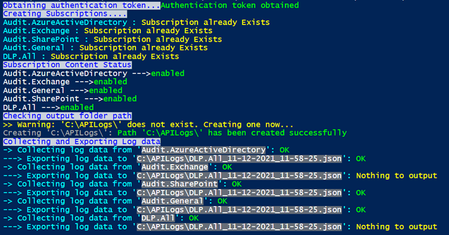
245 TopicsMicrosoft 365 Compliance audit log activities via O365 Management API - Part 1
Auditing and reporting play important roles in the security and compliance strategy for many organizations. With the continued expansion of the technology landscape that has an ever-increasing number of systems, endpoints, operations, and regulations, it becomes even more important to have a comprehensive logging and reporting solution in place.175KViews11likes6CommentsRetired: The Data Loss Prevention Ninja Training is here!
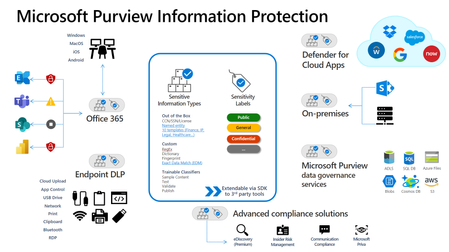
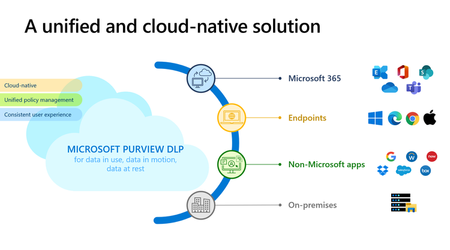
August 2025: New Ninja training can be found at https://aka.ms/DLPNinja RETIRED July 2025: Under Construction for new hosting location The Microsoft Purview Data Loss Prevention Ninja Training is here! We are very excited and pleased to announce this rendition of the Ninja Training Series. With all the other training out there, our team has been working diligently to get this content out there. There are several videos and resources out there and the overall purpose of the Microsoft Purview Data Loss Prevention Ninja training is to help you master this realm. We aim to get you up-to-date links to the community blogs, training videos, Interactive Guides, learning paths, and any other relevant documentation. To make it easier for you to start and advance your knowledge gradually without throwing you in deep waters, we split content in each offering into three levels: beginner, intermediate, and advanced. Please find the Microsoft Purview Information Protection Ninja Training here. In addition, after each section, there will be a knowledge check based on the training material you’d have just finished! Since there’s a lot of content, the goal of these knowledge checks is to help you determine if you were able to get a few of the major key takeaways. There’ll be a fun certificate issued at the end of the training: Disclaimer: This is NOT an official Microsoft certification and only acts as a way of recognizing your participation in this training content. Lastly, this training will be updated one to two times a year to ensure you all have the latest and greatest material! If there's any topic you'd like for us to include and/or have any thoughts on this training, please let us know what you think below in the comments! Legend/Acronyms (D) Microsoft Documentation (V) Video (B) Blog (P) PDF (S) Site (SBD) Scenario Based Demo (Video) (DAG) Deployment Acceleration Guide MIP Microsoft Information Protection (old terminology for Microsoft Purview Information Protection) AIP Azure Information Protection ULC Unified Labeling Client SIT Sensitive Information Type RBAC Role-based access control eDLP Endpoint DLP OME Office 365 Message Encryption EDM Exact Data Match DLP Data Loss Prevention SPO SharePoint Online OCR Optical character recognition MCAS Microsoft Cloud App Security (old terminology for Microsoft Defender for Cloud Apps) TC Trainable Classifiers ODSP OneDrive SharePoint EXO Exchange Online Microsoft Purview Data Loss Prevention (DLP) Microsoft’s DLP solution provides a broad range of capabilities to address the modern workplace and the unique challenges represented by these very different scenarios. One of the key investment areas is in providing a unified and comprehensive solution across the many different kinds of environments and services where sensitive data is stored, used or shared. This includes platforms native to Microsoft and also non-Microsoft services and apps. Beginner Training Public forums to contact the overall information protection team Yammer Tech Community Introducing Microsoft Purview (V) In this video, hear from Microsoft executives on this new product family and our vision for the future of data governance. Introduction to Microsoft Purview Data Loss Prevention? (V) In this video, you’ll find an overview on Microsoft Purview Data Loss Prevention. Quick overview on new Exchange DLP Predicates (V) This video provides a quick walk through on creating an Exchange DLP policy and a soft focus on the new predicates and actions. Microsoft Purview Information Protection Framework (D) Check out the above documentation to see how Microsoft Purview Information Protection uses 3 pillars to deploy an information protection solution. Protect Data with Zero Trust (LP) Zero Trust isn't a tool or product, it's an essential security strategy, with data at its core. Here, you'll learn how to identify and protect your data using a Zero Trust approach. Learn about data loss prevention (D) Learn about DLP basics and Microsoft Unified DLP and why it’s uniquely positioned to protect your data in the cloud. How to secure your data with Microsoft Security (V) The above video is a quick summary on how to protect your data. Microsoft Purview Information Protection and Data Loss Prevention Roadmap (S) Please check out the above site on the latest items on our public roadmap. Microsoft Purview Information Protection support for PDF and GitHub (V) and Ignite Conversation (V) The above videos walk through announcements regarding support for PDF and GitHub Microsoft Defender for Cloud Apps integration (D) Please visit the above documentation to learn more about how Microsoft Purview Information Protection integrates with Microsoft Defender for Cloud Apps Trainable Classifiers (D) Check out the documentation to create custom trainable classifiers. Retrain a classifier in content explorer (D) The above documentation shows you how to improve the performance of custom trainable classifiers by providing them more feedback. Explain data loss prevention reporting capabilities (LP) The above learning path walks you through reporting in the Microsoft Purview Compliance Portal. Review and analyze data loss prevention reports (LP) The above learning path walks you through analyzing reports in the Microsoft Purview Compliance Portal. Beginner Knowledge Check Intermediate Training Microsoft Compliance Extension for Chrome (B) aka Microsoft Purview Extension (D) Please check out the above blog and Microsoft Doc to understand what we’re doing to expand our DLP capabilities to Chrome. Microsoft Purview extension for Firefox (D) The above documentation details procedures to roll out the Microsoft Purview extension for Firefox. Data Loss Prevention and Endpoint DLP (V) This video details how Microsoft approaches information protection across Files, emails, Teams, endpoints and others. How DLP works between the Compliance portal and Exchange admin center (D) You can create a data loss prevention (DLP) policy in two different admin centers; the above document walks through the differences and similarities. Data Loss Prevention across endpoints, apps, & services | Microsoft Purview (V) This video walks you through how to protect sensitive data everywhere you create, view, and access information with one Data Loss Prevention policy in Microsoft Purview. Data Loss Prevention Policy Tips Reference Guide (D) and Quick Overview (V) Please check out the above documentation and short video on where we support policy tips. Create a DLP Policy for Microsoft 365 Online Services (IG) Please use the above interactive guide to see how to create DLP policies. Apply Microsoft Purview Endpoint DLP to Devices (IG) Please use the above interactive guide to see how to create Endpoint DLP policies. Sites for testing documentation (S) The above site details locations where you can get sample data. Scope of DLP Protection for Microsoft Teams (D) The above documentation walks through how DLP protection is applied differently to Teams entities. Manage DLP alerts in the Microsoft Purview compliance portal (LP) The above learning path walks you through managing DLP alerts. Endpoint activities you can monitor and best practices (LP) The above learning path walks you through Endpoint DLP activities and best practices. Troubleshoot and Manage Microsoft Purview Data Loss Prevention for your Endpoint Devices (B) The above blog goes through a quick guide to troubleshooting Endpoint DLP. Microsoft Purview DLP Interactive Guides (IG) Please visit the above home page to see the latest interactive guides walking you through DLP. Learn how to investigate Microsoft Purview Data Loss Prevention alerts in Microsoft 365 Defender (B) This blog is a step-by-step guided walkthrough of the Microsoft 365 Defender Analyst experience for Microsoft Purview Data Loss Prevention (DLP) incident management. Intermediate Knowledge Check Advanced Training Microsoft Defender for Cloud Apps and Data Loss Preventions (D) Please check out the documentation above detailing how the integration to Microsoft Defender for Cloud Apps further enhances your data loss prevention plan. Power BI: Learn about centralized data loss prevention policies (V) This video highlights DLP capabilities with Power BI. Take a unified and comprehensive approach to prevent data exfiltration with Microsoft (V) This video helps show how we can help you prevent unauthorized sharing, use, and transfer of sensitive information across your applications, services, endpoints, and on-premises file shares – all from a single place. Onboard macOS devices into Microsoft 365 (D), capability announcement (B), and additional screengrabs (B) Please use the documentation above to deploy macOS devices into Endpoint DLP and check out the blog to see a few screengrabs on how the user experience. Troubleshooting Guides (D) Resolve issues that affect DLP policy tips Changes to a data loss prevention policy don't take effect in Outlook 2013 in Microsoft 365 DLP policy tips in Security and Compliance Center don't work in OWA/Outlook How to troubleshoot data loss prevention policy tips in Exchange Online Protection in Microsoft 365 Please check out the below documentation to find guides on common issues. Securing data in an AI-first world with Microsoft Purview (B) The above blog details some new updates on AI with Microsoft Purview. Common questions on Microsoft Purview Data Loss Prevention for endpoints (B) This guide covers the top-of-mind FAQs on Microsoft Purview Data Loss Prevention for endpoints (referred to as Endpoint DLP in the blog). Guidance for investigating Microsoft Purview Data Loss Prevention incidents (B) This blog provides guidance for choosing the best investigation experience suited for your organization when using Microsoft Purview Data Loss Prevention. Data Loss Prevention: From on-premises to cloud (PDF) This whitepaper focuses on why you should move to cloud-native data loss prevention. The Microsoft Purview DLP Migration Assistant for Symantec (IG) Follow the above IG to get guidance on migrating from Symantec to Microsoft Purview DLP. Migrating from Windows Information Protection to Microsoft Purview (B) The above blog gives guidance on how to migrate from WIP to the Microsoft Purview stack. Insider Risk in Conditional Access | Microsoft Entra + Microsoft Purview Adaptive Protection (V) The above video goes through how to protect your organization from insider threats with Microsoft Entra's Conditional Access and Adaptive Protection in Microsoft Purview. Please check out this link for a blog with more details. (B) Protect sensitive data throughout its Copilot journey (B) The above details how the native integration enables organizations to leverage the power of GenAI when working with sensitive data as Copilot can understand and honor the controls such as encryption and provide comprehensive visibility into usage. Protect at the speed and scale of AI with Copilot for Security in Microsoft Purview (B) The above blog details the embedded experiences of Copilot for Security in Microsoft Purview (Communication Compliance, Data Loss Prevention, Insider Risk Management, and eDiscovery. Strengthen protection to mitigate data overexposure in GenAI tools with data classification/labeling (B) The blog above goes into detail on OCR, its cost, and how it goes into the AI Realm with Microsoft Purview Information Protection and Data Loss Prevention. Microsoft Purview Exact Data Match (EDM) support for multi-token corroborative evidence (B) The above blog goes into the new feature that improves the accuracy and effectiveness of EDM detection. Advanced Knowledge Check Once you’ve finished the training and the knowledge checks, please go to our attestation portal to generate your certificate; you'll see it in your inbox within 3-5 business days (Coming Soon). We hope you enjoy this training!88KViews14likes20CommentsSecure external collaboration using sensitivity labels
In this article we are going to clarify a topic which has been causing a lot of confusion and questions among our customers: “How do we securely share emails and documents with someone outside of our organization using sensitivity labels?”47KViews12likes12Comments
How to unlock PayPal account?
Paypal is an advantageous method for handling exchanges by means of the web. In the event that the PayPal stage identifies any surprising exchanges for you, it prompts you to give more point by point data about you. It is one of the conspicuous and most secure internet based stages to keep up with and move your assets across the globe. Notwithstanding, once in a while you really want to open the https://www.paynowmoney.com/paypal-account-locked/. You can ask concerning why the record was locked and afterward you can follow the cycle to open the PayPal account. Through this article, we trust that through this article you will gain proficiency with the interaction to deal with the unlock%20paypal%20account. So we should begin! How to open the PayPal account locked? ou, most importantly, need to go to the Paypal page and tap on the "Get in touch with us" interface (see assets). Presently, enter the data as incited on the "Help page". Call PayPal assuming required and supply the data is mentioned to open your record. How long does the PayPal account stay locked? In the event that you face a PayPal account briefly locked issue, it will require 24 hours for a record to get opened or a specialist can go it then you are on the telephone on the off chance that you can hardly stand by that long. Keep in mind, don't endeavor to sign in till the full 24 hours get finished. Email from PayPal saying account locked In the event that the email from PayPal says account locked, you will get to be aware by specific focuses that are referenced underneath: You will get a conventional hello, for example, "'Dear client' or "Hi, PayPal part". You will be requested monetary and other individual data, the genuine site won't ever request your subtleties. It will request that you give the following number of any dispatched things before you got the installments. Keep in mind, it will incorporate a product update to introduce on your PC. Certain tips to remain safeguarded on the web On the off chance that the PayPal account locked for the sake of security, you really want to consider these essential tips and deceives to remain safeguarded on the web: Regardless of whether the URL contains "Paypal" then it may not be a PayPal website page. At the point when you use Paypal, then, at that point, consistently ensure that the URL address is recorded on the program. Search for the "lock" image that shows up in the location bar then this image demonstrates that the site which you are visiting is gotten. Visit site : https://www.paynowmoney.com/paypal-account-locked/ | https://www.paynowmoney.com/paypal-account-locked/ | https://www.paynowmoney.com/paypal-account-locked/ | https://www.paynowmoney.com/paypal-account-locked/ |44KViews0likes0CommentsCo-authoring on Microsoft Information Protection encrypted documents is now generally available
With hybrid work here to stay, organizations are increasingly looking for ways to facilitate seamless collaboration among workgroups and across organizations while keeping their data secure and compliant. Today, we’re announcing a unique capability from Microsoft Information Protection in Microsoft 365 that empowers you to do just that.40KViews15likes9CommentsGetting started with the new Purview Content Search
“I’m looking to get started with the new Content Search experience in Purview. Where do I get started?” Welcome to the exciting new world of Content Search! This revamped experience is designed to be more intuitive, making it easier for you to navigate and find what you need. The modern Content Search experience offers additional capabilities like enhanced data sources to make it easier to identify the locations that you want to search, an improved condition builder, and a streamlined export experience. Also, you will now be able to take advantage of Premier features if you have E5 licensing, further elevating your search experience. Privacy is a key focus in this update, allowing you to restrict access to your content searches and ensure that sensitive information remains secure. Additionally, the ability to configure Role-Based Access Control (RBAC) permissions means you can customize Content Search functionality to suit your needs, granting or limiting access as necessary. There are two different ways of accessing Content Search. You can access content search by clicking on the eDiscovery solution card under the Purview portal and select Content Search on the left nav. ation pane within the eDiscovery section. The "Content Search" option is highlighted, indicating its selection for searching emails, documents, and other content across Microsoft 365. This is a shortcut that will take you to the Content Search case in the new unified Purview eDiscovery. You will see all of your existing content searches here. “What do I need to do first?” First, let’s talk about permissions and privacy. The first step in using the new content search is to make sure that you have access to the new Content Search. eDiscovery managers and administrators will automatically have access to new content search. However, if you are not a member of either of these built-in role groups or in a custom role group, you may need to have either an eDiscovery manager or an eDiscovery administrator grant you access to the new content search. You will need to take the following steps if you receive this message when attempting to access the new content search: Figure 2: A screenshot of a web application displaying a 'Permission Error' message in a pop-up window, indicating that the user does not have access to the requested page. Here are the steps for assigning a custom RBAC group or individual user to the Content Search: 1) NOTE: You will need to have someone with eDiscovery manager or eDiscovery admin permissions to assign these permissions. This is done through the Case settings button under Content Search: & Eliza Gallager Incident" is listed with details such as description, query text, created by, created date, modified by, and modified date. 2) This will take you to the case settings page. You will need to click Permissions. After you select Permissions, you will have the options to add an individual user (Users) or all members of a built-in or custom role group (Role groups) You can see where I have added a custom role group named “Content Search” in this example. 3) Once you have added either the user or the role group, they will then be able to access the new Content Search! “Thanks! I can now access the new Content Search, but it looks like I now have access to holds. My team should not have the ability to place holds. What can we do?” Have no fear! The new Content Search will not provide admins the permission to apply holds. This is tightly controlled via the Purview roles assigned to you by an authorized administrator. If the holds tab is present in the new Content Search case, it is because you already have the Hold Purview role assigned to you. You can learn more about the different roles that eDiscovery and Content Search use in this article: Assign permissions in eDiscovery. You can customize what content search activities a user can perform by using Purview custom role groups. Let’s say that you want to restrict the ability to create and manage holds with Microsoft Purview. We are going to do that by creating a new custom role group named Content Search. Here are the steps for creating a custom role group. 1) The Microsoft Purview portal supports directly managing permissions for users who perform tasks within Microsoft Purview including eDiscovery and Content Search. Using the Roles and scopes area in Settings in the Purview portal, you can manage permissions for your users. IMPORTANT: To view Role groups in the Roles and scopes area in the Microsoft Purview portal, users need to be a global administrator or need to be assigned the Role Management role (a role is assigned only to the Organization Management role group). The Role Management role allows users to view, create, and modify role groups. 2) Next, click the +Create role group button to create a new role group in Purview. You can learn more about the different roles that eDiscovery and Content Search use in this article: Assign permissions in eDiscovery. After reviewing the different Content Search-related roles, select the ones applicable to your Content Search users. Here are the roles that we selected for our Content Search users: 3) Microsoft always recommends that you use roles with the fewest permissions. When planning your access control strategy, it's a best practice to manage access for the least privilege for your eDiscovery and Content Search users. Least privilege means you grant your administrators exactly the permission they need to do their job. 4) Please refer to this article if you need any other assistance creating custom role groups in Purview: Permissions in the Microsoft Purview portal. “Excellent! I can’t see the holds tab anymore. However, I’m noticing that I have access to E5 features like review sets. We only have E3 licenses. What can we do to disable the Premium features?” Depending on your tenant configuration, the new Content Search may have eDiscovery (Premium) features enabled (these features include review sets, advanced indexing, cloud attachment support, and many others). The eDiscovery (Premium) features can be disabled via the Content Search case settings. This can be done by clicking on the Case settings button from the new Content Search. Within the Case details page there is a toggle to enable or disable the eDiscovery (Premium) features. & analytics, and Review sets. The Case details section shows information such as the license type (eDiscovery Premium), premium features toggle, case name ('Content Search'), case number, and a description field. The status of the case is marked as active with a creation date and time. “Thanks! It looks like I have the correct permissions and settings. Where do I get started?” 1) Let’s start with creating a new search. Under the new Content Search, you’re going to click the Create a search button. ry text, created by, last modified date, and status. 2) Give your new search a unique name and description. 3) Under the Query tab in your new search, you will see Data sources on the left side. The new Content Search’s enhanced data sources will make it a lot easier for you to set the locations that you would like to search. You can use Content Search to search for M365 content such as email, documents, and instant messaging conversations in your organization. Use search to find content in these cloud-based Microsoft 365 data sources: Exchange Online mailboxes SharePoint sites OneDrive accounts Microsoft Teams Microsoft 365 Groups Viva Engage In this example, we will be searching a Nestor’s mailbox and OneDrive site for an email sent in March 2025 that contains the keyword string “Project 9” 4) Click Add sources under Data sources to add your locations (you can also search all your mailboxes or sites by selecting Add tenant-wide sources if needed) 5) Type in the name of the user or their email address to find the user that you’re wanting to search and then select them. reenshot shows the 'Search for sources' interface in Microsoft 365 compliance center, where users can add people, groups, SharePoint sites, OneDrive accounts, and Microsoft Teams as sources. The search results display one item matching the query 'Nestor Wilke,' with an option to select or deselect it. 6) Click the Manage button to see the locations associated with this user. The enhanced data source experience will automatically identify a user’s mailbox and OneDrive site if they have one enabled. 7) Select Save to continue. Optional: you can exclude either their Mailbox or OneDrive site by unchecking them under the Manage sources view. 8) Now that we have identified the locations that we want to search. The next step is to create a query to define what we are wanting to search for within the locations. 9) Under the Keywords condition, make sure that Equal is selected, and type in Project 9 and hit enter. This will let you specify that you are looking for any chat, email, or document that contains the phrase “Project 9” 10) Next, click on the + Add conditions button to add the date range condition. Select Date from the list and hit Apply. 11) Switch the Date operator from Before to Between and select March 1, 2025 through March 31, 2025 as the date range. 12) Click the Run query button to generate the search estimate. Then click Run Query after selecting any additional options that you may want. 13) After the search has run, the Statistics tab will help you verify whether the relevant content was found. You can also generate a sample of the results by going under the Sample tab and hitting the Generate sample results button. 14) You can export the results of your search after you have verified that the relevant content has been returned by your search by selecting the Export button. Please give your export a name and description. 15) You can choose what format you want the results to be exported in by scrolling down. enshot displays the "Export" settings window from a software application, detailing options for exporting data. Users can choose to include Teams and Viva Engage conversations, organize conversations into an HTML transcript, and collect items linked to SharePoint or OneDrive. Additional settings allow users to select the export type, format the export into PSTs or .msg files, organize data into separate folders, condense paths to fit within 259 characters, and give items a friendly name. In the Export type section, choose one of the following options: Export items report only: Only the summary and item report are created. The various options for organizing data, folder and path structure, condensing paths, and other structures are hidden. Export items with items report: Items are exported with the item report. Other export format options are available with this option in the Export format section. In the Export formatsection, choose one of the following options: Create PSTs for messages: This option creates .pst files for messages. Create .msg files for messages: This option creates .msg files for messages Select one or more of the following output package options: Organize data from different locations into separate folders or PSTs: This option organizes data into separate folders for each data location. Include folder and path of the source: This option includes the original folder and folder path structure for items. Condense paths to fit within 256 characters: This option condenses the folder path for each item to 259 characters or less. Give each item a friendly name: This option creates a friendly name for each item. 16) After you have selected the options for your export, select the Export button. 17) Click the Export button to go to the Export tab. 18) Select your export once the status shows as “Complete” 19) Select the export packages that you wish to download and hit the Download button. Clicking the Download button will kick off a browser download. The new Content Search does not use classic Content Search and eDiscovery (Standard)’s .NET eDiscovery Export Tool application. NOTE: You may have to disable popup blocking depending on your browser settings. The download report relating to the export is named Reports-caseName-EntityName-ProcessName-timestamp.zip. With EntityName being the user given name to the export. This will include several .CSV files including items.csv which provides details of all items exported, including information such as item ID, location of the item, subject/title of the item, item class/type, and success/error status. The .PST files exported will be included in an export package called "PSTs.00x.zip" 20) Files exported (e.g. files stored in OneDrive and SharePoint) will be included in an export package called Items.00x.zip To learn more about the Microsoft Purview eDiscovery and Content Search solutions and become an eDiscovery Ninja, please check out our eDiscovery Ninja Guide at https://aka.ms/eDiscoNinja!
License required for implementation of Microsoft 365 DLP
We already have Microsoft Purview installed in our network. Now we are implementing Microsoft 365 Data Lost Prevention (DLP) along with Purview. The following link about DLP takes us to licensing page that has tons of licensing options, and we are not clear which license we need for the implementation of DLP. Can someone please clarify? https://learn.microsoft.com/en-us/microsoft-365/compliance/dlp-learn-about-dlp?view=o365-worldwide#licensing-and-subscriptions https://learn.microsoft.com/en-us/microsoft-365/compliance/dlp-learn-about-dlp?view=o365-worldwide#licensing-and-subscriptions Above link reads: See the https://learn.microsoft.com/en-us/office365/servicedescriptions/microsoft-365-service-descriptions/microsoft-365-tenantlevel-services-licensing-guidance/microsoft-365-security-compliance-licensing-guidance#information-protection for Information Protection for details on the subscriptions that support DLP But we are not clear which license we need for DLP. We already have ?24KViews0likes1Comment