mem
18 Topics
Access collections information locally
Is there a way through WMI/Microsoft.SMS.Client comobject to access information from the computer if is in a collection (cached information or otherwise)? I'm not sure if a computer gathers that information somewhere. I can't access that information on the site server or through the AdminService as the account running the commands would be the SYSTEM account. My goal is query if a computer is in a collection and install a piece of software through a task sequence.149Views0likes0Comments
EPM Service Account Breaks User Context In Apps
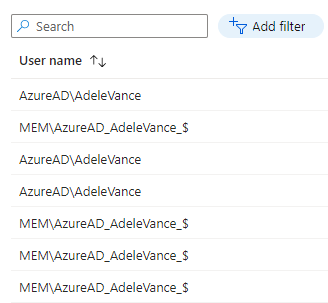
Hi, I am working with a customer who is wanting to make use of EPM for their developer team to run some applications with elevated permissions. They have noticed that when elevating certain applications with EPM that a service account is used (see MEM\AzureAD_AdeleVance_$ below), which therefore runs the app with a new user profile, removing things like user preferences, context and also breaks some apps that rely on domain permissions/credentials. From my testing, this service account only seems to be used by EPM when elevating already installed applications, not application installers. Is this by design and is there a possible workaround that avoids EPM using this service account?Solved1.9KViews1like5CommentsUniversal Print Intune error - Install (User) -2147418113 & -2138701812
I'm currently doing a PoC on Universal Print using connector installed on an on-premise server 2022. I successfully installed the printers on the Connector server, registered with Azure UP (Universal Printer), shared it and began configuring Intune (MEM) to deploy on Win 10 machines. I used printer provisioning from the configuration profile catalog and put all the required values. I targeted the profile on a group of users. The results were interesting. Two users installed the UP with no errors, 3 other users failed to install with error message details below. I could not find any of these errors documented any where. I have engaged MS Support and waiting on solution. These errors are not documented anywhere for MEM. Here are the errors in anyone might be able to help Install (User) -2147418113 Install (User) -2138701812 I have also attached screenshot from MEM3.6KViews0likes2Comments
How to remove MDE managed devices in MEM?
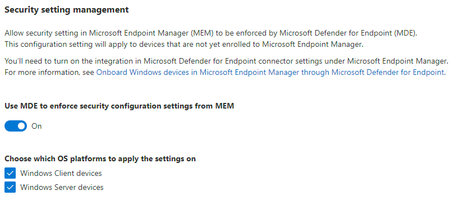
Hi, I had two windows server VMs with MDE(Microsoft Defender for Endpoint) onboarded. For test purpose, I turned on the security settings management in MDE to let MEM deploy some security policies to them. It worked fine. I got corresponding device entries in AAD and MEM and was able to manage the VMs like other Intune managed devices. After I deleted the VMs, I found the device entries are somehow lingering. For MDE, I knew there is a data retention time which is 30 days in my case. I waited for a month and the VMs do disappear from MDE. But I can still see them in AAD and MEM till now. I can't do anything to them in MEM, while I can temporarily delete them in AAD and see them respawn next day. According to the doc, there is a way to solve this problem, but I can't see how. https://learn.microsoft.com/en-us/mem/intune/protect/mde-security-integration#frequently-asked-questions-and-considerations Does anyone know what "be removed from the scope of Configuration Management in the Security Center" means and how to perform it? Thanks for reading this post.Solved8.1KViews0likes2Comments
Azue AD Device Management
Good day, I am new to Azure; currently moving workstations to the Cloud (Azure). There are several Windows "devices" DT-23, LT-12, that are visible on the Azure Active Directory devices that are duplicates; with a different 'owner' for the device. How would I ascertain which device should be deleted from the Azure AD? There are more than twice as many devices in the Azure AD than the devices in the organization. What, if any steps, do I take to prevent this?742Views0likes1Comment
iOS DEP enrolled devices missing Enrollment Profile (breaking dynamic group and filter logic)
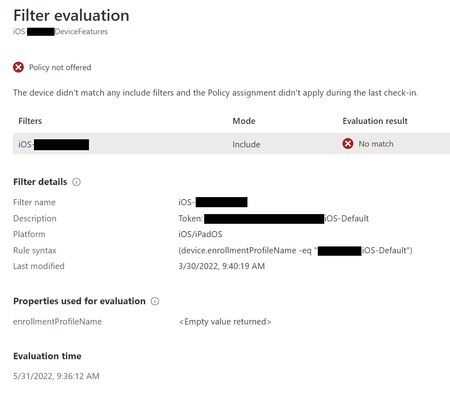
Starting 31/05/2022 new iOS enrollments via Apple Business Manager Device Enrollment do not have an Enrollment Profile attribute assigned under Hardware, generally we use this attribute to define dynamic groups/filters. I have seen this on at least two different customer tenants so far. Example of a filter no longer matching a device enrollment. (previous enrollments still show the correct Enrollment Profile Note: Testing 3 tenants we only see two in APAC impacted so far. Asia Pacific 0101 Asia Pacific 02013.5KViews0likes6CommentsWIP blocks data connections between Excel and Access
Hi everyone, I'm reposting this here from Microsoft Community. I hope that's not bad form. I'm trying to get WIP working, but am experiencing a lot of frustration. I have an Excel XLSX file that connects to an Access MDB database for updates. I do the update manually by opening the XLSX file and clicking Data -> Refresh All. Unfortunately, WIP blocks this connection, giving me this error: [DataFormat.Error] The Microsoft Access database engine cannot open or write to the file. It is already opened exclusively by another user, or you need permission to view and write its data. When I remove WIP, the connection works without issue. If I change the ownership of the MDB file to Personal, it also works without issue. Both the XLSX and MDB files are on a single user's OneDrive. Both show Enterprise ownership. Both are available offline. I'm working on a fresh Windows 10 Hyper-V VM with all current updates and patches. Ditto for Excel and Access. The VM is cloud-managed by Intune. Excel has been added to the Protected Apps list via the Office-365-ProPlus AppLocker policy in the Intune "Recommended Apps" drop-down menu. Access has been added to the Exempt apps list as directed in https://docs.microsoft.com/en-us/windows/security/information-protection/windows-information-protection/enlightened-microsoft-apps-and-wip. Excel runs in Enterprise Context as an "Enlightened, Permissive" app. Access runs as "Exempt". Access has no problem opening this protected MDB, but Excel cannot. I hope someone can point me in the right direction. Thanks.1.4KViews0likes2Comments