meetings
2977 Topics
Feature request: "AFK" status whilst on call
We would like to use Microsoft Teams calls as a continuously open call for long periods of time whilst working remotely as a team. However the current inability to visually see on the call screen whether another attendee is at their keyboard, without everyone having their cameras on all the time (which eats a lot of bandwidth) limits our ability to do so. I would like the ability to have an "away from keyboard" status, similar to the "raise hand" status, that can be set by each attendee when they step away from their desk/keyboard to grab a drink or take a comfort break. This could either be implemented by: adding a new group in which "raise hand" is one option, and "step away" is another adding a new option along the tool bar specifically for "step away" The only way to do this currently is to create another meeting (with yourself) and join that meeting so that you appear 'on-hold' within the previous call. This is very tedious to implement for every attendee involved.132Views1like1Comment
Allow muting a person only for me
Sometimes I am in a meeting where one of the persons in the meeting is actually near me in the world outside the screen. In this case the sound is a bit maddening since there is a small delay between the sound from the person and the sound through the teams interface. In these cases, I would like to mute the person only for me since I am sitting near and can hear the person fine without headphones. Right now I need to takeoff headphones when the person is talking and putting it back as the person finishes talking.133KViews218likes162Comments
Cross-Tenant Shared Meeting Room Spaces
We have two M365 tenancies under our group. We need to allow users from both tenants to use Meeting room resources (book rooms, use calendars etc..). Is this just about configuring Exchange OR Sharing in EXO or do we need anything beyond that to facilitate Teams meeting room resource sharing? Would we also need to sync these meeting room objects across tenancies to allow users to see them in GAL etc.. ? Thank you!4.7KViews0likes4Comments
MacBook Pro TouchBar's not working in meeting with new teams
Hello, I have a MacBook Pro with Touch Bar. With old version of Teams, Touch Bar work in meeting but when I install a new version of teams (business) my Touch Bar not work. I have clear the cache, delete and reinstall Can you help me with a problem? Thank you1.9KViews1like4Comments1:1 meeting notes keep getting lost. I need a better system
So we have about 40 managers who are supposed to do weekly 1:1s with their reports. Most of them take notes in random OneNote notebooks and Ive even seen some use Teams chat as some pseudo-notebook. Is there anything that lets people take notes inside the actual Teams meeting and keeps those notes attached to that meeting in Teams?144Views0likes3Comments
Teams users cannot sign in if using personal account
Anyone have any luck with this? Know of a work around? Anything know if this is a known issue and if a fix is on the way? Once again Microsoft Support has lived up to my expectations so I'm reaching out here. Create a meeting invite link and share with a bunch of people. When clicking on the link the user is presented with options to download Teams, use the web or open with the Teams App. This applies to the Teams App link. Users with business accounts, and users who join as guest work without issue. On the join meeting window there's a link to sign in for a better experience. Clicking this link show a signing in page either indefinitely or for a while and reverts back to the join meeting window. It appears that signing in to a Teams meeting with a personal account (Outlook.com, Gmail) simply is not supported. If this is the case I would expect a message to say this but I suspect this is a bug in Teams.21KViews1like13Comments
"None" option missing from Teams background options
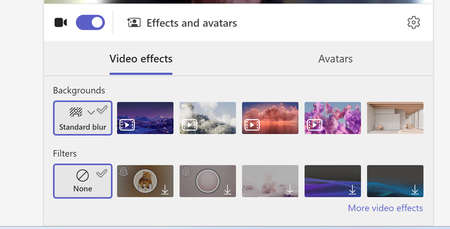
Hi, Our teams "none" background option is missing. Forcing users to use a background or the blur backgrounds. I have tried to revert back to classic teams to see if that is a fix, but I am unable to toggle it off and it takes me to download the classic teams which is just the new teams download. I do see this message "Your org sets background to blur unless something else is selected" when trying to update the background in a call. We are not disabling this option as an organization. And I can switch to other backgrounds.1.8KViews1like7CommentsDropped from meetings
Using Teams v. 26213.1006.5014.9784 on Win 11 laptop fully updated on OS and drivers. Translation: all components have been updated to the point at which there are no longer any updates available. Using mobile Teams Version : 8.15.0 Build : 8.15.77.2026152401/0820 (general) Calling Version: 2026.21.01.16 Release Branch : 2026Aug-T1 on iPhone 16 Pro which is, also, fully updated. Both connected to same 5G Wi-Fi network from same Wi-Fi 6 router with fiber service of 1G up and down. Speed tests from multiple sources on both laptop and phone are above 700 Mbps up and down. When joining meetings from phone, all is well. No call quality issues. No drops from meetings. When joining meetings from laptop, I am commonly disconnected and presented with "Please hold on while we try to reconnect you". The disconnection usually lasts about 10 seconds and I'm reconnected. I have performed a Reset through Windows Settings > Installed Apps. No joy. I have deleted all files in C:\Users\[MYUSERNAME]\AppData\Local\Packages\MSTeams_8wekyb3d8bbwe. No joy. I have removed and reinstalled MS Teams. No joy. Please, assist with the issue above. Thank you.154Views0likes1Comment
Teams user's webcam is showing black for remote participants
we have a user who has an issue with the teams client on Windows Whenever she participates in a call (one on one or group meeting), she can turn on her webcam, and sees herselves. In the Teams settings, the webcam is availlable under "devices" as well While she has her webcam turned off, other participants in the call see her initials. As soon as she turns on her webcam, the other parties involved just see a black screen. No video image, no user initials. as soon as she turns of her webcam, the remote participants get the users initials again. No other applications are using the webcam, and in the privacy settings of Windows Microsoft Teams has access to the camera When she uses teams on the web, the camera is working just fine. Also when using the ZOOM application for attending to a meeting, the camera is working just fine. Ath that time , other participants can see the videofeed. Troubleshooting done so far: - reinstalled webcam drivers - reinstalled Microsoft Teams - Teams client version on all sides: 1.6.00.4472 - Updated all available drivers for this computer - PC was originally running Windows 11 build 21H2 with patches installed up to the patches released on February's patch tuesday. - we formatted the hard drive and reinstalled Windows 11, but with build 22H2, and february's patch tuesday updates. Updated drivers again No difference. She is the only user in the company experiencing this. We are using a Microsoft 365 tennant with Microsoft 365 E3 licenses applied to the users. We don't have any custom policies applied to this user, nor to other users. All users are using the same settings. Any advices on this would be greatly appriciated.Solved3.2KViews0likes8Comments